Recommended resources
The freely available resources this lesson will direct you to.
- The Best (and Worst) Times to Post on Instagram in 2025 | Best Times for Reels, Carousels + Photoswww.youtube.com
- Best Time to Post on TikTok (We Analyzed 1M Posts!) 🚀www.youtube.com
- When Is the Best Time to Post on Social Media? Platform-by ...www.equinetacademy.com
- Best Time to Post on YouTube in 2025 (+ Heatmap) - Bufferbuffer.com
Introduction
Welcome back! In our last lesson, you learned how to use your analytics to discover what content resonates most with your audience by identifying your top-performing posts, Reels, and Pins. This is a crucial skill for any creator.
Now, we'll answer the next logical question: when is the best time to share that amazing content? This lesson focuses on using your platform analytics to determine the optimal days and times to post.
Posting at the right time is about meeting your audience where they are. When you publish content as your followers are actively scrolling, you increase the chances of getting that vital initial engagement (likes, comments, shares). This signals to the platform's algorithm that your content is valuable, which can lead to it being shown to a wider audience. By the end of this lesson, you will know exactly how to find the "golden hours" for your specific audience on each platform.
General Wisdom vs. Your Personal Data
Before we dive into your own analytics, it's helpful to know the general industry benchmarks. These are great starting points, especially if your account is new and you don't have a lot of audience data yet.
This article provides an excellent overview of the factors influencing posting times and gives some general best times for each platform.
When Is the Best Time to Post on Social Media? Platform-by-Platform Breakdown
Read this article from Equinet Academy to understand the 'why' behind strategic timing. It covers audience behavior, time zones, and how algorithms favor timely content.
First, read the section 'Key Factors That Influence Optimal Posting Times' to get a strong foundational understanding. Then, skim the section 'When Is the Best Time to Post on Social Media?' for each of your platforms (Instagram, TikTok, YouTube, Pinterest, X). Finally, pay close attention to the summary table under 'Key Takeaways' for a quick reference.
As the article emphasizes, these general times are a guide, not a rule. The most powerful data is your own. Let's find it.
Finding Your Best Times: A Step-by-Step Guide
Now for the practical part. We'll go platform by platform to find the specific charts that show when your audience is most active.
1. Instagram
In the last lesson, you explored Instagram Insights. We'll go back there, but to a different screen.
The Best (and Worst) Times to Post on Instagram in 2025 | Best Times for Reels, Carousels + Photos
This short clip from Buffer will show you exactly where to find the 'Most Active Times' chart within your Instagram Insights.
Watch from 02:17 to 03:01. The video will walk you through the exact steps: Profile > Professional Dashboard > Total Followers > Most Active Times. Pay attention to how you can toggle between 'Hours' and 'Days'.
Your Action Step for Instagram:
- Open the Instagram app and go to your Professional dashboard.
- Tap Total followers.
- Scroll all the way down to the Most active times section.
- You will see two views:
- Days: A bar chart showing which days of the week your followers were most active.
- Hours: A bar chart showing the average times your followers were active on a specific day. You can tap through the days to see how the times change.
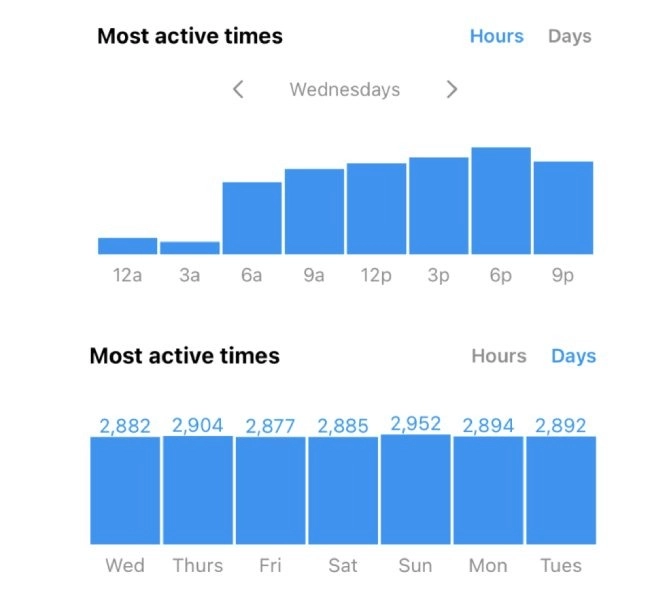
Look for the days and hours with the highest bars. These are your prime posting slots. A good strategy is to post about an hour before the peak time to give the algorithm time to start distributing your content.
2. TikTok
TikTok provides a similar chart, but you need to know where to find it.
Best Time to Post on TikTok (We Analyzed 1M Posts!) 🚀
This clip, also from Buffer, provides a clear, step-by-step guide to finding your audience's most active times in TikTok's analytics.
Watch from 03:07 to 03:57. Follow the path: Profile > TikTok Studio > Analytics > Followers tab. The video will show you the 'Most active times' graph at the bottom.
Your Action Step for TikTok:
- Go to your profile, tap the three lines in the top-right corner, and select Creator tools.
- Tap Analytics and go to the Followers tab.
- Scroll down to the Follower activity section.
- Here you'll find a graph showing follower activity by hour for the past week.
- Important Note: As mentioned in the Equinet Academy article, TikTok often reports this data in Coordinated Universal Time (UTC). You may need to convert these times to your local time zone to get an accurate picture. Simply search "UTC to [Your City] time" to find the difference.
Identify the hours with the highest activity. These are the best times to post your TikTok videos.
3. YouTube
Finding your audience's active times on YouTube is incredibly useful, especially since videos take time to process and be indexed by the platform.
Best Time to Post on YouTube in 2025 (+ Heatmap)
This article from Buffer provides a simple, written guide to finding the audience activity chart in YouTube Studio. It's a great reference to follow along with.
Follow the steps outlined in the article under 'Finding your best time to post on YouTube'. The guide will take you from logging into YouTube Studio to navigating to the 'Audience' tab and finding the 'When your viewers are on YouTube' graph.
Your Action Step for YouTube:
- On a desktop computer, go to studio.youtube.com.
- Click on the Analytics tab in the left-hand menu.
- Click on the Audience tab at the top.
- Scroll down until you find the chart titled "When your viewers are on YouTube."
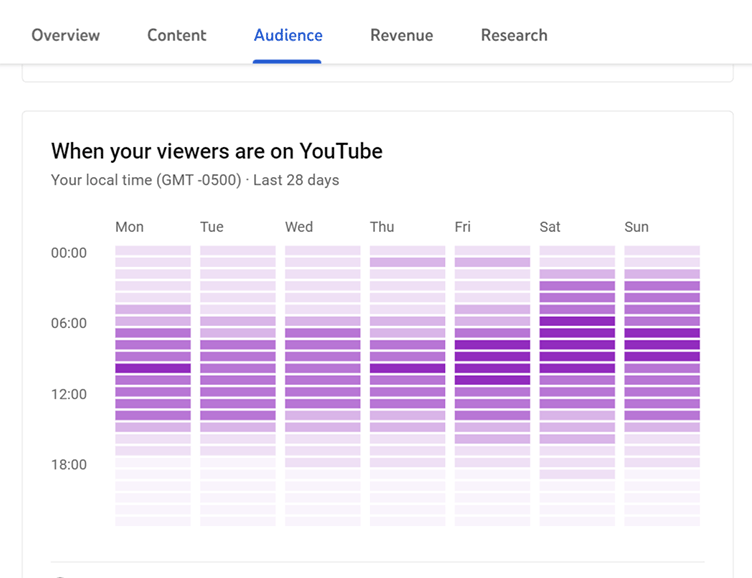
The data here shows you when people are watching, not just your videos, but YouTube in general. The best strategy is to publish your video 2-3 hours before these peak times. This gives YouTube enough time to process your video in full HD/4K and for the algorithm to index it, making it ready for your audience when they log on.
4. Pinterest & X (Twitter)
These platforms are a bit different.
-
Pinterest: As you read, Pinterest is a search engine where "planning energy" is key. Timing is less about a specific hour and more about the user's mindset. Evenings and weekends are generally strong. Your best bet here is to experiment. Look at your Top Pins in Pinterest Analytics. Are the ones with the most saves or outbound clicks consistently posted on certain days (e.g., Saturday mornings, Wednesday evenings)? Use that as your guide.
-
X (Twitter): This platform thrives on immediacy. While you can check
analytics.twitter.comfor general engagement patterns, the best strategy on X is often to post when conversations relevant to your niche are happening. For your "cheap and cheerful" niche, this could be when a major retailer announces a sale or during discussions about rising living costs. For X, being timely is more important than the time of day.
Conclusion
You now have the tools and the knowledge to move beyond guesswork and create a data-driven posting schedule. By aligning your content with your audience's daily habits, you give every post the best possible chance to succeed.
Key Takeaways:
- Start with Benchmarks, Perfect with Data: General best times are a good starting point, but your own analytics provide the most accurate insights.
- Find the "Active Times" Chart: On Instagram, TikTok, and YouTube, there is a specific chart showing when your audience is most active. Learn how to find and read it.
- Instagram: Professional Dashboard → Total Followers → Most active times.
- TikTok: Creator Tools → Analytics → Followers → Follower activity.
- YouTube: YouTube Studio → Analytics → Audience → When your viewers are on YouTube.
- Post Before the Peak: For Instagram and YouTube, posting 1-3 hours before the peak active time is a common and effective strategy.
- Adapt Your Strategy by Platform: A rigid, one-size-fits-all schedule doesn't work. Adapt your timing based on how people use each platform (e.g., "planning energy" on Pinterest, "immediacy" on X).
Preview of the Next Lesson:
You've analyzed your best content (what to post) and your best times (when to post). In our next lesson, we will zoom out and look at the bigger picture. You'll learn how to analyze your tracking data to identify which social media platform is driving the most growth, helping you decide where to focus your precious time and energy.