Recommended resources
The freely available resources this lesson will direct you to.
- How to Create Your X/Twitter Account - Setup a Good Quality Profilewww.youtube.com
- How to Create an Optimized Pinterest Business Account (for Small Businesses)www.youtube.com
- A Beginners Guide to TikTok - Newfound Marketingnewfoundmarketing.ca
- Get a business account | Pinterest Business helphelp.pinterest.com
- Step-by-Step Pinterest Profile Setup for Beginnerswww.youtube.com
- THE ULTIMATE TIKTOK TUTORIAL FOR BEGINNERS | How to film, edit and set up your account for successwww.youtube.com
Introduction
Welcome back! In the last lesson, you successfully built your digital "storefront" by setting up a fully optimized Instagram Creator account. You now have a live profile that clearly communicates your 'cheap and cheerful' brand identity.
Today, we're going to expand your digital footprint efficiently. Your goal is to establish your presence on TikTok, X (formerly Twitter), and Pinterest. The great news is that you've already done the hard work of creating your core brand assets—your username, profile photo, and bio. This lesson will focus on adapting and implementing those assets across these new platforms.
By the end of this lesson, you will have complete and professional creator profiles on TikTok, X, and Pinterest, ensuring a consistent brand experience for your future followers no matter where they find you.
1. Setting Up Your TikTok Profile
TikTok is a powerhouse for short-form video and a crucial platform for discovering new audiences in the lifestyle and money-saving niche. Let's get your profile set up.
Action Step 1: Create and Secure Your Account
First, you'll download the app and create your account.

Make a TikTok Account Step-by-Step [Guide] - Metricool
The article 'Make a TikTok Account Step-by-Step' from Metricool provides a simple checklist for the initial account creation.
Read the section 'How to Create a TikTok Account'. Follow the six steps listed to sign up. Use the username you chose in our first module. Pay attention to the password requirements to ensure your account is secure.
Action Step 2: Switch to a Business Account
Just like with Instagram, switching to a professional account unlocks essential tools. On TikTok, this is called a Business Account. It gives you access to analytics and the ability to add a website link in your bio immediately.
The Metricool article you just read also explains how to do this. Follow the instructions at the end of the section titled "TikTok Business Account" to make the switch. It's a quick process within your account settings.
Action Step 3: Optimize Your Profile
Now, let's fill out your profile to attract your target audience. This video provides excellent, practical advice on how to make your profile searchable and compelling.
THE ULTIMATE TIKTOK TUTORIAL FOR BEGINNERS | How to film, edit and set up your account for success
In 'THE ULTIMATE TIKTOK TUTORIAL FOR BEGINNERS,' Modern Millie breaks down how to optimize each part of your TikTok profile.
Watch from 00:20 to 02:40. Pay close attention to her advice on the 'Name' field and the 'Bio'. She explains how using keywords in your Name (not your username) helps you get discovered in search, a key tactic you also used for Instagram.
Your TikTok Profile Checklist:
- Profile Photo: Upload the same high-quality photo of yourself that you used for Instagram.
- Name: Set this to
Your Name | Frugal Living Tipsor a similar keyword-rich title. This is separate from your @username and is highly searchable. - Bio: Adapt your main bio. TikTok's limit is only 80 characters, so be concise. Focus on the value you provide (e.g., "Helping you live a cheerful life on a budget. frugal tips & deals").
- Website: For now, you can leave this blank. We'll add a link here in a future lesson.
2. Setting Up Your X (Twitter) Profile
X is an excellent platform for sharing quick money-saving tips, engaging in conversations, and connecting with other creators in your niche. Its text-first format is a great complement to your visual content on other platforms.
Action Step 1: Create and Optimize Your Account
The setup for X is straightforward. Go to X.com, sign up with your chosen username, and then immediately fill out your profile details.
This resource provides a clear, concise checklist for what makes a complete profile.
How to Grow on Twitter/X: Complete Growth Strategy Guide 2026
The article 'How to Grow on Twitter/X' from SocialRails has a fantastic foundational section on profile optimization.
Read the sections 'Profile Essentials' and 'Bio Formula That Works'. This gives you a perfect blueprint for filling out your profile.
Your X Profile Checklist:
- Profile Photo: Upload your consistent brand photo.
- Header Image: Use a simple image that reflects your 'cheap and cheerful' theme. You can create one in Canva (1500x500 pixels) using your brand colors. A simple color background with your name or "Frugal Living Tips" works well.
- Bio: X allows 160 characters. Use the provided "Bio Formula" to adapt your main bio. For example: "Helping you save money and live a 'cheap and cheerful' lifestyle. Daily tips on budgeting and finding deals. ☕"
- Location: Add your general location (e.g., country or state) to build trust.
- Website: You can leave this blank for now.
3. Setting Up Your Pinterest Profile
Pinterest is not just a social network; it's a visual search engine. It's the perfect place for your money-saving tips, budget recipes, and DIY content to be discovered and saved by users planning their lives.
Action Step 1: Create a Business Account
From the very beginning, you must create a Business account to access analytics and other essential creator tools.
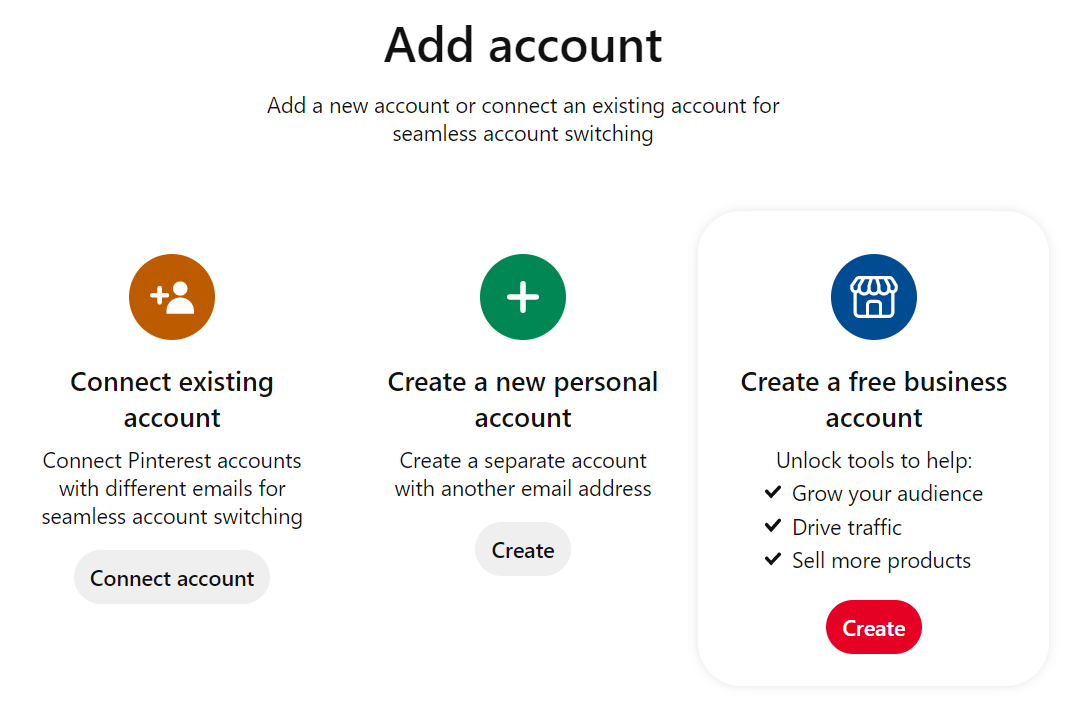
The following video provides a complete walkthrough of the entire Pinterest setup process. We will break it down into manageable steps.
Step-by-Step Pinterest Profile Setup for Beginners
Let's watch 'Step-by-Step Pinterest Profile Setup for Beginners' by Heather Farris. She gives a very clear, actionable guide.
First, watch from 01:06 to 01:59 to see how to sign up specifically for a business account. Then, watch from 02:52 to 05:05 to learn how to fill out your profile details. Just like on TikTok and Instagram, pay attention to how she uses keywords in the 'Display Name' and bio.
Action Step 2: Add a Profile Banner
A branded banner makes your profile look professional and complete. The video you just started watching also shows you how to do this.
Step-by-Step Pinterest Profile Setup for Beginners
Continuing with the same video, let's add your banner.
Watch from 06:54 to 07:44. The recommended size is 800x450 pixels. You can easily create a banner in Canva using your brand colors and name.
Action Step 3: Create Your First Boards
A Pinterest profile isn't complete without a few boards to organize your ideas. A board is a collection of "Pins" (images or videos) about a specific topic. Let's create two or three starter boards relevant to your niche.
Examples for your "cheap and cheerful" niche could be:
- Budget-Friendly Recipes
- Frugal Living Tips
- DIY Home Projects
Step-by-Step Pinterest Profile Setup for Beginners
Finally, let's create your first boards using the same tutorial.
Watch from 07:44 to 08:56. The video explains how to create a new board and write a keyword-optimized description for it. For now, just focus on creating 2-3 boards with clear, searchable titles. Don't worry about board covers or adding pins yet; we will cover that in a later module.
Your Pinterest Profile Checklist:
- Account Type: Created a Business Account.
- Profile Photo: Uploaded your brand photo.
- Display Name: Set to a keyword-rich title like
Your Name | Frugal Living. - Bio: Adapted your bio to highlight the money-saving topics you'll cover.
- Profile Banner: Created and uploaded a branded banner.
- Initial Boards: Created 2-3 starter boards with keyword-rich titles and descriptions.
Conclusion
Excellent work! You have now established a consistent and professional brand presence across four key platforms: Instagram, TikTok, X, and Pinterest. By using the same core assets, you've built a recognizable identity that will serve as a strong foundation for your growth as an influencer.
Key Takeaways:
- Brand consistency is key. Using the same profile photo and similar bios across platforms helps your audience recognize you.
- Always choose a Business or Creator account type to unlock analytics and professional tools.
- Optimizing your display name and bio with relevant keywords is a powerful, free way to improve your discoverability on every platform.
Preview of the Next Lesson:
Our next platform is YouTube, the king of long-form video content. In the next lesson, you will set up a YouTube channel with a profile photo and a compelling channel description, preparing the groundwork for your first video.