Recommended resources
The freely available resources this lesson will direct you to.
- How to Create an Instagram Business Account 2024 [Step by Step Tutorial] - Make Money on Instagramwww.youtube.com
- Instagram Profile/Bio Optimization: 5 Essential Elements of ...catarinamello.com
- Instagram Business Account Guide: Setup, Benefits & Featureswww.business.com
- How to Create an Instagram Business Page | Make Money on Instagram 2024www.youtube.com
- WHATS THE DIFFERENCE BETWEEN A BUSINESS & CREATOR ACCOUNT ON INSTAGRAM? | Which on should YOU have?www.youtube.com
- Instagram Creator Account: Everything You Need to Knowsproutsocial.com
Introduction
Welcome back! In our last lesson, you crafted a clear and compelling bio that communicates the value of your "cheap and cheerful" brand. You now have the essential building blocks: a memorable username, a distinct color palette, and a powerful bio.
Today, we move from planning to action. We will take these elements and build your brand's first home online. This lesson will guide you step-by-step through setting up your Instagram account. We're starting with Instagram because its visual nature is a perfect fit for lifestyle content, and its features are designed to help creators like you grow an audience.
Your learning outcome for this lesson is to set up a business/creator account on Instagram with a complete profile (photo, bio, and contact info). By the end, you will have a professional, fully optimized Instagram profile ready to attract your first followers.
Step 1: Create Your Account and Switch to a Creator Profile
First, we need to create a basic account and then switch it to a "Creator" profile. A Creator account unlocks crucial tools that a standard personal account doesn't have, such as detailed analytics about your followers and content performance (Insights), and new contact options.
The following video provides a clear, step-by-step walkthrough. We'll watch it in segments as we build your profile.
How to Create an Instagram Business Account 2024 [Step by Step Tutorial] - Make Money on Instagram
To start, let's watch this segment from Santrel Media's video, 'How to Create an Instagram Business Account 2024'. It will guide you through downloading the app and creating your initial account.
Watch from the beginning of the setup at 02:15 to 04:06. Follow the instructions on your phone to create your new account. When prompted, use the username you selected in our previous lesson. For the profile picture, you can add a temporary one for now; we'll discuss it more in the next step.
Why a "Creator" Account?
Once your account is created, you need to switch it from a "Personal" to a "Professional" account. Instagram will then give you two choices: "Business" or "Creator".
- Business: Best for companies with a physical location, an online store, or local services.
- Creator: Designed specifically for public figures, content producers, artists, and influencers—that's you! It offers more flexible profile controls and growth tools tailored to building a personal brand.
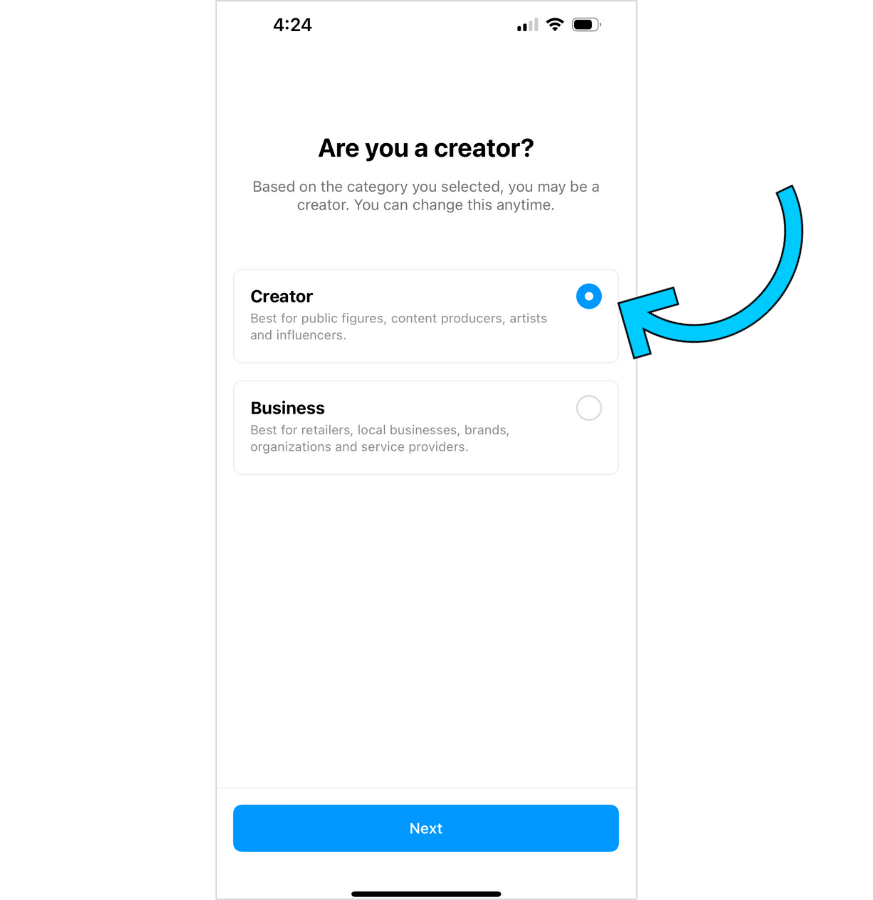
Now, let's make the switch.
How to Create an Instagram Business Account 2024 [Step by Step Tutorial] - Make Money on Instagram
Let's return to the Santrel Media video. This next part will show you how to find the setting to switch to a professional account and select the 'Creator' option.
Watch from 06:09 to 08:18. Follow the steps to navigate to your settings and switch to a professional account. Make sure your profile is set to 'Public'. When given the choice, select Creator. For the category, choose something that fits you, like 'Content Creator,' 'Blogger,' or 'Public Figure'.
Step 2: Complete Your Profile with Your Brand Assets
Your Creator account is now active. The next crucial step is to complete your profile so that new visitors immediately understand who you are and what you offer. This is where the work you did in the previous module comes into play.
A complete profile has several key components, as labeled in the image below.

Let's go through them one by one.
1. Profile Picture
Your profile photo is your virtual first impression. It should be clear, high-quality, and reflect the "cheap and cheerful" vibe of your brand.
For a personal brand, a photo of your face is almost always the best choice. People connect with people. For some great tips on selecting the perfect image, please review the article below.
Instagram Profile/Bio Optimization
The article 'Instagram Profile/Bio Optimization' by Catarina Mello has excellent advice on choosing a profile photo that connects with your audience.
Read the section titled 'A Captivating Profile Photo'. Pay attention to the five tips: show your face, express yourself, use a high-quality image, maintain consistency, and use a clean background.
Action Step: Go to "Edit Profile" on your Instagram page and upload a high-quality, friendly headshot that you feel represents you and your brand.
2. Name, Bio, and Link
This is the core of your profile's message.
- Name: This field is searchable. As we discussed, don't just put your name. Use keywords to help people find you. For example:
Your Name | Frugal Living Tips. - Bio: This is where you tell people what’s in it for them.
- Link: For now, you can leave this blank. We will set up a "link-in-bio" tool in a future lesson to house all your important links.
Action Step:
- Go to "Edit Profile."
- In the Name field, enter your searchable name (e.g.,
Jane Doe | Budget Lifestyle). - In the Bio field, paste the engaging, value-driven bio you wrote in our last lesson.
3. Contact Information
A Creator account allows you to add contact buttons to your profile. This makes you look professional and gives brands an easy way to reach out for potential collaborations later on. The most important one to add is a professional email address.
Action Step:
Follow the steps in the final video segment to add your contact details.
How to Create an Instagram Business Account 2024 [Step by Step Tutorial] - Make Money on Instagram
This last clip from the Santrel Media video shows you how to complete your profile by adding your bio, links, and contact information.
Watch from 08:18 to 10:14. Follow along to add your bio and contact information. For now, the most important piece of contact information to add is your email address. It's best practice to use a dedicated, professional email for this (e.g., yourbrandname@email.com) rather than a personal one. You can skip adding a phone number or physical address for safety and privacy reasons.
After completing these steps, your Instagram profile should be fully set up and optimized. Take a moment to look at your profile and compare it to the "Anatomy of an Instagram Profile" image. It's a real, tangible piece of your new brand!
Conclusion
Congratulations! You have successfully set up your first social media profile as a creator. Your brand now has a home on Instagram, complete with a professional setup that clearly communicates your value to potential followers.
Key Takeaways:
- A Creator account on Instagram is essential for influencers as it unlocks analytics and professional tools.
- Your profile is not complete without a high-quality profile picture, a searchable name, a value-driven bio, and professional contact options.
- Every element of your profile should be intentional and aligned with your brand's niche—in your case, "cheap and cheerful" budget living.
Preview of the Next Lesson:
Now that your Instagram profile is live, the next step is to establish your presence on your other chosen platforms. In the next lesson, you will set up and complete your creator profiles on TikTok, X (Twitter), and Pinterest. We'll move much faster, as we'll be using the same core assets (photo and bio) you've already prepared.