Recommended resources
The freely available resources this lesson will direct you to.
Introduction
Hello! Welcome back. In our last lesson, you did the foundational work of researching and selecting three promising keywords for your "cheap and cheerful lifestyle" YouTube channel. This was a crucial first step in understanding what your audience is actively looking for.
Today, we'll take that research and put it into practice. This lesson is all about applying your chosen keywords to your YouTube videos to make them as discoverable as possible. We'll cover exactly where to place your keywords—in your video's title, description, and tags—to signal to the YouTube algorithm what your content is about and who should see it.
This lesson directly addresses the learning outcome: Apply researched keywords to a YouTube video's title, description, and tags to improve discoverability. By the end of this session, you'll have a clear, actionable checklist to optimize every video you upload for search.
1. SEO 101: Giving YouTube the Right Signals
Before we dive into the "how," let's quickly cover the "why." YouTube is the world's second-largest search engine. To get your videos in front of the right people, you need to help its algorithm understand your content. You do this by providing clear information, or "metadata," in several key places.
Think of it like labeling jars in a pantry. A jar simply labeled "Food" isn't very helpful. But a jar labeled "Spicy Lentil Soup Recipe - High Protein, Low Cost" tells you exactly what's inside and who it's for. Keywords are the words you use for these labels.
The primary places we will add these labels are:
- The video file name itself (before you upload)
- The video Title
- The video Description
- The video Tags
Let's get started with a simple but powerful tip that happens before you even open YouTube.
2. The Pre-Upload Step: Keyword-Rich File Names
Most people upload videos with generic file names like VID_0451.mp4 or Final_Cut_Project_v2.mov. This is a missed opportunity. The file name is the very first piece of data YouTube sees, so it should contain your main keyword.
Watch this short clip to see why this is important and how to do it.
How to Upload YouTube VIdeos to get more VIEWS
In her video 'How to Upload YouTube Videos to get more VIEWS,' creator Virginia Kerr explains a simple but effective trick that most new YouTubers miss: renaming your video and thumbnail files.
Watch from 00:30 to 02:54. Pay attention to how she explains the importance of renaming both the video file and the thumbnail file before you upload them to your channel.
Your Action Step:
Before you upload a video, rename the file on your computer. Replace spaces with hyphens.
- Instead of:
My First Video.mp4 - Do this:
how-to-start-budgeting-for-beginners.mp4 - Also, rename your thumbnail file:
how-to-start-budgeting-for-beginners-thumbnail.jpg
This takes 10 seconds and gives the algorithm an immediate clue about your video's topic.
3. The Big Three: Title, Description, and Tags
Once you start the upload process, YouTube will ask you for details. This is where you'll apply the bulk of your keyword research. The Semrush article below provides an excellent framework for this, which we'll walk through step-by-step.

YouTube Keyword Research: A Complete Guide
This guide from Semrush, a leader in SEO software, offers clear, expert advice on how to use keywords. We'll focus on the section explaining how to apply your research.
Please read the section 'How to Use Your YouTube Keyword Research.' Specifically, focus on the subsections for 'Titles,' 'Descriptions,' and 'Tags.' We will be discussing the advice in each of these.
3.1 Crafting a Searchable Title
Your title has two jobs: attract a human viewer and inform the YouTube algorithm.
- Place your main keyword first: This is the most important rule. It tells both viewers and the algorithm what to expect immediately.
- Keep it concise: YouTube shortens titles after about 60-70 characters in search results. Keep the essential information upfront.
- Make it compelling: Add words that create interest. Numbers ("5 Tips..."), descriptive words ("Simple," "Easy"), or outcome-focused phrases ("...that Saved Me $100") work well for your niche.
Example for your niche:
- Keyword:
frugal living tips - Weak Title:
My Ideas for Living on Less Money - Strong Title:
Frugal Living Tips: 10 Simple Changes That Saved Me $300 a Month
3.2 Writing a Helpful Description
The description box is your chance to provide rich context. YouTube reads this to better understand your video.
- Front-load your keyword: Include your main keyword naturally within the first one or two sentences. This part of the description is often visible in search results.
- Write for humans: After the first few lines, write a detailed paragraph (aim for at least 200 words) explaining what the video is about and what viewers will learn. Use your main keyword 2-3 times and include related keywords you found during your research.
- Add structure and links: Use the rest of the 5,000-character limit to add value. Include:
- Links to your other social media profiles (using your link-in-bio tool!).
- Links to any products or resources you mention.
- A "call to action" asking people to subscribe.
- Include 2-3 relevant hashtags: At the very end, add a few hashtags that include your primary keyword (e.g.,
#frugalliving #savemoney #budgetingtips).
3.3 Using Tags Strategically
You may have seen YouTube's note that tags play a "minimal role." While they aren't as powerful as they used to be, they are still a piece of the puzzle and help confirm your video's topic. It's a quick step that can only help.
How to Upload Videos on YouTube (Best Settings to Get More Views in 2025!)
Let's watch this clip from Justin Brown at Primal Video. He explains the modern role of tags perfectly: it's about 'stacking the deck in your favor.'
Watch from 04:44 to 05:58. He gives a balanced perspective on why you should still take a minute to fill out the tags section.
Here is the best practice for tags:
- First tag = Main keyword: Your first tag should be an exact match of your main keyword (e.g.,
how to save money on groceries). - Add variations: Include other ways people might search for your topic (e.g.,
grocery savings tips,eating on a budget). - Add broader topics: Include general category tags (e.g.,
frugal living,budgeting for beginners,personal finance). - Use the full space: Don't just add two or three. Aim to use most of the 500 characters available.
4. Your Action Plan: Optimizing a Video Concept
Now, let's bring this all together into a repeatable workflow. Take one of the three keywords you researched in the last lesson and complete the following optimization checklist.
Imagine you've just filmed a video for this keyword. Now, prepare the metadata.
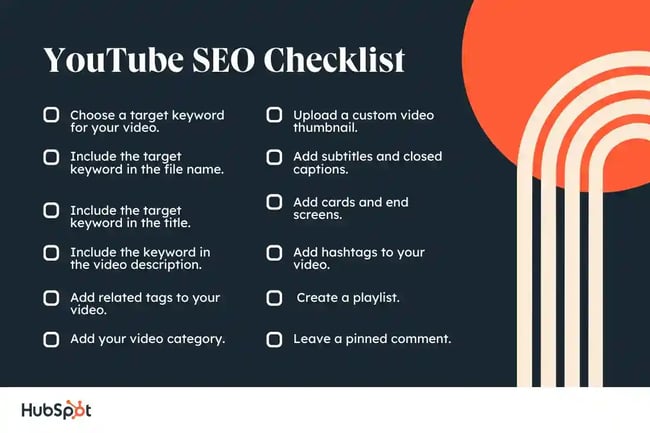
Your Task: Create the Metadata for One Video
Choose one keyword from your list (e.g., "cheap and cheerful home decor"). On a piece of paper or in a new document, write out the following:
-
Video File Name: Write the keyword-optimized file name.
- Example:
cheap-and-cheerful-home-decor-diy.mp4
- Example:
-
Video Title: Write a compelling, keyword-focused title (under 70 characters).
- Example:
Cheap & Cheerful Home Decor: 5 DIY Ideas Using Thrift Store Finds
- Example:
-
Video Description (First 3 sentences): Write the opening of your description, making sure to include the keyword naturally.
- Example: "In this video, I'm sharing my favorite cheap and cheerful home decor ideas to make your space beautiful on a budget. You don't need to spend a lot of money to have a stylish home! I'll walk you through five simple DIY projects using items you can easily find at a thrift store."
-
List of Tags (5-10 tags): Create a list of tags, starting with your main keyword.
- Example:
cheap and cheerful home decordiy home decor on a budgetthrift store decor ideasbudget home decorfrugal decoratinghow to decorate for cheapaesthetic on a budget
- Example:
Pro Tip for Efficiency: You can set up "Upload Defaults" in your YouTube Studio to pre-fill parts of your description that will be the same on every video, like your social media links. This is a huge time-saver.
Conclusion
Excellent work! You've now bridged the gap between research and action. You know not only how to find what people are searching for but also how to use that knowledge to optimize your content effectively.
Key Takeaways:
- Optimize Before Uploading: Start by renaming your video and thumbnail files with your main keyword.
- Title is King: Your title is the most important element. Place your main keyword at the very beginning.
- Description Provides Context: Use the description to elaborate on your topic for both viewers and the algorithm, repeating your keyword naturally in the opening sentences.
- Tags Offer Confirmation: Use tags to reinforce your video's topic with variations of your main keyword and broader category terms.
Preview of the Next Lesson:
We've now covered the fundamentals of being discovered on YouTube. In the next lesson, we'll switch platforms and dive into another powerful visual search engine: Pinterest. You will learn how to find relevant keywords for your niche using the Pinterest search bar and topic tags, opening up another major avenue for traffic to your "cheap and cheerful" content.