Recommended resources
The freely available resources this lesson will direct you to.
- How To Do Pinterest Keyword Research - EASY Pinterest SEO for Beginnerswww.youtube.com
- How to Do Pinterest Keyword Research in 2024www.youtube.com
- How to Use Pinterest Keywords to Boost Your Visibility - Julie Klemensjulieklemens.com
- How Pinterest Can Help Your Budget | A Bowl Full of Lemonsabowlfulloflemons.net
Introduction
Welcome back! In the last lesson, we focused on getting your videos discovered on YouTube by optimizing your titles, descriptions, and tags with keywords. You learned that YouTube is a massive search engine, and providing it with the right signals is key to reaching your audience.
Today, we're shifting our focus to another powerful platform that functions as a visual search engine: Pinterest. Many people think of Pinterest as a place to collect pretty pictures, but for creators, it's a major source of traffic and discovery. People use Pinterest to actively plan and find solutions, which makes it perfect for your "cheap and cheerful lifestyle" niche.
This lesson will teach you how to find relevant keywords for your niche using the Pinterest search bar and topic tags. By the end of our session, you'll have a repeatable, practical method for discovering what your target audience is looking for on Pinterest, so you can create content that meets their needs.
1. Why Keywords are Your Key to Pinterest Success
Just like with YouTube, success on Pinterest starts with understanding that it's a search engine. Users don't just scroll passively; they arrive with a goal. They search for things like "budget meal prep," "DIY home decor ideas," or "how to save money on clothes."
If your content uses the exact words and phrases they are searching for, Pinterest can connect you with them. These words are your keywords. Using them correctly tells the Pinterest algorithm what your content is about and who to show it to.
Let's watch a short clip that explains this concept perfectly.
How to Do Pinterest Keyword Research in 2024
Emilee Vales provides a great overview of why keywords are the foundation of any Pinterest strategy. Pay attention to her explanation of how users interact with the platform.
Watch from 00:34 to 01:41. Notice the list of places where you will eventually use these keywords: your profile, boards, and the pins themselves.
As you saw, keywords are the bridge between your content and the audience looking for it. Now, let's get into the practical steps of finding them.
2. Your Primary Tool: The Pinterest Search Bar
The best keyword research tool for Pinterest is Pinterest itself. It gives you direct insight into what millions of users are searching for every day. We'll start with the most fundamental method, which has two parts: using the search bar's autocomplete feature and the guided topic tags.

To see this process in action within your specific niche, let's look at an article that walks through finding budgeting content on Pinterest.
How Pinterest Can Help Your Budget
The article 'How Pinterest Can Help Your Budget' from A Bowl Full of Lemons provides a perfect example of how to start your keyword research for the frugal living niche.
Please read the sections 'Search your keyword' and 'Narrow your search results.' This will show you exactly how to begin a search and use the guided search bubbles to find more specific ideas.
To summarize the process for you to follow:
- Start Broad: Go to the Pinterest search bar and type in a broad, or "pillar," keyword related to your niche. Examples for you would be
frugal living,save money, orbudgeting. - Note the Autocomplete Suggestions: As you type, Pinterest will suggest a list of popular searches. These are fantastic long-tail keyword ideas. For example, typing "frugal living" might suggest "frugal living tips," "frugal living for beginners," and "frugal living hacks."
- Use the Topic Tags (Bubbles): After you hit enter on your broad search, look for the colored bubbles that appear just below the search bar. These are guided search terms that help you narrow down the topic. Clicking on them adds them to your search and reveals more specific content, giving you even more keyword ideas. For example, after searching
save money, you might see bubbles foron groceries,for travel, orchallenge.
3. Expanding Your Keyword List
The search bar and topic tags will give you a great starting point. To build a truly comprehensive list of keywords, you can use a few more simple but effective techniques. The following video demonstrates several of these practical methods.
How to Do Pinterest Keyword Research in 2024
Let's return to the video from Emilee Vales. She demonstrates several powerful methods for uncovering a wide range of keywords directly within Pinterest.
Watch the following sections: 03:10 to 05:05: This will reinforce how to use the search bar and guided search, and it adds a new tip: analyzing the top-ranking pins for keyword ideas. 06:44 to 07:33: This section explains the 'ABC method,' a very thorough technique for finding dozens of long-tail keywords.
Here is a summary of the advanced methods you just saw:
- Analyze Top Pins: When you search for a keyword, look at the pins that appear at the top of the results. What words do they use in their titles and text overlays? These are proven keywords that are helping that content rank well.
- The "ABC Method": This is a powerful way to uncover less obvious, long-tail keywords. Type your pillar keyword into the search bar, followed by the letter "a" (e.g.,
budget meals a). Write down the suggestions. Then, replace "a" with "b," then "c," and so on through the alphabet. This will give you a huge list of very specific phrases your audience is searching for.
4. Your Action Plan: Building Your Keyword List
It's time to put this into practice. Your task is to start building a master list of keywords for your "cheap and cheerful lifestyle" niche. This list will become the foundation for your content ideas, pin descriptions, and board titles.
Your Task:
Open a simple document or spreadsheet. Follow these steps to find and organize at least 20 keywords.
-
Choose 3 Pillar Keywords: Start with three broad topics at the core of your niche.
- Example:
frugal living,budgeting,saving money.
- Example:
-
Find Long-Tail Keywords: For each pillar keyword, use the Pinterest search bar, topic tags, and the ABC method to find at least 5-7 more specific, long-tail keywords.
-
Organize Your List: A simple table is a great way to keep track. You can use the format suggested in the "How to Use Pinterest Keywords" article by Julie Klemens.
| Pillar Keyword | Long-Tail Keyword Found |
|---|---|
frugal living |
frugal living tips for beginners |
frugal living |
frugal living with a family |
budgeting |
budgeting for beginners printable |
budgeting |
monthly budget template |
saving money |
saving money challenge ideas |
saving money |
how to save money on groceries |
Why are we doing this?
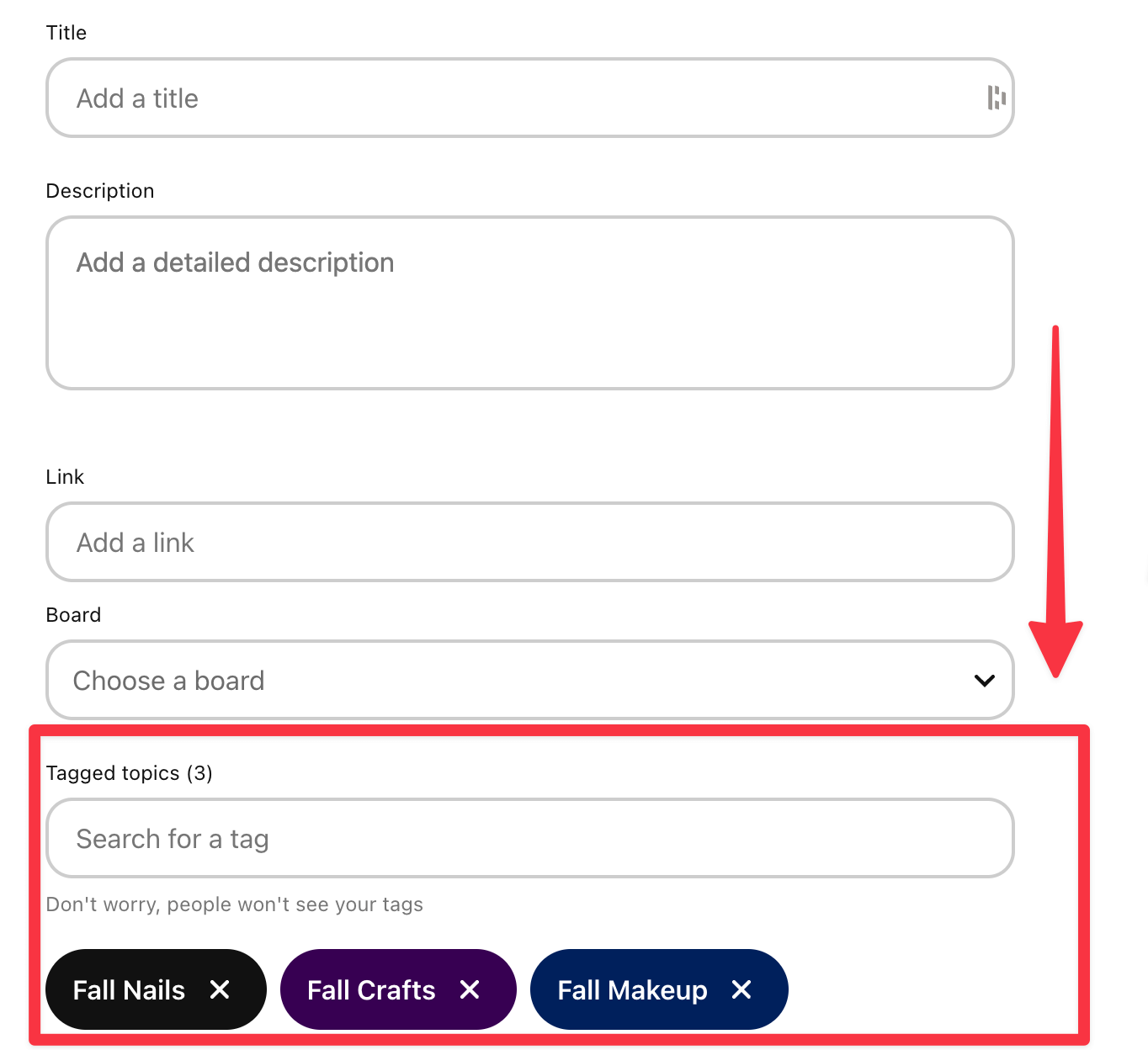
You will use these keywords in the "Tagged topics" section when you create your pins. Finding them now prepares you for the next step of content creation.
Conclusion
Great work today! You've learned that Pinterest is a powerful search engine and have acquired a set of practical, repeatable techniques to uncover the exact terms your audience is using to find content about budget-friendly living.
Key Takeaways:
- Pinterest is a Search Engine: Users are actively looking for ideas and solutions, making keywords essential for discovery.
- Use Pinterest's Own Tools: The search bar autocomplete, guided topic tags (bubbles), and top-ranking pins are your best sources for keyword research.
- Start a Keyword List: Building a master list of pillar and long-tail keywords is a foundational step for your entire Pinterest strategy.
Preview of the Next Lesson:
Now that you know how to find the right keywords, what do you do with them? In our next lesson, we will focus on application: Write Pinterest pin titles and descriptions using relevant keywords for discoverability. You'll learn how to take the list you started today and use it to craft compelling, search-optimized pins.