Recommended resources
The freely available resources this lesson will direct you to.
Introduction
Welcome to your next lesson! In our last session, we focused on crafting engaging captions for TikTok to spark conversation on a fast-paced, interaction-driven platform. Today, we're shifting gears to a different but equally important platform: YouTube.
Unlike the rapid-fire nature of TikTok, YouTube functions more like a search engine. Success here often depends less on jumping on a fleeting trend and more on creating content that people are actively looking for. This is where keyword research becomes one of your most essential skills.
This lesson directly addresses the learning outcome: Research relevant keywords for a YouTube video topic using YouTube search and competitor analysis. We will explore practical, step-by-step methods to find the exact phrases your target audience is using, helping your "cheap and cheerful lifestyle" content get discovered.
1. What Are Keywords and Why They Matter on YouTube?
First, let's clarify what we mean by "keyword." On YouTube, a keyword is simply a word or phrase that a viewer types into the search bar. This could be anything from a broad topic like "save money" to a very specific question like "how to meal prep on a budget for one person."
Your goal is to align your video content with these keywords. When you do this effectively, YouTube's algorithm understands what your video is about and can show it to people searching for that topic. This is called search traffic, and it's a powerful way to get consistent views from a highly interested audience over a long period.
To get a quick overview of this concept, please watch the first part of the following video.
How I Outranked EVERYONE in 1 Day (YouTube Keyword Research 2026)
The video 'How I Outranked EVERYONE in 1 Day' by Website Learners provides a clear and simple explanation of what keywords are and why they are fundamental to getting your videos seen on YouTube.
Watch from 00:52 to 01:30 to understand the basic definition of a keyword and its importance for YouTube.
While getting views from search is our focus today, it's worth knowing that it also helps YouTube recommend your content elsewhere, like on the homepage ("Browse features") and in the "Up Next" sidebar ("Suggested videos"). As the video below explains, optimizing for search can have benefits across the entire platform.
In his detailed guide, 'vidIQ Keyword Research,' Troy Cherasaro explains the difference between getting views from 'browse' and 'search.' Understanding this will clarify why we're focusing on a search-based strategy first.
Watch from 06:54 to 09:16 to understand the two main ways people discover videos on YouTube and why a search-focused strategy is a reliable foundation for a new channel.
2. Finding Keyword Ideas: Your Free Toolkit
You don't need expensive software to start finding great keywords. YouTube itself provides the best free tools. Let's walk through the three most effective methods.
Method 1: YouTube Search Autocomplete
The simplest method is to use the YouTube search bar as if you were a viewer. Type in a broad topic from your niche and see what YouTube suggests. These suggestions are the most popular, real-world searches related to your term.

How to use it for your niche:
- Type: "how to save money on" -> YouTube might suggest "...groceries," "...rent," "...gas," or "...clothes."
- Type: "budget meal prep" -> YouTube might suggest "...for beginners," "...for weight loss," or "...for students."
- Type: "cheap and cheerful" -> YouTube might suggest "...home decor," "...gift ideas," or "...recipes."
Each of these suggestions is a potential video topic with a built-in audience.
Method 2: The YouTube Studio Research Tab
YouTube provides a powerful research tool directly within your channel's dashboard. It can show you what people are searching for across the entire platform and, once you have an audience, what your specific viewers are looking for.
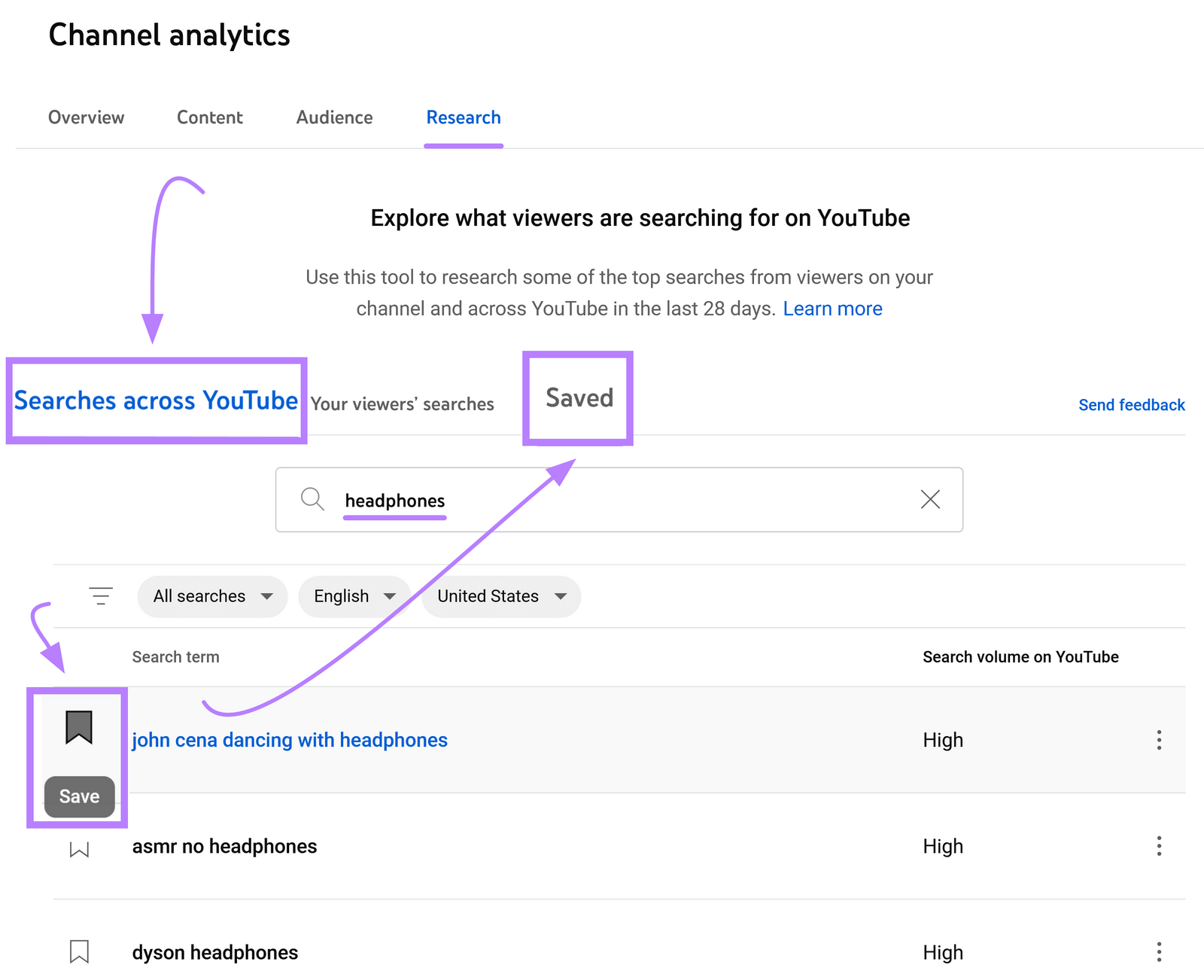
Action Step:
- Go to your YouTube Studio.
- Click on Analytics in the left-hand menu.
- Select the Research tab at the top.
- Use the search bar to explore your topics. You can even filter by "Your viewers' searches" once you start building an audience.
- If you find a promising term, click the bookmark icon to save it to your Saved list.
Method 3: The Alphabet & Asterisk Tricks
You can uncover even more keyword ideas with a couple of clever tricks in the main YouTube search bar. The following video demonstrates these simple but effective techniques.
How I Outranked EVERYONE in 1 Day (YouTube Keyword Research 2026)
Let's return to the 'How I Outranked EVERYONE' video. It demonstrates two simple techniques to dramatically expand your list of keyword ideas using just the search bar.
Watch these three short segments: Standard Search: (01:30 - 02:06) A recap of the basic autocomplete method. The Alphabet Method: (03:11 - 03:58) See how to add letters of the alphabet to find more variations. The Asterisk Method: (04:19 - 04:54) Learn how to use an asterisk as a 'wildcard' to fill in the blank.
3. Competitor Analysis: Learn from What Works
Keyword research isn't just about finding what people search for; it's also about seeing what content is already succeeding. Analyzing your competitors (or peers in your niche) is a shortcut to understanding what topics and titles resonate with your target audience.
The process is straightforward:
- Identify 3-5 other creators in the "frugal living," "budget lifestyle," or "money-saving" niche.
- Go to their channel page and sort their videos by "Popular" to see their all-time hits.
- Look at the titles of their top-performing videos. These titles contain the proven keywords that drive views in your niche.
For example, you might find that a competitor's most popular videos are titled:
- "How I Live on $1500 a Month in a Big City"
- "10 Things I Stopped Buying to Save Thousands"
- "Extreme Grocery Budget Challenge | $20 for a Week!"
These titles give you direct insight into topics and keyword angles that you can adapt for your own content. You don't copy the videos, but you learn from the successful keywords like "$1500 a month," "things I stopped buying," and "grocery budget challenge."
This article from OutlierKit has a great section summarizing this process.
YouTube Keyword Research: Complete 2026 Guide
The 'YouTube Keyword Research: Complete 2026 Guide' reinforces the importance of learning from others. This section explains how to identify the keywords behind your competitors' most successful videos.
Read the short subsection titled 'Analyze competitor keywords' within the '6-Step Process' section. This will solidify the strategy we just discussed.
4. Your Action Plan: Find Your First YouTube Keywords
It's time to put this all into practice. Let's follow a clear, step-by-step process to find three promising keyword ideas for your channel.
1. Brainstorm Your Seed Keywords (5 minutes)
Start by listing 5-10 broad, one or two-word topics that are central to your "cheap and cheerful lifestyle" niche. Don't overthink it.
- Example: "budgeting," "frugal living," "save money," "meal prep," "thrift shopping," "DIY home."
2. Expand Your List with Free Tools (20 minutes)
Take your seed keywords and use the methods from Part 2 to generate a longer list of specific, "long-tail" keywords (phrases of 3+ words). Aim for at least 15-20 ideas.
- Use YouTube Autocomplete: Type "budgeting for..." and see what comes up.
- Use the Alphabet Method: Type "frugal living a..." then "frugal living b..." and so on.
- Use the YouTube Studio Research Tab: Enter your seed keywords and save any interesting ideas that have "Medium" or "High" search volume.
3. Analyze Your Competitors (15 minutes)
Find three other channels in the frugal living space. For each channel:
- Go to their "Videos" tab and sort by "Popular."
- Write down the titles of their top 3-5 videos.
- Underline the core keyword or topic in each title.
4. Select Your Top 3 Video Keywords (10 minutes)
Look at your expanded list from step 2 and your competitor notes from step 3. Choose three specific, long-tail keywords that you feel confident you can create a video about. A good keyword for a new channel is one that answers a specific question and doesn't seem to be dominated only by huge channels.
Example Final Keywords:
how to start a budget for beginners(found via autocomplete)cheap and cheerful home office ideas(found via alphabet method)things to stop buying to save money(found via competitor analysis)
Keep this list of three keywords. They will be the foundation for your first few YouTube videos.
Conclusion
Congratulations! You've just completed the foundational work that many aspiring YouTubers skip. By understanding how to find what your audience is looking for, you're setting yourself up for long-term, sustainable growth.
Key Takeaways:
- YouTube is a Search Engine: Your primary goal is to create videos that match what people are actively searching for.
- Use Free Tools: The YouTube search bar and the Studio Research tab are incredibly powerful and all you need to get started.
- Long-Tail Keywords are Your Friend: Specific, multi-word phrases (e.g., "how to save money on groceries for a family") are less competitive and attract a more targeted viewer.
- Learn from Success: Competitor analysis isn't about copying; it's about identifying the proven topics and keywords that resonate in your niche.
Preview of the Next Lesson:
Now that you have your list of promising keywords, what's next? In our next lesson, we will focus on the learning outcome: Apply researched keywords to a YouTube video's title, description, and tags to improve discoverability. You'll learn exactly where and how to place your chosen keywords to give your video the best possible chance of ranking in search results.