
Welcome back. Last lesson turned a social-app idea into a user story and acceptance criteria. You used the example of a signed-in member publishing a text post, with observable rules for valid text, invalid text, and persistence.
Now we move from what the member should be able to accomplish to how you can plan the coding work without being overwhelmed. The goal is not to list every technical component in your future app. It is to divide one feature into small coding tasks with a clear result, a clear boundary, and a way to verify completion.
Plan for about 40 minutes: study two short resources, then work through the text-post example and use the planning template.
From a feature to work you can finish
A feature is a capability people experience:
A signed-in member can publish a text post and see it on their profile after reloading.
A coding task is a bounded piece of implementation work that contributes to that capability:
Implement the rules that decide whether post text is valid.
The difference matters because “build posting” is too large to start confidently. It contains interface work, validation, saved data, account ownership, error handling, and display logic. Trying to hold all of that in your head at once makes the feature feel much harder than it is.
A good task should answer five questions:
| Question | Example: text-post feature |
|---|---|
| What changes? | A post-text validation routine is added. |
| What is the boundary? | It checks text only; it does not save posts or draw a screen. |
| How will I check it? | Try blank text, one character, 500 characters, and 501 characters. |
| What means “done”? | It consistently returns either “valid” or a specific validation message. |
| What is deliberately excluded? | Image uploads, video uploads, editing, and feed delivery. |
A task does not need to be exciting by itself. “Create a post record” is not a user-facing feature. But it can still be a useful technical task if it has a precise outcome and a reliable way to test it.
The important distinction is this:
- A feature slice should produce meaningful behavior for a person using the app.
- A coding task is a small, testable implementation step inside that slice.
In a one-person project, you will often keep these together in one note or issue: a feature at the top, with its coding tasks beneath it.
Keep feature slices vertical, not horizontal
Your app will eventually have several architectural layers:
- The client interface running in a browser or on Android.
- Application logic that validates actions and applies rules.
- A database that stores structured records such as profiles and posts.
- Media storage for image and video files.
A common beginner planning mistake is to organize an entire feature by technical layer:
- Build all post screens.
- Build all post database tables.
- Build all post backend logic.
- Finally connect everything.
Those are horizontal slices. Each piece may be substantial, yet none alone lets a member publish a post. The user must wait until several separate layers are completed before anything useful can be tested end to end.
A vertical slice is narrower but crosses the layers needed to deliver one observable behavior. For example:
A signed-in member can publish one text-only post and see it on their own profile.
That slice needs some interface, some rules, and saved data—but only the minimum needed for this one behavior. It deliberately leaves out images, videos, edited posts, hashtags, private audiences, comments, notifications, and a personalized feed.
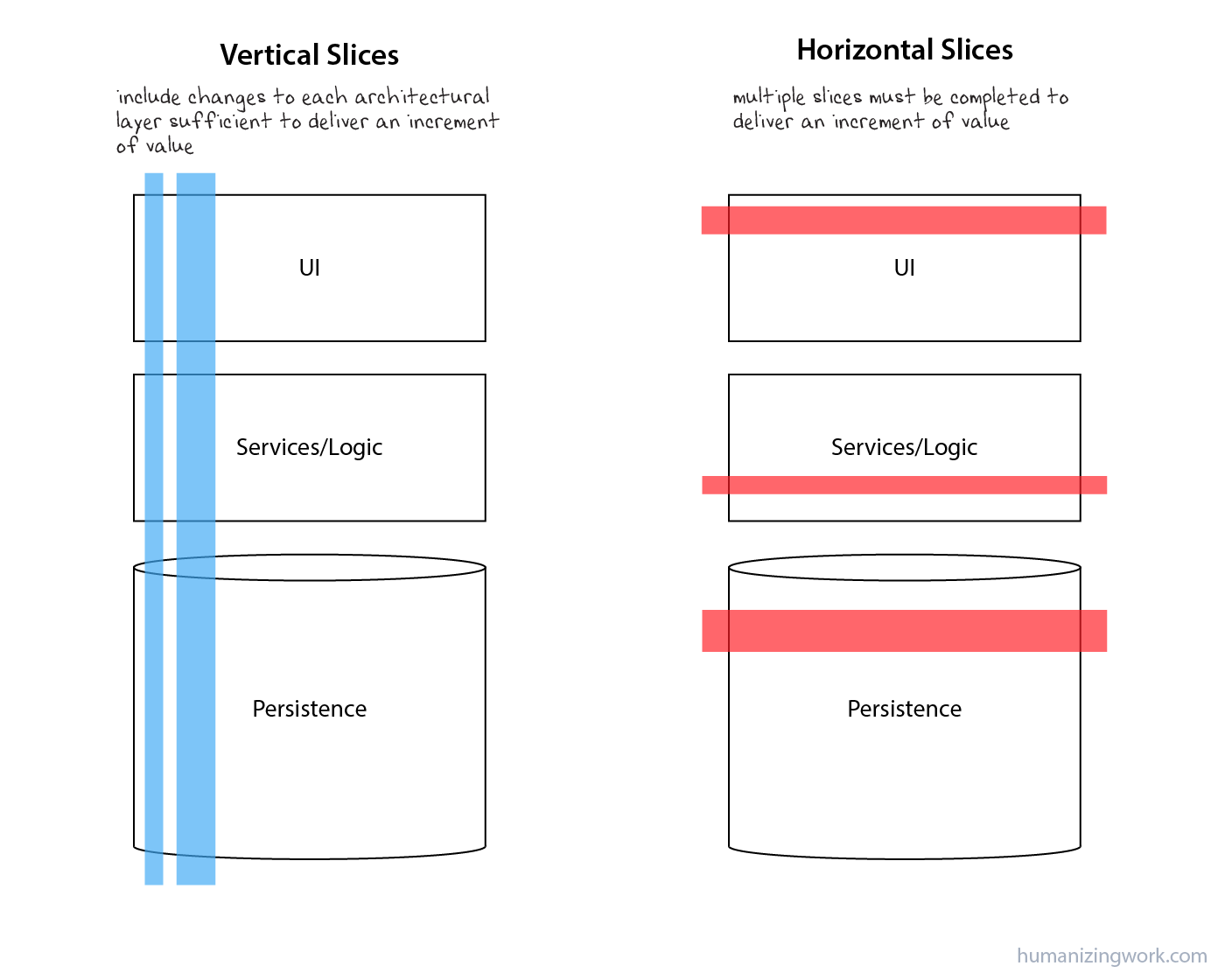
The Humanizing Work Guide to Splitting User Stories
Read this focused portion of the Humanizing Work guide to connect two ideas: a work item needs a concrete, testable result, and useful feature increments usually cross architectural layers.
In the section “INVEST in Good User Stories,” read the INVEST discussion. Focus especially on “independent,” “small,” and “testable”: these are practical checks for whether planned work is manageable. Then read “User Stories Are Vertical Slices.” Pay attention to the contrast between a user-visible change and a change isolated to one technical layer. Read the horizontal-slice contrast, then continue through the end of that section.
There is an apparent tension here: a vertical feature slice touches several layers, while a coding task should be small. Resolve it with two levels of planning:
| Level | Example | Meaning |
|---|---|---|
| Feature slice | Publish a text-only post to my profile | A small, usable change in app behavior |
| Coding task | Validate post text before saving | One bounded part of implementation |
| Coding task | Save a valid post with an author and timestamp | One bounded part of implementation |
| Coding task | Display supplied post data in a profile list | One bounded part of implementation |
| Integration task | Connect the compose screen, validation, save operation, and profile display | The task that completes the vertical slice |
Do not interpret “independent” as “every task can be performed in any random order.” Some tasks naturally need earlier work. Instead, aim for independently verifiable tasks: each can reach a clear done state, can be tested without leaving the app half-working, and has any prerequisites written down.
When a dependency is not ready, developers often use a temporary substitute:
- A screen can display sample post data before the database exists.
- Validation logic can be tested with plain text values before a screen exists.
- A save operation can be tested with a controlled test account before the full profile screen is complete.
These substitutes are sometimes called fixtures, stubs, or test data. The names can wait; the planning idea matters now. Give each task an environment where its result can be checked.
Split a broad social feature by reducing variation
Consider this overly broad feature:
Members can create, edit, delete, and share text, image, and video posts with different privacy settings.
That single sentence hides many separate decisions:
- Is the post text-only, image-only, video-only, or a combination?
- Where does a member create it?
- Can text be blank?
- What file types and sizes are allowed?
- Who can see the post?
- Can the author edit it later?
- Can the author delete it?
- Where does it appear after publication?
The answer is not to make a task called “build post infrastructure.” Instead, find the smallest version that still has a real user outcome.
For the first post slice, choose these boundaries:
| Include now | Defer deliberately |
|---|---|
| Signed-in member | Guest posting |
| Text-only post | Images and videos |
| One author: the signed-in member | Tagging or mentioning other people |
| Public profile display | Personalized home feed |
| Create a post | Editing and deletion |
| Basic character validation | Hashtags, links, rich text, drafts |
| Saved post visible after reload | Notifications to followers |
This is not throwing away the larger vision. It is choosing a stable starting point from which the larger app can grow.
The Mountain Goat Software video presents several ways to make this kind of split. Its SPIDR framework includes separating user paths, simplifying an interface, limiting the kinds of data supported initially, and deferring extra rules.
SPIDR: 5 Ways to Split User Stories & Bring Any Story Down to Size.
Watch “SPIDR: 5 Ways to Split User Stories & Bring Any Story Down to Size” from Mountain Goat Software: Agile & Scrum Mastery. It provides a compact set of lenses for turning an intimidating feature into smaller, testable slices.
Watch the overview to learn the five SPIDR lenses. Then watch the spike example, which explains how a short research task can reduce a genuine technical unknown. Continue through paths, interface, data, and rules. For your social app, focus particularly on limiting data to text before media, using a simple compose interface before polishing it, and implementing only essential rules in the first slice. Finish with the summary.
For a social app, four splitting questions are especially useful:
1. Can I support the simplest data first?
Instead of “members can share media posts,” begin with:
Members can publish text-only posts.
Later slices can add:
- A member attaches one image to a post.
- A member attaches one video to a post.
- A member sees an error when selected media exceeds allowed limits.
Text, image, and video are not merely visual variations. They require different selection, validation, storage, upload, and display behavior. They deserve separate slices.
2. Can I support the normal path before special paths?
Instead of “members can publish posts in every situation,” begin with:
A signed-in member publishes a valid post while connected.
Later, add behavior for failed saves, interrupted uploads, retrying, offline use, or moderation restrictions. These matter, but they should not prevent you from establishing the core behavior first.
3. Can I use a simple interface before a refined one?
Your first compose screen might contain only:
- A text field.
- A character count or validation message.
- A Publish button.
- A confirmation or error message.
A rich editor, media carousel, draft-saving behavior, formatting toolbar, and animation can all come later. The first interface must be understandable and accessible, not visually elaborate.
4. Which rules are essential now?
Some rules are fundamental to the safety and meaning of a feature. For posts, these include:
- A post must be associated with its real author.
- Blank text is not valid content.
- A member should not be able to publish as someone else.
Other rules can be planned as later improvements:
- Rate limits to reduce spam.
- Automated content filtering.
- Detailed post visibility choices.
- Advanced hashtag parsing.
Do not defer a rule merely because it is inconvenient if deferring it would make the feature unsafe or misleading.
A worked task plan: publish a text-only post
Return to the user story from the previous lesson:
As a signed-in member, I want to publish a text post so that I can share an update with people who follow me.
For the first vertical slice, use these acceptance criteria:
- A signed-in member can publish nonblank text from 1 to 500 characters.
- Blank text and text over 500 characters are rejected with a helpful message.
- A published post is attributed to the signed-in member.
- The post appears on that member’s profile and remains there after a reload.
Here is a practical decomposition. You will not write this code until later modules; at this stage, you are learning to plan it accurately.
| Task | Bounded result | How to verify it independently | Not included |
|---|---|---|---|
| 1. Define a post data shape | A post has an identifier, author identifier, text, and creation time. | Create sample post records and confirm each required field is present and correctly named. | Database setup, screen design, publishing. |
| 2. Validate post text | A small piece of logic accepts nonblank text up to 500 characters and rejects invalid input with a reason. | Check blank spaces, 1 character, 500 characters, and 501 characters. | Saving data or displaying controls. |
| 3. Save and retrieve a valid post | A valid post is stored with the authenticated member as its author and can later be read back. | Use a known test member to save a sample post, retrieve it, and check its text and author. | A polished compose screen or a personalized feed. |
| 4. Display a profile post list | A profile screen can render a supplied list of post records. | Give the screen sample posts and check that text and author-related information appear in the intended order. | Creating or saving a new post. |
| 5. Build the compose interaction | The text field, Publish action, and validation feedback work together at the interface level. | Enter valid and invalid text; confirm invalid text produces feedback and does not request a save. | Actual database connection, if a temporary save function is used at this stage. |
| 6. Integrate the first vertical slice | Publishing from the compose interface validates, saves, shows the new post on the profile, and still works after reload. | Perform the acceptance-criteria checks from start to finish using a test account. | Images, videos, editing, deletion, and home-feed ranking. |
Task 6 is important. Without it, you might technically complete several pieces while never confirming the feature works for a person. This integration task is where the horizontal pieces become a vertical, user-visible slice.
Notice how the tasks avoid vague verbs:
| Too vague | Better task title |
|---|---|
| Build posts | Integrate text-post publishing from compose screen to profile |
| Work on database | Save and retrieve a valid post for a known author |
| Make the UI | Render a supplied list of post records on a profile |
| Add validation | Reject blank and over-limit post text with a clear reason |
| Do media later | Add one-image selection and validation to post creation |
The better titles describe an outcome you can observe. They also set a boundary: after completing “validate post text,” you should not accidentally spend the session designing the profile screen.
Write each task as a small contract
For a personal project, a task can live in a notebook, a plain text file, or eventually a GitHub issue. The tool matters less than the information you record.
Use this template:
Task title: Begin with a precise verb, such as validate, save, render, connect, or display.
Purpose: State the result this task contributes to.
Done when: Describe the observable completed behavior.
Verification: List the exact test cases or manual check.
Out of scope: Record what this task intentionally does not do.
Depends on: Name any earlier task, data shape, or decision it needs.
Here is Task 2 from the plan written out fully.
Task title: Validate text for a new post
Purpose: Ensure that a member cannot publish blank text or text longer than 500 characters.
Done when: The validation logic accepts nonblank text from 1 to 500 characters and returns a clear reason when it rejects text.
Verification: Check four inputs: spaces only, one character, exactly 500 characters, and 501 characters.
Out of scope: Media files, hashtags, links, publishing, saving, and visual design.
Depends on: The agreed 1-to-500-character rule.
This task is small enough to complete in one focused session later in the course. More importantly, it can be tested without waiting for a database, Android device, or complete social feed.
A simple sizing test
Before accepting a task into your plan, apply these checks:
- One main result: Can you summarize its completed result in one sentence?
- One obvious test: Could you explain exactly how to check it worked?
- No hidden “and”: Does the title avoid combining unrelated work, such as “create the screen and database and feed”?
- A visible boundary: Is it clear what work belongs in a later task?
- A stopping point: Can you finish the task without leaving a knowingly broken app state?
- Named dependencies: If it needs another piece, have you written that down rather than assuming you will remember?
If a task fails these checks, split it again.
For example:
“Implement post creation with text, images, videos, validation, permissions, and feed delivery.”
This has too many outcomes and too many forms of data. A better first step is:
“Save and retrieve a valid text-only post for the signed-in member.”
That task can later support the initial text-post slice. Image and video support will be their own major module because they bring media-library selection, file restrictions, upload progress, storage, and cross-platform rendering.
Handling uncertainty without pretending it is a task
Sometimes a feature is hard to split because you do not understand a technical part yet. That is normal, especially early in a first app project.
Suppose you later reach this uncertainty:
“How can the app select a video on Android and in a web browser, then upload it safely?”
Do not write a misleading task like “finish video uploads.” Instead, create a short, limited spike: a research or experiment task designed to answer a specific question.
For example:
Spike: Determine whether the selected Expo media tool provides the file information needed for both Android and web uploads.
Done when: A small experiment records the information available for one selected image and one selected video on both platforms, and the result is written down.
Out of scope: Building the production upload experience.
A spike produces knowledge rather than a completed feature. Keep it short and focused. Once the uncertainty is reduced, you can plan real implementation tasks more honestly.
At your current stage, write down uncertainties rather than letting them silently expand your task. Examples might include:
- “Will this app need a separate backend server, or can the managed backend handle this operation?”
- “How will a browser and Android device select the same kind of media?”
- “Where will private configuration values be stored?”
The course will address these questions in later modules. Naming them now prevents them from becoming vague, intimidating blockers.
Your planning artifact for the text-post feature
Keep the following structure in your project notes. It is the kind of compact plan you can return to once you begin coding.
Feature slice: Publish a text-only post to my profile

User value:
A signed-in member shares a short update.

Acceptance criteria:
- Valid nonblank text from 1 to 500 characters can be published.
- Blank and over-limit text show a helpful validation message.
- The saved post has the signed-in member as its author.
- The post appears on the profile after reload.

Tasks:
1. Define post data shape.
2. Validate post text.
3. Save and retrieve a valid post.
4. Display supplied posts on a profile.
5. Build the compose interaction.
6. Integrate and check the complete text-post slice.

Deferred:
- Images and videos
- Editing and deletion
- Home-feed delivery
- Privacy controls
- Notifications
This plan is allowed to change. Planning is not a promise that you already know every implementation detail. It is a way to make the next smallest piece of work clear enough to begin.
Key takeaways
A broad feature becomes manageable when you plan at two levels:
- A vertical feature slice gives someone a small but real improvement in app behavior.
- Coding tasks are bounded implementation steps that support that slice.
For each task, define a clear result, a test method, a boundary, and any prerequisite. Avoid layer-only plans such as “finish the UI first” or “build the database first” as your entire feature strategy; they delay useful end-to-end feedback.
For your first post feature, the right initial scope is text-only publishing by a signed-in member, with basic validation, saved ownership, and profile display. Images, videos, editing, feed ranking, and notifications are valuable future slices—not reasons to delay the first one.
Next, you will begin using your Windows development environment more directly by learning terminal commands for navigating folders and running project scripts.
Can't find a good explanation? Sign up and we'll make it for you
Sign up