
Welcome back. In the previous lesson, you mapped the client, backend, database, and media storage in a social app. That architecture tells you where a feature’s work belongs. Before planning or coding that work, you need to state clearly what the feature should accomplish for a person using the app.
In this lesson, you will turn one social-app idea into a user story and a set of observable acceptance criteria. These provide a compact promise: who benefits, what they need to do, why it matters, and how you will recognize that the feature is actually working. This is the bridge between “I want posts in my social app” and a feature you can later split into small coding tasks.
A useful study plan is about 35–45 minutes: a short video, a focused reading, then a guided drafting workshop.
A user story describes a useful outcome
A user story is a short description of functionality from the perspective of someone who benefits from it. It is not a list of programming work, a database design, or a detailed screen specification.
The common format is:
As a [type of user], I want to [goal], so that [benefit].
Each part does a different job:
| Part | Question it answers | Example for your app |
|---|---|---|
| As a... | Who has this need? | a signed-in member |
| I want to... | What are they trying to do? | publish a text post |
| So that... | Why does it matter to them? | share an update with people who follow them |
For example:
As a signed-in member, I want to publish a text post so that I can share an update with people who follow me.
This is deliberately written from the person’s perspective. Compare it with these alternatives:
| Wording | Why it is not yet a good user story |
|---|---|
| “Create a posts table.” | A technical task. It describes work the development team does, not a user outcome. |
| “Add a Post button.” | A proposed interface detail, not the person’s underlying goal. |
| “As a user, I want posts so that I can use the app.” | The user, goal, and benefit are all too vague. |
| “As a signed-in member, I want to publish a text post so that I can share an update with people who follow me.” | Identifies a role, an action, and meaningful value. |
The wording does not mean you must ignore technical design. It means you should not decide the implementation prematurely. Later, you may choose a particular screen layout, database table, API request, or storage rule. Those are implementation decisions that support the story rather than replace it.
A helpful Agile model calls a user story the three Cs:
- Card: the brief written story.
- Conversation: the discussion that clarifies decisions, edge cases, and trade-offs.
- Confirmation: the acceptance criteria that establish when the story is complete.
The written sentence is therefore a starting point, not a complete specification.
How to write good User Stories in Agile
Watch “How to write good User Stories in Agile” by The Agile Shop for a quick explanation of the user-focused story template and the Given-When-Then structure for acceptance criteria.
In the segment beginning with the Spotify example, watch the story template. Notice how the speaker separates the user role, action, and benefit. Then watch the acceptance criteria, focusing on how “Given” establishes a starting situation, “When” names an action, and “Then” states a result someone can verify.
Acceptance criteria make “working” observable
The user story says what value the feature should provide. Acceptance criteria say what must be true before you can honestly call that story complete.
For the text-post story, this would not be enough:
- “Posting should work.”
- “The post screen should be user-friendly.”
- “Save the post to the database.”
The first two are too subjective. The third is a technical implementation instruction. None gives you a clear way to check success from the user’s point of view.
Instead, write criteria in terms of a starting condition, an action, and an observable result. A useful format is:
Given [starting context], when [the person takes an action], then [a checkable result occurs].
For instance:
Given I am signed in and have entered valid text, when I select Publish, then my post appears on my profile with my account shown as its author.
Someone can test that. They can sign in, enter text, publish, and inspect the profile. The result is concrete: the post either appears with the correct author or it does not.
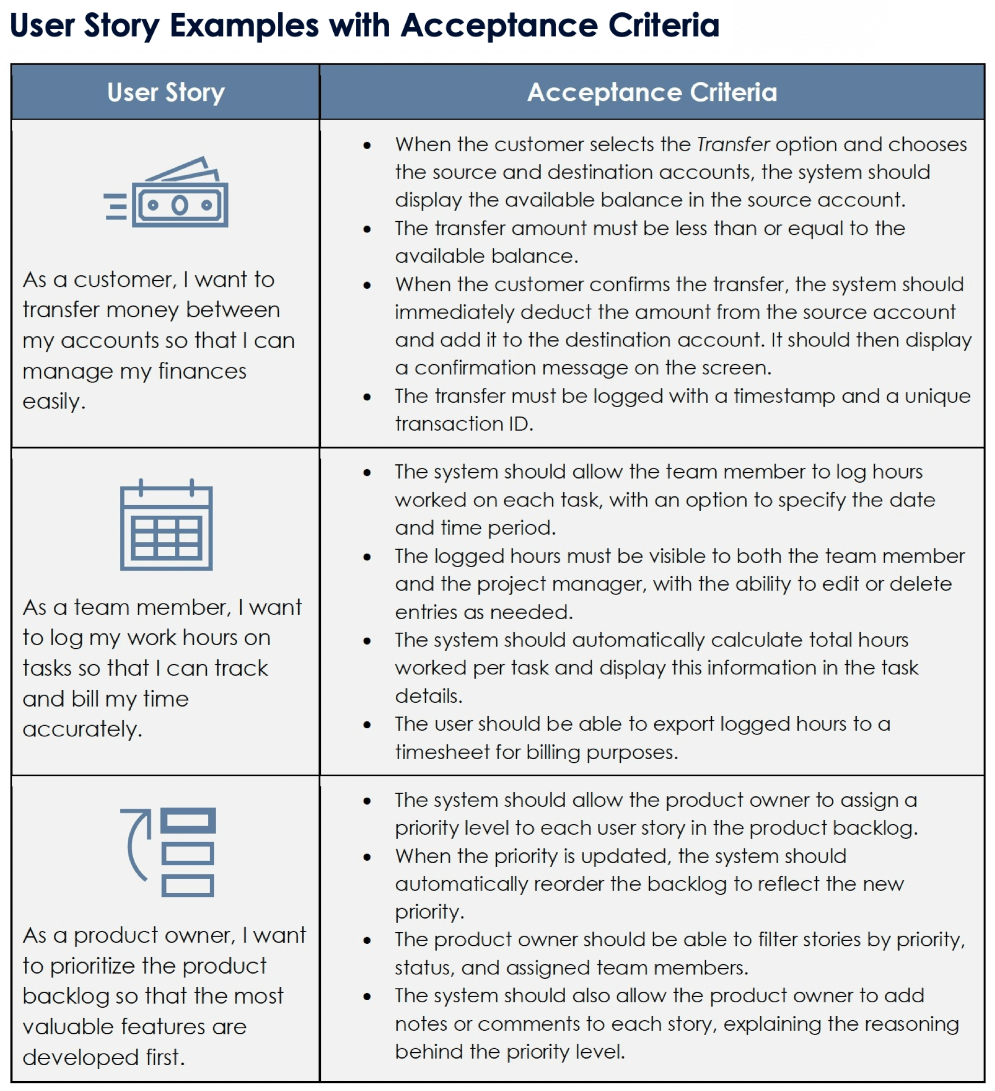
Notice what the examples in the table do well:
- They describe meaningful outcomes, such as a balance being displayed or a transaction being logged.
- They state rules that prevent invalid behavior, such as not transferring more than the available balance.
- They include observable results after an action, such as a confirmation message or a reordered backlog.
- They avoid vague statements such as “make transfers easy” or “make prioritization good.”
For your social app, acceptance criteria should cover more than the ideal successful path. A real feature also needs clear behavior when input is invalid or the action cannot be completed. That is not unnecessary pessimism; it is part of making an app understandable and trustworthy.
User Stories and User Story Examples by Mike Cohn
Read Mike Cohn’s guide to reinforce the distinction between a user outcome, a technical task, and acceptance criteria. Its examples show how a small number of clear criteria can define a feature without dictating every implementation detail.
In “What Is a User Story?”, read the definition, then continue through the template and conference-attendee example. In “The User Story Template,” read the explanation of confirmation. Next, in “User Story Examples,” examine the agenda criteria; identify the normal action, visible state, removal behavior, and conflict case. Finally, in the FAQ section under “What is acceptance criteria?”, read the concise definition.
Drafting one small social-app feature
Let’s write a complete first draft for one feature: publishing a text post.
1. Keep the story small enough to finish
“Let members create and share every kind of post” is too large for one story. It could include text, images, videos, captions, visibility choices, edits, comments, hashtags, mentions, notifications, and feed delivery.
For now, choose a narrow slice that still gives a person a useful outcome:
- A signed-in member publishes a text-only post.
- The post appears on that member’s profile.
- Basic invalid input is handled.
Image and video posts will be separate features later. Choosing a small scope is not abandoning the bigger social-app vision; it is making steady, testable progress toward it.
2. Write the story statement
Here is the story:
As a signed-in member, I want to publish a text post so that I can share an update with people who follow me.
This does not specify:
- the color or location of the Publish button;
- whether the client uses a particular API route;
- the database table or column names;
- the exact visual design of the profile screen.
Those will matter when you design and implement the feature. But they are not necessary to establish the user’s goal.
3. Decide product rules before turning them into criteria
Acceptance criteria depend on decisions. For this first version, suppose you choose these simple rules:
- A post must contain text, not just blank spaces.
- A post can contain from 1 to 500 characters.
- The post belongs to the signed-in member.
- A successfully published post remains present after the profile is reloaded.
The number 500 is a product decision, not a universal law. Another app could choose 280, 1,000, or no fixed limit. What matters is that your product has a clear rule and your criteria state the expected behavior at its boundary.
4. Express the rules as observable criteria
Here is a complete first draft.
User story
As a signed-in member, I want to publish a text post so that I can share an update with people who follow me.
Acceptance criteria
-
Valid publication
Given that a signed-in member enters 1 to 500 characters of nonblank text, when they publish the post, then the new post appears on their profile with the entered text and their account as the author. -
Blank-text validation
Given that a signed-in member has entered no text or only spaces, when they attempt to publish, then no post is created and a message explains that post text is required. -
Length validation
Given that a signed-in member enters more than 500 characters, when they attempt to publish, then no post is created and a message explains that the post exceeds the allowed length. -
Persistence
Given that a member has successfully published a text post, when they reload their profile, then that post is still displayed.
Each criterion is specific enough to check. Together, they describe:
- the normal successful experience;
- two important invalid-input situations;
- persistence, which distinguishes a real saved post from text that only appeared temporarily on one screen.
The final criterion also connects naturally to the architecture from the prior lesson. A person should see the post after reloading because the client sent a request, the trusted server-side system validated it, and structured post data was stored for later retrieval. However, the criterion does not need to say “insert a row in the database.” That is a future implementation task, not the outcome being accepted.
Criteria are not coding tasks
This distinction will matter in the next lesson, when you split a feature into independently testable pieces of coding work.
For the text-post story, these might eventually become tasks:
- create a compose-post interface;
- validate text before allowing publication;
- create a database representation for posts;
- send a request to save a new post;
- enforce that the author is the signed-in member;
- load posts on a profile screen;
- display success and error states.
Those are useful tasks, but they are not user stories. A task describes how the team will deliver an outcome. A user story describes why the outcome matters to someone.
You can use this quick check:
| If the sentence begins with... | It is probably... |
|---|---|
| “As a member, I want...” | A user story |
| “Given..., when..., then...” | An acceptance criterion |
| “Create,” “add,” “configure,” or “write...” | A development task |
| “Use React Native,” “create a SQL table,” or “call an API...” | An implementation decision or technical task |
There is one subtle point: acceptance criteria can include rules that the backend must enforce, especially ownership and permissions. They should still be stated in terms of behavior that can be checked.
For example, this is implementation-focused:
“The client must send the authenticated user ID to the posts endpoint.”
This is a stronger product rule:
“A newly published post is attributed to the signed-in member, and a member cannot publish a post under another account.”
The second statement tells you what must be true. Later, you will choose a secure implementation that makes it true.
A reusable drafting routine
When you plan another social-app feature, use this routine in your notes:
-
Name a single person or role.
Prefer a meaningful role such as “signed-in member,” “group owner,” “group member,” or “moderator,” rather than the vague word “user.” -
State one goal in the person’s language.
Use an action such as follow an account, edit a profile, join a group, or send a direct message. -
State the benefit.
Explain what the action enables: keep track of an account, present accurate profile information, participate in a community, or communicate privately. -
Choose a thin slice.
If your story contains several major actions joined by “and,” it may be too large. For example, “create, edit, delete, and share video posts” should be split. -
List observable results.
Include the successful case, significant invalid or blocked cases, and any result that must persist. -
Remove hidden implementation instructions.
Ask whether a criterion describes something a person can verify or a rule the product must uphold. If it only tells a programmer which tool to use, move it into future technical planning.
You can now apply the routine to one feature you want in your app. Sensible early candidates include following an account, editing a profile, joining a group, or sending a direct message. Keep your first draft short: one story and roughly three to five criteria is usually enough for a small feature slice.
Key takeaways
A user story is a concise description of a valuable outcome:
As a [role], I want to [goal], so that [benefit].
Acceptance criteria define what must be true for that story to be considered complete. Strong criteria are observable and testable: they establish a context, identify an action, and state a result that can be checked.
For your future social app:
- Write stories from the member’s, group owner’s, or moderator’s perspective.
- Keep each story focused on one useful slice of capability.
- Cover both the expected success case and important invalid or blocked cases.
- Describe product behavior and rules, not database tables, API routes, or UI styling.
- Treat the story as the user-centered outcome and later technical work as the tasks that deliver it.
Next, you will take a story like the text-post example and decompose it into coding tasks that can be completed and tested independently.
Can't find a good explanation? Sign up and we'll make it for you
Sign up