
Good to see you again. In the previous lab, you proved that your supply plan resolves the intended buy-or-transfer sourcing rule for FG-TEST at DEST. That establishes where the plan is permitted to obtain supply. This lab verifies the next dependency layer: whether the collected item, manufacturing, calendar, supplier-capacity, and lead-time data actually make those sources feasible and determine the quantity and dates of the recommendations.
For an implementation interview, this is a critical distinction: a sourcing rule can be perfectly configured and still yield unexpected planned orders because Plan Inputs contains stale, incomplete, or conflicting master data. You will use a controlled scenario, inspect the collected records—not merely source setup screens—and then connect each input to a recognizable planning outcome.
Reserve about 40 minutes.
Build a verification scope before opening Plan Inputs
Do not inspect Plan Inputs as a large, unstructured data browser. Start with an item-organization “chain of evidence” and verify each dependency against the same plan horizon.
Continue using the source and destination organizations from the previous lab. Use your real item names where available.
| Verification role | Suggested test record | What you are proving |
|---|---|---|
| Finished good / assembly | FG-TEST at DEST, or a manufactured assembly such as FG-MAKE at M1 | Item planning attributes, make/buy status, order modifiers, BOM, work definition, resources, and manufacturing lead times |
| Purchased component | COMP-BUY at DEST or M1 | Purchasable status, supplier/site, supplier capacity, purchase lead times, and buying order modifiers |
| Transfer source | FG-TEST at SRC | Item validity at source and any source-side supply feasibility |
| Supplier/site | SUP-TEST / MAIN | Supplier/site availability, capacity, and purchase-source feasibility |
| Supply plan | SUP_LAB_<initials>_BASE | The plan that consumes the collected data |
A single externally purchased item normally has no bill of material or manufacturing resource requirement. Conversely, a manufactured assembly normally does not prove supplier capacity. It is therefore appropriate to validate the full dependency set with an assembly item and a purchased item, while keeping the organizations and plan horizon consistent.
Your evidence should answer these questions:
- Is the required record present in the planning data repository?
- Does its value match the intended source data?
- Is it applicable to the correct organization and date range?
- Can you explain what recommendation changes if that value changes?
Plan Inputs is the planning model—not a replacement for source maintenance
Plan Inputs exposes the planning copy of collected data. Its value is diagnostic: the plan reads this collected model, so this is the layer that must be correct when plan behavior is being investigated.
A useful mental model is:
| Layer | Primary question | Typical evidence |
|---|---|---|
| Product, manufacturing, supplier, and inventory setup | Was the source business data defined correctly? | Manage Items, work definitions, supplier setup, calendars |
| Collections | Did the required object get transferred successfully? | Collection request, child-process logs, collection status |
| Plan Inputs / planning repository | What does Planning currently see? | Item, resource, item structure, calendar, supplier, and capacity records |
| Plan output | What did Planning decide from those inputs? | Supplies and Demands, Material Plan, exceptions, Calendar Details |
The inspection approach is consistent with the collection and repository work from Module 1: source setup alone is not sufficient proof. A correction in Product Information Management or Manufacturing becomes relevant to the plan only after the correct collection process has completed.
The following official Oracle reference gives the item attributes and order modifiers that Supply Planning consumes.
Item Attributes and Order Modifiers for Supply Planning
Read Oracle's reference to establish which item attributes affect supply planning and how order-modifier precedence changes planned-order quantities.
In the opening navigation guidance, read from the item setup context, then review the supply-planning attribute table in the same section. Focus on the Planning, Purchasing, Manufacturing, Inventory, and Order Management rows rather than treating every listed attribute as equally relevant. Then continue in the "Order Modifiers" section from the purpose of modifiers through the individual modifier examples ending at the rounding example. Pay particular attention to Fixed Days Supply, Fixed Order Quantity, Fixed Lot Multiplier, Minimum Order Quantity, Maximum Order Quantity, and Rounding.
Open Plan Inputs and establish a repeatable search method
-
Navigate to Supply Chain Planning.
-
Open Plan Inputs. Depending on your 26B navigation and role, select Open in Full View or expand the left-side panel to access the Plan Inputs tables.
-
Select the relevant seeded table, beginning with Items.
-
Search with the narrowest usable criteria:
- Organization:
DESTor your manufacturing organization - Item:
FG-TEST,FG-MAKE, orCOMP-BUY - Where relevant, use effective dates that overlap the supply-plan horizon.
- Organization:
-
In the results, use View, Manage Layouts, or the layout selector to expose the exact columns needed. Do not rely on the default layout; it rarely displays all lead-time and order-modifier fields together.
-
Save a personal layout such as
SUPPLY_INPUT_AUDIT_<initials>with columns grouped into:- identity and organization;
- planning and purchasing eligibility;
- lead times;
- order modifiers;
- dates and source-system context, if available.
The video segment below is optional but useful for quickly orienting yourself in the Plan Inputs tables and layouts. Its interface may differ slightly from your 26B pod, but its inspection method is applicable.
Oracle Fusion planning training | Collection process in oracle Fusion Cloud planning central
Watch "Oracle Fusion planning training | Collection process in oracle Fusion Cloud planning central" from MY TECHNO JOURNAL for a concise demonstration of using seeded Plan Inputs tables, layouts, and drill-downs to inspect collected records.
Watch Plan Inputs review. Focus on the transition from completed collection to inspecting suppliers and items, then on why layouts are needed to display specific attribute groups such as item lead times. Treat this as navigation orientation; use your environment's current labels and the Oracle reference above for the actual configuration meaning.
For each object below, record one screenshot or export containing the filters and key values. This is not administrative overhead: it is how you build an implementation defect case with evidence instead of assumptions.
Verify item planning eligibility, lead times, and order modifiers
1. Check the item’s basic planning identity
In Plan Inputs > Items, find FG-MAKE or FG-TEST at the organization where demand is planned. Confirm:
| Attribute group | Verify | Why it matters |
|---|---|---|
| Organization context | The item record is for the demand or manufacturing organization you intended | Item attributes are organization-specific; a correct value in SRC does not prove the value at DEST |
| Inventory eligibility | Inventory Item, Stockable, and Transactable are appropriate for the scenario | An item not usable in inventory cannot behave as expected in material planning |
| Planning method | Typically MRP planned for a standard supply-planning test | Determines whether Planning is expected to plan the item |
| Planner and planning ownership | Planner code is populated as required by local design | Supports ownership and filtering; it can also affect operational review processes |
| Make or Buy | Matches the intended fallback behavior | Oracle uses Make or Buy by default when an effective sourcing rule is not available |
| Purchasing or transfer eligibility | Purchasable for bought items; Transfer Orders Enabled where transfer execution is intended | Sourcing policy alone cannot overcome invalid execution attributes |
For the previous buy-or-transfer scenario, the most important point is nuanced:
- The active sourcing rule and assignment set should drive the planned source.
- Make or Buy remains important because it can become the fallback if the plan cannot resolve an effective sourcing rule.
- Therefore, if unexpected make orders appear, inspect both the active rule and the item’s Make or Buy value. Do not assume that sourcing is the only cause.
2. Expose and verify lead-time fields
Add these fields to the item layout where present:
- Preprocessing lead time
- Processing lead time
- Postprocessing lead time
- Fixed lead time
- Variable lead time
- Lead-time lot size, if available in your layout
- Acceptable Early Days
- Demand, planning, and release time fences
The key rule is not “all lead times apply to all orders.” Oracle identifies their use as follows:
| Supply method | Lead times most relevant to planned-order scheduling |
|---|---|
| Buy | Processing lead time, plus preprocessing and postprocessing lead times |
| Transfer | Preprocessing and postprocessing lead times, together with transfer/shipping calendar and network timing |
| Make | Fixed and variable lead times, plus preprocessing lead time and the work-definition/resource model |
For a purchased component with a three-day processing lead time, a shortage due on 20 June must generally be planned early enough to accommodate that lead time; preprocessing and postprocessing can shift the dates further. If the plan creates an order on the due date, do not immediately conclude that lead times were ignored. First verify the planned order type, the correct organization’s item record, the supplier and shipping calendars, and whether an override exists in the purchasing or sourcing data.
3. Verify order modifiers as a quantity explanation
Use COMP-BUY or another controlled item with a shortage. Expose:
- Minimum Order Quantity
- Maximum Order Quantity
- Fixed Order Quantity
- Fixed Lot Multiplier
- Fixed Days Supply
- Rounding
Order modifiers explain why a planned order quantity may differ from the exact shortage. They are not planning errors by default.
For example, assume the net requirement is 220 units:
| Modifier setup | Likely planning behavior |
|---|---|
| Minimum Order Quantity = 300 | One order of at least 300 units |
| Maximum Order Quantity = 150 | Two or more orders, each no larger than 150 units |
| Fixed Order Quantity = 500 | A 500-unit planned order, even for a smaller shortage |
| Fixed Lot Multiplier = 100 | Quantity rounded up to a multiple of 100 |
| Fixed Days Supply = 5 | Shortages within the coverage period can be grouped into one order |
Order modifiers have precedence. In particular, a populated Fixed Order Quantity takes control of the planned quantity and causes the planning process to skip directly to rounding; it is not simply combined with every other modifier. Similarly, Minimum Order Quantity determines the minimum quantity and then skips to rounding. This is why a consultant must inspect all populated modifiers before explaining an order as “wrong.”
A strong validation record for one item states both the raw shortage and the relevant modifier:
COMP-BUYatDESThas a net requirement of 220. The collected item record contains a fixed lot multiplier of 100 and no fixed order quantity, so a planned order of 300 is consistent with the planning input.
Verify the manufacturing model: bill of material, work definition, and resources
For a make item such as FG-MAKE, the plan needs both a material model and, for capacity-aware planning, a resource model.
- A bill of material identifies component demand created when the assembly is planned.
- A work definition identifies operations used to make the assembly.
- An operation resource identifies the machine, labor, or other capacity consumed by an operation.
- The bill of resources is the planning representation of the resources derived from the work-definition model.
The Plan Inputs lifecycle is illustrated below.
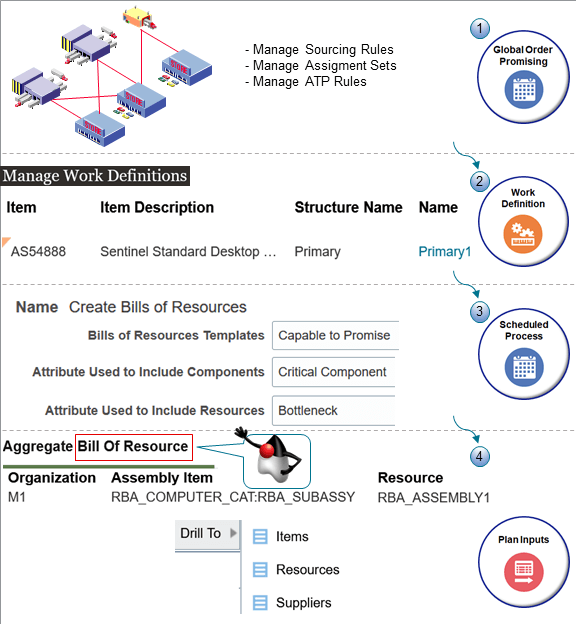
The image highlights an implementation point that is frequently missed: a work definition existing in Manufacturing does not by itself prove that Supply Planning has a usable resource model. The relevant planning representation must be generated and collected.
Inspect the bill of material and item structure
-
In Plan Inputs, open Item Structures, Bills of Material, or the equivalent seeded table available in your pod.
-
Filter to:
- Organization: manufacturing organization, such as
M1 - Assembly Item:
FG-MAKE - Effective date overlapping the plan horizon
- Organization: manufacturing organization, such as
-
Verify:
- the component item is present;
- component quantity and UOM are correct;
- the component is valid in the same organization;
- effectivity dates overlap the plan run date;
- the component is not inadvertently disabled, end-dated, or excluded.
-
Drill to the component item where available and inspect its planning method, lead times, and order modifiers.
The practical test is a simple planning relationship: a planned make order for FG-MAKE should generate dependent demand for COMP-BUY according to the collected component quantity. If it does not, distinguish among:
- no planned make order exists for the assembly;
- the plan is sourcing the assembly externally instead of making it;
- the item structure is missing or ineffective in Plan Inputs;
- the component relationship, quantity, or dates are incorrect;
- the component is outside plan scope.
Inspect work definitions, bills of resources, and resource requirements
-
In Plan Inputs, search for Work Definitions, Bills of Resources, Operation Resources, Resources, or Resource Requirements. Exact table availability and names can vary by enabled features and page layout.
-
Filter to the manufacturing organization and
FG-MAKE. -
Verify the planning resource chain:
- an active work definition exists for the assembly and planning date;
- an operation within the definition has an assigned resource;
- the aggregate bill of resource includes that assembly-resource relationship;
- the resource is collected in the correct organization;
- the resource has available capacity for the relevant dates.
-
If the supply plan is constrained, inspect whether the resource has an applicable capacity constraint. In an unconstrained plan, a valid resource record may still be visible, but capacity does not necessarily limit the recommendation.
Keep the following diagnostic distinction clear:
| Symptom | More likely cause |
|---|---|
| No component demand from a planned make order | BOM/item-structure collection or effectiveness issue |
| Plan creates make supply but it appears late in a constrained run | Resource capacity, resource calendar, work-definition duration, or lead-time issue |
| Plan ignores a seemingly valid resource | Resource is absent from Plan Inputs, not tied to the collected work definition, outside scope, or constraint options do not use it |
| Plan buys the assembly rather than makes it | Active sourcing rule, assignment set, Make or Buy fallback, or manufacturing model viability |
Verify calendars and capacity: dates are calculated, not guessed
A plan does not treat every calendar day as a working day. Calendars determine when material can be made, received, shipped, or processed, while resource availability determines how much work can be performed within those working periods.
Calendar verification checklist
In Plan Inputs, open Calendars, Calendar Assignments, or the equivalent available table. For the selected item and supply path, establish the calendar chain:
| Calendar or schedule context | What to inspect | Consequence if wrong |
|---|---|---|
| Organization manufacturing calendar | Working days, shifts, and holidays | Make orders can start or complete on unexpected dates |
| Resource calendar | Available working hours by resource and day | Constrained capacity can be zero or overstated |
| Supplier planning calendar | Supplier working days and closures | Purchase order processing dates can shift |
| Shipping calendar / shipping network | Ship days between SRC and DEST | Transfer orders can be scheduled late or early |
| Receiving or destination calendar | Receiving availability at destination | Suggested dock or due dates may move |
Check the effective date range, not only the calendar name. A calendar can be correctly assigned but contain an exception, holiday, or end date that falls inside your plan horizon.
The Plan Inputs data tells you what calendar records Planning possesses. Plan output then gives a behavioral validation. Open a planned order in Supplies and Demands and select Calendar Details where available.
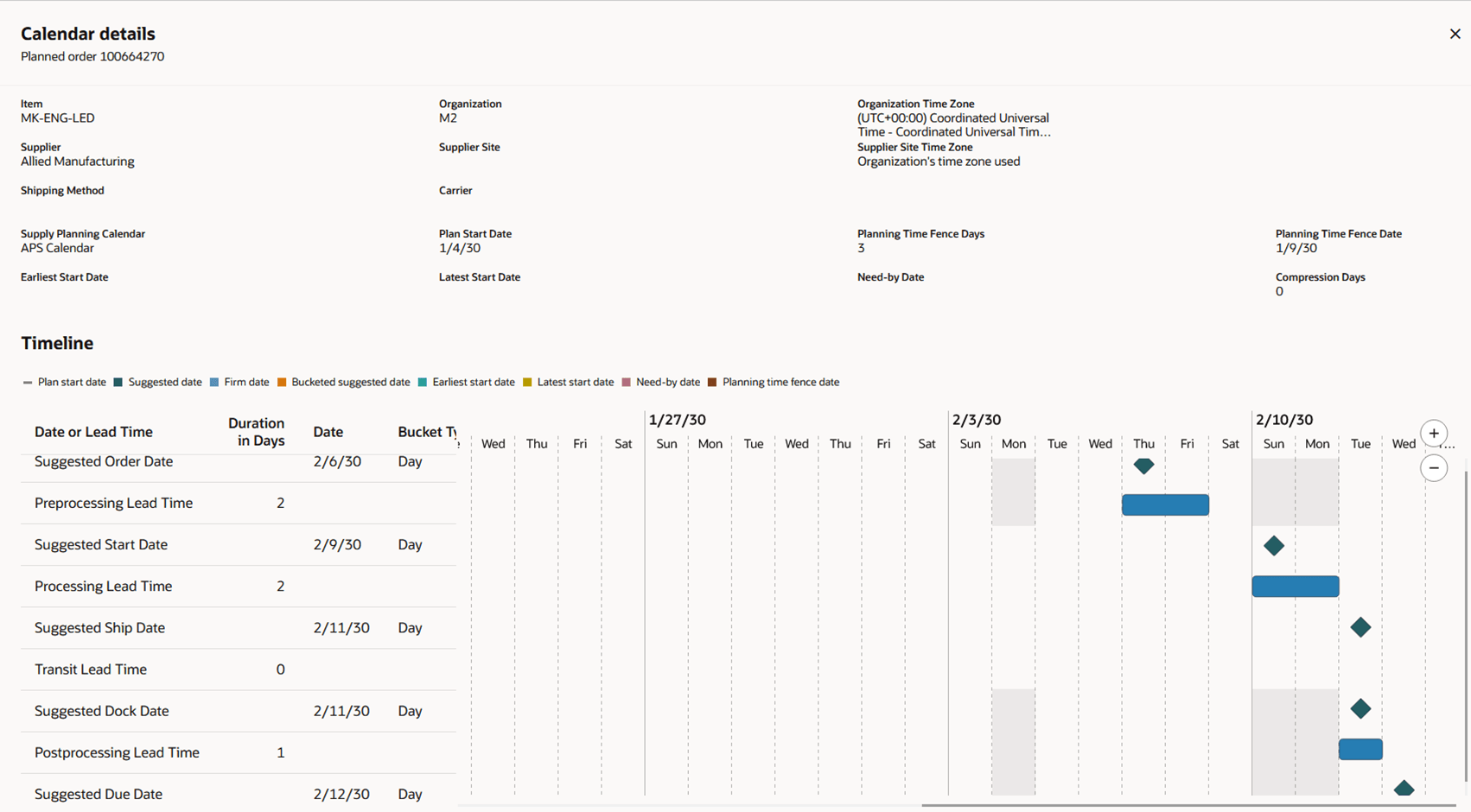
Use Calendar Details to reconcile the scheduled dates:
- Identify the suggested order date.
- Check the preprocessing lead time and resulting suggested start date.
- Check the processing lead time and suggested ship date.
- Check transit lead time, where the order is transferred or shipped.
- Check postprocessing lead time and the suggested due date.
- Compare the timeline’s working and nonworking periods with the calendar records you reviewed in Plan Inputs.
This turns a vague “the planned order is late” observation into a testable statement: the purchase order’s due date shifted because a supplier calendar closure and one day of postprocessing lead time were applied.
Resource availability and constrained capacity
In 26B, the Redwood Resource Availability experience supports review and maintenance of time-phased available hours at day, week, or period level. You can reach it from resource-related planning pages while preserving the organization and resource context.
Redwood: Manage Resource Availability Using a New User Experience
Read Oracle's 26B readiness documentation to understand how Resource Availability complements Plan Inputs when validating time-phased capacity and investigating a capacity-driven late order.
Read the opening description from the Resource Availability overview. Then review the "Navigate to and from Resource Availability Page" tables, beginning at the drill context, to see which organization-resource context is passed. Finally, in "Edit Resource Availability Values," read from editing and simulation copies, followed by the "Resource Availability Time Buckets" note ending at the bucket selection. For this lab, inspect values; do not alter production-like capacity unless you are deliberately working in a simulation set.
For the resource attached to FG-MAKE, confirm:
- Organization and resource match the resource in the bill of resources.
- Available hours are nonnegative and reasonable for the relevant dates.
- The correct day, week, or period bucket is selected before interpreting capacity.
- A shutdown, maintenance window, or holiday has not reduced hours unexpectedly.
- Any edit is kept in a simulation set unless it is an approved master-data change.
This is the bridge to the next lesson’s constrained-versus-unconstrained comparison: resource availability is present in the planning model, but it drives a difference in recommendations only when the selected plan mode and capacity options evaluate the relevant constraint.
Verify supplier, supplier-site, and supplier-capacity feasibility
Return to your purchase source, SUP-TEST / MAIN.
-
In Plan Inputs > Suppliers, search for
SUP-TEST. Confirm the supplier is collected and active in the expected source-system context. -
Drill to Supplier Sites, if available, and confirm that
MAINis the site referenced by the sourcing rule. -
Search the applicable Supplier Capacity, Supplier Capacity Calendar, or supplier-capacity table. Filter by:
- supplier;
- supplier site;
- item where the capacity is item-specific;
- destination organization where the table exposes it;
- dates within the supply-plan horizon.
-
Verify:
- the capacity record overlaps the requirement date;
- units and quantities are meaningful for the item;
- capacity is not zero, end-dated, or associated with a different supplier site;
- supplier calendar availability does not invalidate the apparent capacity.
-
Cross-check with the sourcing rule from the previous lesson. The supplier and site named in Plan Inputs must be the same source that View Sourcing resolved.
Supplier capacity matters most in a constrained plan or in a plan configuration that considers supplier constraints. In an unconstrained plan, a supplier capacity record can be present and correct without limiting the proposed purchase quantity. That does not make capacity verification optional; it means you must explain its expected impact relative to the plan mode.
A clean interview explanation is:
“I first prove the supplier and supplier site are collected and match the active sourcing rule. I then validate the effective supplier-capacity record, its date range, UOM, and calendar. Finally, I interpret the recommendation in the context of plan constraints: capacity limits should affect a constrained plan, whereas an unconstrained plan may recommend supply beyond the stated supplier capacity.”
Use one trace to connect inputs to a recommendation
Complete the lab with a focused trace rather than reviewing every table in the repository.
Purchase trace: COMP-BUY at DEST
-
In Plan Inputs > Items, document purchasing eligibility, preprocessing, processing, and postprocessing lead times, and the active order modifiers.
-
In Plan Inputs > Suppliers and the applicable capacity table, document
SUP-TEST / MAIN, capacity, and effective dates. -
Confirm the prior lesson’s sourcing rule resolves the intended supplier/site for the item and destination.
-
Run or reopen the supply plan.
-
In Supplies and Demands, find the planned purchase order. Compare:
- planned quantity against shortage and order modifiers;
- order, start, ship, dock, and due dates against lead times and calendars;
- supplier and site against the active sourcing rule.
Manufacturing trace: FG-MAKE at M1
-
In Plan Inputs > Items, record Make or Buy, manufacturing lead times, and order modifiers.
-
In the item-structure table, verify components and effective dates.
-
In work-definition and resource-related tables, verify the assembly-resource relationship and available resource hours.
-
In the plan output, locate the planned make order and its dependent component demand.
-
If the plan is constrained, check exceptions and resource-related views for capacity overload or late demand. If it is unconstrained, record that resource data was validated but did not limit the recommendation by design.
This trace is more valuable than an isolated screenshot of every table because it links input values to a specific plan result.
Root-cause matrix: common Plan Inputs defects
| Symptom in plan output | Plan Inputs checks | Typical root cause | Corrective action |
|---|---|---|---|
| Planned order quantity does not equal shortage | Fixed Days Supply, Fixed Order Quantity, minimum, maximum, multiplier, rounding | Order modifier is working as configured or an unintended modifier was collected | Explain expected precedence; correct the source item attribute only if business design is wrong, then recollect and rerun |
| Plan creates a make order when purchase or transfer was expected | Make or Buy, Purchasable, Transfer Orders Enabled, supplier/site record | Sourcing assignment is ineffective or unavailable; item fallback attributes are used | Revalidate View Sourcing, supplier/site collection, plan assignment set, and item attributes |
| Assembly creates no component demand | Item structure/BOM, component effective dates, component scope | Missing or ineffective collected structure; assembly is not actually planned as make | Correct BOM/work-definition source data, run targeted collection for reference data, verify Plan Inputs, rerun |
| Make order is late only in constrained plan | Bill of resources, resource calendar, Resource Availability hours | Resource capacity or calendar is genuinely limiting supply | Validate hours and effective dates; correct capacity or use a simulation to evaluate alternatives |
| Purchase order dates ignore expected working days | Item lead times, supplier calendar, shipping/receiving calendars | Wrong calendar assignment, calendar exception, incorrect lead time, or stale collection | Correct source setup, recollect relevant reference or supply data, verify Calendar Details after rerun |
| Supplier is visible but plan does not buy from the intended site | Supplier site, supplier capacity, source-system identity, sourcing rule | Incorrect site, inactive/end-dated record, mismatch with sourcing rule | Correct supplier/site or sourcing setup; confirm resolved rule and collected supplier record |
| Resource exists but capacity is not considered | Resource record, operation resource, bill of resources, plan constraint options | Resource not tied to assembly, not collected, outside scope, or plan is unconstrained | Repair the manufacturing model or plan options; rerun an appropriate constrained scenario |
When you make a correction, do not immediately rerun the supply plan. Use this controlled sequence:
- Correct the source setup record.
- Run the collection type that includes the changed business object.
- Confirm the changed value in Plan Inputs.
- Rerun the supply plan.
- Compare the recommendation, dates, and exceptions with the pre-change evidence.
That order prevents a common troubleshooting error: believing a source-system correction has been tested when the plan was actually run against old repository data.
Lab evidence and senior-consultant explanation
Save these artifacts:
- Item layout for one manufactured item and one purchased item, showing planning eligibility, lead times, and order modifiers.
- Item structure/BOM evidence for the manufactured assembly.
- Work definition or aggregate bill-of-resources evidence tying the assembly to its resource.
- Resource Availability evidence for a relevant date bucket.
- Supplier, supplier-site, and supplier-capacity evidence for the purchased item.
- Calendar Details for one planned order.
- A Supplies and Demands result tying the input set to a planned purchase, transfer, or make order.
A concise interview response can be:
“After validating the sourcing rule, I verify the collected planning model in Plan Inputs. At item-organization level, I check planning eligibility, Make or Buy fallback, lead times, time fences, and the full order-modifier set because modifiers can legitimately change planned quantities. For manufactured supply, I verify the effective BOM, work definition, aggregate bill of resources, resource calendar, and time-phased available hours. For purchased supply, I reconcile the resolved supplier site to collected supplier capacity, calendars, and purchase lead times. I then prove the result in Supplies and Demands and use Calendar Details to explain the calculated dates. If I correct source data, I recollect, validate the repository record, and only then rerun the plan.”
Wrap-up
You have now validated the input model behind a supply-plan recommendation:
- Item attributes determine planning eligibility, supply fallback behavior, lead-time use, and relevant execution options.
- Order modifiers explain quantity behavior and must be interpreted using their precedence, not checked in isolation.
- BOMs/item structures create dependent material demand; work definitions and bills of resources connect manufactured items to capacity.
- Calendars and time-phased resource availability determine feasible working dates and capacity.
- Supplier, supplier-site, and capacity records must match the source resolved by the active sourcing rule.
- Plan Inputs is the proof of what Planning sees; source setup proves intent, while plan output proves behavior.
Next, you will run comparable unconstrained and constrained supply-plan scenarios and isolate exactly which capacity constraint or plan option caused their recommendations to differ.
Can't find a good explanation? Sign up and we'll make it for you
Sign up