
Good to see you again. In the previous lab, you validated the collected planning model behind a supply-plan recommendation: item attributes, BOMs, work definitions, resources, calendars, supplier capacity, lead times, and order modifiers. This lesson uses that validated model to answer a more senior-level question: when two supply plans give different recommendations, can you prove which constraint or decision rule caused the difference?
You will run matched unconstrained and constrained plans against the same demand and data snapshot, then compare planned orders, sources, dates, quantities, and exceptions. Reserve about 40 minutes, including the controlled reruns.
Treat the comparison as a controlled planning experiment
A constrained plan is not simply an unconstrained plan with “capacity checked.” Oracle’s engine uses a different decision process.
In an unconstrained supply plan, Planning first determines the required supply quantity, then calculates lead time based on fixed and variable lead-time attributes. Resource and supplier capacity can be present in Plan Inputs without limiting the recommendation.
In a constrained supply plan, capacity within the processing lead time participates in the supply decision. Planning can prebuild in earlier capacity buckets, select permitted alternatives, and, if necessary, overload soft capacity constraints to preserve customer service. Lead times are generally harder constraints: if supply cannot be created within a required lead time, demand can be planned late.
Read Oracle’s overview before configuring the plans. It establishes the distinction you must be able to articulate in an interview.
Overview of Constraint-Based Supply Planning
Read the official Oracle documentation to understand the planning-engine behavior you are about to test, rather than treating constrained mode as a purely screen-level setting.
In the opening discussion under “Overview of Constraint-Based Supply Planning,” read from the constrained-planning overview. Focus on Oracle's distinction between soft capacity constraints and generally hard lead-time constraints. Then read the “Run a Constrained Supply Plan” and “Constraint-Based Supply Planning Behavior” material, from the run-mode and quantity logic. Note especially that constrained plans run only in batch mode.
For this lab, control every variable except the constraint settings:
| Keep identical between plans | Deliberately vary |
|---|---|
| Organizations, item scope, demand schedules, horizon, calendar, sourcing assignment set, collected data, order modifiers, and run date | Supply Planning Mode and the targeted constraint or decision-rule option |
| Demand quantity and due date | Resource or supplier capacity enforcement |
| Item, work definition, resource assignment, and alternate-source setup | Capacity Constrained Resources: All resources or Bottleneck resources only |
| Plan horizon and plan start date | A specific alternate decision rule, only when testing alternates |
Use two plan names that make comparison unambiguous:
SUP_CAP_<initials>_Ufor the unconstrained baselineSUP_CAP_<initials>_C_ALLfor the constrained scenario
Do not change source data, recollect, or release recommendations between these first two runs. Otherwise you will be comparing two different planning models rather than two decision modes.
Choose a scenario in which capacity can actually bind
Use a manufactured item such as FG-MAKE at your manufacturing organization M1. It must have:
- a planned make supply path;
- an effective work definition;
- an operation resource assigned through the collected bill of resources;
- a demand that falls inside the plan horizon;
- limited available hours on that resource during the item’s processing lead time.
The most informative test also has a valid alternative. That alternative can be:
- an alternate resource;
- an alternate work definition;
- an alternate source organization;
- an alternate supplier, if you are testing purchase supply.
A simple target scenario is shown below.
| Test component | Example setup | Why it is useful |
|---|---|---|
| Demand | 30 units of FG-MAKE, due Wednesday | Creates a clear, time-bound requirement |
| Primary resource | ASSEMBLY_1, capacity supporting only 24 units from Monday through Wednesday | Makes the primary resource insufficient inside the demand window |
| Alternate | ASSEMBLY_2 or an alternate work definition with available capacity | Lets constrained planning resolve the shortage without relying only on overload |
| Sourcing | Keep the same effective sourcing rule and assignment set in both plans | Prevents sourcing setup from becoming an uncontrolled variable |
| Order modifiers | Prefer no fixed order quantity for the first test | Makes capacity-driven quantity behavior easier to observe |
If you do not have a configured alternate, still run the comparison. However, interpret the outcome correctly: Oracle describes resource and supplier capacities as soft constraints. If no viable alternative exists, Planning may overload capacity to meet the due date. Therefore, identical planned-order dates between the two plans do not automatically prove that resource constraints were ignored.
The following capacity illustration is useful for reading a time-phased result. It shows 22 units of requirement consuming 8 units on Monday, 4 on Tuesday, 8 on Wednesday, and 2 on Thursday; only 6 hours or units of Thursday capacity remain. The key observation is that capacity is consumed by time bucket, not as one undifferentiated weekly total.
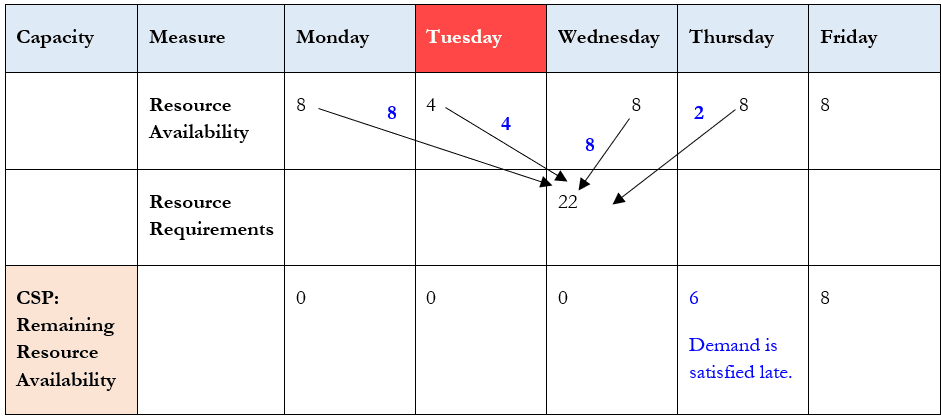
Before creating plans, perform a short pre-run validation in Plan Inputs:
- Open Plan Inputs > Items and verify the item is planned as Make at
M1. - Open the work-definition, bill-of-resources, or resource-requirements view and confirm the item uses the intended primary resource.
- Open Resource Availability and record available hours for each relevant day. Include the days before and after the demand due date.
- If testing an alternate, confirm that the alternate resource or source is effective, collected, and has usable capacity.
- Confirm the demand is within the capacity-enforcement window you will configure.
Record the following as your pre-run evidence:
| Evidence | Example |
|---|---|
| Item and organization | FG-MAKE, M1 |
| Demand | 30 units, Wednesday due date |
| Primary resource | ASSEMBLY_1 |
| Available capacity before due date | 8 units Monday, 8 Tuesday, 8 Wednesday |
| Alternate capacity | ASSEMBLY_2, at least 6 units available |
| Expected constrained behavior | Prebuild, offload to alternate, or report a capacity-related issue depending on configuration |
Configure the unconstrained baseline
Start with a copy of the supply plan used in the prior lessons. Duplicating the plan is safer than editing your existing functional test plan because it preserves a comparison record.
- Navigate to Supply Chain Planning > Plans.
- Select your existing supply plan and use Actions > Duplicate, or create a new supply plan with the same scope and inputs.
- Name it
SUP_CAP_<initials>_U. - Open Edit Plan Options.
- On the Scope tab, retain the same organizations, demand schedules, planning calendar, horizon, and assignment set that you will use in the constrained plan.
- Set Supply Planning Mode to Unconstrained.
- Leave resource and supplier capacity enforcement out of scope for this baseline.
- Save the plan.
For a clean baseline, use batch mode for the unconstrained plan too, even though unconstrained planning can also be run interactively. This keeps the execution approach consistent with the constrained plan, which Oracle requires to run in batch mode.
Run SUP_CAP_<initials>_U:
- Select the plan.
- Choose Run Plan.
- Select Batch if prompted.
- Monitor the submission through the plan run status and Scheduled Processes as needed.
- Do not release any planned orders.
When the run completes, capture the baseline in Supplies and Demands. Filter tightly to your test item and organization, then record:
- demand quantity and due date;
- planned-order type;
- planned quantity;
- suggested order, start, ship, dock, and due dates where applicable;
- source organization, supplier, work definition, or resource;
- any plan exceptions.
A compact comparison worksheet is sufficient:
| Output field | Unconstrained baseline |
|---|---|
| Demand identifier and date | |
| Planned supply type | |
| Planned quantity | |
| Suggested due date | |
| Primary source or resource | |
| Alternate source or resource used? | |
| Late-demand exception? | |
| Capacity-related exception or overload evidence |
Configure the constrained resource-capacity scenario
Duplicate the unconstrained plan. This ensures that scope, sourcing, demand, and horizon remain comparable.
- In Plans, select
SUP_CAP_<initials>_U. - Duplicate it as
SUP_CAP_<initials>_C_ALL. - Open Edit Plan Options.
- On the Scope tab, change Supply Planning Mode to Constrained.
- Open the Supply tab.
- Open the Constraints and Decision Rules subtab.
- Select Enforce resource capacity constraints.
- Set Capacity Constrained Resources to All resources.
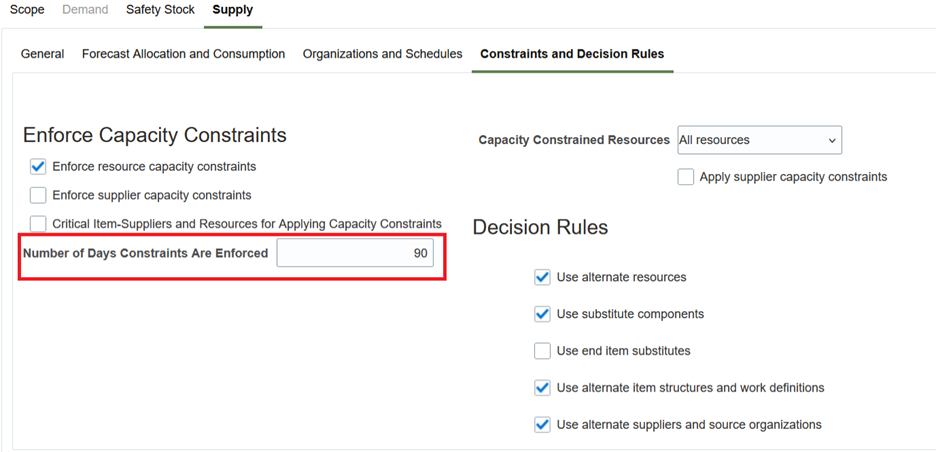
- Set Number of Days Constraints Are Enforced high enough to include your demand date. For a short controlled test, a value such as 90 days is usually more than adequate; the important point is that your requirement falls inside the window.
- If you are testing a resource alternate, enable Use alternate resources. If the model uses an alternate work definition, enable Use alternate item structures and work definitions instead.
- Do not enable supplier capacity enforcement unless supplier capacity is the constraint you intend to test.
- Save the plan.
The following screenshot identifies the settings that must be captured in your evidence package. The exact Redwood styling can differ by release and role, but the decisive settings remain under Supply > Constraints and Decision Rules.
The official explanation below is particularly important for interpretation. It tells you that “All resources” constrains every applicable resource, whereas “Bottleneck resources only” constrains only resources explicitly marked as bottlenecks.
Plan Considering Resource Constraints
Read this Oracle reference to connect the plan-option settings to the sequence the constrained engine uses when it encounters an overloaded resource.
First, in the opening explanation, read the soft-constraint behavior. Focus on the available resolution choices: earlier capacity, alternates, and eventual overload when no feasible alternative remains. Then, under “Order in Which Capacity Constraints Are Applied” and “Capacity Constrained Resources,” read from the allocation sequence and resource scope. Relate each rule directly to the options you configured.
Run SUP_CAP_<initials>_C_ALL in batch mode. When it completes, use the same item, organization, and demand filters as in the baseline plan. Populate the second half of your worksheet.
| Output field | Unconstrained | Constrained: All resources | Meaning of the difference |
|---|---|---|---|
| Planned quantity | Capacity can split or reschedule supply | ||
| Suggested due date | A later date may indicate a binding constraint or hard lead time | ||
| Resource used | Alternate-resource use indicates offloading | ||
| Source or work definition | Alternate selection must be enabled and effective | ||
| Capacity before demand due date | Not decision-driving | Consumed within feasible buckets | Confirms that resource constraints were applied |
| Exceptions | Exceptions identify residual overload or late demand |
Read the result in the engine’s decision order
When constrained planning encounters a resource constraint, Oracle’s documented resolution sequence is:
-
Prebuild in earlier time buckets.
Planning consumes feasible capacity before the due date, provided the item’s lead-time and calendar logic permits it. -
Offload to an alternate.
If enabled and effective, Planning can use an alternate resource, work definition, or supply source. -
Overload capacity.
This is a last-resort response to preserve the required date when no suitable alternative can meet the demand on time.
This sequence explains why simply seeing a primary resource overloaded is not enough to state that constrained planning “failed.” You must first establish whether an earlier bucket, alternate, or lead-time-permitted solution existed.
Use this interpretation guide.
| Comparison outcome | Most likely explanation | Evidence to verify |
|---|---|---|
| Unconstrained plan puts all supply on the primary resource; constrained plan splits it across primary and alternate resources | Resource capacity was binding; Use alternate resources enabled a feasible offload | Resource availability, alternate-resource relationship, constrained plan option, planned-order resource |
| Constrained plan creates supply earlier than the baseline | Capacity was available earlier but insufficient near the required date | Resource Availability by day, processing lead time, calendar details, suggested start and due dates |
| Constrained plan chooses an alternate work definition or source organization | Capacity constraint interacted with an enabled alternate decision rule | Work definitions or sourcing rules, effectiveness dates, applicable decision-rule checkbox |
| Both plans create the same supply and date despite limited capacity | Capacity may be soft and overloaded, the resource may not be constrained, or the demand may be outside the enforcement window | Capacity exceptions, enforcement checkbox, Capacity Constrained Resources setting, number of enforcement days |
| Constrained plan satisfies demand late | A hard lead-time limit, unavailable calendars, insufficient feasible capacity, or unavailable alternatives prevented on-time fulfillment | Demand date, processing and procurement lead times, resource calendar, alternates, late-demand exception |
| Planned quantity changes unexpectedly | Capacity-based sizing can apply in constrained planning; order modifiers may also control quantity | Resource rate, processing lead time, fixed order quantity, minimum quantity, lot multiplier |
| Expected resource constraint has no effect with Bottleneck resources only | The resource is not marked Bottleneck = Yes in the collected resource model | Resources view, Plan Inputs resource record, plan option |
A critical diagnostic distinction:
A capacity constraint can be violated as a last resort because it is soft. A lead-time constraint generally cannot be violated, so it can cause genuinely late demand.
For purchased supply, there is an important exception: if the item attribute Enforce Purchasing Lead Time is set to No, Supply Planning can compress purchasing lead time to meet demand. Do not label a purchase order “unconstrained” until you have checked that attribute as well.
Isolate one option with a focused rerun
Your first comparison proves the broad difference between unconstrained and constrained planning. To identify one specific option as the cause, make one controlled constrained-to-constrained comparison.
Test A: All resources versus bottleneck resources only
Use two copies of the constrained plan:
SUP_CAP_<initials>_C_ALLSUP_CAP_<initials>_C_BN
In SUP_CAP_<initials>_C_BN, change only Capacity Constrained Resources to Bottleneck resources only. Keep Enforce resource capacity constraints selected.
Then validate the primary resource’s Bottleneck indicator in the Resources view or collected Plan Inputs record.
| Primary resource status | Expected C_ALL result | Expected C_BN result |
|---|---|---|
| Bottleneck = Yes | Capacity should be considered | Capacity should also be considered |
| Bottleneck = No | Capacity should be considered | Resource capacity should not limit this resource |
| Resource absent or not linked to the work definition | No reliable capacity behavior | No reliable capacity behavior |
If C_ALL offloads or prebuilds but C_BN behaves like the unconstrained baseline, and the primary resource is not a bottleneck, you have isolated the causal option:
“The difference was caused by the Capacity Constrained Resources setting. In All resources mode, the plan constrained
ASSEMBLY_1. In Bottleneck resources only mode,ASSEMBLY_1was not eligible because its Bottleneck indicator was No.”
Test B: Alternate decision rule enabled versus disabled
Only perform this test if you have a verified alternate resource, source, or work definition.
- Duplicate
SUP_CAP_<initials>_C_ALLasSUP_CAP_<initials>_C_NOALT. - Keep constrained mode and resource-capacity enforcement enabled.
- Clear exactly one applicable option, such as Use alternate resources.
- Run in batch mode.
- Compare the same demand with
C_ALL.
If the plan uses the alternate only when the checkbox is enabled, your causal conclusion is stronger than merely saying “capacity caused a difference”:
“The primary resource capacity became binding in both constrained plans. The recommendation changed from an alternate-resource order to an overload or delayed recommendation only when I disabled Use alternate resources. Capacity created the decision need; the decision rule allowed the resolution path.”
Do not combine resource capacity, supplier capacity, substitute components, and multiple alternate rules in one diagnostic rerun. A senior consultant narrows the experiment until a single configuration change has a defensible effect.
Troubleshoot a result that does not match the expected comparison
Use this sequence before changing configuration.
1. Confirm both plans used the same data snapshot
Verify that no collection, item update, resource-capacity edit, calendar change, or sourcing-rule change occurred between runs. If one did, rerun both plans after the same completed collection.
2. Confirm that constrained mode actually ran
In the constrained plan’s options, verify:
- Supply Planning Mode = Constrained
- plan run completed successfully;
- run was submitted in batch mode;
- resource or supplier capacity enforcement was selected for the intended test.
3. Confirm the constraint applies to the test demand
Check all of these conditions:
- The resource is assigned through the effective work definition and bill of resources.
- The resource is in the correct organization.
- Demand falls within Number of Days Constraints Are Enforced.
- Available hours exist for the relevant calendar days.
- The resource is included by either All resources or the Bottleneck indicator.
- The item’s processing lead time overlaps the resource-capacity window.
4. Confirm that an expected alternative is genuinely feasible
For an alternate resource or work definition, verify effective dates, item applicability, capacity, and calendars. For an alternate supply source, verify the sourcing rule, assignment set, source organization or supplier, capacity where applicable, and lead time.
An alternate that is merely visible in source setup but absent, end-dated, or infeasible in Plan Inputs is not a valid explanation for why Planning did not offload work.
5. Separate quantity logic from capacity logic
If quantities differ, check order modifiers before diagnosing a capacity defect:
- Fixed Order Quantity
- Minimum and Maximum Order Quantity
- Fixed Lot Multiplier
- Fixed Days Supply
- Rounding
A constrained plan can size supply based on feasible capacity within processing lead time, but a fixed order quantity may still dominate the order quantity you observe. State both influences in your analysis.
Evidence package and interview-ready explanation
Save the following evidence from your lab:
- Screenshot of both plans’ Scope and Constraints and Decision Rules options.
- Resource Availability for the constrained dates.
- Resource or Plan Inputs evidence showing the Bottleneck indicator if you performed Test A.
- Supplies and Demands output for the same item-demand pair in both plans.
- Planned-order details showing resource, work definition, supplier, or source organization.
- Relevant exception output for late demand, resource overload, or shortage.
- A one-paragraph conclusion that names the exact changed setting and observed recommendation difference.
A concise senior-functional response could be:
“I compare constrained and unconstrained plans using the same item scope, demand, calendars, assignment set, and collected-data snapshot. I run both in batch and compare the same demand in Supplies and Demands by quantity, date, supply type, source, resource, and exceptions. For constrained mode, I validate resource-capacity enforcement, the constraint-enforcement horizon, and whether the plan constrains all resources or bottleneck resources only. If the constrained plan prebuilds or uses an alternate resource, work definition, or source, I prove that the corresponding decision rule was enabled and that the alternative was effective in Plan Inputs. If the result is late, I distinguish soft capacity overload from generally hard lead-time feasibility before recommending a configuration or master-data correction.”
Wrap-up
You have now established a repeatable comparison method:
- An unconstrained plan is your demand-and-supply baseline; it does not use capacity as a limiting decision factor.
- A constrained plan considers capacity within lead-time feasibility, can prebuild, and can use enabled alternatives.
- Resource and supplier capacities are generally soft constraints; lack of a recommendation change can be a valid consequence of overload behavior, not necessarily a setup failure.
- Lead times are generally hard constraints and are often the real reason a demand becomes late.
- The decisive settings are not just constrained mode: they include capacity enforcement, capacity-resource scope, enforcement duration, and alternate decision rules.
- A credible root-cause conclusion comes from changing one option at a time and comparing the same demand against the same collected planning model.
Next, you will diagnose a late-demand result in detail using Supplies and Demands, Material Plan, Pegging Analysis, Calendar Details, and planning exceptions.
Can't find a good explanation? Sign up and we'll make it for you
Sign up