
Good to see you again. In the previous lab, you compared unconstrained and constrained supply plans and learned that resource capacity is usually a soft constraint, whereas lead-time feasibility is often the reason demand is genuinely late. You also controlled plan options so that a recommendation difference could be attributed to a specific constraint or decision rule.
This lesson turns that comparison skill into a production-style diagnostic method. You will start with a late sales order or forecast, establish exactly what is late and by how much, trace its supply and component dependencies, inspect the relevant planning calendars, and finish with evidence for a defensible root cause. Reserve about 40–45 minutes for the lab.
Define the incident before diagnosing it
“Demand is late” is not yet a diagnosis. It is an observed result that must be translated into a specific planning relationship.
For a sales order in a constrained supply plan, the core condition is:
For a forecast, the comparable issue is that the supply pegged to the forecast is available after the forecast’s requirement date. The immediate late result might occur at the finished-good level, but its cause can be several levels below in a component, supplier, resource, calendar, or firm order.
Use the following investigation sequence every time:
- Find and quantify the late demand in Supplies and Demands.
- Validate the item-level timing picture in Material Plan.
- Trace the causal supply chain in Pegging Analysis.
- Explain the date arithmetic in Calendar Details.
- Classify the issue with planning exceptions, then correct one confirmed cause.
- Rerun and prove the correction using the same demand line.
This order matters. Starting in setup screens and changing lead times or calendars before tracing the affected demand often creates unnecessary changes and destroys useful evidence.
Choose a controlled late-demand case
Use the constrained supply plan from the previous lesson where a demand was late, or deliberately create one. Select one demand that has a clear identifier and is within the current plan horizon:
- a sales order for a manufactured or purchased item;
- an independent forecast for an end item;
- a demand made late by capacity, a component shortage, a planning time fence, a firm order, or an unavailable calendar.
Record this baseline before touching configuration:
| Evidence item | Record |
|---|---|
| Plan name and completed run date | |
| Item and organization | |
| Demand type and order number, if applicable | |
| Demand quantity | |
| Original or requested due date | |
| Suggested due date | |
| Material available date | |
| Days late | |
| Supply type proposed or used | |
| Suspected cause, before analysis |
Keep the final row explicitly labelled as a hypothesis. At this stage, “probably a resource issue” is not a conclusion.
Triage in Supplies and Demands
Open the affected supply plan, then open Supplies and Demands. Depending on your role and page layout, you may access it from the plan actions or plan navigation menu. Filter first by the exact item and organization, then restrict the result to the relevant sales order or forecast date range.
For a late sales order in a constrained plan, use Advanced search:
- In the Search area, select Advanced.
- Select Add Fields and add Days Late.
- Set Order Type to Equals and select Sales order.
- Set Days Late to Greater than and enter .
- Run the search.
- Add useful result columns if they are not already visible: Suggested Due Date, Material Available Date, Days Late, Order Quantity, Pegged Quantity, Source Organization, Supplier, and Action.
For a late forecast, use the same approach, except set Order Type to Forecast.
Configure Order-Based Exceptions for Constrained Supply Plans
Read Oracle's procedure for finding late forecast and sales-order replenishment records in Supplies and Demands. It is especially useful because it distinguishes lateness from unmet quantity.
On the page section “Configure Exceptions That Are Order Based,” read the Advanced Search procedure. Then read “Late Replenishment for Forecast,” including the forecast criteria, and “Late Replenishment for Sales Orders,” including the sales-order criteria. Finish with “Demand Quantity Not Satisfied,” focusing on the unmet-demand search.
Do not confuse these three conditions:
| Condition | What it establishes | What it does not establish |
|---|---|---|
| Days Late | The demand can be supplied, but only after its required date | Why the supply is late |
| Days Past Due | The sales order’s scheduled date was before the plan start date | That the plan caused the lateness |
| Unmet Demand Quantity | The available pegged supply quantity is insufficient | The exact master-data or sourcing defect |
A sales order can be late with no unmet quantity: Planning found a complete supply path, but the path finishes too late. Conversely, a demand can have unmet quantity and no meaningful supply completion date because Planning cannot find a feasible source.
Read the record as a relationship, not just a row
Expand the relevant demand or supply hierarchy. Your immediate objective is to identify:
- the late demand line;
- the supply intended to satisfy it;
- the supply order type, such as planned make order, planned buy order, transfer order, work order, or on-hand;
- any partial supply allocation;
- the first date at which the required quantity becomes available.
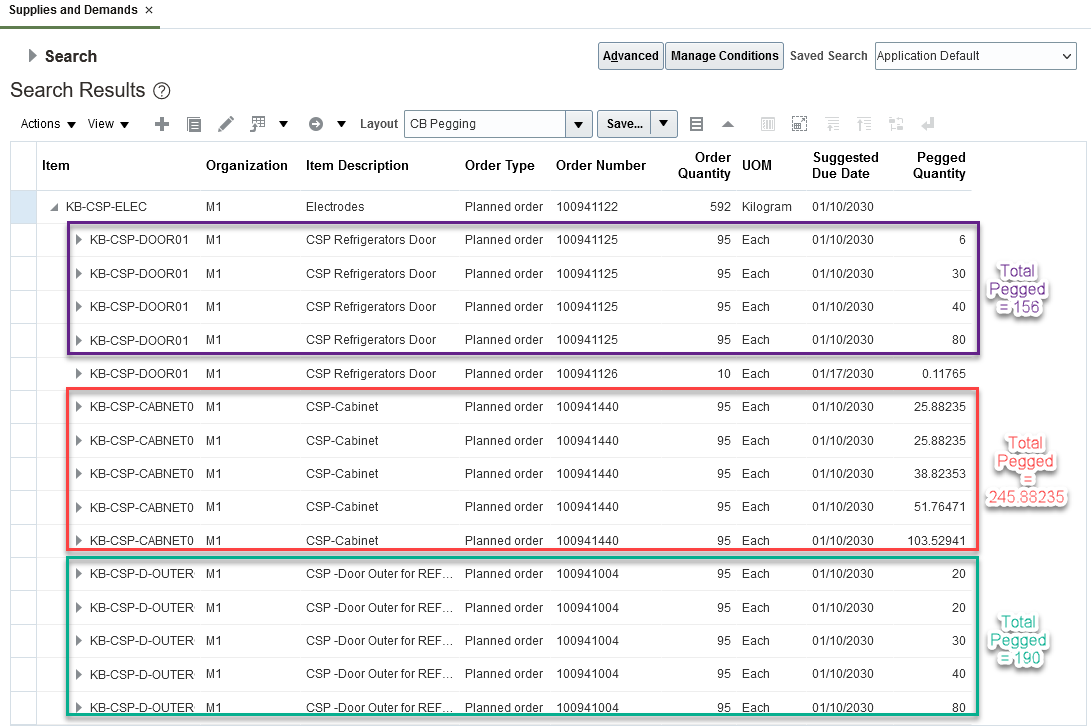
A single planned order can be pegged to several demand lines, and one demand can be supplied by several supplies. Therefore, do not assume that the quantity displayed on a planned order is wholly reserved for the late demand. Compare the Pegged Quantity values and identify the specific portion connected to your demand.
Capture a screenshot of the filtered and expanded result. This is the starting evidence for the case.
Use Material Plan to locate the first timing break
Supplies and Demands identifies the affected orders. Material Plan provides the time-phased explanation at an item-organization level: when demand consumes inventory, when supply arrives, and when the projected balance recovers.
Open Material Plan for the same plan, item, and organization. Use day-level display if the plan and horizon permit it; weekly buckets can obscure a one- or two-working-day calendar problem.
Inspect the dates surrounding the late demand:
- Locate the demand bucket containing the sales order or forecast.
- Check available on-hand and scheduled receipts before that bucket.
- Identify the first planned supply that restores the balance or covers the shortage.
- Compare that supply’s availability date with the demand’s due date.
- If the item is manufactured, note whether component-demand signals appear before the parent planned order can start.
- If the item is purchased or transferred, note whether the inbound supply timing itself is late.
Your diagnostic question is:
At what item and on what date does the plan first become infeasible for on-time fulfillment?
That point is often different from the finished-good demand that first displays the exception.
Interpret common Material Plan patterns
| Material Plan pattern | Likely direction for the next step |
|---|---|
| Finished good has a shortage until its planned make order completes | Trace the planned make order and its component demand in Pegging Analysis |
| A component becomes available after the parent order must start | Investigate the component’s supply, sourcing, lead time, calendar, or capacity |
| Supply exists, but the receipt bucket is after the required date | Open Calendar Details for that supply order |
| On-hand appears sufficient but is not available to the demand | Check reservations, lot or subinventory controls, demand priority, and pegging relationships |
| No replenishment appears at all | Investigate sourcing, item planning attributes, effective dates, constraints, and unmet-demand quantity |
| Supply is forced to start only after a specific date | Check planning time fence, firm orders, and relevant calendars |
Material Plan tells you where to look next. It does not by itself prove whether a late component is caused by an invalid sourcing rule, a calendar closure, a firm supply, or a capacity shortfall.
Trace the causal chain with Pegging Analysis
Open Pegging Analysis for the late demand. Begin at the demand, then expand downstream through its pegged supply and, where applicable, through the supply’s component demands. Continue until you reach the first late, unavailable, or constrained node.
The relationship can include several levels:
- sales order or forecast for a finished good;
- planned make order for that finished good;
- dependent demand for a component;
- on-hand, planned purchase, planned transfer, or planned make supply for that component;
- further dependent demand for lower-level components.
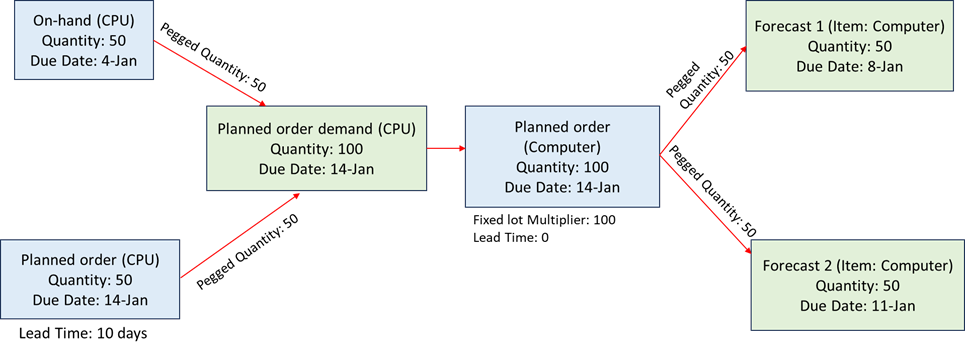
The important discipline is to follow quantity and date together. A component may have sufficient total quantity over the entire horizon but still be unavailable on the date required for the parent order.
For each level, record:
| Pegging level | Item and organization | Requirement date | Supply source | Available date | Quantity | Status |
|---|---|---|---|---|---|---|
| 0 | End-demand item | Sales order or forecast | Late demand | |||
| 1 | End-item supply | Planned make, buy, or transfer | ||||
| 2 | First constrained component | On-hand, planned supply, or no source | ||||
| 3 | Root-cause node, if required | Capacity, supplier, component, or fixed supply |
Stop tracing when you can support one of these statements with plan evidence:
- “The component is not available by the parent order’s required start date.”
- “The selected buy source cannot meet the date after applying lead times and calendars.”
- “The resource has no feasible capacity before the required completion date.”
- “A firm or time-fence rule prevents Planning from creating or moving supply early enough.”
- “No valid supply source exists, so the demand has unmet quantity rather than only a late date.”
Distinguish parent lateness from root-cause lateness
Suppose a sales order for FG-100 is due on 20 June. Material Plan shows the finished-good planned order completing on 24 June. Pegging Analysis then shows that component COMP-A is available only on 22 June, while the work definition requires it by 18 June.
The root-cause statement is not “the finished-good work order is four days late.” That is the business effect. A stronger technical statement is:
“
FG-100is late because the planned make order cannot start on 18 June. Pegging Analysis identifiesCOMP-Aas the gating component; its selected supply is available on 22 June. The next investigation is the supply path and calendar details forCOMP-A.”
This distinction is critical in an interview and in production support: it prevents a planner from changing the parent item’s lead time when the actual defect is in a lower-level supply path.
Prove date feasibility with Calendar Details
Use View Calendar Details on the supply that first becomes late in your pegging trace. For a planned buy order, select the order in Supplies and Demands and use the available View Calendar Details action. The exact action location can vary slightly by page layout, but the objective is the order-level Gantt view of dates, lead-time segments, and working versus nonworking days.
Calendar Details is most valuable when the plan’s dates look surprising. It replaces vague statements such as “the system added too many lead-time days” with an auditable explanation of the calendars and lead-time segments actually used.
View Calendar Details Example: Planned Buy Order
Read Oracle's planned-buy-order example before reviewing your own late buy or transfer supply. It shows why a simple calendar-day subtraction is not a valid way to validate planning dates.
In “View Calendar Details Example: Planned Buy Order,” begin with the order-level view. Then read the detailed table that follows, concentrating first on due date, postprocessing, and dock-date logic, and then on transit and shipping timing. Finish the table through Suggested Order Date, noting which calendar governs processing and preprocessing lead time.
For a planned buy order, review the date chain from the required date backward:
| Calendar Details row | Validate | Typical root cause if date is later than expected |
|---|---|---|
| Suggested Due Date | Need-by date, planning time fence, organization manufacturing calendar | Required date moved to a valid working day or time-fence boundary |
| Postprocessing Lead Time | Item attribute and manufacturing calendar | Wrong postprocessing value or unexpected nonworking days |
| Suggested Dock Date | Receiving calendar | Receiving calendar closure or incorrect carrier/receiving calendar |
| Transit Lead Time | Shipping method and transit calendar | Incorrect transit days or nonworking transit days |
| Suggested Ship Date | Supplier shipping calendar | Supplier shipping calendar excludes expected days |
| Processing Lead Time | Approved Supplier List or item lead time; supplier capacity calendar | ASL lead time, supplier capacity, or calendar is restrictive |
| Suggested Start Date | Supplier working time | Supplier cannot begin work when assumed |
| Preprocessing Lead Time | Item setup and organization manufacturing calendar | Time to raise a planned order was not considered in manual arithmetic |
| Suggested Order Date | Organization manufacturing calendar | Buyer action must occur earlier than expected |
Two practical cautions:
- Working-day calculation is calendar-specific. Manufacturing, receiving, transit, supplier shipping, and supplier capacity calendars can differ for the same supply path.
- A planned order includes planning lead-time logic that may not apply in the same way after release. For example, Oracle’s example notes that preprocessing lead time is normally not applied to released purchase orders and purchase requisitions.
For a planned make order, use Calendar Details to validate its displayed start and completion timing, then return to the resource and operation evidence if the plan cannot complete on time. For a transfer supply, focus on source availability, shipping, transit, and destination receiving dates. Do not assume the destination organization’s manufacturing calendar governs every segment.
Classify the root cause and choose one correction
At this point, you should have evidence from all five views:
| View | What it contributes |
|---|---|
| Supplies and Demands | The exact late demand, its days late, and its pegged supply |
| Material Plan | The first item-date balance failure |
| Pegging Analysis | The dependency chain from business demand to the gating supply |
| Calendar Details | Calendar and lead-time arithmetic for a selected supply |
| Planning exceptions | Prioritized visibility of late, past due, or unmet conditions |
Now classify the issue before changing anything.
| Confirmed evidence | Root-cause classification | Typical correction direction |
|---|---|---|
| Component supply is available after the parent’s required start date | Material constraint | Correct component sourcing, supply date, component lead time, or valid alternate |
| A constrained resource has no feasible capacity before the required date | Resource constraint | Review available capacity, resource calendar, alternate resource/work definition, or capacity decision rules |
| A buy, transfer, or make order is shifted by nonworking dates | Calendar or lead-time feasibility | Correct the applicable calendar assignment, shipping method, ASL or item lead time, if the setup is wrong |
| No planned supply is possible and unmet quantity exists | Sourcing or setup inconsistency | Correct sourcing-rule assignment, item-source setup, effectiveness, or configuration exclusions |
| Material available date starts at a time-fence boundary | Planning time fence | Review whether the time fence is intended; do not reduce it solely to remove an exception |
| Firm supply is late and cannot be moved | Firm-order constraint | Expedite or reschedule execution supply, or revise the firming decision under business control |
| The late sales order was already due before plan start | Past-due operational demand | Treat as an execution recovery issue, not a new plan-generated date failure |
For this lab, make one correction only. Examples:
- Correct a supplier capacity calendar that wrongly marks a normal working day as nonworking.
- Fix an expired or missing sourcing-rule assignment for the item-organization.
- Enable an already validated alternate resource decision rule where business policy permits it.
- Adjust an incorrect ASL processing lead time.
- Correct an unintended planning time fence value in the item setup.
Do not alter the demand date merely to remove the exception. That changes the business requirement rather than the planning model.
Rerun and validate the correction
After correcting source or setup data:
- Run the appropriate net change collection if the changed data is collected from the source system.
- Confirm the changed record appears in Plan Inputs or the planning data repository before relying on it.
- Run the same supply plan in batch mode.
- Reapply the saved Supplies and Demands search.
- Compare the original and new values for Suggested Due Date, Material Available Date, Days Late, Unmet Demand Quantity, supply source, and pegging path.
- Capture the final plan run status and exception result.
Your evidence should support a statement in this format:
“The sales order for
[item]in[organization]was late by[days]because[gating supply or component]was available on[date], after the required[start or due date]. Pegging Analysis established the dependency, and Calendar Details showed that[specific calendar, lead time, time fence, firm supply, or capacity condition]caused the date. After correcting[one setup or data element], recollecting, and rerunning[plan], the Material Available Date changed to[date]and the late-demand exception[cleared or changed as expected].”
Wrap-up
A late-demand exception is the beginning of analysis, not the end of it.
- Use Supplies and Demands to identify the late demand, its quantity, its pegged supply, and the size of the delay.
- Use Material Plan to locate the first item and date where supply cannot satisfy demand on time.
- Use Pegging Analysis to trace the late finished-good result through components and supply orders until reaching the gating condition.
- Use Calendar Details to validate working days and the lead-time segments that produced a planned supply date.
- Use exceptions to categorize the result as late, past due, or unmet, but support the root cause with the underlying planning evidence.
- Correct one confirmed cause, recollect when required, rerun, and prove the new outcome against the same demand.
Next, you will move from analysis to execution: manually releasing an eligible planned order and verifying its release status and downstream execution record.
Can't find a good explanation? Sign up and we'll make it for you
Sign up