
Good to see you again. In the last lab, you diagnosed late demand by moving from the customer-facing symptom to the first infeasible item-date relationship, then proving the underlying cause with pegging, calendar details, and exceptions. That diagnostic work matters before release: releasing an infeasible recommendation merely transfers a planning problem into execution.
This lab covers the controlled handoff from Supply Planning to execution. You will select one eligible planned order, mark it for release, submit the release process, validate its process hierarchy and logs, and confirm that the recommendation reached Supply Chain Orchestration. Plan for about 40 minutes.
Release is a controlled handoff, not merely a status change
A supply plan creates recommendations, not execution documents. A planned make order is a recommendation to create supply through manufacturing; a planned buy order is a recommendation to procure supply. Manual release is the controlled decision to hand that recommendation to downstream execution.
Keep these three evidence layers separate:
| Layer | What you verify | Meaning |
|---|---|---|
| Planning recommendation | Planned-order details and Release Status in Supplies and Demands | The planner selected a recommendation for release. |
| Release process | The Release Plan scheduled-process hierarchy, child processes, logs, and submission notes | Planning processed the release instruction and loaded release data. |
| Downstream execution | The relevant request or exception in Supply Chain Orchestration | The release was handed to orchestration; any downstream processing issue is visible for follow-up. |
A row showing Marked for release is not, by itself, proof that an executable work order or purchasing document was successfully created. It means the row is selected and saved for the page-level release action. The Scheduled Process and downstream orchestration evidence complete the proof.
For this lab, release one planned order only. A single-order release is safer in a student environment and gives you a clean evidence trail for an interview walkthrough.
Select a release candidate deliberately
Use the supply plan from the prior lessons. Choose either:
- one planned make order, if your environment has a manufactured item with a work definition; or
- one planned buy order, if you have a purchasable item with valid supplier and sourcing setup.
Before taking action, review the planned order in Supplies and Demands and record its baseline.
| Evidence to capture | Your value |
|---|---|
| Plan name and completed plan run | |
| Item and organization | |
| Planned order type: make or buy | |
| Planned order number | |
| Quantity and UOM | |
| Suggested start and due dates | |
| Supply source or supplier, where applicable | |
| Current Release Status | |
| Demand or supply to which it is pegged |
Use the same discipline as in a production release review:
- Confirm the recommendation belongs to the intended plan, item, and organization.
- Confirm its quantity and date remain valid after your prior plan analysis.
- Check that you are selecting a planned order, not an existing work order, purchase order, or transfer order with a reschedule recommendation.
- Confirm there is no known exception that should block the business decision, such as a missing source, a late component, or an invalid delivery location.
- Make sure you have an approval basis in a real implementation. In this lab, your recorded baseline serves as the controlled approval evidence.
Review Oracle’s release flow before performing it
The Oracle documentation below is the core reference for this lesson. It distinguishes the order-level action that marks recommendations from the page-level action that actually initiates release. It also specifies the Scheduled Processes hierarchy you will use for validation.
Manually Release Plan Recommendations
Read Oracle's "Manually Release Plan Recommendations" to establish the exact Planning-to-Orchestration release sequence and the special implementation fields for make and buy orders.
In the opening procedure, read from the complete release and verification flow. Focus on the distinction between Mark for Release, Save, and the page-level Release action. Then read the subsection Release Planned Make Orders, beginning with the work order number warning. Finally, in Release Planned Buy Orders, read the implement location behavior, especially the fact that changing the location does not recalculate other implement fields.
The key operational sequence is:
- Search for and select the specific recommendation.
- Mark the selected order for release.
- Save the change so the marked status persists.
- Submit the page-level release action.
- Verify the scheduled process and its child steps.
- Inspect Supply Chain Orchestration for unprocessed requests or exceptions.
These are distinct actions. One common support issue is a planner marking orders, closing the page, and assuming release occurred. The recommendation remains only marked until the release action is submitted.
Locate and mark the planned order
Open your supply plan and navigate to Supplies and Demands. Filter the table tightly:
- Item: your selected item
- Organization: your selected organization
- Order Type: Planned order
- Order Number: the baseline planned-order number, if known
Add or expose the following columns if your saved layout does not show them:
- Order Type
- Order Number
- Order Quantity
- Suggested Start Date
- Suggested Due Date
- Release Status
- Implement Work Order Number, for planned make orders
- Implement Location, for planned buy orders
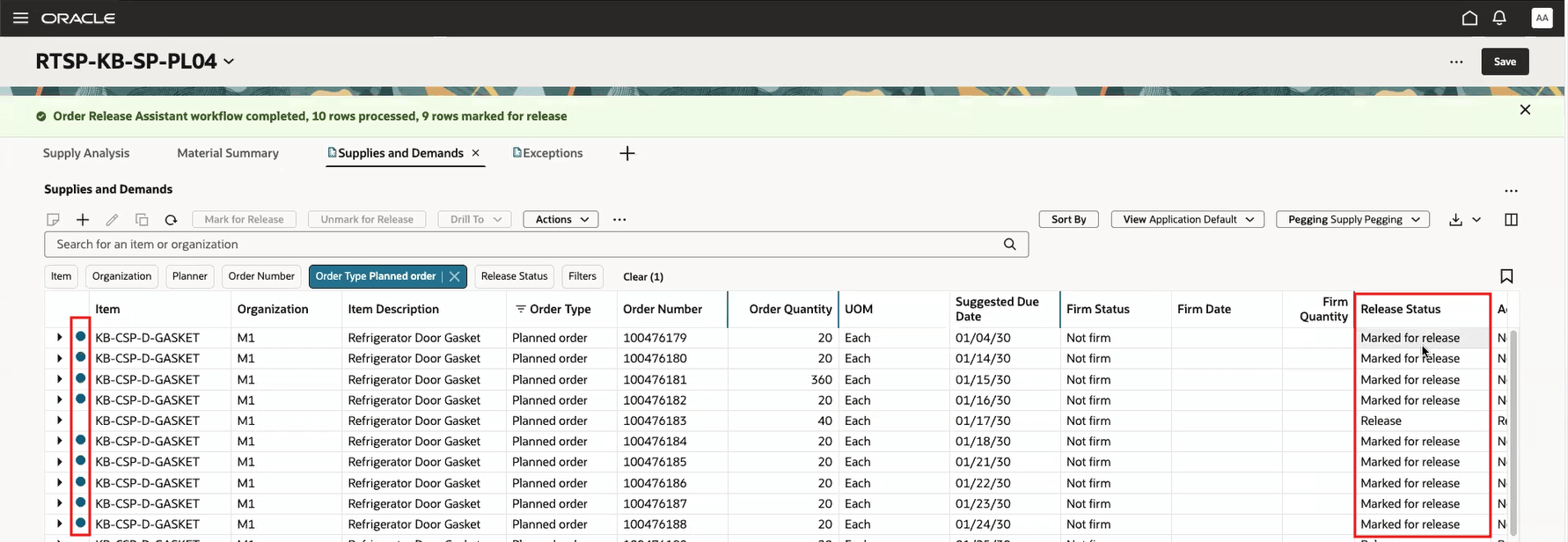
The following screen illustrates the relevant distinction: the selected planned orders show a Release Status of Marked for release. This is the pre-submission status you must see after marking and saving.
Apply the order-level action
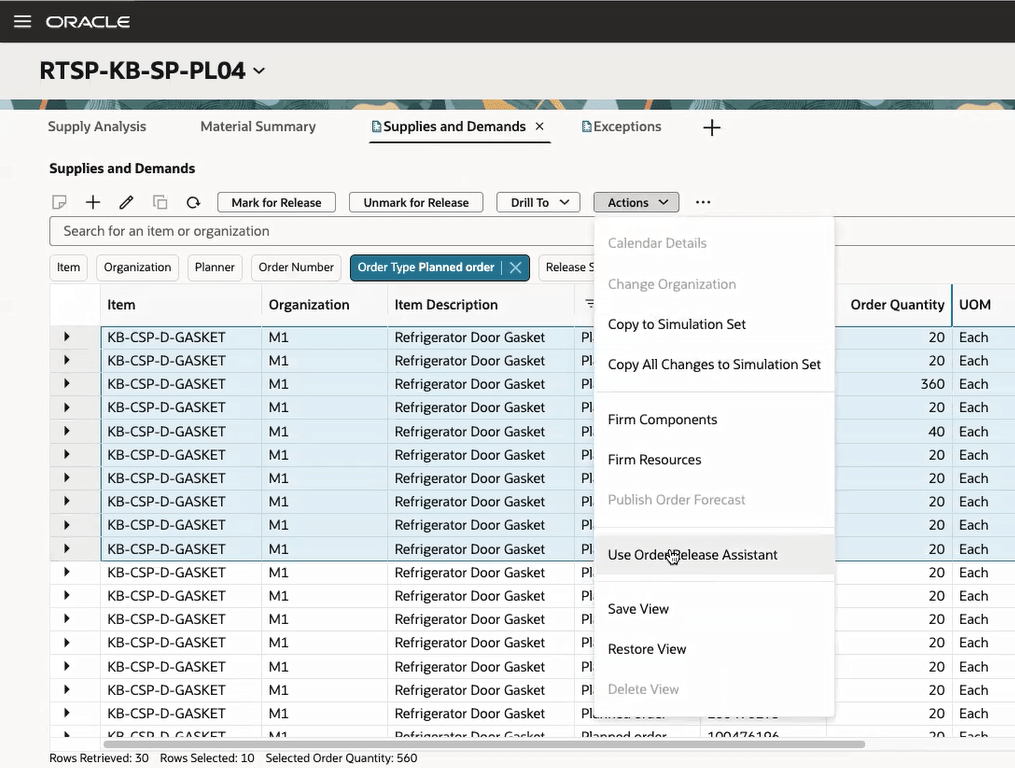
Select your single planned-order row. Then use the available order-level Mark for Release control. Depending on the page layout and release, this may appear as a toolbar action or within the row/action menu.
The Actions menu in this image also shows that Planning provides release-oriented capabilities from the Supplies and Demands page. For this lab, use the standard Mark for Release action rather than a bulk assistant workflow.
After selecting Mark for Release:
- Confirm that Release Status changes to Marked for release.
- Click Save on the Supplies and Demands page.
- Refresh or rerun your search.
- Confirm the same planned-order number still displays Marked for release.
If the status does not persist after refresh, treat the marking as incomplete. Do not proceed to the release submission action until you have confirmed the saved status.
Handle the planned-order type correctly
The planning recommendation can carry implementation fields that downstream execution uses. These fields need deliberate review, especially in a mixed source-system design.
If your candidate is a planned make order
Review Implement Work Order Number.
You may enter a work order number before release, but Planning does not validate it in the Supplies and Demands UI. With an Oracle Fusion source system, the value must be unique within the organization. A duplicate number can pass the marking stage yet fail later in Supply Chain Orchestration.
For the lab:
- Leave the field blank if your organization’s execution setup generates work order numbers automatically.
- If you enter a number, use a clearly unique test value permitted by your environment’s numbering policy.
- Record the value in your evidence sheet so you can search for the downstream result.
Do not reuse an existing work order number simply because it looks valid.
If your candidate is a planned buy order
Review Implement Location.
If you leave this blank, Planning uses the default location associated with the organization as the deliver-to location. You can choose a different location only if it is associated with that organization.
A subtle but interview-relevant point: changing Implement Location does not cause Planning to reevaluate fields such as the implementation shipping method or ship date. Therefore, do not use this field as a way to “fix” a date problem discovered during planning analysis. Correct the underlying sourcing, calendar, lead-time, or execution setup through the appropriate controlled process.
Submit the release process
Once the selected row is saved as Marked for release, use the page-level Actions menu in Supplies and Demands and select Release.
This is the action that initiates the release plan process. A dialog displays process status. You may monitor it there or close the dialog and continue working, but you still must verify the completed process independently in Scheduled Processes.
Record the process submission details:
| Release evidence | Your value |
|---|---|
| Planned order number released | |
| Release submission date and time | |
| Process ID, if displayed | |
| Initial process status | |
| Final process status | |
| Release Status after submission |
Avoid releasing the same recommendation again while the first release process is running. A repeated action can create ambiguity in your test evidence and can be a serious operational control problem in production.
Validate the Scheduled Process hierarchy
Navigate to Tools > Scheduled Processes. Search for your process submission and switch to Hierarchy view.
Oracle identifies the process structure you should inspect:
- Select the top-level Release Plan process.
- Drill into Release Planning Recommendations.
- Select Load Interface Tables.
- Review the status, submission notes, and available log output for each relevant table-loading step.
Do not stop at a successful top-level status without opening the hierarchy. The hierarchy gives you the evidence needed to distinguish a general submission success from a table-level rejection or an interface issue.
Use this validation checklist:
| Validation point | What good evidence looks like | If not successful |
|---|---|---|
| Release Plan | Completed successfully | Open the hierarchy and identify the failed child process. |
| Release Planning Recommendations | Completed successfully | Review its submission notes and log. |
| Load Interface Tables | Completed successfully | Inspect the relevant table log for rejected or errored records. |
| Submission notes | Identifies the release type | Confirm it corresponds to the planned make or buy release you intended. |
| Log files | No record-level error for your planned order | Search for the item, organization, planned-order number, or implement number. |
The logs are particularly important because release failures can be record-specific. A release process can complete its orchestration-level submission while a particular recommendation is rejected downstream because of invalid implementation data.
Interpret common release outcomes
| Symptom | Likely meaning | Investigation direction |
|---|---|---|
| Order remains Marked for release and no Release Plan process exists | The order was saved but the page-level Release action was not submitted | Submit the release process after confirming the selected row. |
| Release Plan has an error | The release process did not complete | Inspect the failed child process and its log first. |
| Load Interface Tables reports an error | Interface data was rejected or could not be loaded | Check the log for order-specific data issues. |
| Planned make order errors downstream | Invalid or duplicate implementation work order number is a likely cause | Validate uniqueness in the organization and correct the value. |
| Planned buy order fails or produces an unexpected destination | Deliver-to location may be invalid or defaulted unexpectedly | Validate the organization-location association and implementation location. |
| Release process completes, but an orchestration exception exists | Planning handed off the request, but execution processing needs correction | Review the request and exception reason in Supply Chain Orchestration. |
Verify the downstream execution record
After the release process completes, navigate to the Supply Chain Orchestration work area. Review the available requests and identify any request that was not processed. Use the planned order number, item, organization, or the implementation work-order number you recorded to narrow the investigation.
Your goal is to establish one of two outcomes:
- Successful handoff: no unprocessed request or related release exception is present for your recommendation, and downstream execution has accepted the release according to your environment’s configured flow.
- Controlled failure: an unprocessed request or exception exists, and you can connect its error text to a specific configuration or data issue.
For a successful lab record, capture:
| Downstream evidence | Your value |
|---|---|
| Supply Chain Orchestration request reference or execution reference | |
| Item and organization | |
| Released supply type | |
| Downstream status | |
| Related work order or procurement reference, if generated | |
| Exceptions found | None, or error summary |
| Evidence source | Scheduled Process log, orchestration request, or execution record |
Be precise in how you communicate the result. For example:
“I selected planned make order
[number]for[item]in[organization], verified its dates and pegging, marked it for release, saved the selection, and submitted the Release Plan process. In Scheduled Processes, I verified the Release Plan hierarchy through Release Planning Recommendations and Load Interface Tables. Supply Chain Orchestration showed no unprocessed request for the release, and the downstream work-order reference was[reference].”
If there is an exception, your conclusion should be equally evidence-based:
“The recommendation was marked and the release was submitted, but Supply Chain Orchestration rejected the downstream request. The process log identified
[error]; the root cause was[for example, a duplicate implementation work order number]. I would correct that value, remark or resubmit only as appropriate under release controls, then revalidate the same hierarchy and downstream request.”
Release-control habits for implementation and support
Manual release tests multiple implementation dependencies at once:
- Planning work-area security and data access
- Supply-plan recommendation generation
- Item and organization setup
- Make or buy sourcing model
- Work definition or supplier-related execution readiness
- Interface table processing
- Supply Chain Orchestration integration
- Downstream Manufacturing or Procurement behavior
That is why “I can see planned orders” is not an end-to-end test. A stronger implementation claim is: “I released a controlled recommendation, traced its process hierarchy, and validated the downstream result or exception.”
For interview use, frame the main design trade-off clearly:
- Manual release provides planner review and release governance. It is appropriate where recommendation quality, feasibility, approval, or execution capacity must be reviewed.
- Release failure investigation starts with the specific child process and record-level logs, not with broad configuration changes.
- A successful Planning status alone is insufficient; the validation chain must reach Supply Chain Orchestration and, where the environment exposes it, the resulting execution document.
Wrap-up
You have now performed the core manual-release control loop:
- Selected one planned make or buy recommendation and confirmed its planning evidence.
- Used Mark for Release, then Save, and confirmed Marked for release in Supplies and Demands.
- Used the separate page-level Release action to initiate the release process.
- Verified the Release Plan hierarchy through Release Planning Recommendations and Load Interface Tables.
- Used process logs and submission notes to validate the release type and detect record-level issues.
- Checked Supply Chain Orchestration for the downstream request or any unprocessed exception.
- Distinguished a planned-order release selection from proof of downstream execution acceptance.
The next module moves into Replenishment Planning, beginning with replenishment-plan configuration: scope, organizations, schedules, horizon, time buckets, and the demand and inventory inputs that drive replenishment recommendations.
Can't find a good explanation? Sign up and we'll make it for you
Sign up