Introduction
In our previous lessons, we've focused on Python-native, dynamic inference frameworks. You benchmarked vLLM, establishing it as a high-performance, general-purpose engine, and then contrasted it with SGLang, discovering its architectural superiority for complex tasks like structured generation. These frameworks offer great flexibility and ease of use by interpreting and JIT-compiling code at runtime.
Today, we shift paradigms to explore the world of Ahead-Of-Time (AOT) compilation with NVIDIA's TensorRT-LLM. Instead of dynamic execution, TensorRT-LLM compiles a model into a highly optimized, static engine tailored to your specific GPU hardware. This promises the ultimate level of performance but comes with a different set of trade-offs.
Your goal in this lesson is to build and deploy a model using TensorRT-LLM by compiling it into an optimized engine, and then benchmark its performance against vLLM and SGLang. This will complete your initial survey of the top-tier inference frameworks and equip you to make informed decisions based on performance, usability, and flexibility.
The Ahead-Of-Time (AOT) Compilation Paradigm
The core philosophy of TensorRT-LLM is to perform as much work as possible before the first request ever arrives. While frameworks like vLLM and SGLang are analogous to interpreted or JIT-compiled languages like Python, TensorRT-LLM is like a C++ compiler. It takes the high-level model definition and transforms it into a low-level, hardware-specific executable—a TensorRT Engine.
This AOT compilation process involves several deep optimizations:
- Operator Fusion: Merging multiple operations (e.g., matrix multiply + bias + activation) into a single GPU kernel, reducing memory traffic and kernel launch overhead.
- Kernel Auto-Tuning: Selecting the fastest CUDA kernel implementation for each operation from a library of variants, based on the exact model dimensions and target GPU architecture.
- Precision Calibration: Optimizing the use of lower-precision data types like FP16, BF16, and especially INT8/FP8 quantization.
- Graph Optimization: Analyzing the entire computation graph to eliminate redundant operations and reorder them for efficiency.
To understand the key benefits and features of this approach, watch this short segment from a Google for Developers presentation on TensorRT-LLM.
Demo: Optimizing Gemma inference on NVIDIA GPUs with TensorRT-LLM
This video introduces the challenges of LLM inference and positions TensorRT-LLM as NVIDIA's solution, outlining its core optimization features.
Watch from 01:19 to 04:42. Pay close attention to the list of features mentioned, such as KV caching, in-flight batching (which you know as continuous batching), and multi-GPU support. This sets the stage for what the framework provides out of the box.
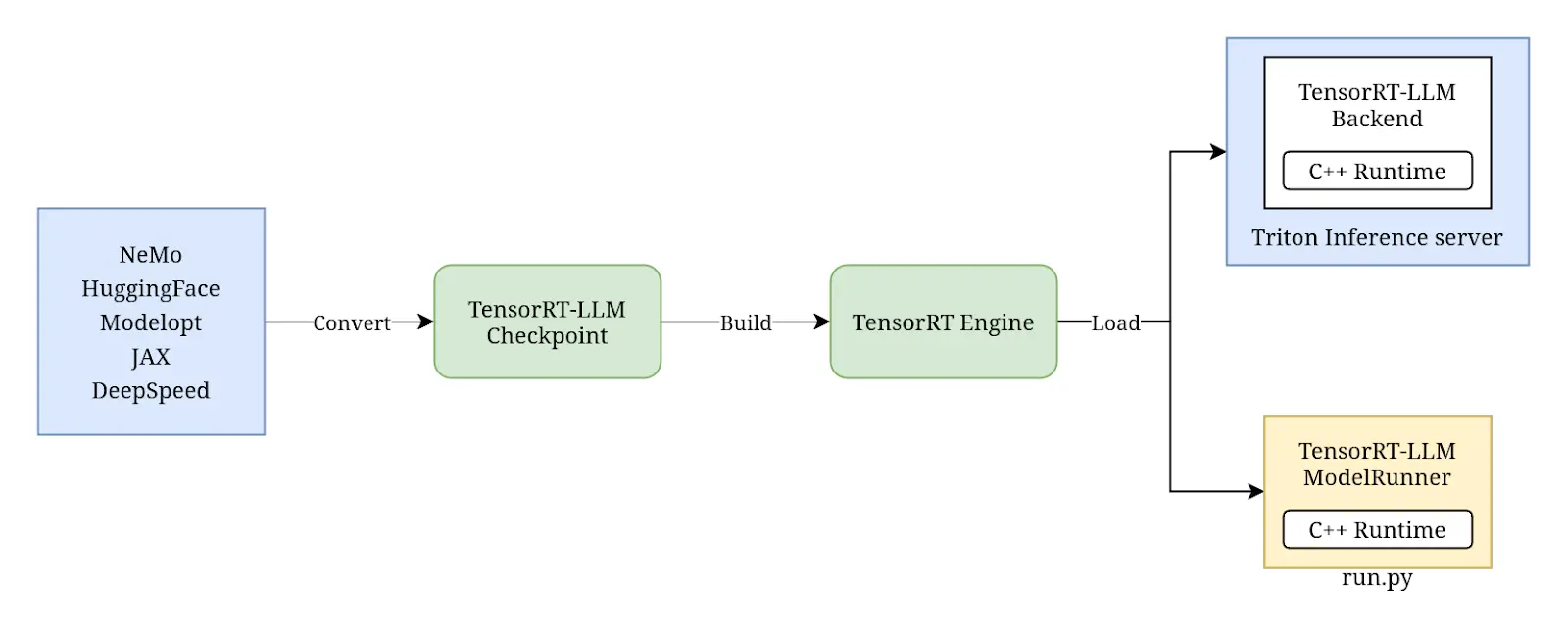
The entire workflow can be visualized as a three-stage pipeline: Convert, Build, and Deploy.
Hands-On: Building and Benchmarking a TensorRT-LLM Engine
We will now walk through this process. Given your background, we'll use the more explicit command-line interface (CLI) workflow, which clearly separates the 'convert' and 'build' steps. This mirrors the process shown in the video and gives you a clearer mental model of the underlying mechanics.
Step 1: Environment Setup
You'll need the NVIDIA TensorRT-LLM container, which bundles all necessary libraries (CUDA, TensorRT, etc.). You can pull it from the NVIDIA NGC catalog:
# Find the latest monthly container tag at https://catalog.ngc.nvidia.com/orgs/nvidia/containers/tensorrtllm-pytorch
docker run --rm -it --gpus all -v .:/workspace nvcr.io/nvidia/tensorrtllm-pytorch:24.05-py3
Inside the container, all the required tools will be available.
Step 2: Convert the Model Checkpoint
The first step is to convert a standard Hugging Face model into the format TensorRT-LLM uses for its builder. We'll use Llama-3-8B-Instruct.
The convert_checkpoint.py script handles this translation.
# From within the Docker container's /workspace directory


# Download the model from Hugging Face
git lfs install
git clone https://huggingface.co/meta-llama/Meta-Llama-3-8B-Instruct


# Convert the checkpoint
python /usr/src/tensorrt_llm/examples/llama/convert_checkpoint.py \
    --model_dir ./Meta-Llama-3-8B-Instruct \
    --output_dir ./tllm_checkpoint_llama3_8b \
    --dtype bfloat16
This command reads the PyTorch model weights and configuration, converts them to the specified data type (bfloat16), and saves them in a format optimized for the next step.
Step 3: Build the Optimized Engine
Now comes the core of the AOT process: compiling the model into an engine. The trtllm-build command takes the checkpoint and performs the hardware-specific optimizations.
# Build the engine from the converted checkpoint
trtllm-build --checkpoint_dir ./tllm_checkpoint_llama3_8b \
             --output_dir ./trt_engine_llama3_8b \
             --gemm_plugin bfloat16
This process can take several minutes as TensorRT-LLM profiles different kernels and builds the optimized computation graph. The output is a .engine file in the trt_engine_llama3_8b directory. This file is now tuned for your specific GPU.
The Demo: Optimizing Gemma inference... video provides a nice visual walkthrough of a very similar process.
Demo: Optimizing Gemma inference on NVIDIA GPUs with TensorRT-LLM
To see these command-line steps in action, watch this segment from the demo.
Watch from 05:06 to 08:45. The demonstrator uses slightly different commands for the Gemma model, but the two-step process of converting a checkpoint and then building an engine is identical to what you just did.
Step 4: Benchmark the Engine
With the engine built, we can now measure its performance using TensorRT-LLM's dedicated benchmarking tool, trtllm-bench. This tool is designed for performance evaluation and is separate from the deployment server.
First, let's prepare a synthetic dataset of prompts.
# Prepare a dataset of 1000 requests with 512 input tokens and 1024 output tokens
python /usr/src/tensorrt_llm/benchmarks/python/prepare_dataset.py \
    --dataset-name cnn_dailymail \
    --output-dir ./tmp_dataset \
    --tokenizer-dir ./Meta-Llama-3-8B-Instruct \
    --max-input-len 512 \
    --max-output-len 1024 \
    --num-requests 1000
Now, run the throughput benchmark. This sends all requests to the engine as quickly as possible to measure maximum token output rate under heavy load.
# Run the throughput benchmark
python /usr/src/tensorrt_llm/benchmarks/python/benchmark.py \
    --engine_dir ./trt_engine_llama3_8b \
    --input_output_len 512,1024 \
    --batch_size "8;16;32" \
    --mode throughput
The output will give you key metrics like output token throughput (tokens/sec). Record this number.
For a detailed guide on using trtllm-build and trtllm-bench, you can refer to the official documentation. The following resource provides a comprehensive overview.
Benchmarking Default Performance — TensorRT-LLM
NVIDIA's official documentation provides a detailed guide on building and benchmarking engines. It's a useful reference for advanced options.
Skim through the sections 'Building and Saving Engines via CLI' and 'Benchmarking with trtllm-bench'. You've already performed these steps, but this text shows the commands and explains the process, confirming your understanding.
Performance Analysis: TensorRT-LLM vs. SGLang vs. vLLM
You've now seen how to build and benchmark a TensorRT-LLM engine. The critical question is: how does it stack up against the dynamic frameworks we've already studied?
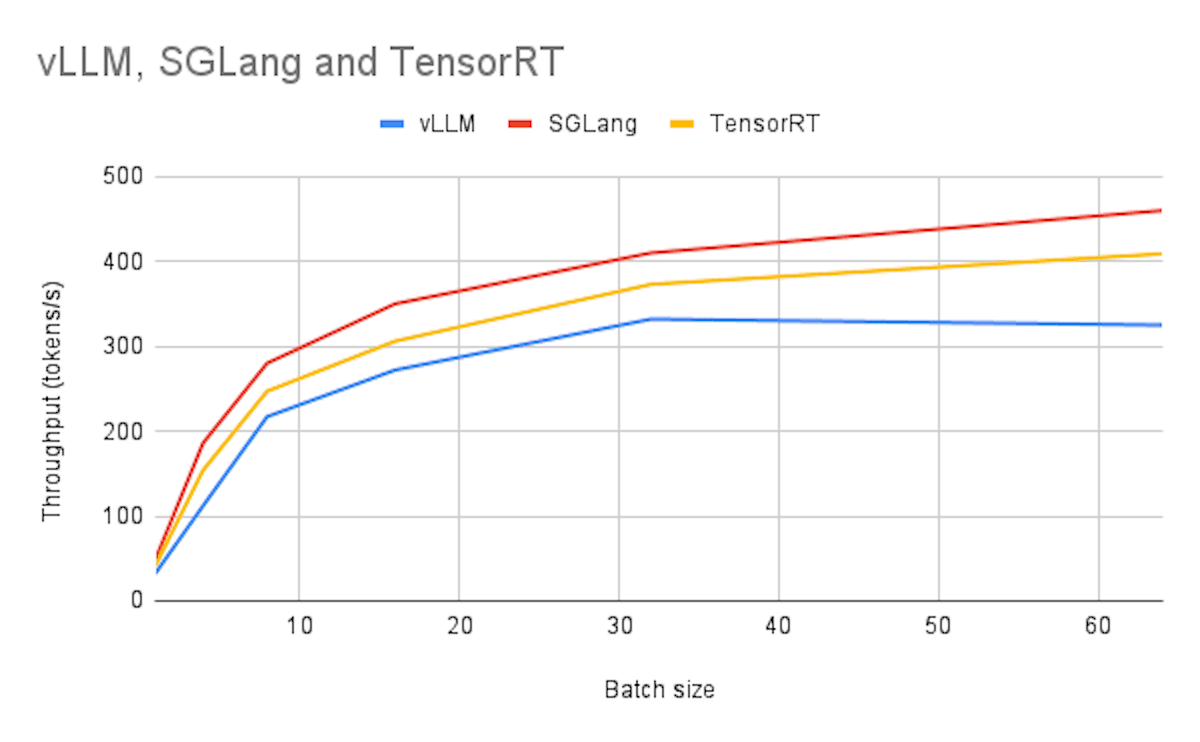
The LMSYS organization, which you're familiar with from our look at SGLang, published a detailed blog post comparing the three frameworks on the latest Llama 3 models. This is precisely the data we need.
Achieving Faster Open-Source Llama3 Serving with SGLang ...
This blog post from LMSYS provides an excellent head-to-head performance comparison of SGLang, TensorRT-LLM, and vLLM on various models and hardware configurations.
Start by reading the introduction to understand the motivation. Then, carefully review the 'Benchmark Setup' to see how the tests were conducted. Examine the benchmark results for 'Llama-8B on 1 x A100' and 'Llama-70B on 8 x H100 (fp8)'. Finally, and most importantly, study the comparison table in the 'SGLang Overview' section. This table synthesizes the core trade-offs.
From this analysis, several key patterns emerge:
- Top-Tier Performance: Both TensorRT-LLM and SGLang consistently deliver top-tier performance, often significantly outpacing vLLM, especially in high-throughput offline scenarios.
- Latency vs. Throughput: TensorRT-LLM frequently excels in online, latency-sensitive benchmarks. Its highly optimized, pre-compiled kernels can deliver the lowest possible time-to-first-token and inter-token latency.
- Scheduling Matters: SGLang's sophisticated Python-based scheduler can sometimes give it an edge in throughput-oriented offline tasks, as it can be more effective at packing batches than the schedulers used with TensorRT-LLM.
- The Usability/Flexibility Trade-off: This is the most crucial takeaway. The comparison table in the LMSYS post highlights that TensorRT-LLM's raw performance comes at the cost of usability (poor) and customizability (low).
The AOT compilation step, while powerful, makes the development cycle slower and the resulting engine opaque. Modifying the model architecture or even just experimenting with different settings requires a full, time-consuming rebuild. In contrast, SGLang and vLLM, being Python-native, are far easier to use, customize, and debug.
Conclusion
You have now built, deployed, and benchmarked a model with TensorRT-LLM, completing your evaluation of the three leading open-source inference frameworks. You've experienced firsthand the power and the friction of the Ahead-Of-Time compilation paradigm.
Key Takeaways:
- AOT for Peak Performance: TensorRT-LLM's AOT compilation (fusion, auto-tuning) produces highly optimized engines that can achieve the lowest latency, making it ideal for production environments where performance is paramount and model architecture is static.
- The Workflow: The process involves a distinct Convert and Build step, creating a hardware-specific engine that is then deployed. This is fundamentally different from the dynamic nature of vLLM and SGLang.
- The Decisive Trade-off: TensorRT-LLM trades flexibility and ease of use for raw performance. The compilation process adds complexity and slows down development, and the resulting engine is a "black box" that is difficult to modify.
- A Clear Decision Matrix:
- vLLM: The go-to for general-purpose, high-throughput serving. It's easy to use and a massive improvement over naive Hugging Face pipelines.
- SGLang: The specialist for complex, structured generation and agentic workflows. Its Python-native DSL and high-performance scheduler give it an edge in flexibility and often in throughput, even over TensorRT-LLM.
- TensorRT-LLM: The choice for latency-critical, static production deployments. When you have a fixed model and need the absolute best performance on NVIDIA hardware, the upfront cost of AOT compilation pays off.
Preview of the Next Lesson:
We have now explored frameworks that are designed to run a complete model on one or more tightly-coupled GPUs. However, as models become astronomically large (e.g., Mixture-of-Experts), even this becomes inefficient. In the next lesson, we will explore a radically different approach: disaggregated serving. You will learn about the architecture of systems like LLM-d and Petals, which break the model apart and distribute it across a loosely-coupled network, and understand the target use cases for this extreme-scale paradigm.