
Hello! Welcome back to our module on Database Performance & Optimization.
In our last lesson, we learned how to use MSSQL execution plans to diagnose performance problems. You saw how to spot tell-tale signs of trouble like table scans, costly key lookups, and warnings. We established that seeing a "Scan" instead of a "Seek" on a large table is a major red flag.
Today, we move from diagnosis to treatment. This lesson is all about the primary tool you'll use to fix those problems: indexes. Our goal is to create and manage clustered and non-clustered indexes to optimize query speed. You will learn what these two fundamental index types are, how they differ, and how to create them to turn those slow, inefficient scans into lightning-fast seeks.
1. The Two Pillars of Indexing: Clustered and Non-Clustered
At its core, a database index is like the index in a textbook. Instead of reading the whole book to find a topic (a table scan), you use the index to jump directly to the right page (an index seek). In SQL Server, indexes are primarily built using a B-tree (Balanced Tree) structure, which allows for very fast data retrieval.
There are two main categories of indexes you must understand: clustered and non-clustered. They serve different purposes and have very different impacts on how your data is stored.
Let's start with a clear overview of both.
Clustered and nonclustered indexes in sql server Part 36
This video by kudvenkat provides a concise and clear introduction to both clustered and non-clustered indexes. It's a great starting point for understanding their core functions.
Please watch the following three segments: Clustered Indexes (00:35 - 05:02): Focus on how a clustered index determines the physical order of the data and how a PRIMARY KEY usually creates one automatically. Non-Clustered Indexes (10:04 - 12:52): Pay attention to the textbook analogy. Note that a non-clustered index is a separate structure that points back to the data. Differences Summary (12:52 - 16:16): This section provides an excellent summary of the key differences in terms of storage, speed, and quantity per table.
2. Deep Dive: Clustered Indexes
As you just saw, a clustered index is special because it dictates the physical sort order of the rows in a table. Think of a phone book sorted alphabetically by last name. The data itself is the index. This has two major implications:
- There can be only one clustered index per table. You can't physically store a book sorted by author's last name and by title at the same time.
- The leaf nodes of the clustered index's B-tree contain the actual data rows.
In MSSQL, when you define a PRIMARY KEY on a table, a unique clustered index is automatically created on that column by default. This is why primary key columns are excellent candidates for searching, as they can perform incredibly fast index seeks.
Structure of a Clustered Index
To visualize how this works, let's see how SQL Server builds the B-tree for a clustered index.
SQL Indexes (Visually Explained) | Clustered vs Nonclustered | #SQL Course 35
The 'Data with Baraa' channel offers a fantastic visual explanation of the B-tree structure for a clustered index. This will help you understand why it's so efficient.
Watch the segment from 09:57 to 16:17. Focus on: How the data pages (the actual table data) form the leaf level of the tree. How the intermediate and root nodes contain key ranges that point down the tree, allowing SQL Server to quickly navigate to the correct data page.
3. Deep Dive: Non-Clustered Indexes
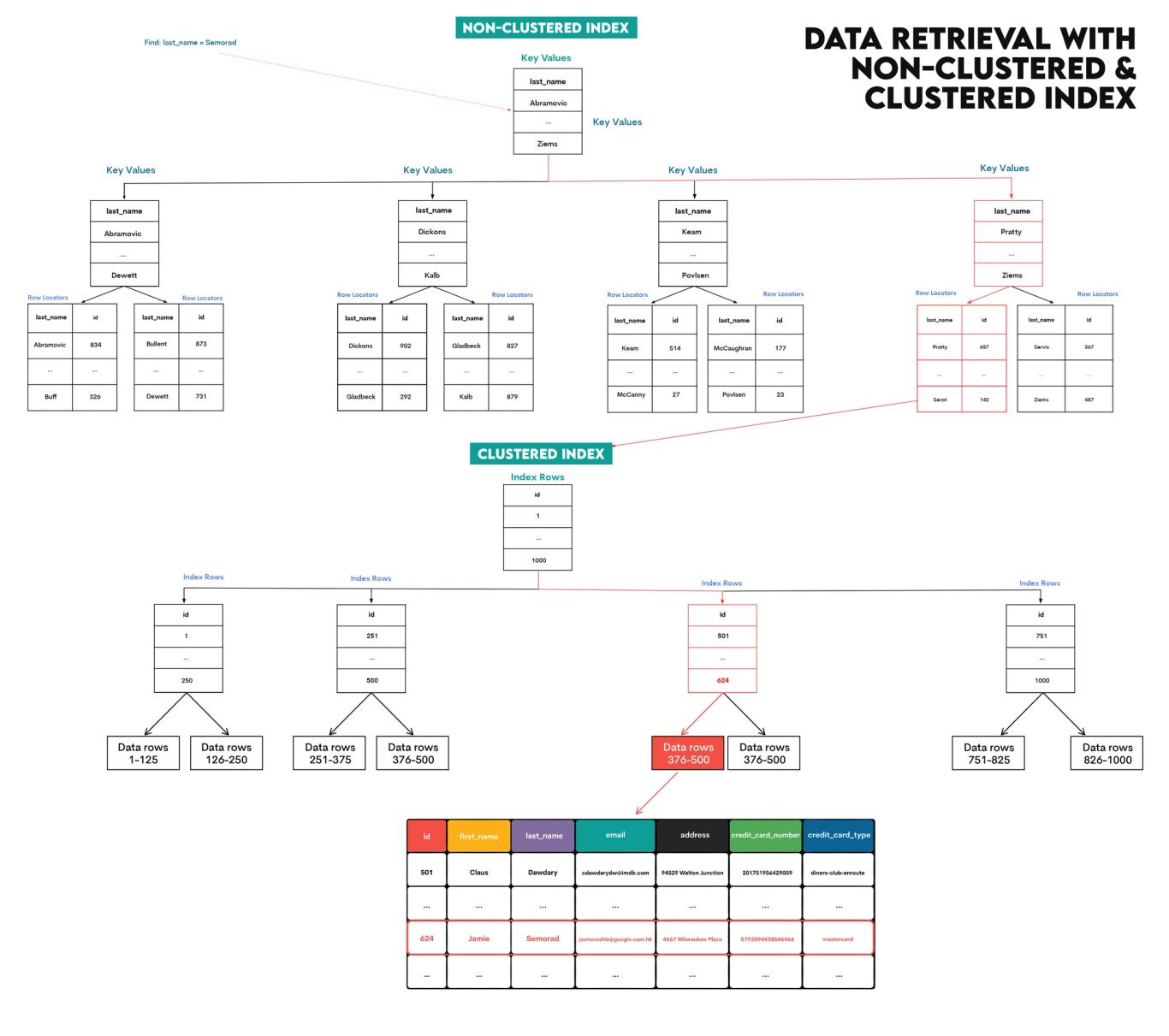
A non-clustered index works like the index at the back of a textbook. It's a separate data structure that contains:
- The value of the indexed column(s).
- A "row locator" that points to the actual data row in the main table (which is organized by the clustered index).
Because non-clustered indexes are stored separately, you can have many of them on a single table (up to 999 in SQL Server).
Structure of a Non-Clustered Index
Let's visualize the B-tree for a non-clustered index to see how it differs.
SQL Indexes (Visually Explained) | Clustered vs Nonclustered | #SQL Course 35
Let's return to the 'Data with Baraa' video to see the structure of a non-clustered index.
Watch from 16:17 to 21:54. Notice the key differences from the clustered index structure: The leaf nodes of this B-tree do not contain the data. They contain the indexed key values and a pointer (the row locator). The actual data pages exist outside of this B-tree structure.
This structure explains the Key Lookup operator we saw in the last lesson. When you search using a non-clustered index but your query needs columns that aren't in that index, SQL Server first performs an Index Seek on the non-clustered index to get the row locator, and then uses that locator to do a second lookup on the clustered index to retrieve the rest of the data.
4. Creating and Managing Indexes
Now for the practical part. How do we create these indexes, and what are the best practices?
SQL Syntax and Best Practices
The T-SQL syntax is straightforward.
- To create a clustered index:
CREATE CLUSTERED INDEX IX_TableName_Column ON TableName(ColumnName); - To create a non-clustered index:
CREATE NONCLUSTERED INDEX IX_TableName_Column ON TableName(ColumnName);
However, real-world indexing involves more than just single columns. We need to consider composite indexes and covering indexes.
SQL Indexes (Visually Explained) | Clustered vs Nonclustered | #SQL Course 35
This final segment from 'Data with Baraa' covers the syntax for creating indexes, including advanced but essential topics like composite indexes and the crucial 'leftmost prefix rule'.
Watch from 21:54 to 42:34. This is a dense and highly practical section. Pay close attention to: The side-by-side comparison of read vs. write performance and storage efficiency. The ideal use cases for each index type. Composite Indexes: How to create an index on multiple columns. The Leftmost Prefix Rule: Why the order of columns in a composite index is critically important for its usability by the query optimizer.
Fixing Key Lookups with Covering Indexes
As we discussed, Key Lookups can be a performance killer if they happen thousands or millions of time for a single query. The solution is often a covering index.
A covering index is a non-clustered index that includes all the columns required to satisfy a query (both in the SELECT list and the WHERE clause). When an index "covers" a query, the database engine can get all the information it needs directly from the index's leaf nodes, eliminating the need for that costly Key Lookup.
You can create a covering index using the INCLUDE keyword:
/*
  Query to optimize:
  SELECT OrderDate, Amount
  FROM Orders
  WHERE CustomerID = 12345;
*/

-- Create a covering index
CREATE NONCLUSTERED INDEX IX_Orders_CustomerID_Covering
ON Orders (CustomerID) -- The column for seeking
INCLUDE (OrderDate, Amount); -- The extra columns to "cover" the SELECT
Managing Indexes in Laravel
As a Laravel developer, you won't be writing CREATE INDEX statements directly in production. You'll manage your schema through migration files. Here's how you apply these concepts in your Laravel code:
use Illuminate\Database\Migrations\Migration;
use Illuminate\Database\Schema\Blueprint;
use Illuminate\Support\Facades\Schema;

return new class extends Migration
{
    public function up(): void
    {
        Schema::create('orders', function (Blueprint $table) {
            $table->id(); // This creates a PRIMARY KEY, which in MSSQL creates a CLUSTERED index.
            $table->foreignId('customer_id');
            $table->date('order_date');
            $table->decimal('amount', 10, 2);
            $table->timestamps();

            // Create a simple non-clustered index on a single column
            // Good for: WHERE customer_id = ?
            $table->index('customer_id');

            // Create a composite (multi-column) non-clustered index
            // The order matters! Good for: WHERE customer_id = ? AND order_date = ?
            $table->index(['customer_id', 'order_date']);

            // You can also give your index a custom name
            $table->index('order_date', 'orders_order_date_index');
        });
    }
};
When you run php artisan migrate, Laravel will generate and execute the appropriate CREATE INDEX statements for your configured database driver, which in your case is MSSQL. Note that Laravel migrations do not have a dedicated include() method for covering indexes. For such advanced optimizations, you would typically use a raw DB statement within your migration.
Conclusion
You have just learned the fundamental concepts for fixing the performance bottlenecks you identified in the previous lesson. Understanding the difference between how clustered and non-clustered indexes store and access data is the key to effective query optimization.
Key Takeaways:
- Clustered Index: Physically sorts the table data. Only one per table. The leaf nodes are the data. Best for primary keys and range queries.
- Non-Clustered Index: A separate structure that points to the data. You can have many. The leaf nodes contain key values and row locators. Best for
WHERE,JOIN, andORDER BYcolumns. - Composite Indexes: Indexes on multiple columns are powerful, but the column order is critical due to the leftmost prefix rule.
- Covering Indexes: Eliminate expensive Key Lookups by using the
INCLUDEclause to add all necessary columns to a non-clustered index. - You can manage your database indexes directly within your Laravel migration files.
Up Next:
In the next lesson, "Resolve inefficient table scans by applying appropriate indexing strategies," we will put this knowledge into practice. We'll take several examples of slow queries with inefficient table scans, analyze their execution plans, and walk through the step-by-step process of designing and creating the perfect index to achieve optimal performance.