
Hello! Let's dive into the next lesson in our module on Database Performance & Optimization.
In our last lesson, we established the fundamental building blocks of query optimization: clustered and non-clustered indexes. You learned what they are, how they're structured, and how to create them in both raw SQL and Laravel migrations.
Today, we'll put that knowledge into action. We will focus on one of the most common and impactful performance problems you'll encounter: the inefficient table scan. Our goal is to apply targeted indexing strategies to resolve these scans, transforming slow queries into fast ones. This lesson bridges the gap between knowing what an index is and knowing how and when to apply it to solve a real-world problem.
1. Identifying the Enemy: The Inefficient Scan
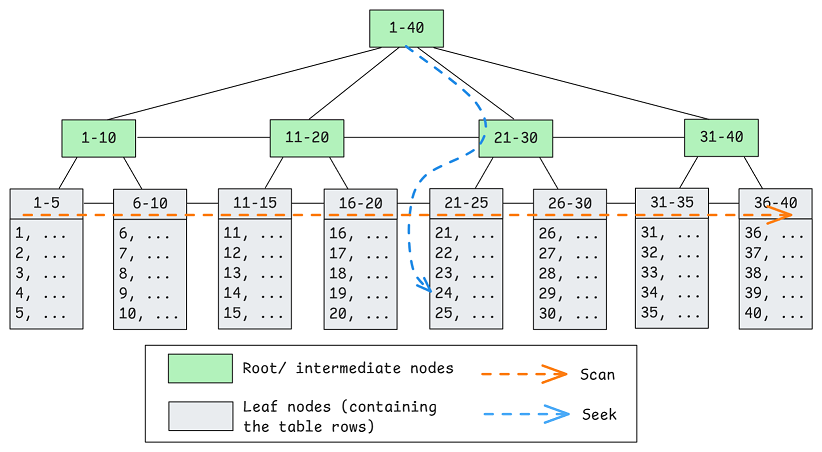
In our lesson on execution plans, you learned that a "scan" operator means the database is reading an entire table or index to find the data it needs. While not always bad, a scan on a large table to retrieve just a few rows is highly inefficient.
There are three main types of scans you'll see in MSSQL execution plans:
- Table Scan: Reads an entire table that has no clustered index (a "heap"). This is usually the worst-case scenario.
- Clustered Index Scan: Reads the entire table by traversing the leaf nodes of the clustered index.
- Index Scan (Non-Clustered): Reads an entire non-clustered index.
Let's watch a segment that clarifies when these scans are acceptable versus when they signal a problem that needs fixing.
SQL Server Execution Plan Operators
This video from Brent Ozar Unlimited provides a professional-grade tour of execution plan operators. We'll focus on the sections defining scans to understand their performance implications.
Please watch the following segments: Table Scan (01:12 - 02:49): Pay attention to the distinction between a 'good' scan (on a small table) and a 'bad' scan (on a large table). Clustered Index Scan (10:24 - 13:58): Note the scenarios where a clustered index scan is acceptable (e.g., low relative cost) versus when it's a problem (e.g., against a table with millions of rows). Index Scan (Non-Clustered) (24:11 - 25:11): Understand why an Index Scan is generally better than a Clustered Index Scan but is still less efficient than a seek.
As the video explains, the problem isn't the scan itself, but its cost. A scan that reads millions of rows to find ten is the kind of inefficiency we need to eliminate. The core difference between an efficient and inefficient query often comes down to this:
| Operator | What It Means | When It's OK | When It's Bad |
|---|---|---|---|
| Index Seek | Goes directly to specific rows using the B-tree | Almost always good | Rarely bad |
| Index/Table Scan | Reads the entire index or table | Small tables, or needing all rows | Large tables where you only need a few rows |
Table adapted from the article "How to Read SQL Server Execution Plans".
The goal of our indexing strategy will be to provide the query optimizer with a direct path to the data, allowing it to perform a seek instead of a scan.
2. The Core Strategy: From Scan to Seek
Let's walk through a practical, step-by-step example of identifying and fixing an inefficient scan. This is the fundamental workflow you will use repeatedly as a developer focused on optimization.
SQL SERVER - Execution Plans and Indexing Strategies
The article 'Execution Plans and Indexing Strategies' by SQL Authority provides a perfect, concise demonstration of this process. We will follow its logic and code examples.
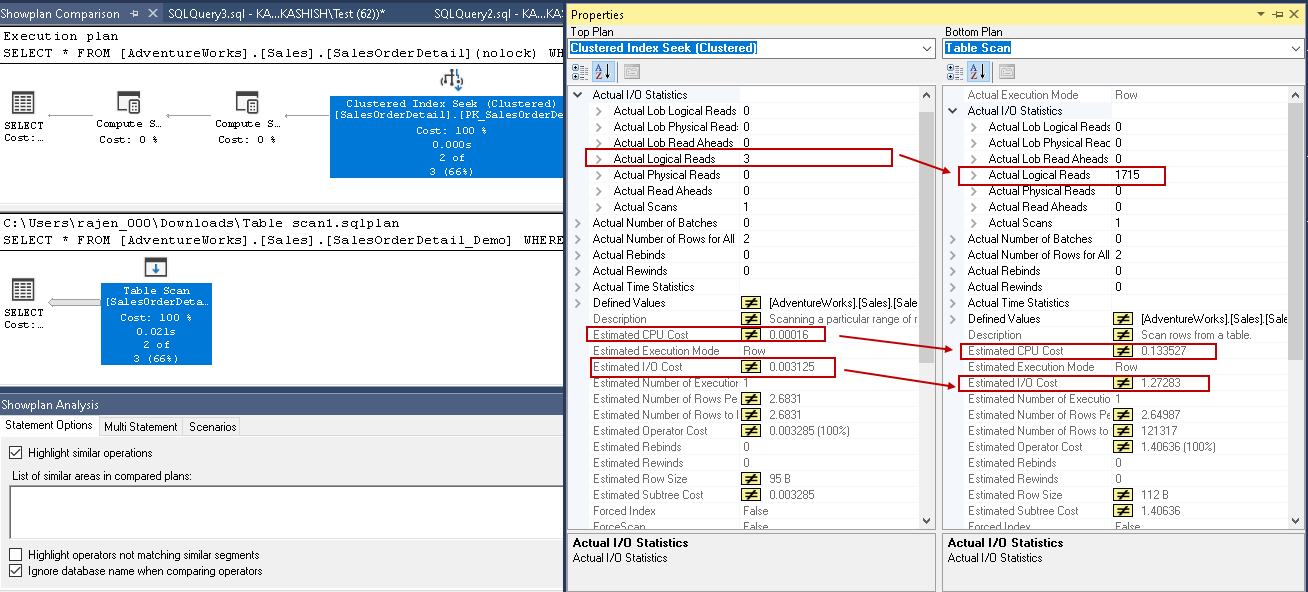
Please read the sections from 'Observing Baseline Performance' to 'Verifying the Execution Plan Change'. As you read, focus on: Baseline: The initial query produces a Clustered Index Scan and a high number of 'logical reads' (7,429). The Fix: A CREATE NONCLUSTERED INDEX statement is used, targeting the OrderDate column from the WHERE clause. The Result: The logical reads drop dramatically, and the execution plan now shows an Index Seek.
This example perfectly illustrates the process:
- Identify the Inefficiency: Run the query and observe a
Scanoperator in the execution plan with a high cost or a high number of logical reads. - Analyze the Query: Look at the
WHEREclause. The columns used for filtering are the candidates for your new index. In the example, it wasWHERE OrderDate BETWEEN .... - Apply the Fix: Create a non-clustered index on the filtering column(s).
- Verify the Improvement: Re-run the query and confirm that the execution plan has switched to an
Index Seekand that logical reads and query time have significantly decreased.
3. Refining the Strategy: Eliminating Key Lookups
In the previous lesson, we introduced the concept of a Key Lookup. This is a common side effect when you add an index to fix a scan. The optimizer can now seek the index to find the right rows, but if your SELECT list asks for columns that aren't in that new index, it has to perform a second operation—the Key Lookup—to go back to the main table and fetch them.
While an Index Seek + Key Lookup is often better than a full Clustered Index Scan, it's still suboptimal, especially if the query returns many rows. Each row requires its own lookup, which can add up to a lot of I/O.
The solution is to create a covering index using the INCLUDE clause.
Let's see a practical example of this "Key Lookup Killer" pattern.
How to Read SQL Server Execution Plans: 7 Things That Matter
The article 'How to Read SQL Server Execution Plans' has a great section that demonstrates how to solve this exact problem.
Please read 'Section 3. Key Lookups (and How to Eliminate Them)' and then 'Example 2: The Key Lookup Killer'. Pay attention to how the CREATE INDEX statement is modified with an INCLUDE clause to cover the columns needed by the query, which eliminates both the Key Lookup and a Sort operator.
By including OrderDate, CustomerId, and Total in the non-clustered index on Status, the database engine can get everything it needs from the index itself without ever touching the main table data. The lookup is eliminated.
4. Common Pitfalls: When Your Index Isn't Used
Sometimes you'll create what seems like the perfect index, but the optimizer ignores it and performs a scan anyway. This is frustrating, but it's usually due to one of a few common issues.
Pitfall 1: Implicit Conversions
This is a classic "gotcha" for application developers. It happens when you compare two columns (or a column and a parameter) of different but compatible data types. For instance, comparing a VARCHAR column in your database to an NVARCHAR parameter from your application code.
Because NVARCHAR has a higher data type precedence, SQL Server won't convert your single parameter value. Instead, it will convert the data type of every single row in the table's VARCHAR column before doing the comparison. This conversion makes your index on that column useless, forcing a scan.
How to Read SQL Server Execution Plans: 7 Things That Matter
Let's look at a clear example of how an implicit conversion kills performance and how to fix it.
Read 'Example 3: The Implicit Conversion'. Notice how the mismatch between the NVARCHAR parameter and the VARCHAR column forces a scan. The fix is to ensure the data types match, either by casting the parameter in SQL or, more correctly, by declaring the correct type in your application code.
In Laravel, this can happen if your model's attribute casting doesn't perfectly match the database column type, or if you pass variables of the wrong type to a DB::raw() query. Always be mindful of data types flowing from your PHP application to the database.
Pitfall 2: Non-SARGable Predicates
SARG stands for Search ARGument-able. A query predicate (the WHERE clause) is SARGable if the database can use an index to satisfy it. It's non-SARGable if the database has to perform an operation on the column before it can be evaluated.
The most common example is using a function on the column or a leading wildcard:
-
Non-SARGable (bad):
WHERE YEAR(OrderDate) = 2023- Fix (SARGable):
WHERE OrderDate >= '2023-01-01' AND OrderDate < '2024-01-01'
- Fix (SARGable):
-
Non-SARGable (bad):
WHERE LastName LIKE '%smith'- Fix (SARGable, if possible):
WHERE LastName LIKE 'smith%'
- Fix (SARGable, if possible):
In the "bad" examples, SQL Server cannot use a standard B-tree index on OrderDate or LastName because it must first execute YEAR() or search for the wildcard on every row. By rewriting the query, you allow the optimizer to perform an efficient Index Seek.
Conclusion
You now have a powerful and repeatable strategy for tackling one of the most common performance issues in database-driven applications. By analyzing execution plans to find inefficient scans and applying targeted indexing, you can achieve dramatic improvements in query speed.
Key Takeaways:
- An inefficient scan reads a large table or index to retrieve a small number of rows.
- Your primary goal is to transform
ScansintoSeeksby creating non-clustered indexes on the columns in yourWHEREclauses. - The workflow is: Identify the scan, Analyze the query, Apply an index, and Verify the improvement.
- Eliminate Key Lookups by creating covering indexes with the
INCLUDEclause to provide all columns needed by the query. - Be aware of pitfalls like implicit conversions and non-SARGable predicates that can prevent your indexes from being used.
Up Next:
In the next lesson, we will continue building on this foundation. We'll explore how to optimize queries involving sorting, filtering, and aggregation in MSSQL. You'll see how the same indexing principles can be used not only to speed up data retrieval (WHERE) but also to eliminate costly Sort operations (ORDER BY) and accelerate aggregate calculations (GROUP BY).