
Hello! Welcome to your next lesson in the "Database Performance & Optimization" module.
In our previous session, we focused on resolving inefficient table scans. You learned to analyze execution plans, identify costly Scan operators, and transform them into efficient Seek operations by creating non-clustered and covering indexes based on WHERE clauses.
Today, we'll build directly on that foundation. We're moving beyond just filtering (WHERE) to optimize queries that also involve sorting (ORDER BY) and aggregation (GROUP BY). You'll learn how to eliminate other expensive operators, like Sort and Hash Match, from your execution plans, which is a crucial skill for making complex reports and data-heavy pages load quickly.
1. Taming the Sort Operator
When you ask the database to sort a large result set, it has to perform a Sort operation. This is one of the most resource-intensive things a database can do because:
- It's CPU-intensive: Comparing and reordering data takes processing power.
- It's a blocking operator: The query can't return the first row until the entire dataset has been sorted.
- It can consume a lot of memory: If the data to be sorted doesn't fit in memory, SQL Server has to spill it to disk (
tempdb), which is extremely slow.
Take a look at the execution plan below. The query involves a simple ORDER BY, but the Sort operator consumes 90% of the total query cost. This is exactly the kind of bottleneck we want to eliminate.
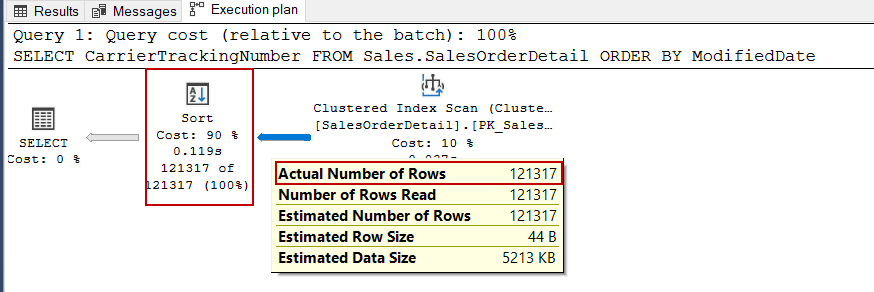
The good news is that we can often eliminate the Sort operator entirely by providing the data to the query optimizer in the exact order it needs. The tool for this? A carefully designed index.
Let's watch a detailed demonstration of how to tackle this.
Removing SORT Operator – SQL Server Execution Plans (by Amit Bansal)
This video by Amit Bansal provides a clear, step-by-step guide to removing the Sort operator. It brilliantly illustrates why the order of columns in your index is so critical.
Watch the video from the beginning to end (00:09 - 06:48). Pay close attention to the following points: The Problem (00:09 - 02:14): Notice the initial execution plan with a Clustered Index Scan, a Hash Match for aggregation, and the expensive Sort operator. Attempt 1 (02:14 - 03:49): An index is created, but with the wrong column order. The Sort operator remains. This is a common mistake and a key learning moment. Attempt 2 (03:49 - 05:05): The index is recreated with the ORDER BY column (CustomerID) as the leading key. Observe how this one change makes the Sort operator disappear and also transforms the Hash Match into a more efficient Stream Aggregate. Refinement (05:05 - 06:48): The index is further improved by moving the subtotal column into the INCLUDE clause, making the index key narrower and more efficient.
The video demonstrates two critical principles for optimizing ORDER BY clauses:
- Index Key Order is King: To eliminate a sort, the column(s) in your
ORDER BYclause must be the leading columns in your non-clustered index. - Sort Direction Matters: The sort direction (
ASCorDESC) in the index definition must match the query'sORDER BYclause.
If a query is ORDER BY OrderDate DESC, an index on (OrderDate ASC) won't help eliminate the sort. You must create the index with the same direction:
CREATE NONCLUSTERED INDEX IX_MyIndex
ON MyTable (OrderDate DESC);
When an index provides data in the correct sorted order, the query optimizer doesn't need to perform a separate sort. It can simply stream the data directly from the index.

2. Optimizing GROUP BY with Stream Aggregation
The video you just watched also revealed something important about GROUP BY. The initial query used a Hash Match (Aggregate) operator. This operator builds an in-memory hash table to perform the grouping and aggregation, which can be memory-intensive.
When the optimal index was created, the plan changed to use a Stream Aggregate operator. This is a much more efficient operator that works because the data is already sorted by the GROUP BY key (CustomerID in the video's example). It can read the sorted data as a stream, calculating aggregates as it goes without needing to build a large hash table.
Often, optimizing for ORDER BY simultaneously optimizes GROUP BY, especially when you group and order by the same columns. Providing a pre-sorted stream of data via an index is a double win for performance.
3. Optimizing Filtering: The SARGability Rule
In the last lesson, we discussed the importance of writing queries that can effectively use indexes. This is known as writing SARGable predicates (Search-ARGument-able). Let's reinforce this concept, as it's fundamental to all query optimization.
A predicate is non-SARGable if you apply a function to the column in the WHERE clause. This forces SQL Server to calculate the function's result for every row before it can do the comparison, making any index on that column useless.
Performance of SARGable queries in SQL Server
This short video provides an excellent, focused explanation of SARGable vs. non-SARGable queries.
Please watch the segment from 00:00 to 03:01. Focus on the core principle: to keep a query SARGable, you must not manipulate the column on the left side of the comparison operator.
This is a very common issue in application code. For example, in Laravel, you might be tempted to write:
// Non-SARGable: applies a function to the column
$orders = Order::whereRaw('YEAR(order_date) = ?', [2023])->get();
The database cannot use an index on order_date for this query. The SARGable way to write this is to manipulate the input value, not the column:
// SARGable: compares the column to a range
$orders = Order::whereBetween('order_date', ['2023-01-01', '2023-12-31'])->get();
Always aim to perform calculations and conversions on your input parameters before they get to the database, leaving the table columns untouched in your WHERE clauses.
4. Specialized Filtering: The Filtered Index
Sometimes, your queries consistently target a very specific and small subset of data. For example, maybe you have an orders table with a status column, and 99% of your queries are only interested in 'processing' orders.
In this scenario, a full non-clustered index on the status column might be inefficient because it still contains entries for all the other statuses. A filtered index is a more efficient solution. It's a non-clustered index that includes only the rows that match a specific WHERE condition.
Index Architecture and Design Guide
The Microsoft Learn documentation provides a great overview of filtered indexes and when to use them. We will focus on the section that explains their benefits and design considerations.
Please read the section 'Filtered index design guidelines'. Pay attention to the examples provided, such as creating an index for columns with many NULLs or for heterogeneous data (like product categories). Notice how a filtered index can improve performance while also reducing storage and maintenance costs.
The benefits of a well-designed filtered index are significant:
- Improved Query Performance: The index is smaller, leading to faster seeks and scans.
- Reduced Storage Costs: The index only stores a subset of rows.
- Reduced Maintenance Costs: The index only needs to be updated when a DML statement affects the data within its filtered subset.
Example: An index just for unshipped orders.
CREATE NONCLUSTERED INDEX IX_Orders_Unshipped
ON Sales.SalesOrderHeader (OrderDate)
INCLUDE (CustomerID, TotalDue)
WHERE ShipDate IS NULL;
This index would be much smaller than a full index and would perfectly serve queries looking for open orders.
5. A Unified Strategy for Index Design
Let's combine everything we've learned. When you face a complex query with filtering, grouping, and sorting, you need a systematic approach to designing the optimal covering index.
Here is a general-purpose strategy for ordering the columns in your index key:
- Equality Predicates First: Columns from your
WHEREclause that use=orIN. These are the most selective and allow the database to immediately narrow down the search. - Inequality/Range Predicates Next: Columns from
WHEREthat use>,<,BETWEEN, orLIKE 'prefix%'. - Sorting/Grouping Columns: Columns from your
GROUP BYorORDER BYclause. This allows the optimizer to use the index to avoid a separate sort operation. - Covering Columns: Any other columns needed in the
SELECTlist should be placed in theINCLUDEclause to prevent key lookups.
Example Scenario:
Imagine you need to optimize this query against the SalesOrders table we discussed in the previous lesson.
-- Get the 50 most recent 'Shipped' orders for a specific customer
SELECT TOP 50 OrderID, OrderDate, TotalAmount
FROM SalesOrders
WHERE CustomerID = @SomeCustomerID
  AND OrderStatus = 'Shipped'
ORDER BY OrderDate DESC;
Analysis & Index Design:
- Filtering (Equality):
CustomerID,OrderStatus. These should be first in the key. - Sorting:
OrderDate DESC. This should come after the filtering columns. - Covering: The query selects
OrderIDandTotalAmount.OrderIDis the clustered key, so it's automatically included. We just need to includeTotalAmount.
Optimal Index:
CREATE NONCLUSTERED INDEX IX_CustomerShippedOrders_ByDate
ON dbo.SalesOrders (CustomerID, OrderStatus, OrderDate DESC)
INCLUDE (TotalAmount);
This index is nearly perfect for the query:
- It can instantly seek to the right
CustomerIDandOrderStatus. - The data is already sorted by
OrderDate DESC, so it just needs to read the top 50 rows. - It covers the query because
TotalAmountis included, so there are no expensive key lookups.
Conclusion
You've now expanded your optimization toolkit significantly. By understanding how indexes can serve not just WHERE clauses but also ORDER BY and GROUP BY, you can tackle a much wider range of performance problems.
Key Takeaways:
- Eliminate expensive
Sortoperators by creating indexes where the key columns and sort direction match yourORDER BYclause. - This same strategy often optimizes
GROUP BYclauses, allowing the use of the more efficientStream Aggregateoperator overHash Match. - Always write SARGable queries by avoiding functions on columns in your
WHEREclauses. Manipulate your input values instead. - Use Filtered Indexes as a powerful tool to create small, highly efficient indexes for queries that target a well-defined subset of your data.
- When designing a multi-purpose index, follow a logical column order: Equality Filters -> Range Filters -> Sorting/Grouping -> Included Columns.
Up Next:
So far, we've focused on making the database return results faster. But what if the result set itself is massive? In our next lesson, we will shift our focus from pure SQL optimization to application-level techniques in Laravel. You'll learn how to process large datasets efficiently using the chunkById and cursor methods, preventing your application from running out of memory.