Recommended resources
The freely available resources this lesson will direct you to.
Introduction
Welcome back! In our last lesson, you learned the foundational skill of writing a single, powerful tweet using the "Hook, Value, Call to Action" formula. This is the building block for all communication on X.
Now, we'll build on that skill to tackle more complex topics. Sometimes, a single tweet isn't enough to share your best money-saving advice. This is where X threads come in. A thread is a series of connected tweets that allows you to tell a story, break down a guide, and provide deeper value to your audience.
In this lesson, you will learn how to write a tweet/X thread that expands on a money-saving tip from one of your other content pieces. This technique is a fantastic way to repurpose your best ideas and establish yourself as a knowledgeable creator in the "cheap and cheerful lifestyle" niche.
1. What is a Thread and Why Use One?
A thread lets you bypass the 280-character limit by linking multiple tweets together. It's the perfect format for content that needs more space, such as:
- Step-by-step guides (e.g., "5 Steps to Create a Monthly Budget")
- Detailed personal stories (e.g., "How I Paid Off $5k in Debt")
- Lists of tips or resources (e.g., "My Top 10 Favorite Frugal Living Blogs")
Threads are a powerful form of content repurposing. You can take a single idea—maybe from a future YouTube video or an Instagram post—and break it down into a thread. This allows you to provide significant value without having to create a brand new concept from scratch.
To get a quick overview of how articles or other long-form content can be adapted for X, let's look at this resource.
How to Repurpose Content for Twitter - Marketing Examined
This article, 'How to Repurpose Content for Twitter,' explains how to adapt existing content for the platform. We'll focus on how it introduces the idea of turning an article into a thread.
Read the section titled 'Article to thread.' It clearly explains how a thread helps you get around the character limit to deliver the core ideas from a longer piece of content.
2. The Anatomy of a High-Performing Thread
A successful thread isn't just a series of random tweets. It has a specific structure designed to grab attention and keep people reading until the very end. The best threads contain four key elements.
The article "How to Write a Twitter Thread: The Complete Guide" provides an excellent breakdown of this structure.
How to Write a Twitter Thread: The Complete Guide
This guide from Ship30for30 outlines the essential components of a viral-worthy thread. Understanding this structure is key to writing threads that people actually read and share.
Read the introductory section that lists the four core elements: Lead-In Tweet, Main Points, TL;DR Recap, and CTA. This will give you a mental map of what we're about to build.
Let's dive into each of those four parts.
Part 1: The Lead-In Tweet (The Hook)
This is the most important tweet in your entire thread. Its only job is to make someone stop scrolling and click "Show this thread." It needs to make a clear promise and create curiosity.
For some practical advice on crafting a strong hook, watch this short video clip.
How to Write a Twitter Thread | Advice for Beginners
The video 'How to Write a Twitter Thread | Advice for Beginners' gets straight to the point on how to start your thread effectively.
Watch the first 46 seconds. Pay attention to the advice on using a 'how to' format for your hook and why attaching an image can increase visibility.
A great hook for your niche might look like this:
"I saved an extra $200 last month by tackling 'phantom' expenses.
Most people don't even realize they're paying for them.
Here are 4 phantom expenses you can cut today: 🧵"
The "🧵" (thread) emoji signals to readers that there's more to come.
Part 2: The Main Points (The Body)
This is the core of your thread, where you deliver on the promise you made in the hook. Break your money-saving tip down into a series of 2-5 tweets.
Best Practices for the Body:
- One Idea Per Tweet: Don't cram too much information into a single tweet.
- Use Formatting: Use bullet points, numbered lists, and white space to make your tweets easy to read.
- Keep the Momentum: End each tweet in a way that makes the reader want to see the next one. Phrases like "Next up..." or "But that's not all..." can help.
The article from Ship30for30 that we looked at earlier has great advice on this.
How to Write a Twitter Thread: The Complete Guide
Let's revisit the guide on writing threads to focus on how to structure the main body.
Read the section titled 'Step 2: Write the Main Points.' Focus on the advice to 'Avoid long bulky paragraphs' and use bullet points.
Here's an example of a real, successful thread in the budget travel space. Notice how each tweet is a single, clear tip that builds on the overall topic.

Part 3: The Summary (TL;DR)
TL;DR stands for "Too Long; Didn't Read." Your second-to-last tweet should be a quick summary of all the points you just made. This is incredibly helpful for readers who skim, and it reinforces your key message.
Example TL;DR:
"TL;DR: How to cut phantom expenses:
- Cancel unused subscriptions
- Downgrade forgotten 'pro' plans
- Unsubscribe from marketing emails
- Check for automated bank fees"
Part 4: The Call to Action (The Closer)
You've just provided a ton of value. Now, tell your audience what to do with it! The final tweet in your thread is your Call to Action (CTA).
Good CTAs include:
- Asking for a follow: "If you found this thread helpful, follow me for more daily money-saving tips!"
- Asking for engagement: "What's a 'phantom expense' you've discovered? Reply and let me know!"
- Asking for a share: "Enjoyed this thread? Retweet the first tweet to help someone else save money."
This last one is especially powerful because it drives new audiences back to the start of your thread.
3. How to Post a Thread on X
Now for the practical part. Composing a thread is simple.
- Write your first tweet (the hook).
- Click the small plus icon (
+) in the bottom-right of the compose window to add the next tweet. - Continue adding tweets until your thread is complete.
- When you're ready, click the "Tweet all" button to publish the entire thread at once.
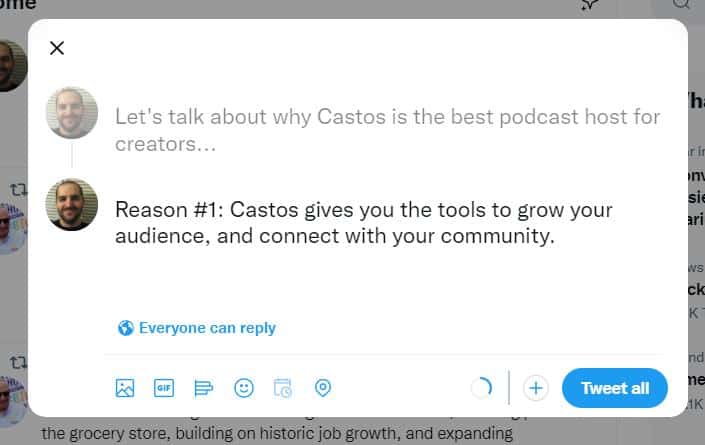
This very short video demonstrates the process visually.
How to Write a Twitter Thread (in less than 2 Minutes)
This clip from 'How to Write a Twitter Thread (in less than 2 Minutes)' gives a quick, no-frills demonstration of the buttons you'll use to create and publish your thread.
Watch from 00:31 to 01:16. The video will walk you through clicking the plus symbol to add new tweets and using the 'Tweet all' button to publish.
4. Your Action Plan: Write Your First Thread
It's time to put it all together. Your task is to expand a simple money-saving tip into a short thread.
Step 1: Choose your topic. Pick a simple, actionable tip from your "cheap and cheerful" niche. Good examples include:
- How to do a "no-spend" weekend.
- Tips for reducing food waste.
- How to find the best deals at a thrift store.
Step 2: Write a 4-tweet thread in a document, following the structure we learned.
- Tweet 1 (The Hook): Introduce your topic, state the benefit, and promise to explain how. End with the 🧵 emoji.
- Example: "Thrift stores are goldmines for a cheap & cheerful lifestyle, but it's easy to get overwhelmed. Here's my 2-step method for finding the best items every time: 🧵"
- Tweet 2 (Main Point 1): Explain the first step or tip. Use clear language and spacing.
- Example: "1/ Go in with a plan. Don't just browse aimlessly. Have a specific list of what you're looking for (e.g., 'a black blazer,' 'blue coffee mugs'). This saves time and prevents impulse buys."
- Tweet 3 (Main Point 2): Explain the second step or tip.
- Example: "2/ Check for quality, not just brand. Ignore the label. Look for good fabrics, sturdy stitching, and check for stains or damage. A well-made generic item is better than a worn-out designer one."
- Tweet 4 (Summary & CTA): Combine your TL;DR and your Call to Action.
- Example: "In short: Go with a list, and focus on quality. If this helped, retweet the first tweet to share the thrifting knowledge! #frugalfashion #thrifting"
Focus on making each tweet clear and valuable. We're not posting this yet—the goal is to practice the structure.
Conclusion
Excellent work today! You've moved beyond the single tweet and learned how to structure and write a comprehensive X thread. This skill is crucial for sharing your more detailed money-saving strategies and positioning yourself as an expert.
Key Takeaways:
- Threads are perfect for repurposing content and delivering in-depth value.
- A successful thread follows a clear structure: Hook -> Main Points -> Summary -> Call to Action.
- The Hook is the most critical part; it must make a compelling promise to get people to read on.
- Keep the Main Points concise, with one main idea per tweet and easy-to-read formatting.
- Always end with a Call to Action to encourage follows, replies, or retweets.
Preview of the Next Lesson:
As you start posting engaging content like threads, you'll begin to receive comments and direct messages. How you handle these interactions is key to building a loyal community. In the next lesson, you'll learn how to develop a strategy for responding to comments and DMs to build trust and encourage conversation.