
Kia ora. In the previous lesson, you practised converting SI-prefixed quantities into compatible units before a calculation. Keep that habit: if a formula expects amperes, ohms, watts, metres, or square metres, convert values such as , , , and first.
This lesson is about the next exam skill: entering the formula-sheet expression exactly as intended and obtaining a reliable numerical answer. You will work with fractions, percentages, powers of ten, squares, and square roots—the forms that occur repeatedly in electrical calculations. The focus is on clear calculator setup and enough written working to protect your method marks.
Start with the expression, not the keys
A scientific calculator evaluates what you enter, not what you meant to enter. Before touching the calculator, copy the formula and substitute the values on paper.
For any calculation question, use this three-line structure:
For example, suppose a formula sheet gives:
and the question states and .
Write:
The brackets around are not essential here, but they make the base of the square unambiguous. This layout also makes it much easier to find an error later.
A good calculator routine is:
- Check units and convert prefixes before entry.
- Identify the complete numerator and denominator of any fraction.
- Put brackets around a whole numerator or denominator that has more than one part.
- Use the correct special key for squares, roots, or powers of ten.
- Keep extra digits on the display until the final answer.
- Write the final answer with a unit.
Become familiar with your calculator
The exact key positions vary between models, including permitted Casio models. The calculator image below shows the important functions to locate before an exam: square, square root, arbitrary power, fraction entry, negative sign, and scientific notation entry.
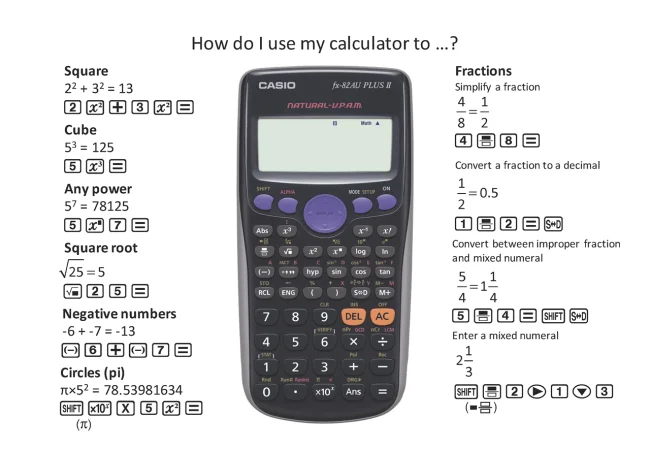
Notice the difference between these two keys:
- The subtraction key, used in a calculation such as .
- The negative key, often marked , used to enter a negative number such as or an exponent such as .
They are not always interchangeable. In particular, when entering , use the calculator’s negative-number key for the exponent.
Read these short Casio Education FAQ entries to learn how to switch an exact fraction or root result to a decimal, and how to respond when the calculator reports an error.
Under “Functions & Procedures,” read the entry “How do I convert my fraction answer to a decimal? (or visa versa).” Focus on switching formats when an electrical answer needs a decimal. Then read “My answer contains a root. How do I get a decimal approximation?” Follow the root guidance; look for the key labelled [S-D], [F-D], or [FORMAT] on your own calculator. Finally, under “Errors and Issues,” read “I get an error when I try to perform a calculation. Why?” Review the error meanings, especially Math ERROR and Syntax ERROR.
If your calculator displays a fraction or a root when you need a decimal, this does not mean the answer is wrong. It is often an exact form. Use the fraction–decimal toggle described in the reading, then round the decimal appropriately.
Fractions: protect the whole denominator
Many electrical formulae contain a fraction. For example, Ohm’s law may be rearranged on a formula sheet as:
If and , the calculation is straightforward:
You can enter this with the calculator’s fraction template or with the division key:
The danger appears when the top or bottom of the fraction contains several operations.
Consider an efficiency calculation:
If output power is and input power is :
Enter this as:
The brackets show that the division must be completed before multiplying by .
When brackets are essential
Suppose the formula is:
with , , and .
The correct entry is:
which gives:
Without brackets, entering gives , because the calculator performs division before addition. That is a correct answer to the wrong expression.
Use this rule:
If there is more than one operation above or below a fraction bar, use brackets around that entire numerator or denominator.
Percentages: convert the meaning, not just the symbol
A percentage means “per hundred”:
Therefore:
In electrical questions, percentages most often appear in efficiency, voltage drop, tolerances, or loading.
Example: efficiency
A machine has an input power of and output power of .
The is necessary because the fraction by itself is . Both expressions describe the same proportion, but the question asks for a percentage.
Example: percentage loss
If the loss is of an input power of , first make the units suitable:
Then convert the percentage to a decimal:
Some calculators have a percentage key. It can be useful, but for formula-sheet work the most reliable method is usually to write the percentage as a decimal yourself. You can then see exactly what number has been entered.
Powers of ten: use scientific notation cleanly
You met powers of ten during SI-prefix conversion:
A calculator may display scientific notation in a form such as:
This means:
On many scientific calculators, the key marked , , or is used to enter this form directly. It is faster and safer than typing many zeros.
For example, to enter:
you would normally enter:
- the , , or key
- the negative-number key
Do not try to create a negative exponent by subtracting after pressing the scientific-notation key. The exponent itself is the negative number .
How to use Scientific Notation on the Casio fx-115 Calculator
Watch HD Calcs’ “How to use Scientific Notation on the Casio fx-115 Calculator” for a demonstration of entering positive and negative powers of ten. The labels and key positions may differ from your own calculator, but the entry logic is the same.
Watch exponent entry. Focus on the use of the dedicated scientific-notation key and the distinction between the negative-number key and the subtraction key when entering a negative exponent.
Electrical example using powers of ten
A formula sheet may give conductor resistance as:
Suppose:
The area must first be in square metres:
Now substitute:
Rounded suitably:
For calculator entry, use brackets around the denominator:
The key point is not to memorise this formula yet; it is to see how a complex formula-sheet fraction is entered without losing the denominator.
Squares: the exponent applies to the value immediately before it
A square means a number multiplied by itself:
Electrical power calculations commonly use a square:
For and :
Use the calculator’s dedicated key where available. It is quicker than entering the full exponent operation.
Brackets change what is squared
Compare:
with:
In the second expression, the calculator squares the first, then applies the negative sign. The brackets in the first expression tell it to square the entire negative number.
Electrical quantities in introductory formula questions are often positive, but this is still an important calculator rule. Whenever a negative number, a sum, or a fraction is the base of a power, enclose the full base in brackets.
For example:
but:
The calculator is following order of operations correctly in both cases.
Square roots: check what sits inside the root
A square root reverses a square:
because:
A formula sheet may give current directly in root form:
If and :
When entering this into the calculator, make sure the fraction is inside the square root:
A common incorrect entry is:
Those are different expressions.
If the square root does not come out exactly, the calculator may show an exact root expression rather than a decimal. For example:
may remain displayed as . Use the fraction–decimal toggle to obtain:
For ordinary real-number electrical calculations, a negative number inside a square root produces a Math ERROR. Treat that as a prompt to check your input, units, brackets, and formula—not as a calculator fault.
A full formula-sheet calculation routine
When an exam question includes several of today’s skills, work through it in a fixed order.
Suppose a resistance expression is supplied as:
Evaluate it in a way that earns method marks.
1. Copy the expression carefully
2. Identify the grouped parts
- The whole is squared.
- The entire is the denominator.
3. Enter with brackets
4. Check the size before accepting the display
Since:
and the denominator is approximately , the answer should be a number around , not or .
5. Record a sensible final answer
If the question supplies units, attach the appropriate unit. If it requests a particular number of decimal places or significant figures, follow that instruction. Otherwise, avoid reporting a long calculator display as though every digit is meaningful.
This routine is deliberately slower than guessing at first. With practice, it becomes quick—and it prevents the most costly calculator errors.
Key takeaways
To evaluate electrical formula-sheet expressions accurately:
- Convert prefixed quantities into compatible units before substitution.
- Treat a fraction bar as a grouping symbol; use brackets when entering multi-part numerators or denominators.
- Convert a percentage to a decimal when finding a percentage of a quantity, and multiply by when converting a ratio into a percentage.
- Use the calculator’s dedicated scientific-notation key for numbers such as , and use the negative-number key for negative exponents.
- Use brackets when squaring a negative number, a fraction, or a complete expression.
- Make sure the complete intended expression sits inside a square root.
- Keep full calculator precision until the end, then round once and include the correct unit.
- A Math ERROR or Syntax ERROR is useful information: check brackets, denominator entry, roots of negative values, and use of the negative key.
Next, you will practise looking at a supplied formula sheet and selecting the equation that matches the quantity an exam question asks you to find.
Can't find a good explanation? Sign up and we'll make it for you
Sign up