
Hello. You now have a completed Product–Organization segment group and a deliberate item-location segment override from the previous lab. This lesson turns that segmentation result into executable replenishment logic: a policy assignment set defines how Oracle calculates replenishment thresholds and quantities for item-locations in each segment.
For continuity, your target item-location was calculated into RPSEG_<initials>_TARGET but manually overridden to RPSEG_<initials>_REVIEW. In this lab, configure the effective segment (REVIEW) so the next policy-calculation run has an unambiguous policy to apply. Plan for about 40–45 minutes.
From segment membership to replenishment behavior
A segment group answers: Which item-locations belong together? A policy assignment set answers: How should Oracle replenish the item-locations in that segment?
A policy assignment set contains three distinct layers. Keeping them separate is important in both configuration and troubleshooting.
| Layer | Purpose | What it means in this lab |
|---|---|---|
| Policy parameters | Tell Oracle how to calculate values such as safety stock, reorder point, and EOQ. | Use ROP and EOQ, forecast-based average demand, and days-of-cover safety stock. |
| Default policy values | Fallback values when required history, forecast, cost, or order-quantity data is unavailable at item-location level. | Leave blank initially unless your test data is known to be incomplete. |
| Policy value overrides | Fixed business values that bypass policy calculation. | Do not use in this lab; the next lesson validates calculated results. |
The policy assignment set is attached to a segment group, and a replenishment plan can select one policy assignment set for that segment group on the Scope tab of Plan Options. You can create multiple sets for comparison or phased policy designs, but only the one selected by the plan is effective in that plan run.
Read Oracle’s creation guidance now, paying particular attention to the dynamic behavior of fields after you choose a policy type.
Create a Policy Assignment Set
Read Oracle Help Center’s “Create a Policy Assignment Set” to confirm the availability prerequisite, understand which parameter fields change with policy type, and distinguish defaults from calculated values.
In “Name the Policy Assignment Set and Associate It with a Segment Group,” read the complete subsection. Focus on segment-group availability: the group must have completed segmentation, and groups using Customer or Demand Class dimensions are excluded. Then read all of “Define Policy Parameters for a Segment.” In particular, locate the policy-type controls and observe that Oracle enables fields only when they are meaningful for the selected policy. Finally, in “Define Default Policies for a Segment,” read the table entries for ROP and EOQ. Use the default-value guidance to distinguish a fallback from a policy override.
For this controlled lab, use ROP and EOQ rather than Min-max planning. This keeps the policy design aligned with the next lesson, where you will calculate and inspect average daily demand, safety stock, reorder point, and economic order quantity.
Oracle calculates the reorder point conceptually as:
When Beginning Inventory Position reaches or falls below that reorder point, Oracle proposes replenishment using the calculated EOQ. Beginning Inventory Position consists of projected available balance plus on-order quantity.
This design makes the upstream dependencies visible:
- Demand supplies average daily demand.
- Lead times determine demand during lead time.
- Safety-stock parameters establish protection above lead-time demand.
- Cost and ordering attributes, or an approved default, support EOQ calculation.
- The effective segment determines which segment policy is applied.
Decide the lab policy before entering values
Use names that make the relationship between plan, segment group, and assignment set evident in later troubleshooting.
| Object | Lab value |
|---|---|
| Segment group | RPSEG_<initials>_LAB |
| Effective segment for your target item-location | RPSEG_<initials>_REVIEW |
| Policy assignment set | RPAS_<initials>_LAB |
| Policy type | ROP and EOQ |
| Policy UOM | Units |
| Safety Stock Calculation Method | Days of cover |
| Safety Stock Days of Cover | 2 |
| Days of Cover Basis | Forecast |
| Horizon for Average Daily Demand | 30 |
These are deliberately modest test values, not a production recommendation. The values let you observe the calculation chain without creating excessive inventory protection:
- Oracle derives average daily demand from the forecast over the selected horizon.
- Two days of cover converts that average daily demand into safety stock.
- Safety stock contributes to the reorder point.
- EOQ is calculated from available item-location cost attributes, unless an approved default is configured.
Policy UOM = Units means the resulting policy values are static quantities. This does not conflict with choosing Days of cover as the safety-stock calculation method: Oracle uses the days-of-cover setting to calculate a quantity, then stores and uses the policy result in units.
Do not enter a segment-level safety-stock override, ROP override, or EOQ override in this lab. An override is not a “better default.” It instructs Oracle not to calculate that policy value for the affected segment. That would conceal exactly the data dependencies you need to validate next.
Oracle’s policy reference is useful for confirming that distinction.
Policy Assignment Sets - Oracle Help Center
Read Oracle Help Center’s “Policy Assignment Sets” for the relationship between segments, policy types, defaults, and overrides. This is the reference to use when an interviewer asks why a calculated policy value differs from a fixed policy value.
In the opening section, read the assignment-set definition, then note that a plan can specify only one assignment set for a segment group. In the policy-types table, find the “Reorder point (ROP) and economic order quantity (EOQ)” row. Read the ROP-and-EOQ behavior, concentrating on the trigger condition and the fallback behavior when EOQ cannot be calculated. Then read the “Default Policy Values” and “Policy Value Overrides” material in the next section. Focus on why overrides bypass calculation.
Create the policy assignment set
1. Confirm the prerequisite state
Before creating the assignment set, verify these conditions from the previous lab:
RPSEG_<initials>_LABexists.- The latest Execute Parts Segmentation request completed successfully.
- The target item-location appears in Manage Segment Members.
- Its Preview Segment is
RPSEG_<initials>_REVIEW, because you applied the controlled segment override. - The segment group uses Product and Organization granularity, not Customer or Demand Class.
The assignment-set creation page only offers eligible segment groups. If your group is absent from the list, do not create a replacement group yet; diagnose the segmentation status and dimensions first.
2. Open the assignment-set page
- Navigate to Replenishment Planning.
- Open the Tasks panel.
- Under the replenishment setup or plan-input tasks, select Manage Policy Assignment Sets.
- On the search page, select Actions > Create.
In the New policy assignment set dialog, enter the header values.
| Field | Value |
|---|---|
| Policy Assignment Set | RPAS_<initials>_LAB |
| Description | ROP and EOQ policy for REVIEW segment in replenishment lab |
| Segment Group | RPSEG_<initials>_LAB |
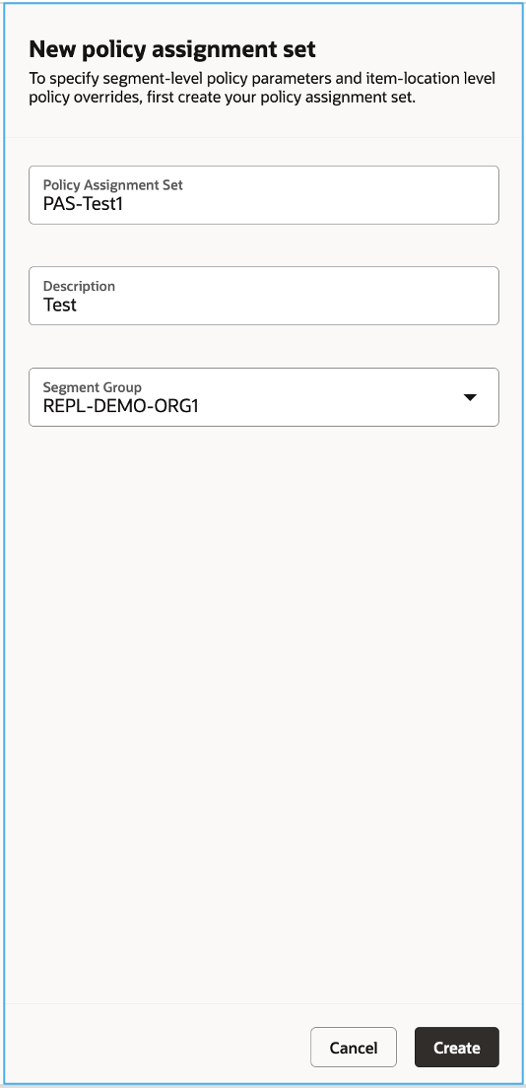
- Select Create.
The selected segment group is not a label alone. It is the controlled link between segmentation and the policy definitions you are about to enter.
Configure policy parameters for the effective segment
After the header is created, Oracle opens the assignment-set details page. You must now add a segment policy.
1. Add the segment row
- In the policy assignment set, select the Add or plus icon to create a segment row.
- In the Segment field, select
RPSEG_<initials>_REVIEW. - Confirm that the segment description reflects your general-review segment.
Use REVIEW, not TARGET, for this lab. Your target item-location currently has REVIEW as its effective Preview Segment due to the override in the prior lesson. Configuring TARGET alone would not validate the policy actually used for that item-location.
In a production design, configure every active segment deliberately. A controlled lab needs only the effective segment for the selected item-location, but an unconfigured production segment is a design gap rather than a harmless omission.
2. Set the policy type and calculation inputs
On the Policy Parameters tab, enter the following values.
| Area | Field | Value |
|---|---|---|
| Replenishment policy | Policy Type | ROP and EOQ |
| Replenishment policy | Policy UOM | Units |
| Safety stock | Safety Stock Calculation Method | Days of cover |
| Safety stock | Safety Stock Days of Cover | 2 |
| Safety stock | Days of Cover Basis | Forecast |
| Safety stock | Horizon for Average Daily Demand | 30 |
Save the segment policy.
The screen layout changes according to the policy type. The following Oracle screen illustrates the same policy-parameter area with Min-max planning selected; your ROP-and-EOQ configuration will retain the safety-stock controls but will not require Min-max maximum-quantity parameters.
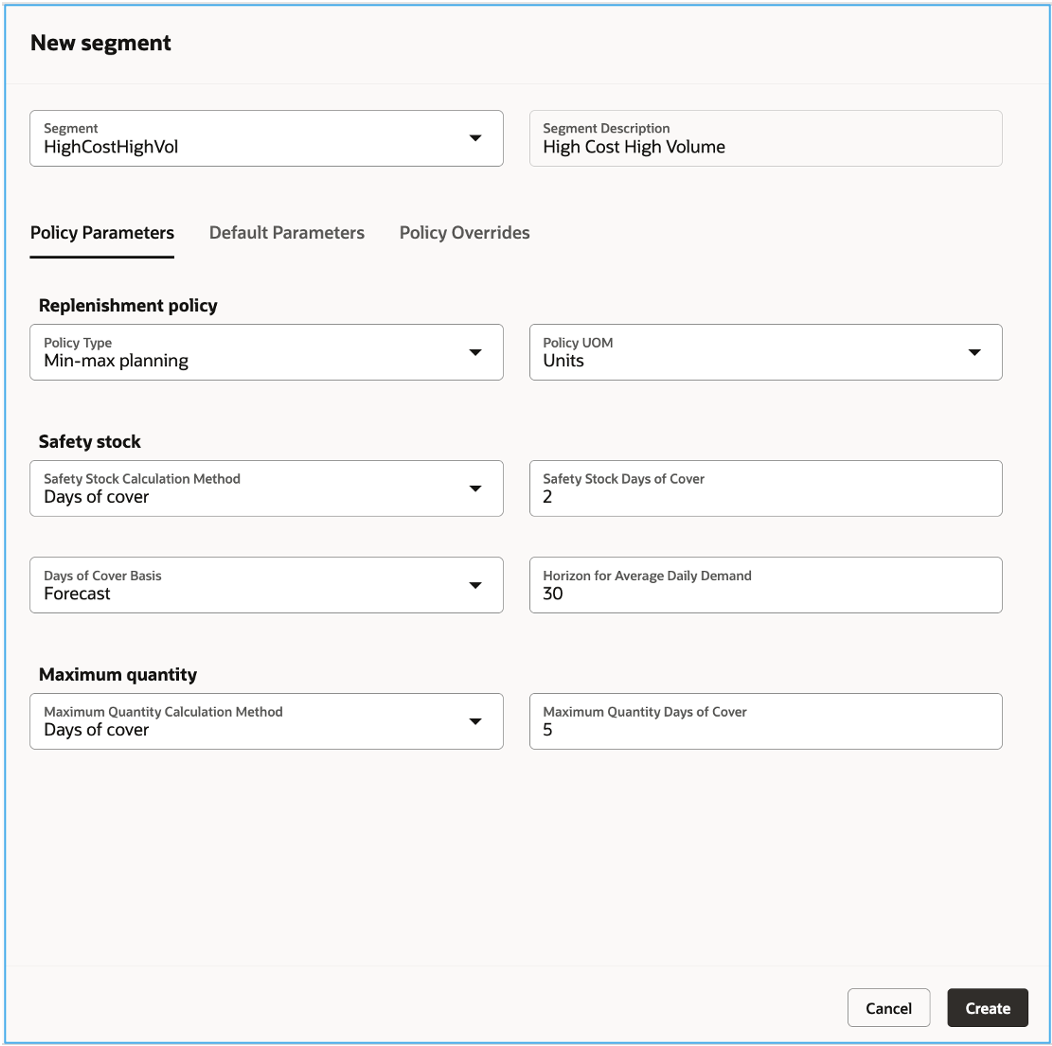
Validate the following behavior immediately:
- Safety Stock Days of Cover is enabled because you selected Days of cover.
- Days of Cover Basis permits Forecast, matching the forecast input configured for the replenishment plan.
- The maximum-quantity controls shown for Min-max planning are not the driver for ROP and EOQ.
- A fixed-order-cycle calendar is not relevant because you did not select Fixed order cycle.
- PAR-specific fields are not relevant because you did not select Periodic automatic replenishment.
If the expected fields remain disabled, first recheck Policy Type. Do not assume it is a security issue: Oracle intentionally enables and disables parameter fields based on the selected policy design.
3. Leave defaults and overrides empty for the baseline
Review the Default Parameters tab. For this initial controlled run:
- Leave Default Daily Demand blank if valid forecast data exists.
- Leave Default EOQ blank if standard cost, carrying-cost percentage, and ordering cost are maintained for the item-location.
- Do not populate default standard cost, carrying cost percentage, or ordering cost merely to make the page appear complete.
A default value is appropriate only when you have approved fallback logic. For example, a newly introduced item may lack history but need a documented default daily demand. It should not be used to hide a collection, forecast-publication, or master-data defect.
Next, open the Policy Overrides tab and confirm all override fields are blank. For ROP and EOQ, this especially means:
- Safety Stock Override is blank.
- ROP Override is blank.
- EOQ Override is blank.
This is the clean baseline needed for the next lesson. Oracle should calculate the values from collected demand, lead time, safety-stock policy, and cost data rather than read hard-coded quantities.
Save again after this check.
Attach the set to the replenishment plan and validate the effective design
Creating a policy assignment set does not automatically make it active in a replenishment plan. Attach it before the next policy-calculation run.
- In Replenishment Planning, open the replenishment plan created in the first lesson of this module.
- Select Actions > Edit Plan Options.
- Open the Scope tab.
- Confirm the Segment Group is
RPSEG_<initials>_LAB. - Select
RPAS_<initials>_LABas the Policy Assignment Set. - Save the plan options.
Do not run the plan yet. The next lesson uses the run specifically to calculate and validate policy measures.
Record the following implementation evidence:
| Evidence | Expected result |
|---|---|
| Assignment-set header | RPAS_<initials>_LAB is linked to RPSEG_<initials>_LAB |
| Configured segment | RPSEG_<initials>_REVIEW |
| Policy design | ROP and EOQ, Units, forecast basis, 30-day horizon, 2 safety-stock days |
| Defaults | Blank unless an approved data-gap fallback is required |
| Policy overrides | Blank |
| Replenishment plan Scope | Same segment group and assignment set selected |
| Target item-location membership | Preview Segment remains RPSEG_<initials>_REVIEW |
The configuration chain is now coherent: the plan selects an assignment set; the assignment set is associated with a segment group; the item-location has an effective segment within that group; the effective segment has a calculation policy.
Troubleshoot before the policy run
Use this guide if the lab does not behave as expected.
| Symptom | Probable cause | Root-cause action |
|---|---|---|
| Segment group is missing when creating the assignment set | Segmentation never completed successfully, or the group uses Customer or Demand Class | Verify the Execute Parts Segmentation request and inspect segment-group granularity |
Target item does not use the configured REVIEW policy | Its override was removed, retained incorrectly, or the effective segment differs from the expected Preview Segment | Return to Manage Segment Members and compare Segment, Segment Override, and Preview Segment |
| ROP-and-EOQ fields are missing | Another policy type is selected, or the segment row was not saved correctly | Reopen the segment’s Policy Parameters tab and reselect ROP and EOQ |
| Plan runs but appears not to use the assignment set | The plan Scope tab points to another set, another segment group, or has unsaved changes | Reopen Plan Options > Scope and verify both values |
| Calculated safety stock, ROP, or EOQ is unexpectedly blank later | Missing forecast, lead time, item cost, ordering cost, or carrying-cost data; a default or override may also be masking expected behavior | Keep overrides blank, then diagnose the missing source attribute in the next policy-calculation lab |
| A policy override seems attractive as a quick fix | The underlying data or calculation dependency has not been understood | Use an override only after recording a business-approved fixed policy and its expiry or review rule |
You have created a replenishment policy assignment set, linked it to the prior segment group, and configured a forecast-based ROP and EOQ policy for the selected item-location’s effective REVIEW segment. The key distinction is now clear: parameters calculate, defaults fill approved gaps, and overrides suppress calculation.
Next, you will run policy calculation and verify the resulting average daily demand, EOQ, safety stock, and reorder point for this same item-location.
Can't find a good explanation? Sign up and we'll make it for you
Sign up