
Welcome. This lab focuses on the calculation layer of Oracle Replenishment Planning: proving that the policy values shown for one item-location are the values Oracle should have calculated from demand, calendars, lead time, and cost inputs.
This is part of the Replenishment Planning module’s progression from policy configuration to policy validation and order analysis. Use one controlled item-location rather than attempting to validate an entire segment. That is both the fastest implementation test and the clearest way to explain your approach in a senior functional-consultant interview.
By the end of this lesson, you will run a replenishment plan with Calculate policy parameters enabled and assemble auditable evidence for:
- Average Daily Demand (ADD)
- Safety Stock
- Economic Order Quantity (EOQ)
- Reorder Point (ROP)
Plan for approximately 40–45 minutes in your 26B environment.
The calculation chain you are validating
For an item-location assigned to an ROP and EOQ policy, Oracle first determines demand and supply-policy inputs, then derives the policy measures. Conceptually, the dependency chain is:
- Demand history or gross forecast establishes Average Daily Demand.
- Calendars determine which days count in the calculation horizon.
- Lead-time attributes and sourcing establish Demand During Lead Time.
- The safety-stock method establishes the safety-stock quantity.
- Cost inputs establish EOQ.
- Oracle combines demand during lead time and safety stock to calculate ROP.
For a buy item, the total lead time used in ROP logic is:
For a transfer item, the processing lead time is not included:
The core ROP relationship is:
The key implementation distinction is this:
- A default policy value fills in an unavailable item-location attribute, such as default ordering cost.
- A policy value override deliberately supplies the policy result. When an override exists at segment or item-location level, Oracle does not calculate that policy for the affected item-location.
Therefore, a policy result that “does not match the formula” may be correct if it is an override. Always establish whether you are looking at a calculated policy or a maintained policy before troubleshooting arithmetic.
Policy Assignment Sets - Oracle Help Center
Read Oracle’s policy-specific calculation and override rules before opening the plan. This is the reference for differentiating an ROP-and-EOQ calculation from a fixed order quantity, min-max, or PAR policy.
In the policy-type table, read the “Reorder point (ROP) and economic order quantity (EOQ)” row. Focus on the ROP and EOQ logic, especially the trigger condition and Oracle’s fallback behavior when EOQ cannot be calculated. Then read “Default Policy Values,” “Policy Value Overrides,” and “Policy Value Overrides at the Item-Location Level.” Focus on the default-value rule and the fact that an override prevents calculation. These sections are essential when displayed results are unexpectedly static.
Establish a controlled item-location baseline
Choose one item-location that meets these conditions:
| Requirement | Why it matters |
|---|---|
| Item is in the replenishment plan scope | Otherwise, the plan will not calculate or display policy results. |
| Item-location resolves to an ROP and EOQ policy | This lab is specifically validating both ROP and EOQ. |
| No segment or item-location policy override | You need Oracle to calculate rather than reuse a maintained value. |
| Demand source is available | ADD needs either shipment history or gross forecast, unless Oracle falls back to default daily demand. |
| A working calendar is associated where intended | The calculation divides demand by eligible working days, not necessarily calendar days. |
| Sourcing and lead-time attributes are complete | Missing lead time invalidates the ROP validation. |
| Standard cost, carrying-cost percentage, and ordering cost are available | EOQ depends on these inputs; segment defaults can supply missing values. |
Create a short evidence sheet before running the plan. Use the actual values from your environment; do not rely on memory from earlier configuration.
| Evidence field | Your value | Where to inspect |
|---|---|---|
| Plan name | Replenishment Planning work area | |
| Item and organization | Plan scope and Policy Comparison | |
| Replenishment policy type | Policy assignment set | |
| Demand basis: History or Forecast | Policy Parameters subtab | |
| ADD horizon | Policy Parameters subtab | |
| Extrapolation percentage, if History | Policy Parameters subtab | |
| Safety stock method | Policy Parameters subtab | |
| Safety-stock days, if Days of Cover | Policy Parameters subtab | |
| Working calendar | Policy assignment / item-location context | |
| Source type: Buy or Transfer | Sourcing assignment | |
| Lead-time components | Item, supplier, or sourcing data | |
| Standard cost | Item-location attributes | |
| Carrying-cost percentage | Item-location or segment default | |
| Ordering cost | Item-location or segment default | |
| Item-location policy override present? | Yes / No | Policy assignment set |
Average Daily Demand: choose the correct audit path
Oracle uses the Days of Cover Basis setting in the policy assignment set to decide whether ADD comes from History or Forecast.
For the history path, Oracle takes collected shipment history over the configured horizon, divides it by eligible working days, then applies the extrapolation percentage:
If shipment history is unavailable, Oracle can use the segment-level Default Daily Demand.
For the forecast path, Oracle reads gross forecast from the configured source and divides it by the eligible days within the plan horizon:
A calendar is therefore not a peripheral setup object. If the ADD horizon is 30 days but the calendar is open only 22 days, the denominator is 22, not 30. This is a common cause of apparently inflated policy values.
How Average Daily Demand Is Calculated in Oracle Replenishment Planning
Read this Oracle reference to validate the demand basis and day-count logic before you compare any calculated number. It explains why a seemingly simple “monthly demand divided by 30” check often fails.
In “How Average Daily Demand Is Calculated,” read the complete comparison table. Start with the decision rule. Then read both the History and Forecast rows, paying particular attention to the working-calendar count, the forecast-source hierarchy, and the default-daily-demand fallback.
Use a simple expected-value model
For a controlled Days of Cover safety-stock test, you can construct a transparent manual baseline.
Suppose your item-location has:
- Forecast for the next 20 eligible working days: 500 units
- Average daily demand horizon: 20 days
- Safety-stock coverage: 4 days
- Buy lead time: 1 preprocessing day, 2 processing days, 1 postprocessing day, and 3 transit days
Then:
Use these figures only as a model. Your validation must use the actual demand quantity, eligible working days, lead time, and policy parameters for the selected item-location.
For EOQ, the traditional cost relationship is:
where:
- is annual demand
- is ordering cost per order
- is standard cost per unit
- is the carrying-cost percentage expressed as a decimal
The implementation check is not simply whether the EOQ “looks reasonable.” Confirm that Oracle has a nonzero demand basis and usable values for ordering cost, standard cost, and carrying-cost percentage. If Oracle cannot calculate EOQ and no default EOQ is configured at the segment level, its replenishment behavior can fall back to ordering up to ROP rather than ordering an EOQ quantity.
Run the policy calculation
Before running, confirm that your policy assignment set is associated with the plan and that the target item-location is covered by the plan’s organizations and schedules. If you changed any relevant source data, policy configuration, forecast, item attributes, or sourcing since the most recent successful run, use a current-data refresh for this validation.
-
Navigate to Supply Chain Planning and open the Replenishment Planning work area.
-
Open the replenishment plan that contains your target item-location.
-
Select Run Plan. In the Run Plan drawer, enter a clear submission note, such as:
Validate ROP EOQ policy ITEM X ORG Y YYYYMMDDThis gives you an auditable reference when multiple test runs exist.
-
Under Data Refresh Options, select Refresh with current data for a controlled validation run.
Use Do not refresh with current data only when you intentionally want to prove results against an already-known planning snapshot. -
In Scope Options, confirm Calculate policy parameters is selected. If you also need to validate the recommendation created from those values, retain Calculate replenishments. For this lesson, policy-parameter validation is the primary objective.
-
Do not select unrelated options merely because they are available. For example:
- Select Generate forecast only if your test design requires the replenishment plan to generate its own forecast.
- Select Rebalance inventory only when that is explicitly part of the test scope.
- Select Prepare for buyer planning only when testing the buyer-planning handoff.
-
Click Run, then monitor the plan run until it completes successfully. If the run ends in warning status, inspect warnings before treating policy values as valid; incomplete data can still produce partial outputs.
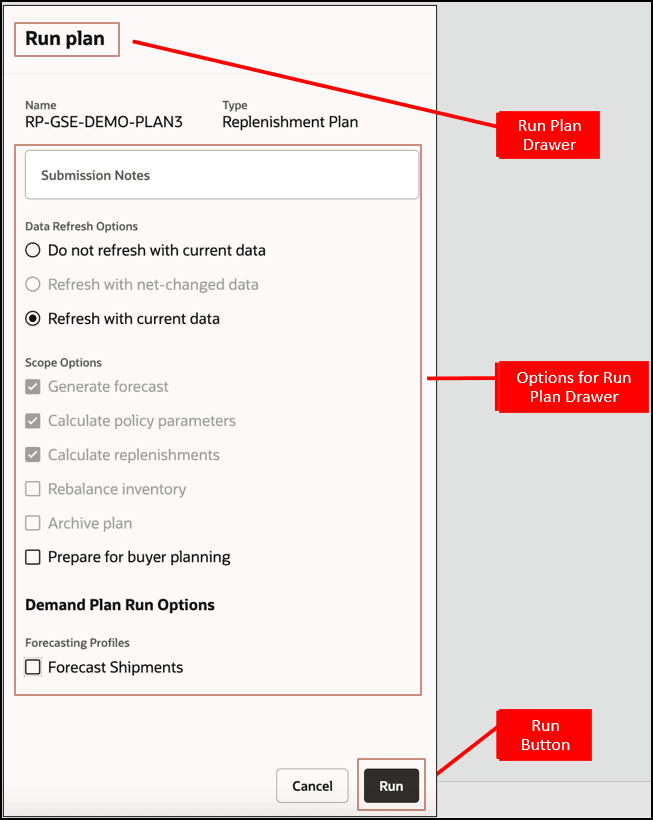
The image also highlights an important operational point: plan execution is parameterized. In an interview, do not say only “I ran the replenishment plan.” State whether you refreshed data and whether you calculated policy parameters, replenishments, or both. Those choices affect what evidence can be trusted after the run.
Verify the calculated values in the plan
After successful completion, open the plan’s policy-analysis area, typically available through Manage Policy Comparison or the corresponding policy comparison table/action in the replenishment plan. Filter the table to the selected item and organization. Your goal is to see one unambiguous item-location row and compare it with your evidence sheet.
Expose or review the available measures for:
- Average Daily Demand
- Safety Stock
- Reorder Point
- Economic Order Quantity
- Policy type
- Demand basis and relevant policy parameters, where available
- Segment and policy assignment information
- Any item-location override indicator or policy source information
If your layout does not expose the measures, personalize the table or use the plan’s measure-selection capability. Do not validate from a summary total across multiple organizations or items.
Reconcile in the right order
Validate upstream values first. A mismatch in ADD contaminates safety stock and ROP, so starting with ROP can send you to the wrong root cause.
| Validation order | What to compare | Acceptance logic |
|---|---|---|
| 1. Policy identity | Policy type and assignment | Must be ROP and EOQ and must not be overridden for this calculation test. |
| 2. ADD | Displayed ADD versus history or forecast calculation | Same demand horizon and same eligible working-day count must be used. |
| 3. Safety stock | Displayed safety stock versus configured method | For Days of Cover, validate demand multiplied by safety-stock days. For Service Level, validate configuration and treat Oracle’s service-level calculation as the governing logic. |
| 4. Lead time | Sourcing type and total lead time | Buy and transfer sourcing use different lead-time components. |
| 5. ROP | Displayed ROP versus lead-time demand plus safety stock | Compare against the displayed ADD and final policy safety stock. |
| 6. EOQ | Displayed EOQ versus available cost inputs and demand | Confirm all cost inputs, defaults, and rounding behavior before challenging the value. |
For the selected item-location, record a compact reconciliation:
| Measure | Plan result | Manual expected result | Status | Evidence / explanation |
|---|---|---|---|---|
| Average Daily Demand | Pass / Investigate | Demand source, horizon, working days | ||
| Safety Stock | Pass / Investigate | Days of cover or service level | ||
| Total Lead Time | Pass / Investigate | Buy or transfer source and component days | ||
| Reorder Point | Pass / Investigate | Lead-time demand plus safety stock | ||
| EOQ | Pass / Investigate | Cost inputs, default values, rounding |
Separate policy results from order behavior
For ROP and EOQ, Oracle triggers a replenishment order when the Beginning Inventory Position reaches or falls below the ROP. The beginning inventory position consists of projected available balance plus on-order quantity.
The calculated policy values can be correct even if no replenishment recommendation appears. Possible reasons include:
- Beginning inventory position remains above ROP.
- There is no valid demand or forecast within the relevant horizon.
- The plan has calculated policy parameters but not replenishments.
- The item-location is not eligible for a recommendation because of plan scope, sourcing, calendar, or execution constraints.
- EOQ cannot be calculated and fallback behavior applies.
Conversely, an order quantity can differ from a displayed EOQ once planning and execution constraints such as order modifiers or calendar availability are applied. Treat the policy comparison as the source for validating policy calculation; treat the replenishment recommendation as the source for validating policy application.
Fast root-cause guide for mismatches
Use this sequence when one of the four policy measures is implausible.
ADD is too high, too low, or zero
Check:
- Days of Cover Basis is History or Forecast as expected.
- Horizon for Average Daily Demand is the intended number of days.
- The attached calendar’s working days are counted as expected.
- Shipment history was collected successfully if using History.
- Gross forecast is present and in the plan horizon if using Forecast.
- The default shipment-history-measure profile is pointing to the intended history measure.
- No fallback to Default Daily Demand occurred unexpectedly.
A typical defect is using 30 calendar days in a manual calculation when Oracle found only 22 working days. Another is expecting sales orders to be used when the policy is explicitly configured to use shipment history.
Safety stock is unexpected
Check:
- Whether the safety-stock basis is Days of Cover or Service Level.
- Whether safety stock is maintained as units or as days.
- The ADD value used by the safety-stock calculation.
- Whether a segment-level or item-location policy override supplied safety stock directly.
- Whether the policy is time-phased because its UOM is Days.
For a clean initial test, Days of Cover is easier to audit because it makes the demand relationship visible. Service-level safety stock should be validated against its configured service and variability inputs rather than reduced to a days-of-cover formula.
ROP is unexpected
Check:
- The displayed ADD.
- Safety stock.
- The resolved source type: buy or transfer.
- Each lead-time component, especially transit time.
- The sourcing rule and assignment effective for this exact item-location.
- Calendar effects on supply availability, if the timing looks correct numerically but not operationally.
An ROP that is exactly short by one lead-time component is strong evidence that the wrong sourcing path or incomplete lead-time attribute is being used.
EOQ is blank, zero, or implausible
Check:
- Standard cost at the item-location, then the segment default.
- Carrying-cost percentage at the item-location, then the segment default.
- Ordering cost at the item-location, then the segment default.
- Demand basis and nonzero ADD.
- Default EOQ configured for the segment, if calculation is not possible.
- Segment and item-location policy overrides.
Do not “fix” EOQ by immediately creating an override. First establish whether the issue is missing or incorrect master data. An override may conceal a data-governance defect that will recur for other item-locations.
Lab completion evidence
Before closing the lab, retain these artifacts:
- The plan-run submission note and successful run status
- Screenshot or export of the target item-location in Policy Comparison
- The policy assignment configuration showing policy type, demand basis, horizon, and safety-stock method
- The sourcing and lead-time evidence
- The item or segment cost evidence used by EOQ
- Your one-row reconciliation sheet with pass/investigate outcomes
A concise senior-level explanation of the run would sound like this:
“I refreshed current data and ran the replenishment plan with Calculate Policy Parameters enabled. For the selected item-location, I first validated the resolved ROP-and-EOQ policy and confirmed no override existed. I reconciled average daily demand against the configured forecast or history horizon and working calendar, validated safety stock against its configured method, derived ROP from lead-time demand plus safety stock, and then traced EOQ to standard cost, carrying percentage, ordering cost, and applicable segment defaults.”
Key takeaways
A reliable replenishment-policy validation proceeds from inputs to outputs:
- ADD depends on the configured demand basis, horizon, forecast or history availability, and eligible calendar days.
- Safety stock must be interpreted according to its configured method; Days of Cover is the most transparent controlled-test method.
- ROP equals demand during total lead time plus safety stock.
- EOQ depends on demand and cost data, with segment defaults filling missing inputs.
- Overrides do not merely adjust calculated values; they prevent calculation for the affected scope.
- A correct policy value and a generated replenishment order are related but distinct validations.
Next, you will use these same measures to correct an implausible replenishment order by simulating policy changes and tracing demand, lead time, calendars, sourcing, and order modifiers.
Can't find a good explanation? Sign up and we'll make it for you
Sign up