
Hello! Welcome back to our module on SEO & Organic Search Foundations.
In our last lesson, you mastered the art of crafting compelling title tags and meta descriptions. These elements act as your digital storefront on Google, speaking directly to potential customers to earn their clicks. You've learned how to communicate with people. Now, we're going to learn how to communicate directly with machines.
Today's lesson addresses the learning outcome: Add basic 'SoftwareApplication' Schema.org markup to a product page to enhance search appearance. Think of this as adding a layer of structured, machine-readable data to your product page. This helps search engines like Google and AI tools like Perplexity understand exactly what your page is about—not just a webpage, but a page describing a specific piece of software. This can unlock powerful "rich results," like star ratings and pricing information, directly in the search listings, making your SaaS stand out.
1. What is Schema Markup?
In the previous lesson, we placed content in <title> and <meta> tags. While these give hints to search engines, they are still just strings of text. Schema.org provides a vocabulary (a shared language) that allows you to be far more explicit.
You can tell Google, "This string of text is not just any text; it's the name of a SoftwareApplication. This number isn't just a number; it's the price. This other number is the ratingValue."
Given your computer science background, you can think of it as adding type definitions to the content on your page. It removes ambiguity and provides clear, structured context. The most common and Google-recommended format for this is JSON-LD (JavaScript Object Notation for Linked Data), which you'll find very familiar.
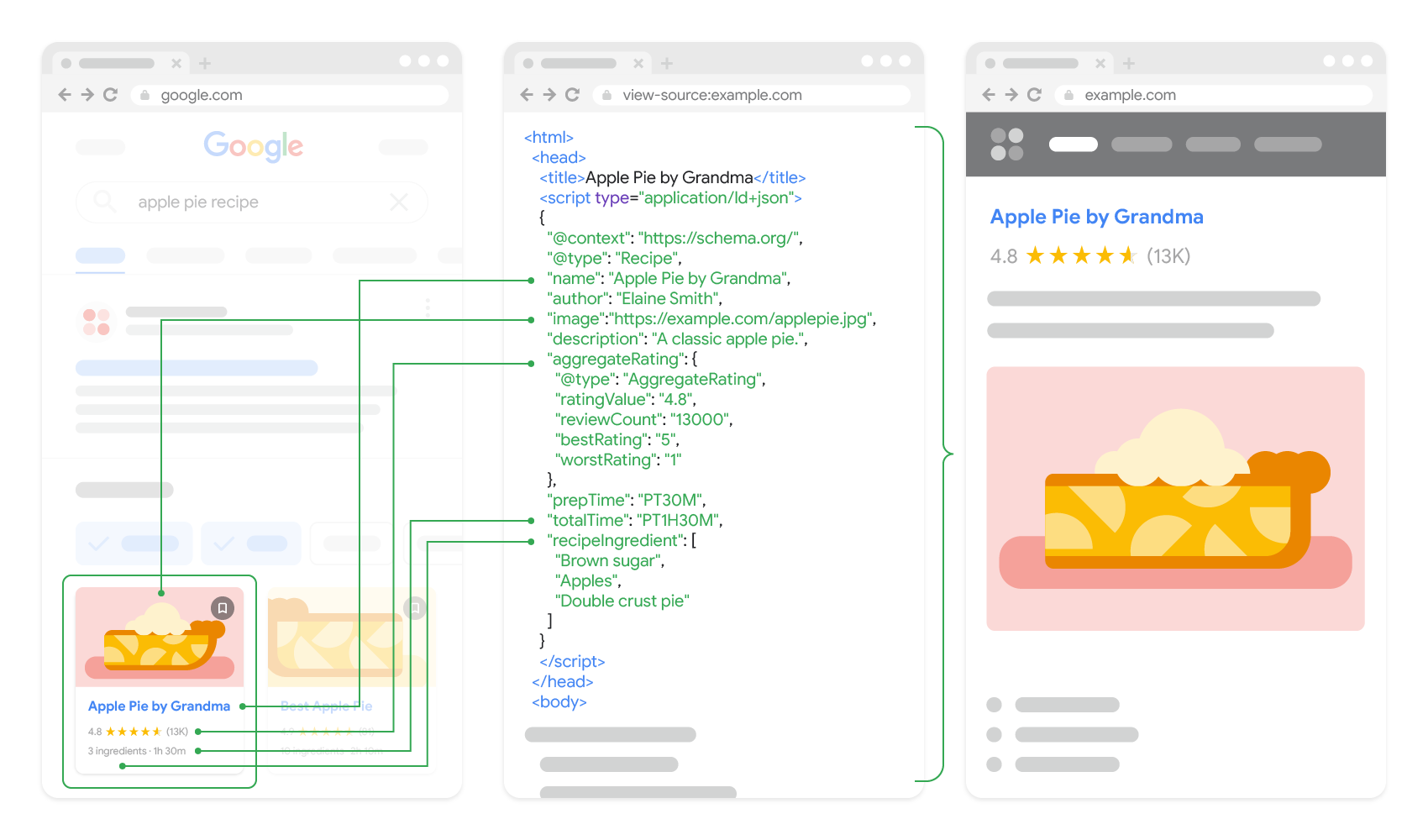
2. The SoftwareApplication Schema for Your SaaS
For a SaaS company, the most important schema type is SoftwareApplication. This tells search engines that your product page describes a piece of software, which makes it eligible for software-specific search features.
To understand the core components, let's look at the official documentation.
Software app (SoftwareApplication) structured data
Google's developer documentation is the definitive source for what properties are required and recommended for the SoftwareApplication schema. This will be our technical reference.
Read the section titled 'Structured data type definitions'. Focus on the tables for 'Required properties' and 'Recommended properties'. Pay close attention to what name, offers, and aggregateRating entail.
Key Properties to Implement:
Based on that documentation, here are the crucial properties for your SaaS product page:
@context: Always"https://schema.org"@type:"SoftwareApplication"name: The name of your SaaS.operatingSystem: For a web-based SaaS, this would be"Web Browser". You could also add"Windows","macOS", etc., if you have desktop clients.applicationCategory: The type of your app, e.g.,"BusinessApplication","ProductivityApplication","FinanceApplication".offers: This object describes your pricing.- For a free product, set
priceto0. - For a paid product, specify the
priceandpriceCurrency(e.g.,"USD"). - If you have multiple pricing tiers, you can use
@type: "AggregateOffer"and specify thelowPriceandhighPrice.
- For a free product, set
aggregateRating: If you have user reviews, this object shows an average rating. This is what generates the star ratings in search results and is a huge driver of clicks. It requires properties likeratingValueandreviewCount.
Here is a practical example of how these properties come together for a fictional SaaS product.
Schema SEO for SaaS Company - Implementation Guide
The article 'Schema SEO for SaaS Company' provides excellent context and a clear example of what a complete SoftwareApplication schema looks like in practice.
First, read the section 'Essential Schema Types for SaaS Businesses' to reinforce the importance of SoftwareApplication. Then, jump to the section 'Schema Markup Examples for SaaS Companies' and study the 'Software Application Schema Example' code block. Notice how it combines all the properties we just discussed.
3. Your AI-Powered Workflow for Generating Schema
As you prefer a tactical, hands-on approach, let's build a repeatable workflow to generate this code using AI, which will dramatically speed up the process for your future SaaS projects.
The following video demonstrates a fantastic end-to-end process. While the example is for a blog post and video, the workflow of prompting -> generating -> validating -> correcting is exactly what we will use.
How to Add Schema Markup to Your Website (SEO For Beginners)
This video from Scott Redgate, 'How to Add Schema Markup to Your Website', shows a complete workflow for using an AI tool (Google Gemini) to generate, implement, and validate schema markup. We will adapt this process for our SoftwareApplication type.
Watch from 05:19 to 15:59. Focus on the process, not the specific schema type being generated: Prompting (05:19 - 08:35): See how he asks the AI to analyze content and suggest schema, and then asks it to generate the code. Implementation (08:35 - 10:30): Notice how he pastes the code into the website's HTML. Validation & Correction (10:30 - 15:59): This is the most critical part. Observe how he uses testing tools to find errors and then uses the AI again to fix them. This iterative process is key.
Your Custom ChatGPT Prompt for SoftwareApplication Schema
Here is a prompt you can use to generate the schema for any of your SaaS products.
Act as a technical SEO specialist with expertise in Schema.org for SaaS companies.
1. Product Context (You fill this in):
- Product Name: ProjectFlow
- Product URL: https://www.projectflow.com/
- Product Description: A team collaboration and project management tool designed for agile software teams.
- Operating Systems: Web Browser, Windows, macOS
- Application Category: BusinessApplication
- Pricing Model: 3 tiers. Free plan at $0, Pro plan at $29/month, Enterprise at $99/month. Currency is USD.
- Aggregate Rating: 4.7 out of 5 stars from 856 reviews.
2. Your Task:
Based on the context above, generate a complete and valid JSON-LD script for theSoftwareApplicationschema type.
- Use
"AggregateOffer"for theoffersproperty to represent the pricing tiers.- Include the
aggregateRatingproperty.- Ensure all required properties are present.
4. Implementation and Validation
Once you have the code from your AI tool, you need to add it to your product page and test it.
1. Add the Code to Your Page
The generated JSON-LD code should be placed inside a <script type="application/ld+json"> tag, typically within the <head> section of your page's HTML. Most landing page builders (like Webflow, Carrd, Unbounce) or CMS platforms provide a field for adding custom code or header scripts.
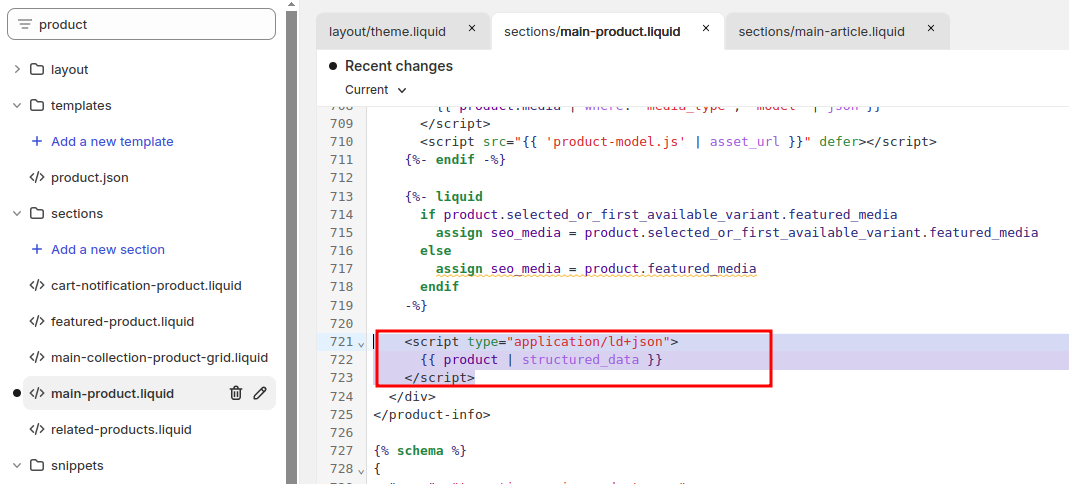
2. Validate Your Implementation
Never skip this step. A small syntax error can make the entire schema invalid. Use Google’s official tools to test your code before and after deploying it.
- Rich Results Test: This tool shows you if your page is eligible for rich results. It will flag any errors or warnings.
- Schema Markup Validator: A more general-purpose validator that checks for syntax and adherence to Schema.org standards.
If you find an error, go back to your AI prompt, describe the error reported by the tool (just as shown in the video), and ask it to provide a corrected version.
Test your understanding!
You have a new SaaS called "InvoiceJet".
- It's a web-based tool for freelancers (
ApplicationCategory:FinanceApplication). - It has a single paid plan at $15 USD per month.
- It has an average rating of 4.9 stars from 120 reviews.
Write the SoftwareApplication JSON-LD schema for InvoiceJet's homepage. Don't forget the @context and @type properties.
Show answer
Here's a valid JSON-LD script. The order of properties doesn't matter, but the structure and values do.
<script type="application/ld+json">
{
  "@context": "https://schema.org",
  "@type": "SoftwareApplication",
  "name": "InvoiceJet",
  "operatingSystem": "Web Browser",
  "applicationCategory": "FinanceApplication",
  "offers": {
    "@type": "Offer",
    "price": "15.00",
    "priceCurrency": "USD"
  },
  "aggregateRating": {
    "@type": "AggregateRating",
    "ratingValue": "4.9",
    "ratingCount": "120"
  }
}
</script>
Conclusion
Excellent work! You've now moved beyond basic on-page SEO into the realm of structured data. By providing this clear, machine-readable information, you're not just hoping search engines understand your product; you're explicitly telling them what it is, what it costs, and how much users love it. This is a crucial advantage for any new SaaS trying to gain visibility and credibility.
Key Takeaways:
- Schema.org provides a vocabulary to describe your content to search engines in a structured way.
- JSON-LD is the Google-recommended format for implementing schema.
- The
SoftwareApplicationschema type is essential for SaaS product pages and can unlock rich results like ratings and prices. - AI tools can rapidly generate schema code, but you must always validate it with tools like the Rich Results Test before deployment.
Preview of the Next Lesson:
We've now worked on how you present your page's content and structure to users and search engines. Next, we'll shift our focus to the technical performance of the page itself. In the next lesson, you will learn to analyze and identify improvements for Core Web Vitals using Google PageSpeed Insights. A fast, responsive page is crucial for both user experience and search rankings, and you'll learn how to measure and improve it.