
Hello! Let's continue our journey into the heart of Laravel's architecture.
In our previous lesson, we compared the three main ways to access services in Laravel: Dependency Injection, Facades, and helper functions. We established that the Service Container is the central piece of this puzzle, responsible for managing and providing these services.
Today, we'll dive deeper into how the container actually works. The learning outcome is to bind and resolve services from the container manually and using automatic injection. You'll learn how Laravel can often "magically" figure out your class dependencies, and also how you can take full control to tell the container exactly how to build your objects. This knowledge is fundamental to building flexible, testable, and powerful Laravel applications.
The Magic: Automatic Injection & Zero-Configuration Resolution
For a large number of cases, you don't need to do anything to tell the container how to build an object. Laravel is smart enough to figure it out on its own. This is called Zero-Configuration Resolution or auto-wiring.
How does it work? When you type-hint a class in a constructor or method that the container is responsible for resolving (like a controller), Laravel uses PHP's Reflection capabilities to inspect that type-hint.
- If the type-hint is a concrete class (a class that can be instantiated with
new), the container will simply create a new instance for you. - If that concrete class also has dependencies in its own constructor, the container will recursively resolve those as well.
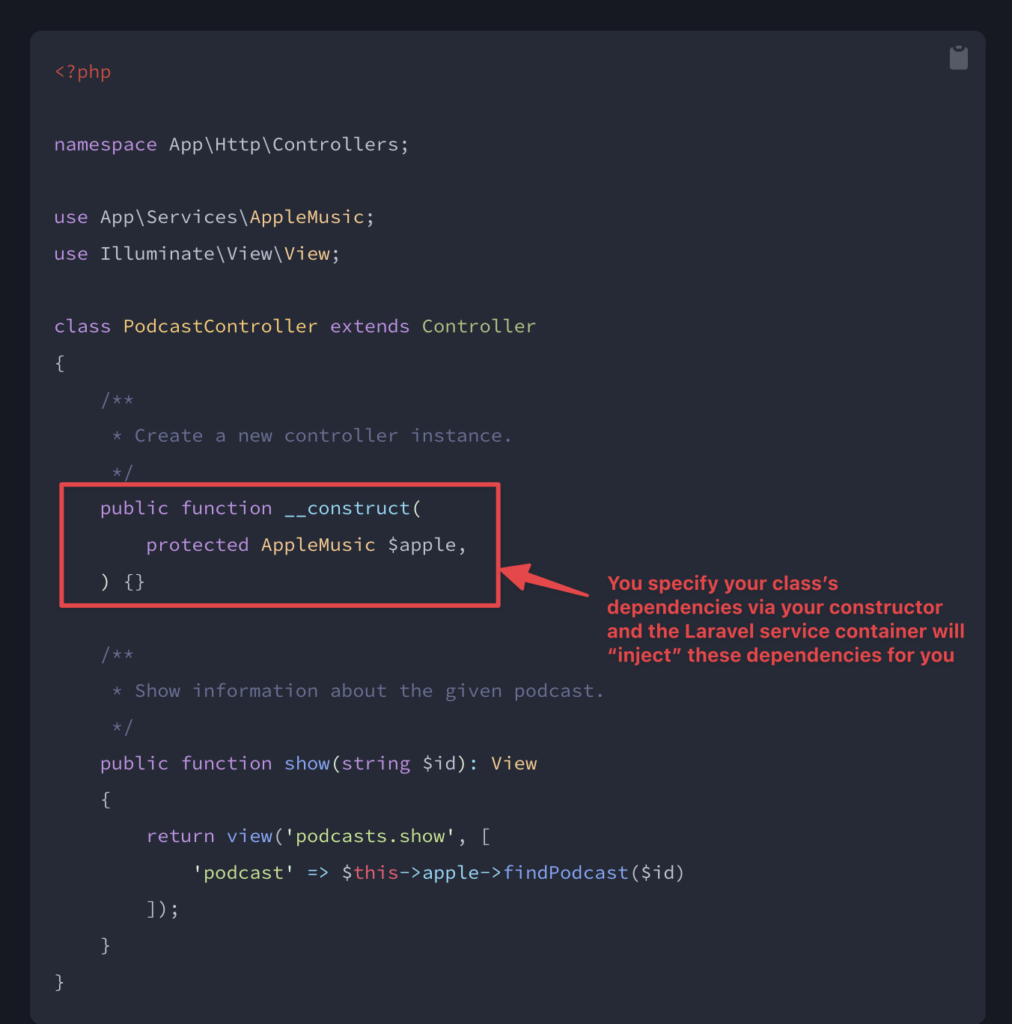
This is incredibly powerful because it means for many of your own services, you can just type-hint them and they will be automatically injected without any extra configuration files.
Let's watch a demonstration of this in action. The following video will show how Laravel automatically injects a custom service and what happens when you try to inject something it can't automatically figure out, like an interface.
Understanding the Laravel Service Container | Learn Laravel The Right Way
This video from the 'Learn Laravel The Right Way' series by Program With Gio provides a clear demonstration of Laravel's zero-configuration resolution.
Watch the segment from 05:52 to 11:19. Focus on: How the TransactionService class is automatically injected into the controller without any explicit configuration. The explanation of how PHP's Reflection API makes this possible for concrete classes. The error that occurs when you change the service to an interface. This perfectly sets up our next topic: manual binding.
As you saw, auto-wiring works great for concrete classes but fails for interfaces. Why? Because an interface is a contract, not an implementation. If a class depends on PaymentGatewayInterface, the container has no idea whether you want to use the Stripe implementation, the PayPal implementation, or something else. This is where we need to give the container explicit instructions.
Manual Binding: Taking Control of the Container
When you need to tell the container how to resolve something, you create a binding. This is your way of registering a "recipe" that tells the container, "When someone asks for X, give them Y."
The primary place to register bindings is in the register method of a Service Provider, typically app/Providers/AppServiceProvider.php for application-specific services.
There are two main types of bindings:
bind(): Creates a new instance every time the service is resolved from the container.singleton(): Creates an instance only the first time it's resolved. On all subsequent requests for that service within the same request lifecycle, the container will return the exact same instance.
FAQs on Laravel Service Container
This short FAQ from a practical guide on dev.to clearly explains the difference between bind and singleton and when you'd choose one over the other.
Read the first question in the FAQ section, titled 'Q1: What's the difference between bind() and singleton() in the Service Container?'. This will solidify your understanding of these two core methods.
As a rule of thumb:
- Use
singletonfor services that are expensive to create or that need to maintain state throughout a request (e.g., an API client, a database connection wrapper). - Use
bindfor lightweight, stateless services where you always want a fresh object.
How to Bind
Let's look at the most common binding scenario: binding an interface to a concrete implementation.
// In app/Providers/AppServiceProvider.php

use App\Contracts\PaymentGatewayInterface;
use App\Services\StripePaymentGateway;

public function register(): void
{
    $this->app->bind(
        PaymentGatewayInterface::class,
        StripePaymentGateway::class
    );
}
This tells Laravel: "Anytime a class's constructor asks for PaymentGatewayInterface, give it an instance of StripePaymentGateway."
Sometimes, creating the object is more complex. For example, it might need an API key from your configuration. For this, you can pass a closure as the second argument.
// In app/Providers/AppServiceProvider.php

use App\Contracts\PaymentGatewayInterface;
use App\Services\StripePaymentGateway;

public function register(): void
{
    $this->app->singleton(PaymentGatewayInterface::class, function ($app) {
        return new StripePaymentGateway(
            config('services.stripe.secret')
        );
    });
}
Notice here we used singleton. It makes sense for a payment gateway client, as we probably don't need to re-instantiate it multiple times in one request. The closure also receives the container instance itself (as $app), which you can use to resolve other dependencies if needed.
The following video segment walks through this entire process: creating an interface, binding it to a class in a service provider, and handling more complex dependencies with closures.
Understanding the Laravel Service Container | Learn Laravel The Right Way
Let's return to the Program With Gio video to see a complete, practical example of manual binding.
Watch the segment from 11:19 to 20:36. This is a crucial part of the lesson. You will see: How to bind an interface to a concrete class in AppServiceProvider. How to use a closure for more complex bindings, like passing a configuration array. How to resolve dependencies within a binding closure using $app->make().
Manual Resolution: Pulling from the Container
While automatic injection (type-hinting in constructors/methods) is the preferred way to receive dependencies, there are times you might need to manually "pull" a service out of the container from within a method.
Laravel provides several convenient ways to do this. They all achieve the same goal.
- The
resolve()helper:$service = resolve(MyService::class); - The
app()helper:$service = app(MyService::class); - The
Appfacade:$service = App::make(MyService::class);
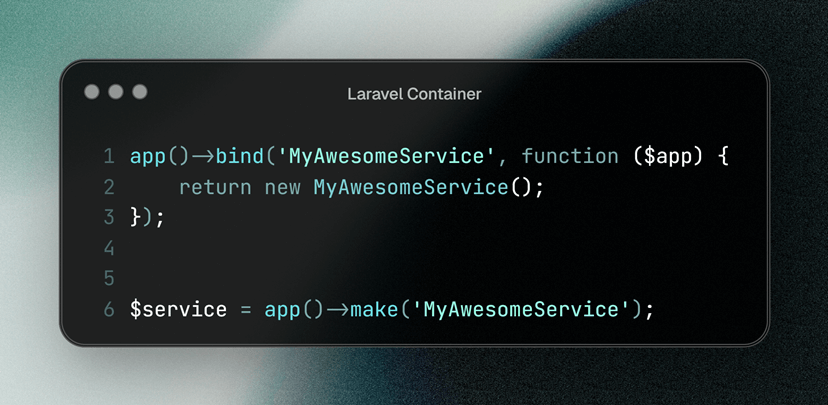
Choosing between resolve(), app(), or App::make() is mostly a matter of personal or team preference. They are functionally identical for this purpose.
Let's watch a final clip that demonstrates these different methods.
Understanding the Laravel Service Container | Learn Laravel The Right Way
This clip shows the various helper functions and facade methods you can use to manually resolve a service from the container.
Watch from 20:36 to 24:29. The video demonstrates resolving a service using: app()->make() The App facade The resolve() helper Injecting the container itself
While manual resolution is useful, you should favor automatic constructor injection whenever possible. It makes your class's dependencies explicit and clear, whereas manual resolution can hide what your class truly depends on.
Conclusion
You now have a solid understanding of how Laravel's Service Container works under the hood. You've seen both its automatic "magic" and the manual controls you can use to direct it.
Key Takeaways:
- Automatic Injection (Auto-wiring): For concrete classes, Laravel uses reflection to automatically build and inject dependencies without any configuration.
- Manual Binding: You must explicitly bind an interface to a concrete implementation in a Service Provider's
register()method. bind()vs.singleton():bind()creates a new instance on every resolution, whilesingleton()reuses the same instance throughout the request.- Manual Resolution: When automatic injection isn't an option, you can manually pull services from the container using helpers like
app()andresolve().
Mastering the Service Container is a significant step toward becoming an advanced Laravel developer. It allows you to write decoupled, flexible, and highly testable code—hallmarks of professional software development.
Next Up:
We have now covered the core architectural concepts of Laravel's request lifecycle and service container. In the next lesson, we will shift gears to focus on another fundamental part of the framework: advanced routing patterns. You'll learn how to use features like route model binding customization and rate limiting to build robust and efficient routes for your application.