
Hello! Welcome back to your course on mastering Laravel.
In our last lesson, we explored the request lifecycle and the central role of the Service Container. We learned that the container is a powerful tool for managing dependencies and that Dependency Injection (DI) is the primary way the framework provides services to your classes, like controllers.
Today, we'll build directly on that knowledge. The learning outcome for this lesson is to differentiate between Facades, helper functions, and dependency injection for accessing services.
While dependency injection is powerful, it's not the only way to interact with services from the container. Laravel offers two other convenient mechanisms: Facades and global helper functions. By the end of this lesson, you'll understand how each of these three approaches works, their respective pros and cons, and—most importantly—how to make an informed decision about which one to use in different situations. This is a crucial step in writing clean, readable, and maintainable Laravel code.
A Quick Recap: Dependency Injection
As we covered previously, Dependency Injection (DI) is a design pattern where a class's dependencies are "injected" from an external source (the Service Container) rather than being created by the class itself. In Laravel, this most often happens in two places:
- Constructor Injection: Type-hinting a dependency in a class's constructor. The container automatically resolves and passes in an instance when the class is created.
- Method Injection: Type-hinting a dependency in a controller method (or other specific methods like in Jobs or Listeners). The container provides the instance when the method is called.
The following diagram illustrates the general flow. A Client (like your controller) needs a Service. It doesn't create it itself; instead, an Injector (the Service Container) is responsible for creating the Service and providing it to the Client.

The primary benefits of DI are:
- Explicit Dependencies: It's crystal clear what a class needs to function just by looking at its constructor.
- Flexibility & Testability: You can easily swap implementations, especially when you depend on an interface. This is invaluable for testing, as you can inject a "mock" or fake version of a service.
The main perceived drawback is:
- Verbosity: It can sometimes feel like more boilerplate code, especially in classes with many dependencies.
Introducing Facades: The "Static" Interface
At first glance, Facades look like static method calls. For example, to access the cache, you might write:
use Illuminate\Support\Facades\Cache;

$value = Cache::get('key');
This syntax is clean and concise. However, this is not a typical static method call. In Laravel, a facade is a "static proxy" to an object that lives in the service container. It provides the benefit of a terse, expressive syntax while maintaining the testability of the underlying non-static object.
The general Facade design pattern aims to provide a simplified interface to a more complex system, as shown below.
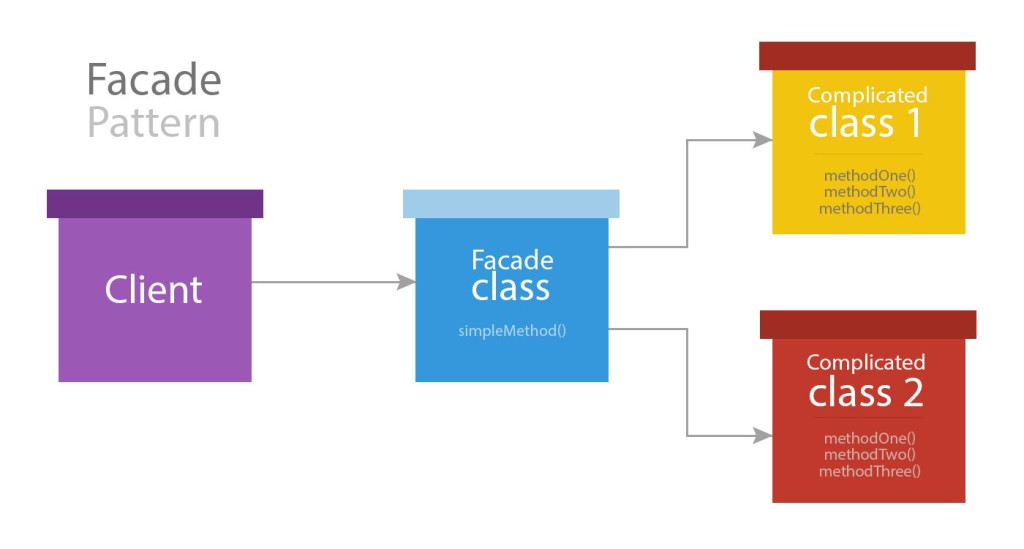
How Do Facades Work?
Facades work through a bit of PHP "magic." When you call a static method like Cache::get('key'), the base Facade class uses the __callStatic() magic method to intercept the call. It then:
- Looks at the specific facade class you're using (e.g.,
Illuminate\Support\Facades\Cache). - Calls a method on that class called
getFacadeAccessor(). This method returns a string, which is the key of the service binding in the container (e.g.,'cache'). - Asks the service container to resolve the object bound to that key.
- Calls the original method (
get) on the resolved object.
The official documentation provides the definitive explanation of what Facades are and how they work. Understanding the getFacadeAccessor method is key to demystifying them.
First, read the 'Introduction' section to get the official definition. Then, jump to the 'How Facades Work' section. Pay close attention to the explanation of the getFacadeAccessor() method and how it links the static call to a service container binding.
Facades and Testing
One of the most significant advantages of Facades is their testability. Since they resolve objects from the container, Laravel can easily swap the real service with a fake or mock implementation during a test. This allows you to isolate your code and make assertions without hitting external services like a real cache or API.
The following video demonstrates how to create a custom facade and, more importantly, how to create a "fake" version for testing.
Why the Laravel Service Container is the Key to Better Dependency Management
Let's see a practical demonstration of creating and using a Facade, with a focus on how it simplifies testing.
Watch the segment from 25:57 to 30:54. The video shows: How to create a new Facade class. How to use the Facade in place of an injected dependency. The power of creating a fake() method on the Facade to swap the implementation for testing purposes.
Global Helper Functions
The third way to access services is through global "helper functions." Laravel provides dozens of these functions that are available everywhere in your application without needing to import any class.
For example, instead of using the Response facade, you can use the response() helper:
// Using the Facade
use Illuminate\Support\Facades\Response;
return Response::json(['name' => 'Alex']);

// Using the helper function
return response()->json(['name' => 'Alex']);
In many cases, a helper function is simply a wrapper for its corresponding facade. There is no practical difference in functionality, and you can test code that uses helpers in the exact same way you test code that uses facades.
Some helpers, like app() and resolve(), are specifically designed to pull things directly from the service container.
Resolving Dependencies Helpers
This short video clarifies the different helper functions available for resolving dependencies and how they relate to one another.
Watch from 01:36 to 05:51. The video demonstrates the resolve(), app(), and App::make() methods. The key takeaway is that these helpers are essentially different syntaxes for achieving the same goal: asking the container for a service.
The primary benefit of helpers is convenience and readability, especially in places like Blade template files or simple route closures where you don't want to import a full class namespace.
The Comparison: When to Use Which?
Now for the most important part: deciding which approach to use. There is no single "best" way; the choice depends on the context and what you want to optimize for—explicitness, brevity, or convenience.
Laravel Facades vs Dependency Injection: What's the Difference...
This article provides an excellent, balanced comparison of Facades and Dependency Injection, offering clear guidance on where each pattern shines.
Please read this article from start to finish. It's concise and directly addresses our learning outcome. Focus on the sections 'When to Choose Facades' and 'When to Choose Dependency Injection' to understand the practical trade-offs.
Here is a summary table of the key differences based on what we've learned:
| Feature | Dependency Injection | Facades | Helper Functions |
|---|---|---|---|
| Syntax | Explicit type-hint in constructor/method. private readonly MyService $service; |
"Static" method call. MyService::doSomething(); |
Global function call. myService()->doSomething(); |
| Dependency Visibility | High. Dependencies are explicitly declared, making the class's requirements obvious. | Low. Dependencies are hidden within method calls. You have to read the code to find them. | Low. Same as facades; dependencies are hidden within function calls. |
| Testability | High. Excellent for mocking, as you can inject any implementation (real or fake). | High. Laravel provides built-in, expressive mocking tools (shouldReceive, fake). |
High. Testable in the same way as their corresponding facades. |
| Risk of "Scope Creep" | Low. A large constructor is a visual warning that a class is doing too much. | High. It's easy to pull in many facades, leading to large, unfocused classes. | High. Same as facades; it's easy to sprinkle many helper calls throughout a class. |
| Common Use Cases | Core business logic, Service classes, Packages, anywhere dependencies must be explicit and swappable. | Controllers, Route closures, Console commands. Places where brevity is valued and dependencies are straightforward. | Route closures, Blade templates, quick one-off tasks. Places where convenience is paramount. |
Conclusion
You now have a clear picture of the three primary ways to access services in a Laravel application. None is inherently superior; a skilled Laravel developer knows how to use all three effectively.
Key Takeaways:
- Dependency Injection is the most explicit approach. It clearly declares a class's dependencies in its constructor or methods, which is excellent for maintainability and adhering to SOLID principles. It's best suited for the core, complex parts of your application.
- Facades offer a concise, "static-like" syntax that acts as a proxy to services in the container. They are highly testable but can hide dependencies and lead to "scope creep" if not used with care. They shine in controllers and other framework-level code.
- Helper Functions provide maximum convenience with globally available functions. Many are simply wrappers around facades. They are great for simple tasks, especially in routes and views.
By understanding these trade-offs, you can write code that is not only functional but also clean, maintainable, and easy for others (and your future self) to understand.
Next Up:
In the next lesson, we will take a deeper practical dive into the Service Container itself. You'll learn how to bind and resolve services from the container manually and using automatic injection, giving you full control over how your application's components are constructed and managed.