Recommended resources
The freely available resources this lesson will direct you to.
- Amazon Affiliate Marketing for Beginners (2025): Step-By-Step Tutorialwww.youtube.com
- How to Start Affiliate Marketing in 2024 (Beginner Tutorial)www.youtube.com
- Join the Amazon Affiliate Program — Step By Step Instructionswww.smartpassiveincome.com
- How I made my first £500 online with Amazon Affiliate : r/sidehustlewww.reddit.com
Introduction
Welcome back! In our last lesson, you did some crucial research to identify the main ways influencers in the budget-living niche earn money: sponsorships, affiliate marketing, and selling their own products. You even created a list of potential affiliate programs that fit your "cheap and cheerful" brand.
Today, we move from research to action. This lesson is all about taking your first concrete step into monetization. We'll focus on affiliate marketing because it's the most accessible path for new creators.
Your learning outcome for this lesson is to sign up for an affiliate marketing program relevant to budget living (e.g., Amazon Associates) and create an affiliate link. By the end of our 60 minutes, you will have an active affiliate account and know exactly how to generate a trackable link for a product you might want to recommend to your future audience.
A Quick Refresher: What is Affiliate Marketing?
Before we dive in, let's quickly refresh our understanding of affiliate marketing. It can seem complex, but the core idea is very simple.
How to Start Affiliate Marketing in 2024 (Beginner Tutorial)
The creator Greg Gottfried explains this concept perfectly in his video 'How to Start Affiliate Marketing in 2024.'
Watch from 00:38 to 01:21. He boils it down to its essence: a referral program where you share a unique link and earn a commission on sales.
As he explains, you partner with a company, get a unique link, share it, and earn a commission when someone buys through your link. It costs your follower nothing extra, but it allows them to support you for providing valuable recommendations.
Many of the world's biggest companies use these programs. We're going to focus on the largest one: the Amazon Associates program.
Why Start with Amazon Associates?
For a "cheap and cheerful lifestyle" creator, the Amazon Associates program is an ideal starting point. Amazon sells a vast range of budget-friendly products your audience would be interested in, from kitchen gadgets and cleaning supplies to affordable home decor.
However, it's important to understand both the pros and cons.
Join the Amazon Affiliate Program — Step By Step Instructions
The article 'Join the Amazon Affiliate Program — Step By Step Instructions' from the Smart Passive Income blog does a great job of breaking this down.
Read the section titled 'What is the Amazon Associates affiliate program and why should I join?' Focus on the two main advantages it highlights: 'It’s where lots of people shop' and 'You get the whole cart.'
To summarize the key points from the article:
- Advantage 1: Trust and Volume. People already know, trust, and shop on Amazon. You don't have to convince them to buy from the site, which means they are more likely to complete a purchase (this is called a high "conversion rate").
- Advantage 2: The "Whole Cart" Commission. This is the biggest benefit. If someone clicks your link for a specific budget-friendly cookbook, but then also adds a new vacuum cleaner and a set of towels to their cart and checks out, you get a commission on the entire purchase, not just the cookbook! This happens as long as they buy within 24 hours of clicking your link.
- The Downside: Low Commission Rates. As the article shows, the commission percentages are not very high (often 1-4% for common product categories). However, the high volume of sales and the "whole cart" benefit can make it a very effective income stream over time.
Now that you know why we're starting here, let's get you signed up.
Action Step 1: Sign Up for Amazon Associates
This is our main practical task for today. We'll walk through the process step-by-step. You will need to provide your personal information, tax details (you can do this later, but it's required before you get paid), and the URLs for the social media profiles you've already set up.
Amazon Affiliate Marketing for Beginners (2025): Step-By-Step Tutorial
The video 'Amazon Affiliate Marketing for Beginners' by Justin Brown is an excellent, clear walkthrough of the entire sign-up process. We'll follow along with him.
Watch from the beginning to 03:40. Follow the steps on your own screen as he goes through them. Pause the video as needed. \nHe will guide you through: Finding the Amazon Associates page. Creating your account and filling in your details. Adding your website/social media URLs. Choosing your unique 'Store ID.' Understanding the approval process and the 180-day requirement to make 3 sales.
To support the video, here are the steps in text format, based on the video and the Smart Passive Income article:
- Go to the Amazon Associates homepage and click "Sign Up."
- Sign in with your existing Amazon account or create a new one.
- Enter your account information, including your name and address.
- Enter your social media URLs. In the box that asks for your website or mobile app URLs, enter the links to your Instagram, TikTok, and YouTube profiles. You must enter at least one.
- Complete your profile.
- Choose a Store ID: This is your unique username. Make it short and related to your brand name. Amazon will add numbers if it's already taken.
- Describe your content and how you heard about the program.
- Agree to the terms and click Finish.
You will now have temporary access to your Associates dashboard! As the video mentions, your account will be fully approved after you refer three "qualified sales" within 180 days. This means you have a good amount of time to get your content strategy running before you need to worry about making sales.
Action Step 2: Create Your First Affiliate Link
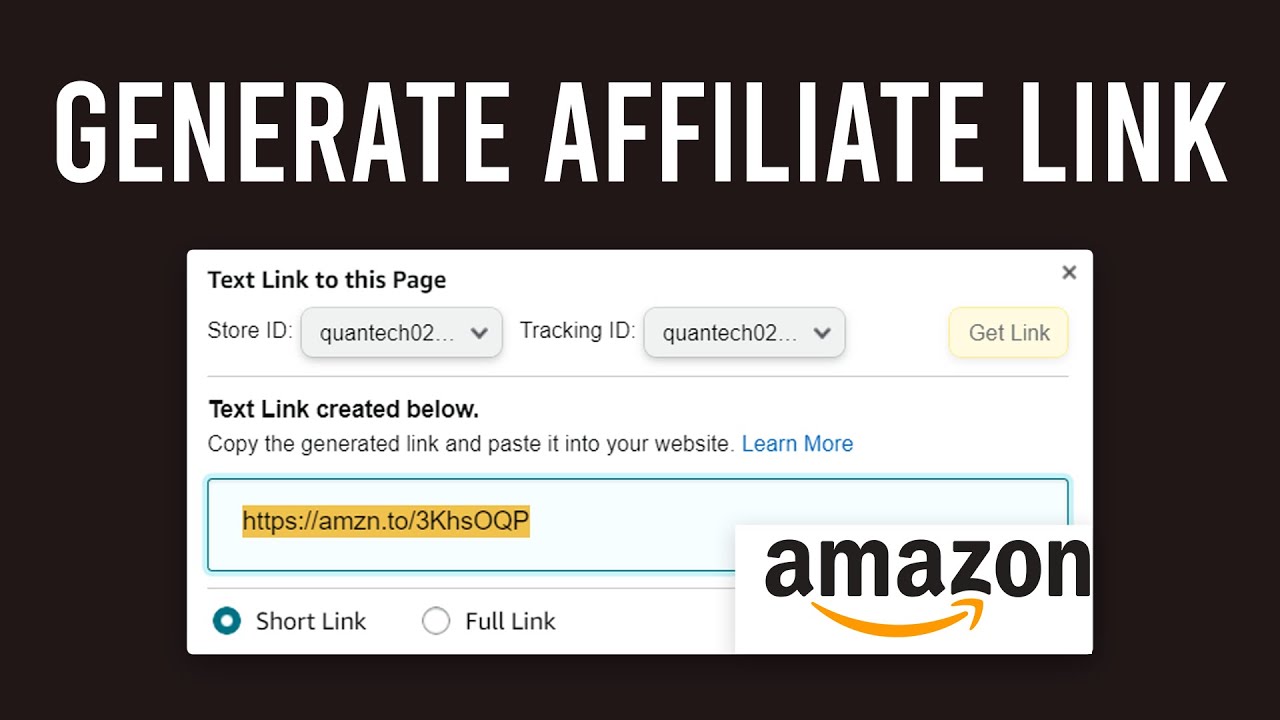
Congratulations on setting up your account! Now comes the fun part: generating a link. Amazon makes this incredibly easy with a tool called SiteStripe, which is a toolbar that appears at the top of Amazon.com when you're logged into your Associates account.
Let's find a product relevant to your "cheap and cheerful" niche. For example, search on Amazon for "OXO Good Grips POP Containers"—these are popular, well-reviewed, and fit the home organization/budget-friendly theme.
Once you are on the product page, you'll use SiteStripe to get your link.
Amazon Affiliate Marketing for Beginners (2025): Step-By-Step Tutorial
Let's return to the Justin Brown video. He demonstrates exactly how to do this on both desktop and mobile.
Watch from 05:52 to 07:49. He shows how to find a product and use the SiteStripe toolbar to generate a short text link. He also quickly shows how to get a link from the mobile app, which is very useful.
Here is the process for creating a link on a desktop computer:
- Go to any product page on Amazon.com.
- At the top of the page, in the SiteStripe toolbar, click "Get Link" and then select "Text."
- A box will pop up with your Store ID and a shortened link (it will look something like
amzn.to/...). - Copy that link. That's it!
This is your unique affiliate link for that product.
A Crucial Final Step: Disclosure
Before we finish, there's one rule you must always follow: you must clearly disclose that you are using affiliate links. This is required by law (the FTC in the US) and by Amazon's own policies. Not disclosing your links can get your account banned.
A simple disclaimer near your links is all you need. Amazon provides specific language you must use if you are an associate:
"As an Amazon Associate I earn from qualifying purchases."
You should place this disclaimer in your YouTube video descriptions, your link-in-bio page, or on your blog/website where you share links. Being transparent is not only a rule, but it also builds trust with your audience.
Conclusion
Fantastic work today! You've officially crossed the bridge from creator to creator-entrepreneur. You haven't just learned about monetization in theory; you've taken a real, practical step towards building it.
Key Takeaways:
- Affiliate marketing is a simple referral system, and Amazon Associates is a powerful starting point for your niche due to its trust, volume, and "whole cart" commission structure.
- You have successfully signed up for the Amazon Associates program and have access to your dashboard.
- You can now generate a unique, trackable affiliate link for any product on Amazon using the SiteStripe tool on desktop or the "Share" button in the mobile app.
- Disclosing your affiliate relationship with a clear disclaimer is a non-negotiable rule for building trust and staying in compliance.
Preview of the Next Lesson:
Now that you have a way to generate income from product recommendations, how do you get people to trust you enough to click your links? One of the best ways is by offering them free value upfront. In our next lesson, you will design a one-page digital freebie (like a budget checklist) using Canva to start building an email list—one of the most valuable assets an influencer can have.