
Hello. In the previous lesson, you identified the four events that can trigger CPU scheduling: a process blocks, is interrupted back to ready, becomes ready after waiting, or terminates. The key question now is what the OS is allowed to do at those decision points.
This lesson distinguishes preemptive scheduling, in which the OS can take the CPU away from a runnable process, from non-preemptive scheduling, in which a process keeps the CPU until it blocks, finishes, or voluntarily yields it. This distinction will determine how the scheduling algorithms in later modules behave.
The central rule: may the OS forcibly reclaim the CPU?
Suppose process is running and process is ready.
A non-preemptive scheduler does not forcibly remove from the CPU simply because is ready or more desirable according to a policy. must wait until :
- blocks for I/O or another event,
- terminates, or
- explicitly gives up the CPU through a voluntary yield in systems that support it.
A preemptive scheduler may interrupt , place it back in the ready queue, and dispatch , even though could have continued executing.
In short:
| Scheduler type | Can a runnable process lose the CPU before it blocks or terminates? |
|---|---|
| Non-preemptive | No; it keeps the CPU voluntarily until it cannot or chooses not to continue. |
| Preemptive | Yes; the OS may stop it and select another ready process. |
Preemption describes a capability and policy choice, not a particular algorithm by itself. For example, priority scheduling can be configured as either preemptive or non-preemptive; the difference is whether a newly ready higher-priority process may immediately replace the current one.
Connecting preemption to process states
The extended process-state diagram below shows the normal ready, running, and blocked states, plus suspended variants that are managed by medium-term scheduling. For this lesson, focus on the dotted Preempt transition from Running to Ready.
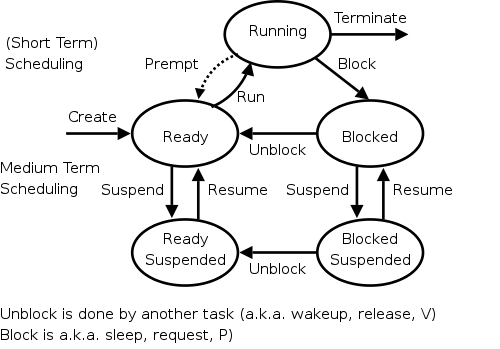
A preemption is not the same thing as blocking:
- Blocking: cannot continue, perhaps because it requested disk I/O. It moves from running to blocked. The OS must find another ready process if one exists.
- Preemption: can continue, but the OS chooses to stop it temporarily. It moves from running to ready.
The four scheduling points from the previous lesson can now be classified more precisely.
| Process-state event | What happens to the CPU? | Preemption involved? |
|---|---|---|
| Running to blocked/waiting | The current process cannot continue. Another ready process must be selected if available. | No |
| Running to terminated | The current process has finished. Another ready process must be selected if available. | No |
| Running to ready | Often caused by expiration of a time slice. The current process is still runnable but loses the CPU. | Yes, if a different process is selected |
| Waiting/blocked to ready | An I/O completion or released lock makes a process runnable again. The scheduler may let it replace the current process. | Yes, if it displaces the current process |
The final row deserves care. An I/O completion does not automatically mean the CPU is free. Usually another process is already running. The completion merely makes the waiting process eligible to run. A preemptive policy may decide to switch to it immediately; a non-preemptive policy lets the current process continue.
The mechanism beneath the policy
Read the following short sections for a formal definition and a concrete comparison between non-preemptive SJF and its preemptive counterpart.
Read Scheduling: Introduction from OSTEP by Remzi and Andrea Arpaci-Dusseau. It connects the definition of preemption to the practical mechanism that makes it possible: context switching. Its SJF/STCF comparison also shows why late-arriving short work can motivate preemption.
On PDF page 5, read the full “ASIDE: PREEMPTIVE SCHEDULERS,” beginning with the discussion of old batch systems. Focus on the context switch mechanism: preemption requires the kernel to stop one execution context and resume another. Then continue to page 6, Section 7.5, “Shortest Time-to-Completion First (STCF).” Read the first paragraph and inspect Figure 7.5. In the STCF example, compare the long job’s treatment with the preceding non-preemptive SJF schedule in Figure 7.4. Do not worry about proving optimality yet; focus on exactly when and why the long job is interrupted.
Several concepts that sound similar should remain separate:
-
An interrupt transfers control from the currently running code to the kernel. A periodic timer interrupt is a common opportunity for the kernel to reconsider scheduling.
-
A scheduling decision is the kernel’s selection of which ready process should run next. It may decide that the current process should continue.
-
Preemption occurs when that decision forcibly stops the current runnable process in favor of another one.
-
A context switch is the actual handoff of execution state: the kernel saves the old process or thread’s CPU state and restores another’s state.
Thus, a timer interrupt does not automatically imply a context switch. The kernel could handle the interrupt, consult the scheduler, and resume the same process. If it instead chooses a different ready process, the timer interrupt has led to a preemption and context switch.
Why a preemptive system interrupts useful work
Preemption is valuable when waiting for the current process to block or finish would harm a system objective. Common reasons include:
- Interactive responsiveness: A process handling keyboard, mouse, terminal, or network input should get CPU time promptly rather than waiting behind a long CPU-bound computation.
- Fairness: A CPU-bound process should not monopolize the processor indefinitely.
- Priority: A newly ready urgent task may need the CPU sooner than the current lower-priority task.
- Short remaining work: A policy may favor a newly arrived process whose CPU burst is much shorter than the remaining burst of the running process.
A time quantum or time slice is a maximum amount of CPU time that a scheduler allows a process to use in one turn. When the quantum expires, a timer interrupt gives the kernel an opportunity to preempt the process. Round Robin, which you will study later, is the standard time-sliced preemptive policy.
However, preemption is not free. Every actual context switch requires kernel work to save and restore state. It can also reduce cache and memory-translation locality: the incoming process may need to rebuild useful data in processor caches and translation structures. The next lesson examines these dispatcher and context-switch costs directly.
A timeline comparison
Consider a single CPU and two processes:
| Process | Arrival time | CPU time needed |
|---|---|---|
| 0 ms | 12 ms | |
| 2 ms | 2 ms |
Assume that is running when arrives at 2 ms.
Non-preemptive outcome
If the policy is non-preemptive, 's arrival cannot take the CPU from . Unless blocks, continues until its 12 ms CPU burst ends.
Time interval     0–12 ms     12–14 ms
Running process      A            B
Although needs only 2 ms of CPU time, it does not start until 12 ms. This may be acceptable for a simple batch workload, where rapid interaction is unimportant and minimizing switches is valuable.
Preemptive outcome
Now suppose the scheduler is preemptive and uses a policy that favors the process with less remaining CPU work. At 2 ms, has 10 ms remaining, while needs only 2 ms. The scheduler may preempt , run , and resume .
Time interval     0–2 ms      2–4 ms      4–14 ms
Running process      A            B            A
Here, starts immediately at 2 ms and finishes at 4 ms. still receives all 12 ms of CPU time it needs; it is delayed, not cancelled.
The important qualification is that preemptive does not mean “always switch when a process arrives.” It means the scheduler can switch. The policy decides whether the arriving process is important enough, short enough, or otherwise preferable enough to justify the disruption.
A concise video review
The following segment ties the four process-state events directly to the classification you are learning.
Preemptive and Non-Preemptive Scheduling
Watch “Preemptive and Non-Preemptive Scheduling” from Neso Academy for a compact verbal summary of the distinction. It uses the same four scheduling circumstances from the previous lesson.
Watch the non-preemptive rule first. Notice that the essential condition is that the running process keeps the CPU until it blocks or terminates. Then watch the preemptive rule, focusing on the idea that the CPU may be reassigned before the current process has finished or blocked.
Recognizing the distinction in scheduling questions
When an OS question describes an event, use this three-part method.
1. Identify the process that currently owns the CPU
Ask whether the running process can still execute instructions. If it has blocked or terminated, it cannot continue; this is not preemption.
2. Identify the event that brought the kernel into the decision
Typical clues are:
- “time slice expires” or “timer interrupt,”
- “a higher-priority process becomes ready,”
- “I/O completes,”
- “a process arrives and is admitted to the ready queue,”
- “the current process requests I/O,” or
- “the current process exits.”
3. Determine whether the current runnable process is forcibly replaced
If a process that was still runnable is moved from running to ready and another process begins running, the policy is acting preemptively.
If the current process continues until it blocks, exits, or willingly relinquishes the CPU, the policy is acting non-preemptively.
A useful phrasing for interviews is:
In non-preemptive scheduling, a running process retains the CPU until it blocks, terminates, or voluntarily gives it up. In preemptive scheduling, the operating system can interrupt a runnable process and switch to another ready process, commonly due to time slicing, priority, or a policy that favors shorter remaining work.
Common misconceptions
“Non-preemptive means a process always runs to completion.”
Not necessarily. It may issue an I/O request and block long before it terminates. Non-preemptive means it is not forcibly removed while still runnable.
“Any context switch is preemption.”
No. A switch after a process blocks or exits is necessary but not preemption. Preemption specifically stops a process that was still capable of using the CPU.
“An I/O completion always causes an immediate switch.”
No. I/O completion changes a waiting process to ready. A non-preemptive system normally lets the current process continue; a preemptive policy may decide to replace it.
“Preemptive scheduling is automatically better.”
It usually improves responsiveness and fairness, but it introduces more switching overhead and can complicate timing behavior. The appropriate choice depends on the workload and system goals.
“Preemptive scheduling itself causes data corruption.”
Preemption can expose poorly synchronized code, but the underlying issue is unsafe concurrent access to shared data. Correct synchronization is required regardless of scheduling style, especially on modern multiprocessor systems.
Key takeaways
- Non-preemptive scheduling lets a process keep the CPU until it blocks, terminates, or voluntarily yields it.
- Preemptive scheduling allows the OS to interrupt a still-runnable process and give the CPU to another ready process.
- A timer interrupt, I/O completion, new arrival, or priority change can create an opportunity to preempt, but a policy must still decide whether switching is worthwhile.
- An interrupt, scheduling decision, preemption, and context switch are related but distinct events.
- Preemption improves responsiveness and can support fairness or urgency, while its costs include extra context-switch work and reduced cache locality.
Next, you will examine the dispatcher: the OS component that performs the handoff after a process has been selected, and the performance costs of context switching.
Can't find a good explanation? Sign up and we'll make it for you
Sign up