
Hello. Previously, you separated the responsibilities of long-term, medium-term, and short-term schedulers. The short-term scheduler is the one that chooses a ready process for the CPU. This lesson sharpens the next question: when does the operating system need, or get the opportunity, to make that choice?
The canonical answer is built from four process-state transitions. By the end, you should be able to look at an event such as an I/O request, timer interrupt, I/O completion, or process exit and state precisely why it triggers CPU scheduling—and whether the OS must choose a different process or may keep the current one running.
Scheduling decisions begin with state changes
Recall the basic lifecycle: a process is running only while it owns the CPU. A process that is ready could run but is waiting for CPU allocation. A waiting process cannot currently continue because it needs an event, such as I/O completion.
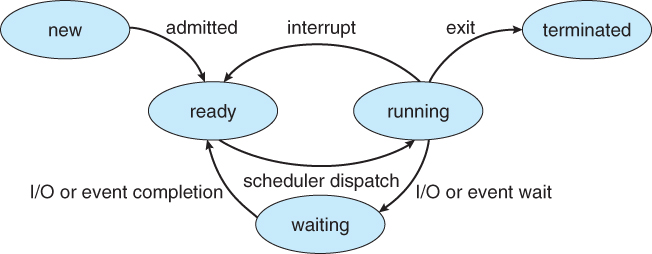
The CPU scheduler matters whenever the CPU might become available or when the set of ready processes changes in a way that could justify reconsidering the current choice. Standard operating-systems texts identify four canonical scheduling points:
| State transition | Typical OS event | What changes for CPU scheduling? |
|---|---|---|
| Running to waiting | Process requests I/O, waits for a child, or blocks on a lock | The running process cannot use the CPU. |
| Running to ready | Timer interrupt or other interrupt preempts the process | The current process remains runnable but relinquishes the CPU. |
| Waiting to ready | I/O completes, a lock becomes available, or a waited-for child exits | A newly runnable process joins the ready queue. |
| Running to terminated | Process finishes or calls exit | The running process has permanently released the CPU. |
Read the concise formal statement of these four points before examining why they differ.
Operating Systems: CPU Scheduling
In Section 5.1.3, “Preemptive Scheduling,” the University of Illinois Chicago notes lay out the four state transitions that create CPU scheduling decision points. Read it to establish the exact classification used throughout this course.
In Section 5.1.3, begin at the sentence listing the four conditions. Continue through the explanation distinguishing conditions 1 and 4 from conditions 2 and 3. Focus on the difference between a decision that is unavoidable because the CPU owner cannot continue and one where the OS can reconsider which ready process should run.
The key word is decision. A scheduling decision does not always mean a context switch occurs. The scheduler may examine the ready queue and decide that the same process should continue. A context switch occurs only when execution actually moves from one process to another.
When the CPU owner cannot continue
Two events make a new CPU selection unavoidable—assuming there is at least one ready process. In both cases, the process that had been running is no longer able to execute ordinary instructions.
1. A process moves from running to waiting
A process enters the waiting state when it requests something that will not be immediately available. The most common example is an I/O request.
Imagine process running and requesting a disk read. The operating system starts or queues the disk operation, but cannot usefully continue until the data arrives. It changes state from running to waiting. The CPU has therefore been released.
The short-term scheduler must now look for another ready process, perhaps , to use the CPU while the device works in parallel. This is the core benefit of multiprogramming: I/O delay from one process need not leave the processor idle.
I/O is not the only reason for this transition. A process can also block because it:
- waits for a child process to finish;
- waits for a synchronization primitive, such as a lock or semaphore;
- waits for a message, user input, or another event.
The common principle is simple: the running process cannot make further progress until something external happens.
2. A process terminates
When a process finishes its final CPU burst, returns from its main routine, or invokes an exit operation, it moves from running to terminated. It no longer exists as a runnable task, so it cannot retain the CPU.
Again, the scheduler must select a ready process if one exists. If the ready queue is empty, the OS runs an idle task or places the CPU in a low-power idle state until a later event makes some process ready.
These two cases are mandatory because there is no valid choice to let the former process continue. It is either blocked or finished.
When the OS may reconsider its choice
The other two decision points are more subtle. In both, a process is available to run, and the OS can decide whether switching would serve its scheduling policy.
3. A process moves from running to ready
This happens when the OS takes the CPU away from the currently running process but the process remains able to execute. The standard example is a timer interrupt.
A hardware timer periodically interrupts the CPU. The kernel handles the interrupt and can determine that the process has used its time allocation. The process has not finished and is not waiting for I/O; it merely moves from running back to ready.
At that point, the scheduler can make a new decision:
- continue running the same process, or
- select a different ready process.
This state transition is the basis of time-sharing systems. Without a mechanism such as timer interrupts, a CPU-bound process could keep executing for a very long time without voluntarily giving up the processor.
Be careful with the terminology: the interrupt is the event that brings control into the operating system. The scheduler then decides whether that event should result in a different process receiving the CPU.
4. A process moves from waiting to ready
This occurs when the event a process was waiting for finally happens. For example:
- a disk or network I/O operation completes;
- a lock becomes available;
- a child process terminates;
- requested input arrives.
Suppose is running while waits for disk I/O. When the disk signals completion, the OS handles that device interrupt and changes from waiting to ready.
Notice what has not happened: has not necessarily stopped running. The completion merely adds to the ready queue. The scheduler can now decide whether should take over immediately or wait its turn.
That choice depends on policy. A non-preemptive system may allow to continue. A preemptive policy might switch to if it has higher priority or is otherwise favored by the policy.
The distinction between “a process becomes ready” and “a process starts running” is essential:
I/O completion makes a process eligible for the CPU. Scheduling and dispatch are still required before it can execute.
A compact classification: mandatory versus discretionary
The four transition types are worth memorizing, but understand the logic rather than treating them as an isolated list.
| Triggering event | Former CPU owner able to continue? | Is a fresh selection necessary? |
|---|---|---|
| Running to waiting | No | Yes, if another process is ready |
| Running to terminated | No | Yes, if another process is ready |
| Running to ready | Yes | The scheduler may keep it running or choose another |
| Waiting to ready | The current CPU owner may still be running | The scheduler may keep it running or choose the newly ready process |
A useful interview-quality formulation is:
CPU scheduling decisions occur when a process blocks, is preempted, becomes ready after waiting, or terminates. Blocking and termination force the CPU to be reassigned if runnable work exists. Timer interrupts and I/O completion create opportunities for a preemptive scheduler to reconsider which ready process should execute.
The following segment gives a visual walkthrough of the four events and then explains the mandatory-versus-optional distinction.
Preemptive and Non-Preemptive Scheduling
Watch “Preemptive and Non-Preemptive Scheduling” from Neso Academy for a direct explanation of the four scheduling situations. The second segment is especially useful for separating “the scheduler runs” from “the scheduler must replace the current process.”
Watch the four situations to connect each state transition to a familiar event, particularly I/O requests, interrupts, I/O completion, and termination. Then watch the choice analysis, focusing on why running-to-waiting and termination require another runnable process, while the other two situations permit the OS to retain the present CPU owner.
Trace a short timeline
Consider three processes on one CPU:
- is running.
- is ready.
- is waiting for network I/O.
Now follow several OS events.
-
requests disk I/O.
moves from running to waiting. Since it cannot continue, the scheduler chooses , which begins running. -
The network reply for arrives.
moves from waiting to ready. could continue running, but the OS has an opportunity to reconsider. Whether runs immediately depends on the scheduling policy. -
's timer quantum expires.
moves from running to ready. The scheduler again compares ready processes—now perhaps and —and selects one. -
The selected process eventually exits.
It moves from running to terminated. The scheduler must choose any remaining ready process; otherwise, the CPU becomes idle.
This single trace contains all four scheduling points. It also shows why state transitions are the cleanest way to identify triggers: the details of the scheduling algorithm can change, but these basic OS events remain recognizable.
Events that are related but not identical
A few distinctions prevent common mistakes.
Process arrival versus admission to ready
A new program being launched can lead to a new process entering the ready queue. Once it becomes ready, the scheduler may need to reconsider CPU allocation—particularly under a preemptive priority policy.
However, “a program was started” is not itself one of the canonical four transitions. The decisive CPU-scheduling fact is that the OS has created or admitted a process that is now ready. Whether it displaces the current process is policy-dependent.
I/O request versus I/O completion
These are opposite events:
- An I/O request usually takes the requester from running to waiting, so the CPU owner cannot continue and the OS needs another runnable process.
- An I/O completion takes a waiting process to ready, expanding the set of runnable work. The OS may choose to run it immediately, but does not always have to.
Interrupt versus automatic context switch
An interrupt transfers control to the kernel. It does not automatically mean the OS will switch processes. For example, a timer interrupt can cause the scheduler to decide that the current process should keep running. A context switch occurs only if the OS selects a different process and performs the handoff.
You will study the cost of that handoff—saving and restoring execution state—later. For now, separate the event, the scheduling decision, and the possible context switch.
A practical recognition method
When reading a scheduling question or debugging a simple scheduler simulation, identify these three facts:
-
Which state transition occurred?
Classify it as running-to-waiting, running-to-ready, waiting-to-ready, or running-to-terminated. -
Did the current CPU owner become unable to run?
If it blocked or terminated, another ready process must be selected if one exists. -
Did a runnable competitor merely appear or return?
If a waiting process became ready, or the current one was preempted back to ready, the policy determines whether a switch happens.
This method is stronger than memorizing examples because it works for disk I/O, network events, synchronization waits, child-process completion, timer expiration, and process exit alike.
Key takeaways
CPU scheduling decisions are triggered at four canonical process-state transitions:
- Running to waiting: a process blocks for I/O or another event; a new process must be chosen if the ready queue is nonempty.
- Running to ready: often caused by a timer interrupt; the OS may keep the same process running or select another.
- Waiting to ready: I/O or another awaited event completes; the newly ready process may or may not preempt the current one.
- Running to terminated: the process exits; a new process must be chosen if runnable work remains.
Most importantly, a scheduling decision is not automatically a context switch. It is the OS’s opportunity to decide who should own the CPU next.
Next, you will formalize the policy difference behind those discretionary points: preemptive scheduling can take the CPU from a running process, while non-preemptive scheduling waits until the process blocks or terminates.
Can't find a good explanation? Sign up and we'll make it for you
Sign up