
Hello. Last lesson separated preemption from non-preemption: a timer interrupt or a newly ready process creates an opportunity for the kernel to schedule, but it does not by itself guarantee that the currently running process will be replaced.
This lesson examines what happens after the OS decides that a different process should run. The scheduler makes the policy decision; the dispatcher performs the handoff. Understanding that division, and why the handoff costs time, is essential before evaluating scheduling algorithms and their timelines.
The scheduler chooses; the dispatcher executes
It is useful to separate two questions:
-
Who should receive the CPU next?
This is the scheduler’s job. It applies a policy such as FCFS, priority scheduling, shortest remaining time, or Round Robin to the ready processes. -
How does the CPU actually begin executing that process?
This is the dispatcher’s job. It transfers control from the old process to the process selected by the scheduler.
The dispatcher is therefore not the policy-maker. If the scheduler decides that should run after , the dispatcher makes that decision real at the processor level.
Operating Systems: CPU Scheduling
Read the short “Dispatcher” subsection in the University of Illinois Chicago CPU Scheduling notes. It gives the standard definition of the dispatcher and identifies its three core responsibilities.
In Section 6.1.4, “Dispatcher,” begin where the text introduces the dispatcher, immediately after the discussion of preemption and critical sections. Read the entire subsection through its final sentence. Focus on the core definition, then distinguish context switching, changing to user mode, and resuming at the correct instruction.
The dispatcher’s responsibilities can be summarized as follows:
| Responsibility | What it means |
|---|---|
| Switch context | Preserve enough CPU state for the outgoing process to resume later, then load the saved state of the incoming process. |
| Switch to user mode | Return the CPU from privileged kernel execution to the restricted user mode in which ordinary application code runs. |
| Jump to the correct instruction | Load the incoming process’s program counter so it resumes precisely where it previously stopped, rather than restarting its program. |
The first responsibility is the most substantial: it is a context switch.
A useful interview-quality distinction is:
The scheduler decides which ready process should run; the dispatcher performs the low-level work that gives that selected process the CPU.
Context: the information needed to resume correctly
A process can be paused at any instruction. To resume it correctly, the OS must retain the execution state that the CPU was using for that process. This state is its context.
Typical parts of a process context include:
- the program counter, which identifies the next instruction;
- general-purpose CPU registers, which hold temporary values;
- the stack pointer and processor status information;
- references to the process’s address-space and kernel-management state.
The process’s PCB (Process Control Block) is the OS data structure that records this information and other administrative details, including the process state and scheduling-related information.
OS Processes - CS 3410 - Cornell: Computer Science
Read Cornell CS 3410’s explanation of context switching. It provides a concrete six-step account of what the OS must preserve, update, select, restore, and resume.
Find the section titled “Context Switching.” Read it from its opening explanation that only one process can be running through the numbered six-step sequence and the following discussion of cost. In particular, follow the six-step account; notice that choosing the next process and restoring its CPU registers are distinct steps.
A typical process-to-process switch has this shape:
- The CPU stops executing , perhaps because blocks for I/O, exhausts its time quantum, or is preempted by a higher-priority task.
- The kernel saves 's CPU context in or through 's PCB.
- The OS changes 's process state, such as from running to ready or from running to waiting.
- The scheduler identifies as the next process to run.
- The OS marks as running and restores its saved CPU context.
- The dispatcher returns to user mode when appropriate and resumes at the instruction indicated by its restored program counter.
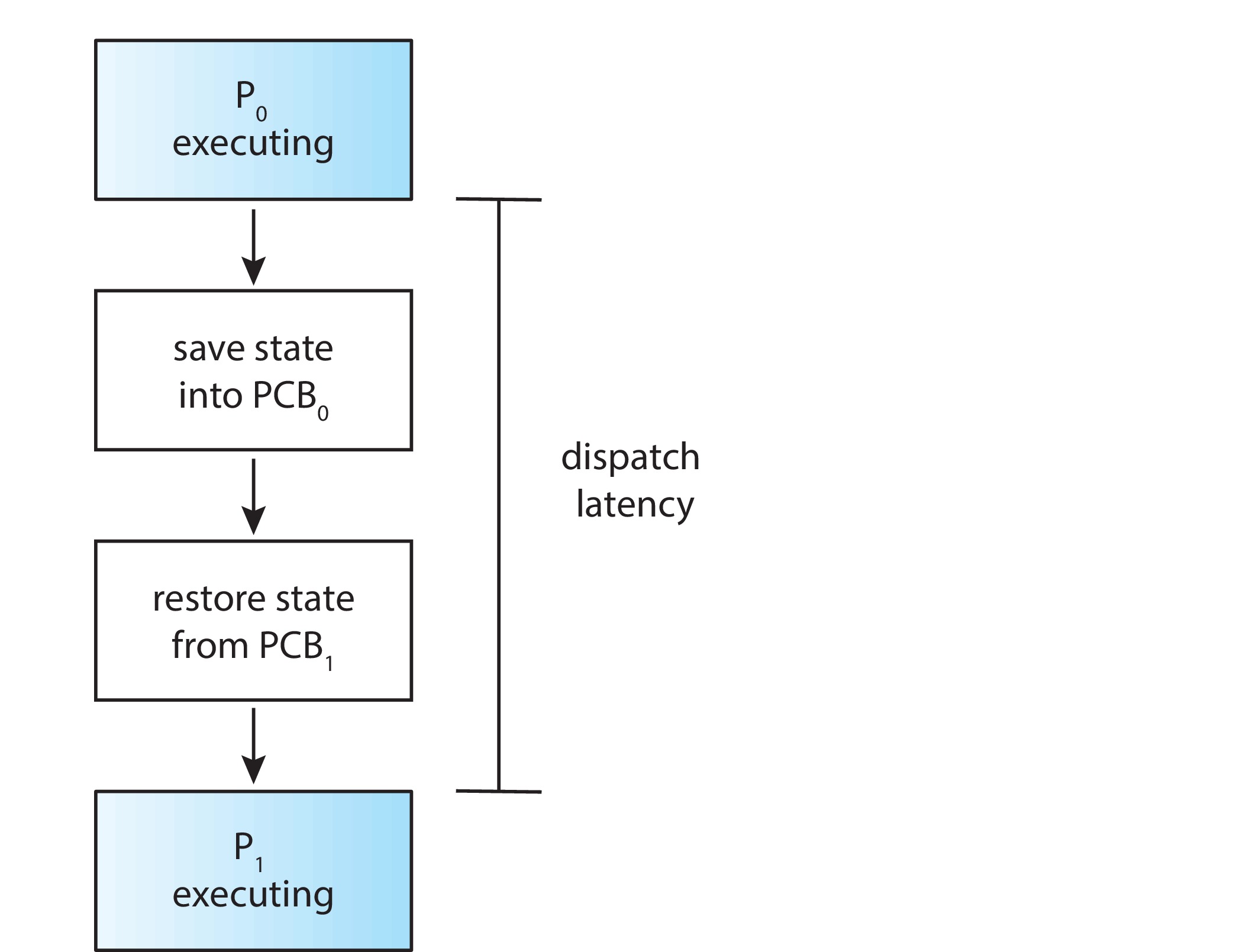
The figure highlights a crucial point: a context switch does not copy an entire program or all of its memory. The program’s code and data remain in memory. What must be saved and restored is the execution state needed for the processor to continue the correct instruction stream with the correct register values and memory environment.
At the hardware level, entering the kernel due to an interrupt or system call may automatically save a small amount of state. The kernel then completes whatever additional bookkeeping and state management the OS design requires. The details vary by processor architecture and operating system, but the conceptual requirement remains the same: preserve the old execution context before replacing it with another.
Interrupts, context switches, and dispatching are related but not identical
These terms often appear together, but they describe different things.
- An interrupt transfers control to the kernel so it can handle an event, such as a timer tick or I/O completion.
- A scheduling decision determines whether the current process should continue or another ready process should run.
- A context switch saves one execution context and restores another.
- Dispatching is the work of handing the CPU to the selected process, including the context switch when a different process is selected.
An interrupt does not necessarily cause a process-to-process context switch. For example, a timer interrupt may bring the kernel into control, after which the scheduler decides that the current process should keep running. The kernel then returns to that same process. There was kernel activity, but no switch from to .
Similarly, a context change may occur when the CPU temporarily runs an interrupt handler and then returns to the same process. In CPU-scheduling discussions, however, “context switch” commonly refers to the more visible handoff between two runnable processes or threads.
This short video reinforces the scheduler–dispatcher distinction and walks through the saving and restoring operation.
The Fancy Algorithms That Make Your Computer Feel Smoother
Watch “The Fancy Algorithms That Make Your Computer Feel Smoother” from Core Dumped for a compact walkthrough of what the dispatcher does after a process blocks or is interrupted.
Watch the dispatcher walkthrough. Focus on the distinction between the scheduler organizing the ready queue according to a policy and the dispatcher saving the outgoing state, restoring registers and the program counter, and assigning the CPU to the chosen task.
Dispatch latency: necessary time that does not run application work
Dispatch latency is the time required for the dispatcher to stop one process and start another. It includes the essential handoff work: saving state, restoring state, changing execution mode where needed, and beginning execution at the incoming process’s saved location.
From the applications’ perspective, this time is overhead. During it, the CPU is busy with necessary operating-system work, but it is not advancing either application’s useful computation.
A simple model makes the cost visible. Suppose a workload contains units of useful CPU work, performs actual context switches, and each switch costs time units. Ignoring I/O waits and other OS work, the elapsed CPU time is:
The fraction of time devoted to useful process execution is then:
For example, if processes need of useful CPU work in total and the OS performs 20 context switches that each cost , switching consumes:
The total becomes , so about 99 percent of that time executes useful process work. That may sound inexpensive, but the effect grows quickly when switches are extremely frequent.
This is why the time quantum in a time-sharing policy cannot be arbitrarily small. A shorter quantum can improve responsiveness because processes wait less long for a turn. But if the quantum approaches the dispatcher’s switching cost, the system spends a large fraction of CPU time performing handoffs rather than running processes.
Direct and indirect costs
The direct cost is the time spent executing the dispatch and context-switch code itself. Its size depends on factors such as:
- how many registers and processor-state values must be saved;
- the speed of memory used to store and load saved contexts;
- the complexity of the kernel’s bookkeeping;
- hardware support for traps, privilege changes, and context management.
The more subtle cost is lost processor locality. When replaces , the CPU’s caches may contain data and instructions useful to , not . The incoming process can suffer cache misses while rebuilding its working set. Depending on the machine and the processes involved, address-translation caches and branch-prediction state may also be less useful after a switch.
Thus, the practical penalty of switching can be larger than the measured dispatcher code alone:
| Cost type | Example consequence |
|---|---|
| Direct dispatch work | Time spent saving registers, updating PCBs, and restoring the incoming state |
| Scheduling work | Time used to inspect queues or priorities and select a process |
| Cache disruption | The incoming process waits for its instructions or data to be fetched again |
| Translation disruption | Address translation may need to be rebuilt for a different process |
| Reduced throughput | Frequent switching leaves fewer CPU cycles for completing processes |
Switching between threads of the same process can sometimes be less expensive than switching between unrelated processes, because the threads share an address space. The CPU still needs to save and restore register state and stacks, but it may avoid some address-space-related disruption. The exact cost depends on the OS and hardware.
Why dispatch latency matters for responsiveness and real-time systems
For an interactive system, dispatch latency adds to the delay a user experiences after an event. Suppose an input event makes a high-priority task ready. Even under a preemptive policy, that task cannot begin user-level work until the system has:
- recognized and handled the relevant interrupt,
- made the scheduling decision,
- performed the necessary dispatch and context-switch work.
A short dispatch latency helps an editor react to keystrokes, a game process respond to input, or a network service handle a newly arrived request.
In a real-time system, latency matters even more because a task may have a deadline. A high-priority task that becomes ready may be logically entitled to the CPU, yet still miss a deadline if the kernel cannot safely reach a dispatch point quickly enough. Long non-preemptible kernel sections can therefore be a problem: the scheduler may want to run the urgent task, but the dispatcher must wait until the kernel can switch safely.
This connects directly to the earlier lesson: preemption provides an opportunity for a fast response; low dispatch latency helps make that opportunity useful.
A compact method for analyzing a switching scenario
When you encounter a scheduling trace or interview prompt, classify it with four questions:
-
What triggered kernel control?
Look for a timer expiration, I/O request, I/O completion, termination, system call, or higher-priority task becoming ready. -
Did the scheduler actually choose a different process?
A scheduling opportunity is not automatically a switch. -
What state is saved and restored?
The outgoing process’s program counter, registers, and execution state must be preserved; the incoming process’s saved state must be restored. -
What is the performance trade-off?
The switch may improve responsiveness, fairness, or priority handling, but it consumes dispatch time and may harm cache locality.
A concise answer for a job interview would be:
The scheduler selects the next ready process according to a scheduling policy. The dispatcher then gives that process the CPU by performing the context switch, entering the appropriate execution mode, and resuming at the saved instruction. This takes dispatch latency, which is overhead: it improves responsiveness and fairness when used appropriately, but frequent switches reduce useful CPU time and can hurt cache locality.
Key takeaways
- The scheduler decides which process should run; the dispatcher carries out that decision.
- A context switch saves the outgoing process’s execution context and restores the incoming process’s context, usually using information associated with each PCB.
- The dispatcher must switch context, enter the correct privilege mode, and resume at the incoming process’s saved program location.
- Dispatch latency is the time required to complete this handoff. It is necessary OS work but overhead from the perspective of useful application execution.
- Frequent context switches can reduce throughput through direct switching time and indirect effects such as cache and translation disruption.
- Preemptive scheduling improves responsiveness only when the OS can also dispatch the chosen process quickly enough.
You have now completed the scheduling foundations module. Next, the course moves from concepts to concrete CPU timelines: you will construct Gantt charts from process arrival times, CPU bursts, and a stated tie-breaking rule.
Can't find a good explanation? Sign up and we'll make it for you
Sign up