
Hello. In the previous lesson, we separated the process—the resource-owning execution environment—from the thread—the execution stream that actually receives CPU time. Introductory scheduling models usually label that execution stream as a “process,” assuming one thread per process. We will use that conventional model here while keeping the distinction in mind.
This lesson gives you the process-state vocabulary needed for every later scheduling problem. You will trace how a process is created, becomes eligible for CPU time, executes, waits for an external event, resumes, and eventually finishes.
A process state answers one practical question
At any instant, the OS needs to know why a process is or is not executing. A process state summarizes that answer. In the basic five-state model, a process is in exactly one of these states:
| State | Meaning | Is it using a CPU right now? |
|---|---|---|
| New | The process is being created and prepared for admission into the system. | No |
| Ready | It could execute, but is waiting for the scheduler to assign it a CPU. | No |
| Running | It is currently executing instructions on a CPU. | Yes |
| Waiting (or blocked) | It cannot continue until some event occurs. | No |
| Terminated | It has completed or has been stopped; its execution is over. | No |
The most important distinction is between ready and waiting:
- A ready process has everything it needs except access to a CPU. The reason it is not running is a scheduling decision: another runnable process is currently selected.
- A waiting process is not eligible to run yet, even if the CPU is idle. It needs an external event, such as a disk read completing, network data arriving, a timer expiring, or user input becoming available.
A concise diagnostic rule is:
If giving the process a CPU right now would let it continue, it is ready. If it must wait for something else first, it is waiting.
On a single-core system, at most one process can be running at a given instant. Many processes can be ready or waiting simultaneously. On a multicore system, several can be running, up to the number of available cores.
Watch Udacity’s short Process Life Cycle: States explanation for the complete basic model. It is especially useful for seeing that “not running” has two fundamentally different meanings: ready for CPU time, or blocked on an event.
Watch “Process Life Cycle: States” from Udacity for a compact walkthrough of the five states and the events that cause state changes.
Watch ready and running to establish the scheduler’s role. Then watch creation and readiness, focusing on admission and why a ready process is not yet executing. Finish with execution outcomes, which covers interruption, waiting for I/O or events, and termination.
The five-state lifecycle
The standard process-state diagram brings the model together.
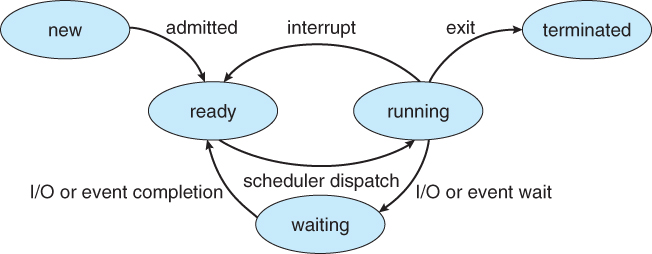
Read the diagram as a set of permitted state changes, each caused by a particular event. The canonical transitions are below.
| Current state | Trigger | New state | What it means |
|---|---|---|---|
| New | Admitted | Ready | The OS has created sufficient execution state and accepted the process for execution. |
| Ready | Scheduler dispatch | Running | The scheduler selects it for a CPU. |
| Running | Interrupt or preemption | Ready | The OS takes the CPU away while the process is still able to execute. |
| Running | I/O request or event wait | Waiting | The process cannot make progress until an external event occurs. |
| Waiting | I/O or event completion | Ready | The required event has occurred; the process is eligible for CPU time again. |
| Running | Exit, completion, or fatal failure | Terminated | The process’s execution has ended. |
Two of these changes are easy to confuse:
Running to ready: the process is still runnable
Suppose a process is calculating a large result. A timer interrupt occurs, and the OS decides that another ready process should get CPU time. The original process moves from running to ready.
Nothing is wrong with it. It is not waiting for a disk, keyboard, or network. It has simply been preempted or descheduled. Its execution context is saved so it can later continue from the same instruction.
Running to waiting: the process cannot use the CPU productively
Now suppose that process asks the OS to read data from a file. The disk or storage subsystem needs time to provide the data. Until it arrives, the process cannot execute the next instruction that depends on it, so it enters waiting.
Keeping it on the CPU would waste processor time. The OS can instead schedule another ready process while the I/O operation proceeds independently.
A completion event does not normally make a waiting process instantly running. It first becomes ready. The scheduler then decides when it receives CPU time. This separation matters: I/O completion changes whether the process can run; scheduling determines whether it does run now.
State names differ across operating systems and textbooks:
- Waiting and blocked usually mean the same basic idea.
- Ready may appear as runnable in a real OS.
- Real systems include additional states such as suspended, stopped, or zombie. Those are useful refinements, but the five-state model is the correct foundation for tracing ordinary CPU scheduling behavior.
A concrete trace: two processes and one CPU
Consider a single-core machine with two processes, and . Both have been created and admitted; therefore, both begin in the ready state.
Suppose first needs some CPU time, then reads from disk. Meanwhile, has CPU work available.
| Moment | CPU / event explanation | ||
|---|---|---|---|
| 1 | Ready | Ready | Both are eligible, but neither has been selected yet. |
| 2 | Running | Ready | The scheduler dispatches . |
| 3 | Waiting | Ready | requests disk I/O and blocks. |
| 4 | Waiting | Running | The scheduler dispatches , keeping the CPU useful. |
| 5 | Ready | Running | ’s disk operation completes. It can run, but still has the CPU. |
| 6 | Ready | Ready | A timer interrupt preempts ; it remains runnable. |
| 7 | Running | Ready | The scheduler chooses next. |
| 8 | Terminated | Ready | finishes its remaining instructions and exits. |
This trace exposes several core ideas.
First, when requests I/O at moment 3, it does not go back to ready. It genuinely cannot continue until the disk operation finishes, so it is waiting.
Second, when the disk completes at moment 5, becomes ready but does not automatically displace . Whether the OS should switch immediately to is a scheduling-policy question. Later modules will compare policies that make different choices.
Finally, ’s change at moment 6 is different from ’s I/O wait. is preempted, but remains ready because it still has useful computation available.
OSTEP’s The Abstraction: The Process uses the three-state core of this same model: running, ready, and blocked. Its two traces show precisely why blocking for I/O lets another process use the CPU.
Read Sections 4.4, “Process States,” and the following examples from Operating Systems: Three Easy Pieces by Remzi and Andrea Arpaci-Dusseau. These pages give a concise, technically accurate account of ready, running, and blocked states.
In Section 4.4 on pp. 6–7, begin at the three definitions. Continue through the state-transition discussion, ending at the transition explanation. Then read the two traces in the following section, especially Figure 4.4 and the paragraph beginning the I O example. Notice that I/O completion puts Process0 in ready, not necessarily directly back into running.
New and terminated: the boundaries of execution
The three-state running-ready-waiting cycle describes the active middle of a process’s life. New and terminated mark its boundaries.
New
A program on disk is not automatically a process. When a user launches an application or one process creates another, the OS begins creating a new process. It assigns an identifier and establishes the information needed to manage execution, such as memory mappings, security information, open-resource bookkeeping, and saved execution state.
The exact moment at which different operating systems call a process “new” varies. The important conceptual point is that the process has been created but has not yet been admitted as runnable. Once admitted, it enters the ready state.
Terminated
A process enters terminated after it completes normally, explicitly exits, or is aborted because of a serious error or an external termination request. It no longer competes for CPU time.
“Terminated” does not necessarily mean every record of the process disappears at precisely that instant. An OS may briefly retain accounting information, an exit status, or bookkeeping that another process must collect. For scheduling purposes, however, a terminated process is no longer runnable and cannot return to ready or running.
How to trace state questions reliably
When you encounter a state-tracing question in an exam, interview, or scheduler simulation, avoid guessing from vague phrases like “the process is inactive.” Instead, process every event in order.
- Record the current state of each process.
- Identify the event. Is it CPU assignment, a timer interrupt, an I/O request, I/O completion, or program exit?
- Apply the state rule associated with that event.
- Check CPU availability. On one core, dispatching one ready process to running means no other process can be running at that instant.
- Separate eligibility from selection. An I/O completion makes a process ready; it does not itself guarantee immediate execution.
A useful compact vocabulary is:
- Dispatch: ready becomes running.
- Preempt or deschedule: running becomes ready.
- Block: running becomes waiting.
- Wake up: waiting becomes ready.
- Exit: running becomes terminated.
These words describe state changes, not merely informal activity. For example, saying “the process is waiting for its turn on the CPU” is imprecise: it is ready, not waiting/blocked.
Key takeaways
The five-state process model explains why a process is not executing:
- New means it is being created and not yet admitted.
- Ready means it can execute but is awaiting CPU assignment.
- Running means it currently has a CPU.
- Waiting or blocked means it needs an external event before it can continue.
- Terminated means its execution is complete.
The central distinction for scheduling is that ready processes compete for CPU time, whereas waiting processes do not. A process that finishes I/O moves to ready first; the scheduler separately decides when it runs.
Next, we will connect this lifecycle to workloads by examining how CPU-bound and I/O-bound processes alternate between CPU bursts and I/O bursts.
Can't find a good explanation? Sign up and we'll make it for you
Sign up