
Hello, and welcome to the first module of this operating-systems course. CPU scheduling is ultimately about deciding what gets CPU time and when. Before comparing scheduling algorithms, we need a precise vocabulary: a program is stored code, a process is an OS-managed execution environment, and a thread is the execution unit the scheduler can run.
By the end of this lesson, you should be able to look at an application in a task manager, or at a scheduling problem, and identify which parts are programs, processes, and threads—and, crucially, which one actually competes for the CPU.
From stored instructions to execution
A program is a passive artifact: executable instructions and related static data stored persistently, usually on disk. Examples include an installed application such as word.exe, a compiled C program, or a Python interpreter executable. It has no current CPU register values, no active call stack, and no identity in the running system merely by existing on disk.
When the operating system launches a program, it creates a process: a live, protected instance of execution. A process supplies the resources needed to run the program, including:
- a virtual address space, which holds code and data in memory;
- memory used for a heap and one or more stacks;
- OS-managed resources such as open files, network connections, and security information;
- a process identifier, often called a PID;
- at least one thread of execution.
The same program can create many distinct processes. If you open two separate instances of a text editor, both may run the same executable program, but each instance normally has its own process, address space, heap, and set of open documents.
A useful way to state the distinction is:
A program is the recipe. A process is one protected, running instance created from that recipe.
The process is not necessarily using a CPU at this instant. It may be waiting for input, ready to run, or temporarily paused while another task runs. It is still an active OS object with allocated resources.
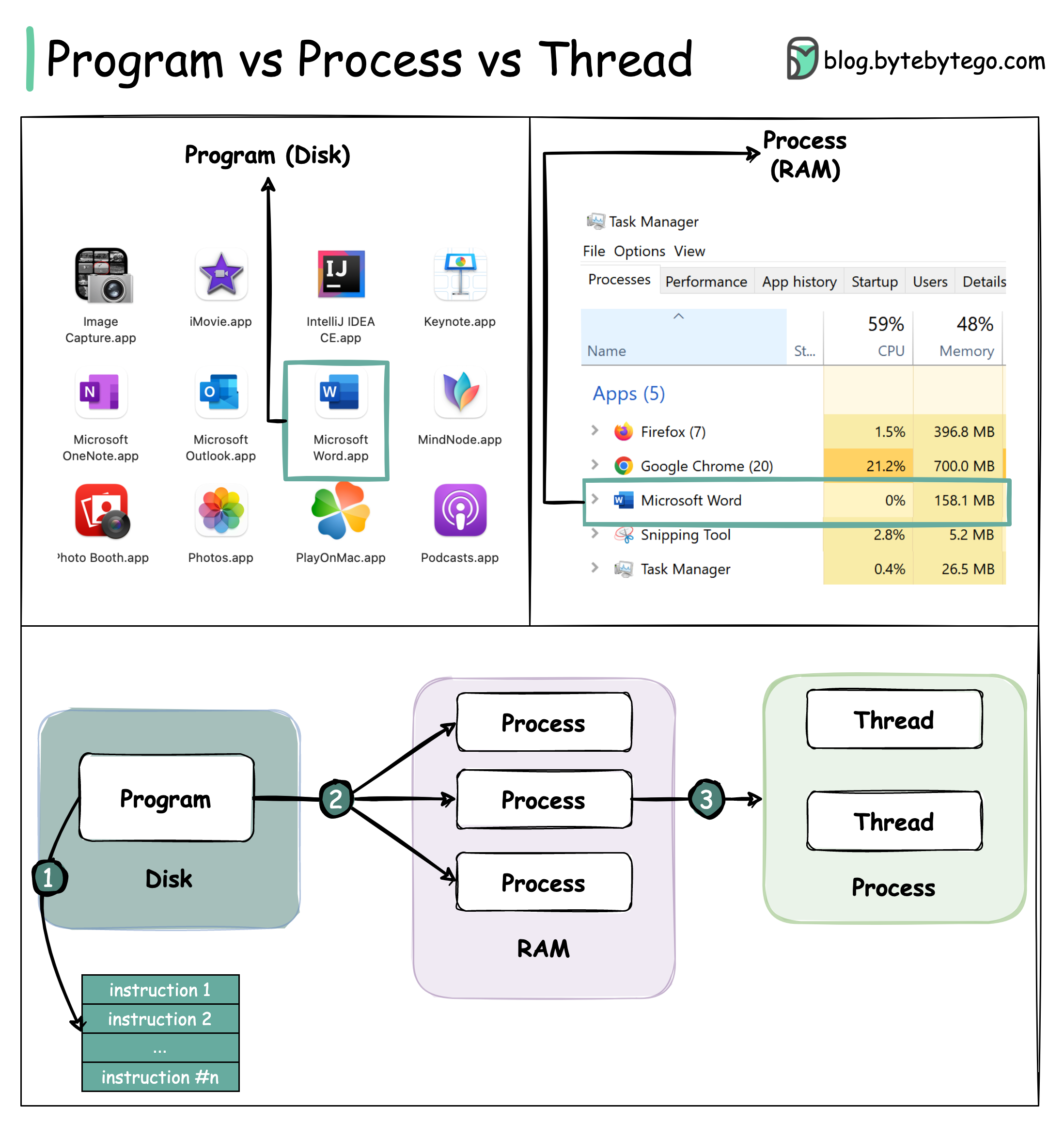
The image also captures an important one-to-many relationship:
- One program can produce multiple processes.
- One process can contain one or more threads.
Threads: the units that execute
A thread is an independent sequence of instructions within a process. It is the entity that has a current instruction location and can be selected to execute on a CPU.
Each thread needs its own execution context. In particular, a thread has its own:
- program counter or instruction pointer: the location of its next instruction;
- CPU register values;
- stack, which holds function calls, local variables, and return addresses;
- scheduling information, such as its priority and current execution status.
Threads in the same process share the process’s resources. They generally share:
- the same virtual address space;
- program code;
- global variables and heap-allocated objects;
- open files and other process-owned OS resources.
That sharing makes threads efficient collaborators. For example, a music application might have one thread handling the user interface, another decoding audio, and another receiving data from the network. They can all access shared playback state in the process’s memory.
But sharing also has a cost: if two threads access the same mutable data without coordination, they can interfere with each other. And because threads share an address space, a serious memory error in one thread can crash the whole process. Later operating-systems material will examine the synchronization tools used to manage this safely.
Watch this short explanation from ByteByteGo first. It establishes the three definitions, then corrects a common imprecision: registers, program counters, and stacks are more accurately associated with threads, not with the process as a whole.
FANG Interview Question | Process vs Thread
In “FANG Interview Question | Process vs Thread,” ByteByteGo gives a compact visual explanation of the program–process–thread relationship, including memory isolation between processes and sharing within a process.
Watch program basics for the definition of a stored executable. Continue with the process view, focusing on the resources that turn stored instructions into a live process and on why separate address spaces isolate failures. Finish with the thread view; note carefully which state is private to each thread and which memory is shared.
What the CPU scheduler actually schedules
For CPU scheduling, the key distinction is this:
A scheduler runs threads, not programs.
A program on disk cannot be scheduled because it has no active execution state. The CPU needs a specific next instruction, register contents, and stack to continue work. Those belong to a thread.
In many introductory scheduling problems, each process is assumed to have exactly one thread. Under that simplifying assumption, saying “schedule process ” is convenient shorthand: scheduling its only thread is effectively the same thing. This is why textbook Gantt charts often label CPU intervals with process names.
Real systems commonly have multithreaded processes. In that case, the scheduler may choose between threads belonging to:
- Different processes — for example, a browser-renderer thread versus a text-editor thread.
- The same process — for example, a browser’s UI thread versus one of its networking threads.
The process still matters enormously, because it defines the resource and protection boundary. The thread matters because it is the schedulable execution stream.
Consider this scenario:
| Object | Meaning |
|---|---|
editor.exe on disk | A program |
| Editor window A | Process , created from editor.exe |
| Editor window B | Process , also created from editor.exe |
| UI code for window A | Thread in process |
| Background spell-checking for window A | Thread in process |
| UI code for window B | Thread in process |
If a single-core machine runs , then switches to , it is switching between two execution streams that share ’s address space. If it switches from to , it switches to a thread in a different process, whose address space and resources are isolated from .
On a multicore computer, several threads can genuinely execute at the same time, up to the available processor capacity. For example, might run on one CPU core while runs on another. On a single core, the operating system creates the appearance of simultaneous progress by rapidly alternating execution among runnable threads.
Microsoft’s documentation states this operating-system view directly: processes own the execution resources, while threads are schedulable and carry their own context.
About Processes and Threads - Win32 apps | Microsoft Learn
Read Microsoft Learn’s “About Processes and Threads” for a precise system-level account of what a process owns and why a thread is the schedulable entity.
Begin with the first paragraph under “About Processes and Threads.” Read the process definition, concentrating on the separation between process resources and threads of execution. Then read the next paragraph, starting “A thread is the entity within a process that can be scheduled for execution,” through thread context and scheduling. Keep a two-column note: resources shared by a process on one side, state owned by a thread on the other.
Isolation versus sharing
The main design trade-off between processes and threads is the boundary between isolation and sharing.
Separate processes have separate virtual address spaces. In normal operation, process cannot directly read or overwrite the memory of process . This isolation improves fault containment and security: if one process crashes, the OS can often terminate that process while leaving others alive.
Threads in one process share an address space. This makes communication fast because they can access the same memory directly. It also avoids duplicating much of the process’s resource setup. However, a buggy thread can corrupt the shared memory used by its sibling threads.
A browser illustrates why systems often use both levels. A browser may use separate processes to isolate different tabs or components, while using multiple threads within each process for user interaction, rendering, networking, and background work. The exact structure varies by browser and operating system, but the principle remains: processes establish protected compartments; threads provide concurrent execution inside a compartment.
This distinction helps interpret operating-system monitoring tools:
- A task manager often lists processes because they are useful units for resource accounting, termination, permissions, and memory reporting.
- A process may show a count of its threads because those are its individual execution streams.
- CPU usage reported for a process is usually the aggregate CPU time consumed by all of its threads.
A scheduling-focused checklist
When you see a scheduling question, classify each noun before doing any calculation:
| If the question mentions… | Treat it as… | Why it matters |
|---|---|---|
| An executable file installed on storage | Program | It is passive; it cannot receive CPU time. |
| A running application instance with memory and open resources | Process | It is the protection and resource-owning container. |
| A runnable execution stream with registers and a stack | Thread | This is the direct scheduling unit in modern OSes. |
| “Process ” in a basic CPU-burst problem | Usually a single-threaded process | The process label stands in for its one schedulable thread. |
Do not overcorrect the textbook shorthand. In an introductory FCFS or Round Robin problem, if the workload lists “processes” and gives each one a CPU burst, schedule the listed processes exactly as requested. The conventional assumption is that each represents one thread. In systems-level discussion, be more precise: a CPU executes a thread, within a process, created from a program.
A brief self-check for your mental model:
- Can two processes come from one program? Yes.
- Can a process contain multiple threads? Yes.
- Do threads in one process normally share heap memory? Yes.
- Does each thread have its own stack and register context? Yes.
- Can a stored executable on disk be placed directly on the ready queue? No. A runnable thread from a launched process can.
Key takeaways
A program is static code and data stored persistently. A process is a live, OS-managed instance of a program with an isolated address space and associated resources. A thread is the independently executing stream inside that process, with its own registers, instruction pointer, and stack.
For scheduling, remember the central rule: the CPU scheduler selects runnable threads. Introductory problems often use processes as the scheduling labels because they assume one thread per process, but the distinction becomes essential when analyzing real applications and multiprocessor systems.
Next, we will follow a process as it moves through its lifecycle: from creation to readiness, CPU execution, waiting for events such as I/O, and termination.
Can't find a good explanation? Sign up and we'll make it for you
Sign up