
Hello. Last lesson established the active process-state cycle: a process is running when it has a CPU, ready when it could run but has not been selected, and waiting when an external event must occur first. CPU and I/O bursts explain the repeated pattern that causes a process to move between those states.
In this lesson, you will learn to recognize CPU bursts and I/O bursts, distinguish CPU-bound from I/O-bound behavior, and explain why a mixture of processes lets an operating system keep the machine productive. These ideas are the workload model behind every scheduling algorithm you will study later.
The CPU–I/O burst cycle
A process does not normally execute continuously on the CPU from start to finish. It performs some instructions, requests input or output, waits for that operation, and then performs more instructions. This recurring pattern is called the CPU–I/O burst cycle.
A CPU burst is a period in which a process actively executes instructions on a processor. Those instructions might perform arithmetic, compare values, traverse a data structure, update variables, or prepare an I/O request.
An I/O burst is the period in which the process is waiting for an I/O-related operation or external event to complete. Typical causes include:
- reading data from storage;
- writing output to a file;
- waiting for network data;
- waiting for keyboard, mouse, or touch input;
- communicating with another device or service.
The important point is that the process waits during an I/O burst, not necessarily the CPU. If another process is ready, the operating system can dispatch it while the first process is blocked.
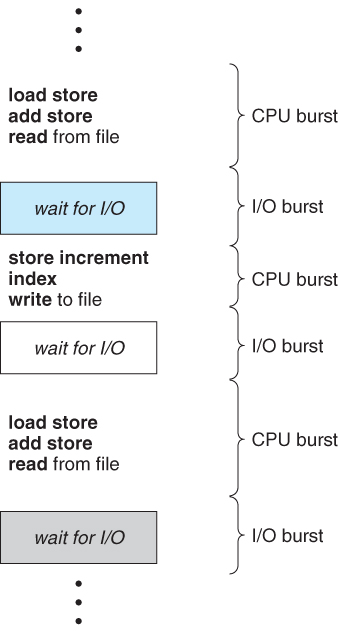
Consider a program processing records from a file:
- It executes instructions to set up and issue a read request. This is part of a CPU burst.
- The storage system retrieves the data. The process is now in an I/O burst and is waiting/blocked.
- When the data arrives, the process becomes ready.
- When scheduled again, it executes instructions that inspect and process the newly available record. This begins the next CPU burst.
Eventually, a final CPU burst performs the work needed to finish and issue an exit request. At that point, the process enters the terminated state rather than beginning another I/O burst.
The short video below gives a clear visual walkthrough of these definitions and the repeated pattern.
Watch CPU and I/O Burst Cycles from Neso Academy to establish the standard vocabulary and connect the terms to a concrete instruction-level example.
Begin with the definitions of CPU and I/O bursts. Then watch the cycle, noting that the process resumes CPU execution only after its I/O completes. Finish with the example, which walks through instructions, I/O waits, and the final termination burst.
Connecting bursts to process states
The burst model adds detail to the state transitions from the prior lesson.
| What happens | Process state | Burst interpretation |
|---|---|---|
| The scheduler selects a ready process | Running | A CPU burst can execute. |
| The process requests I/O it must wait for | Waiting / blocked | Its current CPU burst ends; an I/O burst begins. |
| The device or event completes | Ready | The I/O burst has ended, but the process has not necessarily received a CPU yet. |
| The scheduler chooses it again | Running | Its next CPU burst resumes. |
| The process completes | Terminated | Its final CPU burst has ended. |
There are two subtleties worth keeping straight.
An I/O request itself needs CPU time
A process cannot request I/O without first executing instructions. For example, it may calculate a memory address, place arguments in registers, and invoke an operating-system service. That setup occurs during its CPU burst. The I/O burst begins after the request has been issued and the process blocks.
Similarly, when I/O completes, the OS performs some work to record completion and wake the process. The simplified burst model focuses on the process’s perspective: it is waiting until completion, then it becomes ready.
Preemption can split the wall-clock appearance of a CPU burst
Later, you will study preemptive scheduling, where a timer interrupt can remove a running process from the CPU before it requests I/O. In that case, the process changes from running to ready, not waiting.
Conceptually, it still has CPU work remaining in its current CPU burst. It simply finishes that work across multiple turns on the CPU. Thus:
- an I/O request ends a CPU burst because the process cannot proceed;
- preemption pauses a CPU burst because the scheduler temporarily gives the CPU to someone else.
This distinction will matter when you draw schedules: the amount of CPU work a process needs is different from the particular time slices in which it receives that work.
The following reading presents the basic reason schedulers exist: while one process is blocked for I/O, a different ready process can use the processor.
Operating Systems: CPU Scheduling
Read the opening of Operating Systems: CPU Scheduling. It states the CPU–I/O burst model concisely and ties it directly to CPU scheduling.
In Section 6.1, “Basic Concepts,” read the opening bullets, especially why scheduling exists. Then read Subsection 6.1.1, “CPU-I/O Burst Cycle,” including the figure and bullets. Focus on the burst-cycle definition, and distinguish a period of computation from a period spent waiting for a transfer.
Two contrasting workload patterns
Processes differ greatly in the relative lengths and frequencies of their bursts. The terms CPU-bound and I/O-bound describe these typical patterns.
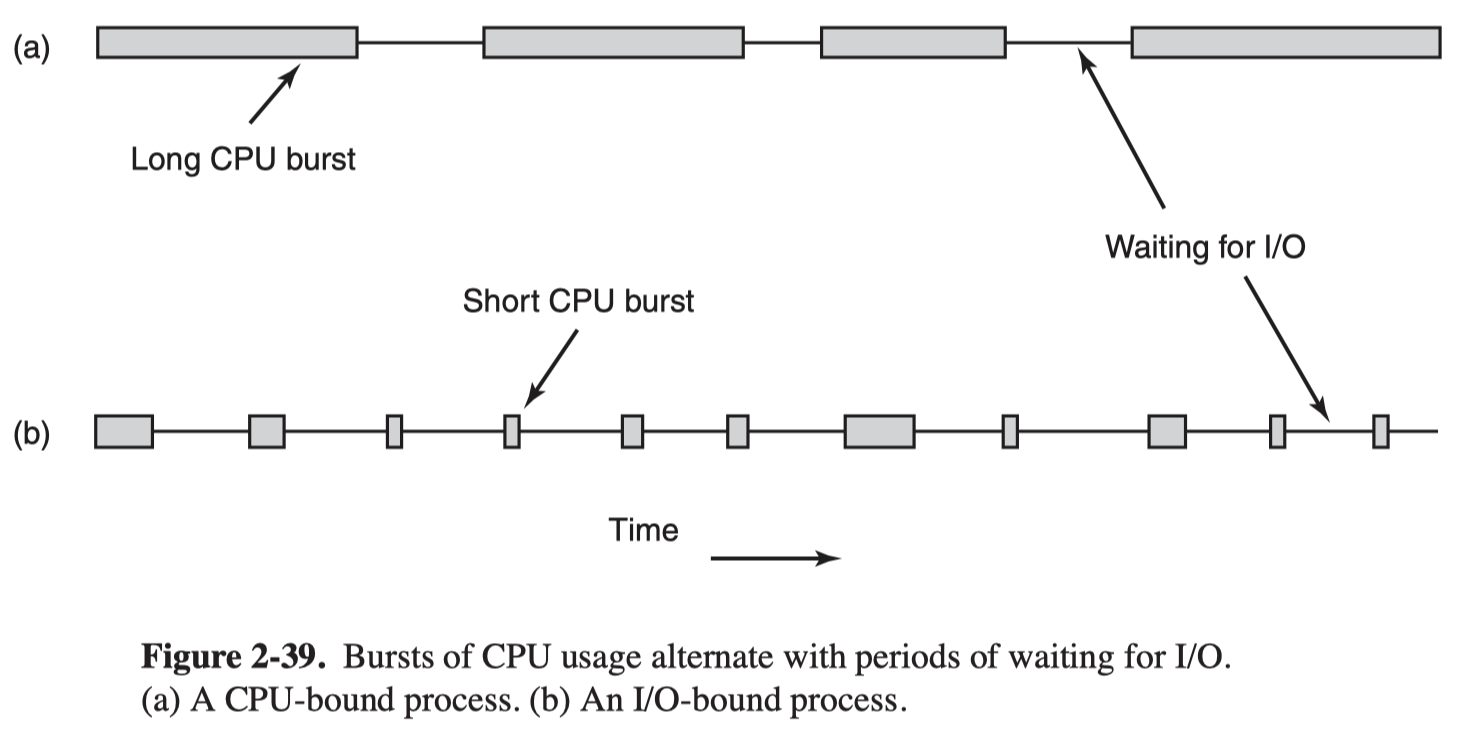
CPU-bound processes
A CPU-bound process spends much of its execution time doing computation. It tends to have relatively long CPU bursts and comparatively little I/O waiting.
Examples include:
- numerical simulation;
- image or video encoding;
- compression;
- large-scale data analysis;
- compilation;
- password-hashing or cryptographic computation.
Its completion time is substantially constrained by available processor capacity. Giving such a workload a faster CPU, more CPU time, or more CPU cores can often improve its throughput.
A CPU-bound process can still perform I/O. A compiler, for example, reads source files and writes object files. But most of its execution may consist of parsing, optimization, and code generation, which are CPU-intensive tasks.
I/O-bound processes
An I/O-bound process frequently waits for I/O or external events. It tends to have many short CPU bursts, each often used to issue a request or process a small result before waiting again.
Examples include:
- a web client waiting for server responses;
- a program copying data between slow storage or network locations;
- an interactive application waiting for user actions;
- a database service waiting for disk pages;
- a chat application waiting for incoming messages.
For an I/O-bound workload, a faster CPU may make the brief CPU bursts finish sooner, but it may not greatly reduce total completion time if storage, network latency, server response time, or user input remains the dominant delay.
A useful comparison is:
| Characteristic | CPU-bound | I/O-bound |
|---|---|---|
| Typical CPU bursts | Long | Short |
| I/O frequency | Lower | Higher |
| Main performance limit | CPU capacity | Device, network, storage, or external-event delay |
| Scheduler concern | Prevent one long computation from dominating access | Let short bursts run promptly after I/O completion |
These labels are not permanent identities. They describe observed behavior for a particular execution phase on particular hardware. A data-processing program may be I/O-bound while loading a large dataset, then CPU-bound while analyzing it. Likewise, an application can contain several threads with different behavior.
For a practical explanation of the distinction in terms of system bottlenecks, watch this focused segment.
CPU Bound vs. I/O Bound | Computer Basics
In CPU Bound vs. I/O Bound | Computer Basics, Dave Xiang relates each category to the resource that limits progress and gives concrete examples.
Watch the classification. Focus on the criterion behind the labels: CPU-bound work improves most when processor performance improves, whereas I/O-bound work is constrained primarily by a device or external service.
Why mixing process types can improve utilization
The burst cycle explains one of the operating system’s most important opportunities: overlap.
Suppose a single-core computer has two processes:
- , an I/O-bound network client with short CPU bursts;
- , a CPU-bound calculation with long CPU bursts.
A possible sequence is shown below. The exact choice of which ready process runs is a scheduling-policy question, but the state changes are not.
| Time interval or event | : network client | : calculation | CPU situation |
|---|---|---|---|
| Initial moment | Ready | Ready | The scheduler selects . |
| Short CPU burst | Running | Ready | prepares and sends a network request. |
| requests network I/O | Waiting | Ready | blocks, so its CPU burst ends. |
| While the request is in progress | Waiting | Running | The scheduler can give the CPU to . |
| Network response arrives | Ready | Running | is now eligible again, but may continue running for the moment. |
| A later scheduling decision | Running or ready | Running or ready | The policy determines which ready process receives the CPU next. |
While is waiting for the network, it cannot make useful progress on the CPU. Letting compute during that interval improves CPU utilization. Meanwhile, the network device and the CPU may both be active, each serving a different process.
This is why a system containing a mix of CPU-bound and I/O-bound work can use hardware efficiently:
- I/O-bound processes create intervals in which they voluntarily give up the CPU.
- CPU-bound processes can make progress during many of those intervals.
- Promptly scheduling an I/O-bound process after its I/O completes can keep the I/O device active and preserve responsive behavior.
There is one important limit: the CPU can only be kept busy if at least one process is ready. If every process is waiting for I/O, the CPU is idle despite the scheduler’s best efforts.
This also shows why the ready queue excludes blocked processes. A waiting process cannot use the CPU to “speed up” a disk read or make a remote server respond. Scheduling it would not help until the required event completes.
A precise way to describe a process’s behavior
When explaining a workload in an exam or interview, avoid saying only that a program “uses a lot of CPU” or “does I/O.” Nearly every nontrivial program does both. Instead, state the burst pattern and the limiting resource.
For example:
- “This simulation is CPU-bound because it has long computation bursts and relatively infrequent I/O; additional CPU capacity is likely to reduce completion time.”
- “This web service is I/O-bound while awaiting database responses; its CPU bursts are short, and it spends much of its time blocked on network or storage activity.”
- “This process has completed I/O and is ready, but it is not running until the scheduler selects it.”
That vocabulary connects a program’s observable behavior to the decisions a scheduler must make. In the next module, CPU-burst lengths and arrival times will become the values you use to construct timelines and calculate performance metrics.
Key takeaways
A process commonly alternates between CPU bursts, when it executes instructions, and I/O bursts, when it waits for a required operation or event.
- Issuing an I/O request ends a CPU burst and usually moves the process from running to waiting.
- I/O completion ends the I/O burst and moves the process from waiting to ready.
- A ready process still needs a scheduler decision before it becomes running.
- CPU-bound processes tend to have long CPU bursts and are limited mainly by processor capacity.
- I/O-bound processes tend to have short CPU bursts and frequent I/O waits, so they are limited mainly by devices or external services.
- Scheduling another ready process during an I/O wait prevents otherwise wasted CPU time.
Next, you will examine the three scheduler levels—long-term, medium-term, and short-term—and see which one controls admission, suspension, and immediate CPU selection.
Can't find a good explanation? Sign up and we'll make it for you
Sign up