
Hello again. In the previous lesson, you distinguished the roles of SIEM, XDR, EDR, and cloud workload protection. Now we attach those roles to the Microsoft products you are likely to see in SC-200 questions.
The goal is not to memorize six product names in isolation. It is to identify the product whose primary security function matches a scenario: enterprise log analytics, unified incident correlation, device defense, identity and access control, compliance evidence, or cloud-workload security.
The Microsoft security operations map
Start with this high-level view of the product family:
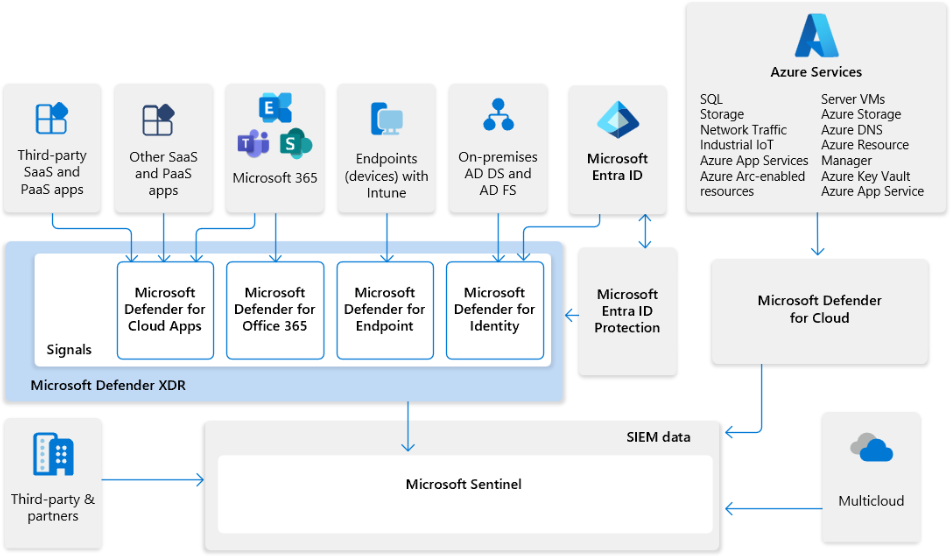
The diagram contains an important exam principle: products integrate, but integration does not make their primary jobs identical. For example, a Defender for Cloud alert may appear in a broader incident workflow, but Defender for Cloud remains the product for securing cloud resources and workloads.
Use this functional map as your starting point:
| Product | Primary function | Think of it when a scenario emphasizes… |
|---|---|---|
| Microsoft Sentinel | Cloud-native SIEM and SOAR | Data connectors, heterogeneous logs, analytics rules, KQL across many sources, automation rules, playbooks |
| Microsoft Defender XDR | Unified cross-domain detection, investigation, and response | One attack involving endpoint, email, identity, and cloud-app signals; unified incidents; coordinated response |
| Microsoft Defender for Endpoint | Endpoint protection and EDR | Device timelines, processes, files, device isolation, investigation packages, live response |
| Microsoft Entra ID | Identity and access management | Users, groups, applications, authentication, Conditional Access, privileged access |
| Microsoft Purview | Data governance, compliance, and investigation of Microsoft 365 content/activity | Audit, eDiscovery, retention, data loss prevention, insider-risk and compliance investigations |
| Microsoft Defender for Cloud | Cloud security posture management and cloud workload protection | Azure, AWS, or GCP resources; VMs, containers, storage, databases, cloud misconfigurations, workload alerts |
The names describe different security control planes:
- Sentinel is centered on security data and SOC analytics.
- Defender XDR is centered on connected attack detection and incident response.
- Defender for Endpoint is centered on devices.
- Entra ID is centered on identities and access decisions.
- Purview is centered on data, compliance, and content-related evidence.
- Defender for Cloud is centered on cloud resources, workload protection, and cloud posture.
A concise product tour
The following short video gives a useful visual orientation before we separate the products more carefully.
Understanding all Microsoft security solutions in 10 mins: Sentinel, Defender, XDR, Purview & More!
Watch “Understanding all Microsoft security solutions in 10 mins: Sentinel, Defender, XDR, Purview & More!” by GoliTech for a quick portal-level overview of the products in this lesson. Treat it as orientation; the distinctions below are what you should use to answer SC-200 scenarios.
Watch Sentinel overview for its detection, incident-management, automation, and threat-intelligence role. Continue with Defender for Cloud, focusing on the distinction between workload protection and posture recommendations. Then watch Defender XDR, Entra ID, and Microsoft Purview. Notice that the presenter navigates different portals because the products have different operational purposes.
Microsoft Sentinel: the broad SOC data and analytics platform
Microsoft Sentinel is Microsoft’s cloud-native SIEM, with SOAR capabilities. It gathers data through connectors, stores and analyzes that data, creates incidents from detections, supports investigation and threat hunting, and can automate follow-up work.
Sentinel is the best primary answer when a requirement involves data that extends beyond the Defender ecosystem:
- Collect Syslog from Linux servers or network appliances.
- Ingest firewall, VPN, third-party SaaS, and multicloud logs.
- Build a custom KQL analytic rule across several sources.
- Investigate long-running patterns in centrally collected telemetry.
- Enrich or route Sentinel incidents with automation rules and playbooks.
- Apply entity behavior analytics, threat intelligence, or broad SOC reporting.
Do not reduce Sentinel to “a place that shows alerts.” Its differentiator is broad ingestion and analysis of organizational security data. A firewall log, an Entra sign-in, a Windows event, and an alert from another cloud provider can all be investigated together when the relevant sources are connected.
Microsoft Defender XDR: the cross-domain attack story
Microsoft Defender XDR is the unifying detection and response layer for Microsoft security signals. It correlates signals across protection domains such as endpoints, identities, email, collaboration, and cloud applications. Its goal is to group related evidence into a coherent incident so analysts can understand attack scope and coordinate response.
A phishing campaign illustrates the difference:
- Defender for Office 365 identifies a suspicious attachment.
- Defender for Endpoint detects that the attachment launched a malicious process.
- Identity-related signals show suspicious use of the affected account.
- Defender XDR correlates these observations into an incident rather than leaving the analyst with several unrelated alerts.
Therefore, select Defender XDR when the question asks for:
- A unified incident queue across Defender products.
- Correlation of related alerts into one attack narrative.
- Cross-domain investigation across email, devices, identities, and cloud apps.
- Automated investigation and remediation across the connected services.
- Advanced hunting over Defender XDR data.
Defender XDR is not a replacement for Sentinel in every log-collection scenario. A requirement to ingest arbitrary third-party appliance logs still points primarily to Sentinel. Equally, Defender XDR does not replace the deep endpoint telemetry and response tools of Defender for Endpoint; it builds on them.
Defender for Endpoint and Defender XDR: component and coordinator
This distinction is especially important for SC-200.
Microsoft Defender for Endpoint is the endpoint security platform. It provides preventative protection, EDR, investigation capability, and response for devices such as workstations and servers. Its evidence is device-centered:
- Process creation and command lines
- Files and hashes
- Registry and persistence changes
- Network connections from a device
- Device exposure and vulnerability context
- The device timeline
Its response actions are also device-centered: isolating a device, collecting an investigation package, running antivirus scans, restricting app execution, or using live response when authorized.
Microsoft Defender XDR takes endpoint evidence and places it alongside evidence from other Defender products. It is the coordinator that helps the SOC answer: How did this device event relate to an email, a user account, or a cloud application?
| Scenario wording | Best answer |
|---|---|
| “Identify the PowerShell command that executed on a laptop.” | Defender for Endpoint |
| “Isolate the compromised workstation from the network.” | Defender for Endpoint |
| “Group the phishing email, malicious endpoint process, and affected identity into one incident.” | Defender XDR |
| “Perform an investigation across related alerts and affected assets in one unified incident.” | Defender XDR |
The Microsoft documentation describes the components and the cross-product layer directly.
What is Microsoft Defender XDR? - Microsoft Defender XDR
Read Microsoft’s “What is Microsoft Defender XDR?” to distinguish the individual protection products from the Defender XDR layer that correlates their signals.
In the “Microsoft Defender protection” section, read the product mapping. Concentrate on the endpoint, identity, email, and cloud-app entries: each protects a different asset type. Then, in the following cross-product features section, read the XDR layer explanation. Focus on the difference between a component product’s telemetry and Defender XDR’s functions: correlating signals into incidents, coordinating response, and automating remediation.
A useful qualification from this documentation: Defender XDR correlates signals from products that your organization has licensed and provisioned. A unified portal does not mean every feature or data source is automatically enabled.
Microsoft Entra ID: identity and access security
Microsoft Entra ID is Microsoft’s cloud identity and access management service. It manages identities, authentication, application access, and authorization controls in cloud and hybrid environments.
Think Entra ID when the central question is: Who is allowed to access what, under which conditions?
Core functions include:
- Managing users, groups, enterprise applications, and service principals.
- Providing authentication and single sign-on.
- Enforcing multifactor authentication.
- Applying Conditional Access, such as requiring MFA for risky sign-ins or blocking access from noncompliant devices.
- Managing privileged access through Privileged Identity Management (PIM).
- Producing identity events that can become investigation evidence.
A key naming distinction:
- Microsoft Entra ID is the identity and access platform.
- Microsoft Entra ID Protection detects and helps remediate identity risks, such as risky users and risky sign-ins.
- Microsoft Defender for Identity detects threats involving on-premises Active Directory signals, compromised identities, and related identity attacks.
- Defender XDR can correlate identity signals with endpoint, email, and app evidence.
These products can all occur in one identity incident, but they answer different needs. If an exam question says “require multifactor authentication when sign-in risk is high,” it is primarily about Entra ID Conditional Access using risk signals. If it says “investigate unusual activity against on-premises Active Directory,” Defender for Identity is likely involved. If it asks to correlate that identity evidence with a malicious email and an endpoint alert, the answer shifts to Defender XDR.
Microsoft Purview: data, compliance, and investigation evidence
Microsoft Purview is Microsoft’s family of data governance, risk, and compliance solutions. In SC-200, it becomes important when security investigations involve Microsoft 365 activity, content, sensitive data, or legal/compliance obligations.
Purview is the primary answer for capabilities such as:
- Audit: reviewing activities such as mailbox access, file operations, sharing, administrative actions, and other Microsoft 365 events.
- eDiscovery: locating, preserving, collecting, reviewing, and exporting content relevant to an investigation or legal matter.
- Data Loss Prevention (DLP): helping prevent inappropriate sharing or exfiltration of sensitive data.
- Insider Risk Management: identifying potentially risky user activities in a governance-focused workflow.
- Retention and compliance controls: managing information according to policy and regulatory needs.
For example, suppose an employee is suspected of exfiltrating confidential documents before leaving the company. The SOC may use Defender products to detect suspicious access behavior, but a search for the relevant emails, Teams messages, and SharePoint or OneDrive documents is a Purview eDiscovery task. Determining what the user did in Microsoft 365 is often a Purview Audit task.
Purview can supply valuable evidence to a security investigation, but it is not primarily the SIEM, EDR, or cross-domain XDR engine. Keep its center of gravity clear: data governance, compliance, content, and auditability.
Microsoft Defender for Cloud: cloud posture and workload protection
Microsoft Defender for Cloud protects cloud and hybrid environments. It has two broad functions that SC-200 questions often test together:
- Cloud security posture management (CSPM): identifies risky configuration, compliance gaps, and recommendations intended to reduce exposure before an incident.
- Cloud workload protection platform (CWPP): detects and helps respond to threats affecting cloud workloads such as servers, containers, storage, databases, and application services.
Choose Defender for Cloud when the security target is a cloud resource or workload:
- A public storage account contains sensitive data.
- A cloud VM displays suspicious activity.
- A container workload exhibits cryptomining behavior.
- A database workload needs threat protection.
- Azure, AWS, or GCP resources need posture assessment and security recommendations.
- A development pipeline or cloud-native application needs security management integrated into its lifecycle.
A cloud-hosted VM is a useful overlap case. It may be protected by Defender for Endpoint at the operating-system level and by Defender for Cloud at the cloud workload and resource-context level. If the question asks to isolate the operating system from the network, Defender for Endpoint is the more direct answer. If it asks for workload protection, cloud configuration findings, or cloud-resource context, select Defender for Cloud.
The official SIEM/XDR integration guide provides a concise mapping of these boundaries.
Incident Response with XDR and Integrated SIEM | Microsoft Learn
Read Microsoft’s “Incident Response with XDR and Integrated SIEM” for the official division of responsibilities between Sentinel, Defender XDR, and Defender for Cloud.
Start with the introduction and read the platform definitions, noting that Defender XDR collects and correlates Microsoft 365 security signals while Sentinel provides SIEM and SOAR capabilities. Then go to the “Key capabilities” table. Read the capability mapping, focusing on the rows for Advanced hunting, device response, cloud workload protection, security posture, UEBA, data connectors, and SOAR. Use the Product column to practice matching a stated capability to its primary product.
A practical decision method
When several Microsoft products seem plausible, classify the scenario in this order.
1. Identify the protected object or evidence source
| If the scenario is mainly about… | Start with… |
|---|---|
| Device processes, files, or device containment | Defender for Endpoint |
| User authentication, access policy, MFA, privilege, or Conditional Access | Entra ID |
| Microsoft 365 content, audit history, sensitive data, legal hold, or content search | Purview |
| Cloud resources, containers, databases, cloud posture, or cloud workload alerts | Defender for Cloud |
| Broad logs from many Microsoft and non-Microsoft sources | Sentinel |
2. Determine whether the task needs a connected incident view
If the question is not merely about one asset but about correlating evidence across several Defender security domains, select Defender XDR.
For example, “find the phishing email, affected device, risky account, and cloud-app activity associated with the same attack” describes XDR’s purpose even though individual component products supplied the evidence.
3. Look for strong product-boundary clues
| Clue in an exam scenario | Likely product |
|---|---|
| Data connector, Log Analytics workspace, Syslog, custom analytics rule, playbook | Microsoft Sentinel |
| Incident correlation across email, endpoint, identity, and app alerts | Microsoft Defender XDR |
| Device timeline, live response, isolate device, investigation package | Microsoft Defender for Endpoint |
| Conditional Access, PIM, user/group/application identity administration | Microsoft Entra ID |
| Audit, eDiscovery, retention, DLP, compliance | Microsoft Purview |
| Defender plan for servers, containers, database, CSPM recommendation | Microsoft Defender for Cloud |
Avoid choosing a product just because it can display related information. Instead, ask which product has the native control, data, or action called for in the requirement.
Key takeaways
You should now be able to map the main Microsoft security products to their primary functions:
- Microsoft Sentinel is the broad SIEM and SOAR platform for ingestion, analytics, hunting, investigation, and automation across many data sources.
- Microsoft Defender XDR correlates Microsoft security signals into unified incidents and coordinates investigation and response across domains.
- Microsoft Defender for Endpoint protects, investigates, and responds at the device level through endpoint protection and EDR.
- Microsoft Entra ID manages identities and access, including authentication, Conditional Access, and privileged access.
- Microsoft Purview supports data governance, compliance, audit, eDiscovery, and investigations involving Microsoft 365 content and activity.
- Microsoft Defender for Cloud provides cloud posture management and protection for cloud and hybrid workloads.
Next, you will learn the operational vocabulary that connects these products in a SOC workflow: alerts, incidents, evidence, entities, actions, and remediations.
Can't find a good explanation? Sign up and we'll make it for you
Sign up