
Hello, and welcome to the SC-200 course. This first module establishes the operating vocabulary of a modern security operations center (SOC): what each major platform is for, what kind of evidence it handles, and where its boundaries lie.
In this lesson, you will distinguish four closely related capabilities: SIEM, XDR, endpoint detection and response (EDR), and cloud workload protection (CWPP). SC-200 questions often describe an operational need rather than naming a technology outright, so the aim is to identify the primary role that best fits the situation—not to pretend these products never overlap.
The SOC problem: many signals, one attack
A SOC has to make sense of activity across devices, user identities, email, SaaS applications, network infrastructure, and cloud resources. An attacker, however, does not stay in one place. A phishing email can lead to a malicious process on a laptop, stolen credentials, and then access to a cloud-hosted virtual machine.
The four capabilities in this lesson address that problem at different scopes:
| Capability | Primary focus | Central SOC value | Microsoft example |
|---|---|---|---|
| EDR | Individual endpoints: workstations, servers, mobile devices | Detect, investigate, and contain suspicious behavior on a device | Microsoft Defender for Endpoint |
| XDR | Connected security domains, such as endpoint, identity, email, and cloud apps | Correlate related signals into one attack story and coordinate response | Microsoft Defender XDR |
| SIEM | Broad organizational telemetry, including Microsoft, third-party, on-premises, and multicloud sources | Centralize, retain, query, correlate, detect, investigate, and hunt across the environment | Microsoft Sentinel |
| CWPP | Workloads running in cloud and hybrid environments | Protect cloud servers, containers, databases, application services, and related runtime workloads | Microsoft Defender for Cloud |
A useful way to remember the relationship is through scope:
- EDR asks: What happened on this device, and can we contain it?
- XDR asks: How do endpoint, identity, email, and application signals describe one coordinated attack?
- SIEM asks: What does the full set of security data, from all connected sources, show over time?
- CWPP asks: What threats and exposures affect the workloads that run our cloud services?
The labels can overlap in product marketing, and modern platforms increasingly share features. For SC-200, classify them by their main telemetry source, scope of correlation, and response target.
SIEM: the broad security-data and analytics layer
SIEM means security information and event management. At its core, a SIEM collects security-relevant logs and events from many sources, stores them, normalizes them where possible, and makes them available for detection, investigation, reporting, and threat hunting.
Microsoft Sentinel is Microsoft’s cloud-native SIEM. Its scope is deliberately broad: an organization might ingest Microsoft Entra ID sign-in logs, Azure activity, Windows events, firewall logs, Syslog from Linux servers, alerts from third-party security tools, and activity from other cloud providers.
What is Microsoft Sentinel SIEM?
Read Microsoft Learn’s overview of Microsoft Sentinel to establish the SIEM model before focusing on its individual capabilities.
In the opening of the article, read the opening definition. Focus on the words multicloud, multiplatform, and threat hunting: they signal why SIEM has a wider data boundary than an endpoint product. Then, in the “Collect data at scale” section, read the collection passage. Pay particular attention to data connectors, custom connectors, and normalization. These are the mechanisms that let a SIEM work with diverse sources rather than only one security vendor’s telemetry.
What makes SIEM distinctive?
A SIEM is often the best fit when the requirement emphasizes one or more of these needs:
- Heterogeneous data collection, particularly from third-party, on-premises, and multicloud systems.
- Central analytics across logs that otherwise live in separate products.
- Longer-term retention and querying for investigations, compliance, or threat hunting.
- Custom detection logic, often using KQL in Microsoft Sentinel.
- Security monitoring and reporting across an enterprise rather than a single workload.
For example, suppose an analyst wants to correlate:
- A suspicious VPN login from a firewall,
- A privileged Active Directory group change,
- A Linux
sudoevent, - An Azure resource deletion, and
- A third-party proxy log.
That is fundamentally a SIEM-shaped problem. The data is cross-platform, potentially multicloud, and includes sources that do not naturally belong to a single endpoint or Microsoft 365 incident.
Microsoft Sentinel also includes orchestration and automation capabilities, commonly associated with SOAR (security orchestration, automation, and response). In Sentinel, automation rules and playbooks can enrich incidents, create tickets, notify teams, or initiate approved response actions. That does not change its primary identity as a SIEM; it means the platform can help carry the SOC’s work from detection into response.
What is Microsoft Sentinel SIEM?
Return to the Microsoft Learn Sentinel overview to connect broad data collection with detection, investigation, hunting, and response.
In “Detect threats,” read analytics and incident grouping. Notice that analytics rules turn ingested data into alerts and can group related alerts into incidents. Next, in “Investigate threats,” read the investigation and hunting discussion. Distinguish reactive investigation of an incident from proactive hunting before an alert exists. Finally, in “Respond to incidents rapidly,” read the automation introduction. Focus on the division of labor: automation rules coordinate handling, while playbooks perform workflow actions through Azure Logic Apps.
EDR: deep visibility and response on endpoints
Endpoint detection and response focuses on the endpoint itself: laptops, desktops, servers, and, depending on the platform, mobile devices. EDR observes behavior such as process execution, command lines, file changes, persistence mechanisms, network connections, and user logons.
The key distinction from traditional antivirus is that EDR does not only look for a known malicious file. It collects behavioral telemetry that can show an attacker’s actions over time. This is what lets analysts reconstruct a device timeline and understand the scope of a compromise.
Microsoft Defender for Endpoint is Microsoft’s EDR platform. It combines preventative protection with post-breach detection, investigation, and response.
Watch “EDR, MDR & XDR Explained” from Pro Tech Show for a concise behavioral explanation of EDR. It is especially useful for separating endpoint telemetry and containment from broader cross-domain investigation.
Watch the EDR explanation. Focus on the example of unusual directory querying: individual events may appear harmless, but their pattern can indicate reconnaissance. Note the two essential EDR outcomes: preserved endpoint telemetry for forensics and response actions such as isolating an affected device.
The EDR analyst’s view
Imagine a user opens a malicious attachment. On the workstation, the document launches a scripting engine, downloads a payload, creates a scheduled task for persistence, and begins contacting a suspicious domain.
An EDR platform can help the SOC:
- Detect the suspicious process chain and outbound connection.
- Display the device timeline and related files, users, processes, and network activity.
- Determine whether the behavior reached other devices.
- Take a device-focused action, such as isolating the device from the network.
- Collect investigation data or use live-response capabilities where appropriate.
EDR is therefore the strongest answer when the problem describes host-level behavior or requires a device-specific response.
However, an endpoint is only one part of an attack. EDR might show that a malicious script ran, but it may not independently provide the fullest picture of the email that delivered it, the identity session that was abused, or the SaaS activity that followed. That larger correlation problem is the role of XDR.
XDR: correlate a connected attack across security domains
XDR means extended detection and response. It extends beyond a single endpoint by correlating security signals across multiple domains.
Microsoft Defender XDR is a unified defense suite that coordinates detection, prevention, investigation, and response across endpoints, identities, email, and applications. Its value is not simply that it displays more alerts in one portal. Its core value is that it can recognize that separate observations are part of the same attack.
What is Microsoft Defender XDR? - Microsoft Defender XDR
Read Microsoft Learn’s Defender XDR overview to establish the Microsoft-specific meaning of XDR and its cross-product incident model.
Start with the definition in the opening section. In the “Microsoft Defender protection” section, read the protection scopes, identifying endpoint, email, identity, and cloud-app protection as distinct signal domains. Then read the correlation and incident discussion. Focus on how Defender XDR joins alerts, suspicious events, and affected assets into combined incidents.
EDR versus XDR
The distinction is easiest to see in the same phishing scenario.
| If the analyst needs to know… | Best primary capability |
|---|---|
| Which processes executed on the user’s laptop? | EDR |
| Whether the laptop should be isolated? | EDR |
| Which message delivered the attachment, which mailbox received it, which user identity was affected, and whether the same file reached other devices? | XDR |
| Whether cloud or third-party logs reveal related activity beyond the XDR-connected security domains? | SIEM |
Defender XDR can correlate alerts and evidence from products such as Defender for Endpoint, Defender for Office 365, Defender for Identity, and Defender for Cloud Apps. Rather than requiring an analyst to manually connect four independent alerts, XDR can form a combined incident with affected entities, evidence, and automated actions.
The endpoint product has not become unimportant in an XDR environment. EDR supplies deep endpoint telemetry and endpoint actions; XDR supplies cross-domain correlation and coordinated response. The products are complementary.
A practical qualification matters: Defender XDR correlates signals from products that are licensed and provisioned in the environment. Do not assume a unified portal means every possible data source is automatically available or correlated.
CWPP: protect the workloads that run in the cloud
Cloud workload protection platform is usually abbreviated CWPP. A cloud workload is the computing service that performs work for the organization: a virtual machine, container, database, Kubernetes cluster, application service, or serverless component.
CWPP focuses on threats affecting these workloads and on the cloud context around them. Microsoft Defender for Cloud is the Microsoft product most associated with this role.
In an SC-200 scenario, think Defender for Cloud / CWPP when you see language such as:
- Suspicious activity on an Azure virtual machine.
- A threat in a container or Kubernetes environment.
- An alert involving a cloud database, application service, API, or DevOps workload.
- Investigation and remediation of an alert related to cloud infrastructure or hybrid server workloads.
CWPP should not be confused with every kind of cloud security:
- CWPP protects the workloads and services running in cloud or hybrid environments.
- Defender for Cloud Apps focuses on visibility and security controls for cloud applications, especially SaaS use and data movement.
- EDR may still protect the operating system of a cloud-hosted server. If a VM has Defender for Endpoint, both EDR and CWPP can be relevant.
- SIEM can ingest and correlate cloud-workload alerts with data from elsewhere in the enterprise.
Microsoft Defender for Cloud also has capabilities beyond CWPP, including cloud security posture management. For this lesson, keep the narrower distinction clear: CWPP is the protection of running workloads; posture management is concerned with identifying and improving risky cloud configurations.
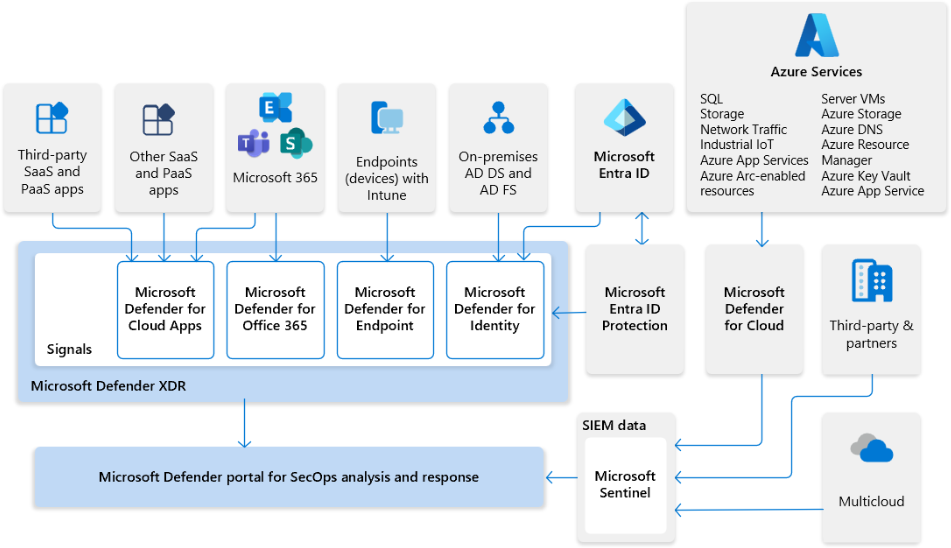
The architecture illustrates why a SOC should not force a false choice between XDR and SIEM. Defender XDR provides a strong, integrated view across Microsoft security domains. Microsoft Sentinel adds broad ingestion and analytics for third-party, multicloud, and other enterprise telemetry. Defender for Cloud contributes security context and alerts for cloud workloads.
SC-200: Threat Protection with Microsoft Defender XDR
Watch “SC-200: Threat Protection with Microsoft Defender XDR” from Cloud 360 Training for a Microsoft-oriented tour of the specialized Defender roles and their placement alongside Sentinel.
Watch specialized protections to review the distinct roles of Defender for Endpoint, Defender for Cloud Apps, and Defender for Cloud. Then watch the reference architecture, focusing on Sentinel as the SIEM and Defender for Endpoint as the EDR component within a wider SOC design.
Choosing the right capability in an exam scenario
Use the following decision pattern rather than relying solely on product names.
Choose EDR when the central concern is a device. The evidence will often involve processes, files, registry changes, command lines, device timeline activity, or network isolation.
Choose XDR when the task is to connect an attack across Microsoft security domains. Look for related email, identity, endpoint, and cloud-app signals that need to become one incident narrative or coordinated response.
Choose SIEM when the task requires broad data aggregation, custom correlation, long-term querying, multicloud coverage, or third-party ingestion. Terms such as data connector, log source, KQL hunting across sources, Syslog, firewall logs, and workbook strongly indicate Microsoft Sentinel.
Choose CWPP when the protected target is a cloud or hybrid workload. Look for VMs, containers, cloud databases, application services, and cloud-infrastructure threat alerts.
Consider this integrated incident:
A user receives a phishing message. A malicious attachment executes on their laptop. The attacker then uses stolen credentials to access cloud resources and deploys a cryptomining container.
Several technologies may legitimately participate:
| SOC task | Primary capability |
|---|---|
| Detect the malicious process and isolate the laptop | EDR |
| Correlate email delivery, endpoint execution, and identity use into a unified incident | XDR |
| Investigate cloud workload alerts related to the malicious container | CWPP |
| Correlate the incident with firewall, VPN, and third-party cloud logs; run an enterprise-wide hunt | SIEM |
This is the key SC-200 principle: overlap does not erase specialization. A mature SOC uses each layer for the role it performs best.
Key takeaways
- EDR is device-centered detection, investigation, and response. Microsoft Defender for Endpoint is Microsoft’s EDR solution.
- XDR correlates related signals across security domains into attack stories and coordinated incidents. Microsoft Defender XDR is Microsoft’s XDR platform.
- SIEM aggregates and analyzes broad security telemetry across an organization, including multicloud and third-party sources. Microsoft Sentinel is Microsoft’s SIEM and also provides automation capabilities.
- CWPP protects cloud and hybrid workloads such as VMs, containers, databases, and application services. Microsoft Defender for Cloud is the principal Microsoft product for this role.
- In scenario questions, identify the best technology by the data scope, investigation objective, and response target.
Next, you will map the major Microsoft security products—including Sentinel, Defender XDR, Defender for Endpoint, Entra ID, Purview, and Defender for Cloud—to their specific security functions.
Can't find a good explanation? Sign up and we'll make it for you
Sign up