
Hello! Welcome back.
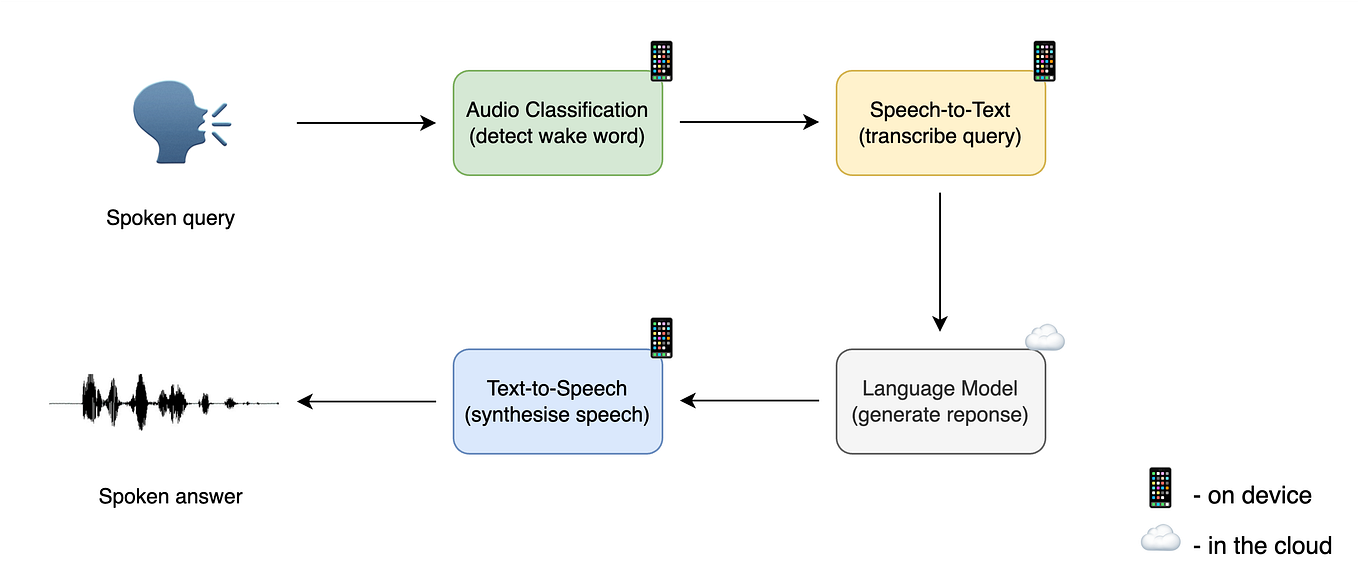
In our last lesson, we designed the logical system architecture for a real-time conversational AI agent, focusing on a concurrent, streaming pipeline to achieve sub-500ms latency. We now have the "what"—the blueprint of our STT-LLM-TTS system. Today, we focus on the "how": deploying this complex system in a way that is scalable, reliable, and efficient.
This lesson directly addresses the learning outcome: Propose a deployment strategy for the conversational agent, considering scaling, container orchestration, and cloud services. We will translate our architectural blueprint into a concrete, production-ready deployment plan, leveraging your expertise in cloud services and MLOps.
1. The Unique Challenges of Deploying Voice AI
Deploying a web server is a well-understood problem. Deploying a real-time voice AI agent presents a unique and more difficult set of challenges. It's not just about serving requests; it's about maintaining stateful, long-running, ultra-low-latency conversations.
Let's start by watching a segment that outlines these specific deployment hurdles.
Pipecat Cloud: Enterprise Voice Agents Built On Open Source - Kwindla Hultman Kramer, Daily
In this video from the AI Engineer conference, Kwindla Hultman Kramer of Daily.co discusses Pipecat Cloud, a platform for deploying voice agents. This specific section is invaluable as it breaks down the fundamental infrastructure problems that make voice AI deployment different from standard web service deployment.
Please watch the segment from 08:09 to 12:37. As you watch, focus on the speaker's enumeration of the hard problems in voice AI deployment. Pay attention to terms like 'long-running sessions,' 'autoscaling for real-time workloads,' 'cold starts,' and 'global deployment.'
As the video highlights, a successful deployment strategy must address:
- Low Latency: The entire stack must be optimized for real-time interaction.
- Stateful, Long-Running Connections: Conversations are not stateless HTTP requests; they are persistent sessions.
- Specialized Scaling: Standard autoscaling (e.g., based on CPU) is often insufficient for GPU-bound, real-time workloads.
- Cold Starts: The time it takes for a new instance to start up can kill the user experience. An agent needs to be available almost instantly.
- Global Reach & Data Residency: Users are global, and latency is distance-dependent. This necessitates a distributed infrastructure, while also respecting data privacy laws like GDPR.
- Cost Management: GPUs are expensive, so efficient utilization is paramount.
The speaker in the video mentions that many of these issues boil down to a "How do I do my Kubernetes?" problem. That's exactly what we'll tackle next.
2. The Foundation: Kubernetes for GPU-Accelerated Workloads
Given your background with Docker and microservices, you know that containerization is the first step. The next is orchestration. For managing complex, multi-container applications like our conversational agent, Kubernetes has become the industry standard. It provides the foundational tools for automating deployment, scaling, and management.
However, running AI workloads on Kubernetes requires specific configurations to manage expensive and specialized hardware like GPUs.
GPUs in Kubernetes for AI Workloads
The channel 'DevOps & AI Toolkit' provides a clear, practical guide on how to configure Kubernetes for AI. This video will walk us through the essential steps to make a Kubernetes cluster 'AI-ready'.
Please watch the first eight minutes of the video (00:00 - 08:06). You can skim the parts about setting up a specific Helm chart, but focus on these core Kubernetes concepts: Device Plugins: How Kubernetes becomes aware of GPUs on a node. Adding a GPU Node Pool: The concept of having a dedicated group of machines with GPUs in your cluster. Resource Limits: How you request a GPU for your pod in the manifest file (spec.containers.resources.limits). Taints and Tolerations: The mechanism Kubernetes uses to ensure that only pods that need GPUs are scheduled onto expensive GPU nodes.
These concepts are the building blocks for our deployment strategy. We won't place our STT or LLM containers on just any machine in the cluster; we'll use taints and tolerations to direct them specifically to nodes equipped with the necessary GPUs, and we'll use resource limits to allocate those GPUs.
3. A Microservices-Based Deployment Architecture
In the last lesson, we designed our agent with distinct components: STT, LLM, TTS, and an Orchestrator. This modular design maps perfectly to a microservices architecture, a pattern you're familiar with. Each component will be deployed as a separate, independently scalable service within our Kubernetes cluster.
Microservices Architecture for Voice AI
This diagram from an Introl blog post shows a typical microservices architecture for voice AI. An API Gateway routes traffic to different backend services (ASR, LLM, TTS), each of which is composed of multiple pods that can be scaled independently.
This approach offers several key advantages for our conversational agent:
- Independent Scaling: The LLM is the most compute-intensive part. The STT and TTS services might handle more concurrent streams per GPU. We can scale each service based on its specific load, optimizing resource usage. For instance, we might need 10 STT pods but only 4 LLM pods.
- Fault Isolation: If the TTS service crashes, it doesn't bring down the STT and LLM services. The system can degrade gracefully.
- Technology Flexibility: We could, for example, run a PyTorch-based STT model and a TensorFlow-based TTS model without conflict.
Our deployment strategy will therefore be to package each component (STT, TTS, LLM, Orchestrator) into its own Docker image and deploy each as a separate Deployment and Service within Kubernetes.
4. Advanced Resource Management for AI on Kubernetes
While standard Kubernetes gives us the basics, a production-grade deployment requires more sophisticated tools to optimize for the specific demands of AI workloads, especially regarding cost and performance. Given your research interests, this is where we can go beyond a basic setup.
A recent research paper from members of Red Hat, NVIDIA, and Intel provides an excellent overview of the emerging Kubernetes-native ecosystem for GenAI.
Evaluating Kubernetes Performance for GenAI Inference
This paper, 'Evaluating Kubernetes Performance for GenAI Inference,' is a cutting-edge look at how to properly orchestrate AI workloads. It moves beyond basic GPU scheduling to discuss a full stack of tools for queuing, resource slicing, and intelligent request routing.
This is a dense, academic paper, but it's directly relevant to your goals. I recommend reading the Abstract, Introduction (Section 1), Background (Section 2), and the Takeaways and Conclusion (Sections 4.4 and 5). \nFocus on understanding the purpose of these three key technologies: Kueue: For managing batch jobs (e.g., transcribing a large audio archive offline). Dynamic Accelerator Slicer (DAS): For GPU partitioning/slicing. This allows multiple, less-demanding pods to share a single physical GPU, dramatically improving utilization and cutting costs. Gateway API Inference Extension (GAIE): For intelligent, model-aware routing of online inference requests, especially for distributed LLMs, to optimize things like KV-cache hits.
The key insight from this paper is that a high-performance deployment isn't just about scheduling pods on GPUs. It's about building a cohesive platform that can:
- Share GPUs efficiently: For our STT and TTS services, which may not need a full A100 GPU per instance, using a tool like DAS (or NVIDIA's native Multi-Instance GPU - MIG) allows us to "slice" a GPU and run multiple pods on it. This drastically reduces cost.
- Manage Queues Intelligently: If our agent needs to support offline transcription, a job queueing system like Kueue ensures fair and efficient processing of batch workloads without interfering with real-time services.
- Route Requests Smartly: For the LLM service, especially if it's a large model distributed across multiple nodes, a simple round-robin load balancer is inefficient. A system like GAIE can route requests based on the current state of the model replicas (e.g., sending a request to a replica that already has a relevant prompt cached), significantly reducing latency.
5. Proposed Deployment Strategy
Let's synthesize everything into a comprehensive deployment strategy for our conversational agent.
1. Cloud & Orchestration Foundation:
- Cloud Provider: Use a major cloud provider like Google Cloud Platform (GCP) or Amazon Web Services (AWS).
- Managed Kubernetes: Employ their managed services, Google Kubernetes Engine (GKE) or Elastic Kubernetes Service (EKS). This abstracts away the complexity of managing the Kubernetes control plane.
- Node Pools: Configure the cluster with at least two node pools:
- A general-purpose CPU node pool for the Orchestrator service and other cluster components.
- A GPU node pool using machines equipped with NVIDIA GPUs (e.g., A100s or L4s) for the STT, LLM, and TTS services. This pool should have the appropriate taint (
nvidia.com/gpu=true:NoSchedule).
2. Component Deployment (Microservices on K8s):
- Containerization: Each service (STT, LLM, TTS, Orchestrator) is containerized with Docker.
- Deployment Manifests: Each service is deployed via a Kubernetes
Deployment.- STT/TTS Services:
- The pod spec will request a GPU slice (e.g., using MIG annotations) rather than a full GPU.
- The pod spec will include a
tolerationfor the GPU node taint. - A
HorizontalPodAutoscaler(HPA) will be configured to scale the number of pods based on a custom metric, such as concurrent streams or GPU utilization.
- LLM Service:
- The pod spec will request one or more full GPUs.
- For large models, we'll use a distributed serving framework like
vLLM, which runs across multiple pods/nodes. - We will use an advanced ingress controller that supports GAIE to perform model-aware routing to the
vLLMpods.
- Orchestrator Service:
- Runs on the CPU node pool.
- Scaled via an HPA based on standard CPU/memory metrics.
- STT/TTS Services:
3. Scaling Strategy:
- Service-level Scaling: HPA for each microservice allows independent, fine-grained scaling.
- Cluster-level Scaling: The cloud provider's Cluster Autoscaler will be enabled. It will automatically add new GPU or CPU nodes to the cluster when pods are pending due to insufficient resources, and remove them when idle to save costs.
- Global Distribution & Low Latency:
- Deploy identical Kubernetes clusters in multiple geographic regions (e.g.,
us-east1,europe-west1,asia-southeast1). - Use a Global Load Balancer (like Google Cloud Load Balancing or AWS Global Accelerator) to route end-user traffic to the nearest regional cluster.
- This minimizes network latency, which is critical for voice, and helps comply with data residency requirements like GDPR. The decision of co-locating compute close to users vs. close to centralized data sources, as discussed in the Pipecat video, becomes a key strategic choice here.
- Deploy identical Kubernetes clusters in multiple geographic regions (e.g.,
4. Reliability and Monitoring:
- Health Checks: Each
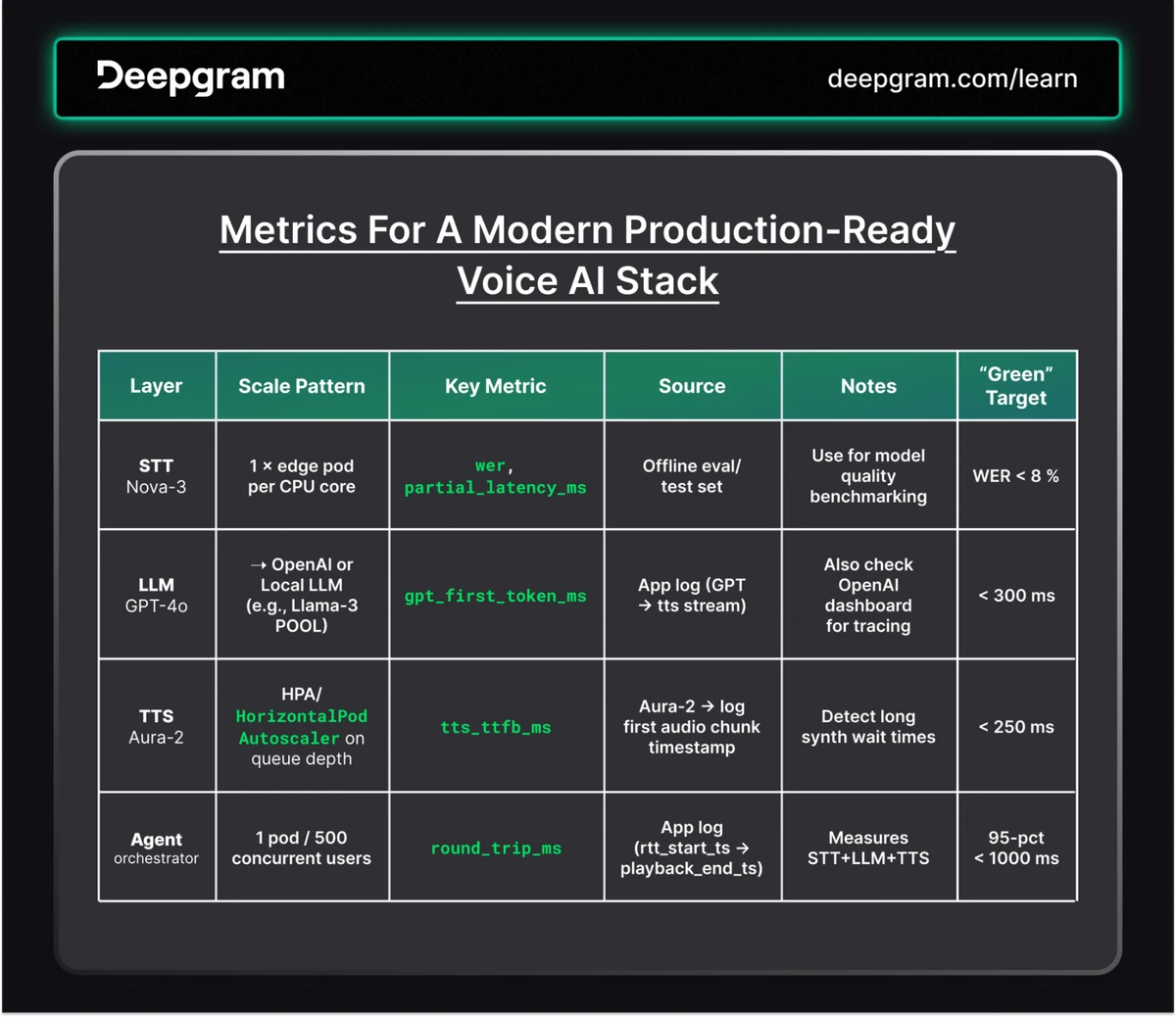
Deploymentwill havelivenessProbeandreadinessProbeconfigured. Kubernetes will automatically restart unhealthy containers and stop sending traffic to pods that are not ready. - Monitoring: Use a monitoring stack like Prometheus and Grafana to scrape metrics from all services. The Deepgram table below provides an excellent example of the key KPIs to track for each component.
- Logging: Aggregate logs from all pods using a cluster-level logging agent (e.g., Fluentd) into a centralized system like Elasticsearch or Google Cloud Logging.
Conclusion
We have now moved from a logical design to a robust, scalable, and production-ready deployment strategy. This approach leverages the best practices of modern cloud-native development.
Key Takeaways:
- A microservices architecture on Kubernetes is the standard for deploying complex AI applications like our conversational agent.
- The strategy must account for the unique challenges of voice AI: low-latency, stateful connections, and efficient GPU utilization.
- We use Kubernetes primitives like Deployments, Services, Taints/Tolerations, and HPAs to manage the lifecycle and scaling of each component.
- For state-of-the-art performance and cost-efficiency, we integrate advanced, AI-native tools like GPU Slicing (MIG/DAS) for resource sharing and intelligent routing (GAIE) for optimized LLM inference.
- A global deployment with multiple regional clusters and a global load balancer is essential to minimize latency for users worldwide.
Preview of the Next Lesson:
Over the past twelve modules, we have covered the entire lifecycle of audio AI, from the fundamental physics of sound to the complexities of production deployment. You now possess a deep and wide-ranging understanding of the field. In our final lesson, we will pivot to your future as a researcher. You will learn how to formulate a research proposal for a novel problem in audio AI, outlining the methodology and evaluation plan. This will be the capstone of your learning journey, allowing you to synthesize your knowledge to identify and tackle the next generation of challenges in audio AI.