
Hello! Welcome to the next lesson in your journey to becoming an audio AI researcher and developer.
In our last few lessons, we've built up a powerful MLOps toolkit. We learned to package our speech models into isolated, portable services using Docker and to manage all our project artifacts—code, data, and models—reproducibly with DVC. We now have the building blocks for professional-grade AI services.
But a single service, like an ASR API, is only one piece of a much larger puzzle. The real magic happens when you connect these pieces to create a seamless, interactive experience. Today, we're zooming out from the individual components to the system as a whole.
This lesson addresses the learning outcome: Design the system architecture for a conversational AI agent combining STT and TTS components in a pipeline. We'll move beyond thinking about just a single model and start thinking like a system architect, designing the blueprint for an AI that can listen and speak in real-time.
1. The Architectural Challenge: Defeating the Awkward Pause
Have you ever used a voice assistant and been frustrated by the long, unnatural pause between when you finish speaking and when it starts responding? This delay, often called "latency," is the primary enemy of natural-feeling conversational AI. It's often not a problem with the models themselves, but with the architecture connecting them.

A naive approach simply chains services together: wait for the user to finish talking, send the full audio to the STT service, wait for the full transcript, send the full transcript to an LLM, wait for the full response, and finally, send the full text to the TTS service to generate audio. This is a cascaded or batch architecture. As you can imagine, each "wait" step adds up, creating that awkward silence.
Our task is to design an architecture that minimizes this "voice-to-voice" latency. The widely accepted target for a natural-feeling conversation is under 500 milliseconds.
2. The Anatomy of a Conversational AI System
Before we can optimize the pipeline, we need to understand its parts. A typical Spoken Dialogue System (SDS) is composed of several modules working in concert.
ESPnet-SDS: Unified Toolkit and Demo for Spoken Dialogue Systems
This research paper, 'ESPnet-SDS', introduces a toolkit for building Spoken Dialogue Systems. The introduction clearly outlines the standard components of such a system, giving us a solid, academic foundation for the building blocks we'll be working with.
Please read the introduction (the first four paragraphs) and the first paragraph of Section 4.1, 'Cascaded Models.' Focus on identifying the key modules mentioned (VAD, ASR, NLU/NLG, TTS) and their roles in a traditional cascaded pipeline.
As the paper describes, the traditional components are:
- Voice Activity Detection (VAD): A crucial but often overlooked module. Its job is to detect when a person is speaking and, more importantly, when they have paused or finished speaking. This is often called "phrase endpointing."
- Automatic Speech Recognition (ASR / STT): Our familiar component that transcribes the user's speech into text.
- Natural Language Understanding (NLU) / Dialogue Management: This is where the "thinking" happens. An LLM typically fills this role, processing the transcribed text, maintaining conversational context, and generating a response.
- Text-to-Speech (TTS): The final step, which synthesizes the LLM's text response into audible speech.
While this cascaded structure is simple, it's inherently slow and suffers from other issues like error propagation (an ASR mistake can confuse the LLM) and loss of para-linguistic information (the LLM doesn't know how something was said, only what was said). To overcome the latency problem, we must fundamentally change how these components interact.
3. The Blueprint for a Low-Latency System: Concurrent Streaming
The solution to high latency is to stop waiting. Instead of processing entire chunks of audio or text sequentially, we design a concurrent, streaming architecture where the components work in parallel and operate on continuous streams of data.
Let's watch a video that breaks down the immense complexity of building a real-time voice bot and highlights why latency is the central challenge.
How to build the world's fastest voice bot: Kwindla Hultman Kramer
In this talk from AI Engineer, Kwindla Hultman Kramer, co-founder of Daily.co, details the challenges and strategies for building ultra-fast voice AI. It provides a real-world perspective on the latency targets and where delays accumulate.
Please watch the following segments: The Messy Reality (02:01 - 05:14): Get a sense of all the complex moving parts beyond the core models. The Latency Target (07:43 - 10:01): Pay close attention to the <500ms goal and why it's so hard to achieve. Latency Breakdown (11:58 - 14:20): This is a crucial part. See a detailed breakdown of where every millisecond is spent in a typical pipeline. This will inform our architectural decisions.
The key takeaway is that we can't afford to let the latencies of each stage simply add up. We need to overlap them. The following article provides an excellent deep dive into the design patterns that make this possible.
Designing concurrent pipelines for real-time voice AI
This blog post from Gladia is a fantastic guide to the practical engineering of real-time voice agents. It details the concurrent pipeline architecture and the specific techniques used in the STT and TTS stages.
Please read the sections from 'How real-time voice agents are built' through 'Pre-emptive TTS and overlapping speech generation.' Focus on these core concepts: The five-stage pipeline. How 'streaming STT' with 'partials' allows the system to start processing before the user finishes speaking. How 'pre-emptive TTS' starts generating audio before the LLM has finished its response.
4. System Architecture in Detail: A Sequence Diagram
Let's synthesize everything we've learned into a concrete architectural design. The diagram below shows the data flow and interactions in a modern, low-latency conversational AI system. We will use this as our reference blueprint.
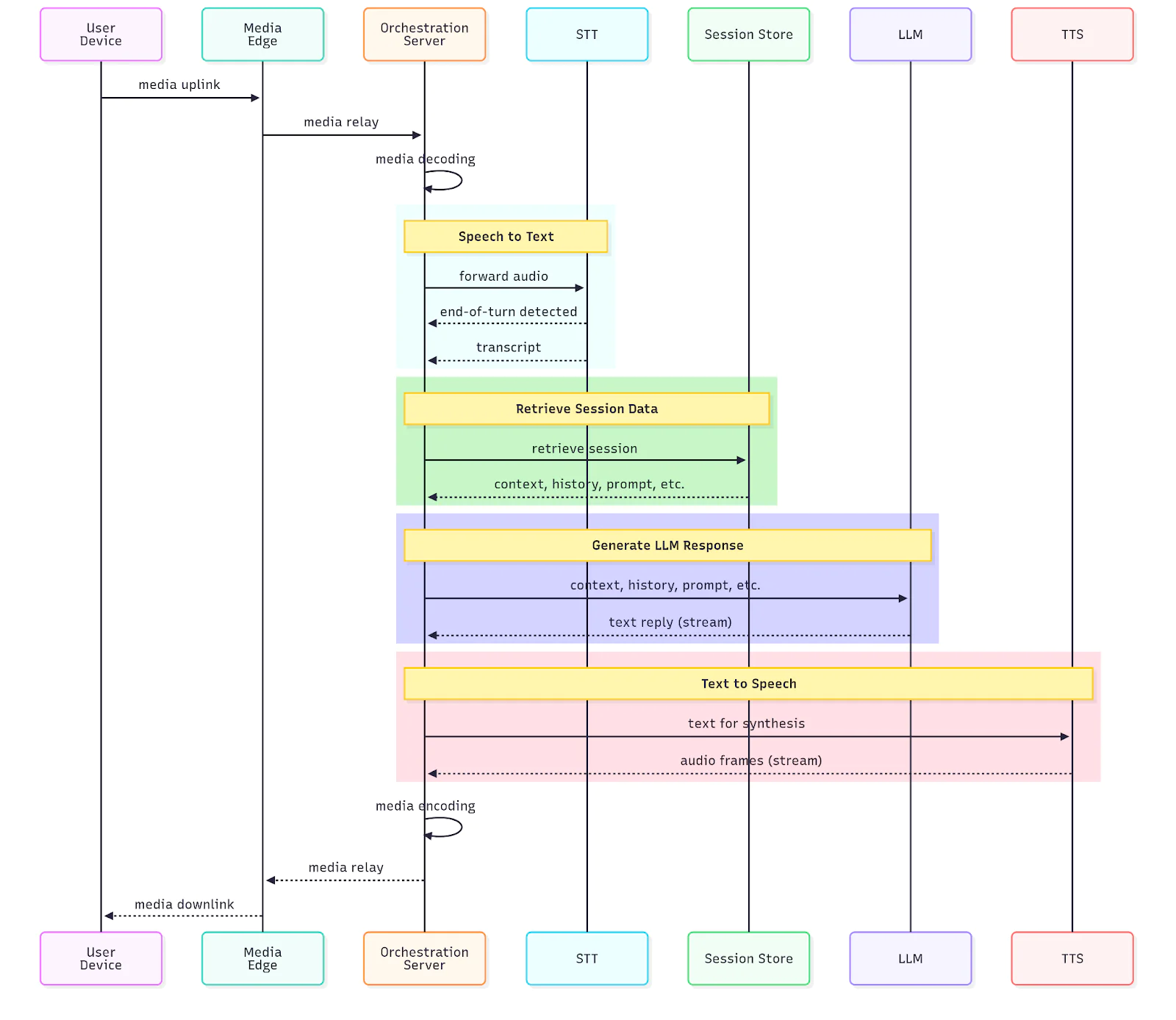
Let's trace the flow of a single user utterance through this architecture:
-
Audio Capture & Uplink (User -> Media Edge): The user speaks. Their device captures audio in small chunks (e.g., 20ms frames) and streams them continuously over the network (e.g., using WebRTC) to a Media Edge server. This server's job is to handle the raw media transport.
-
Streaming STT (Media Edge -> STT Service): The Media Edge forwards the audio chunks to the STT Service. The STT model doesn't wait for a full utterance. It begins transcribing immediately, producing a stream of partial and final transcripts.
- Partial Transcript: "I'd like to book a" -> "I'd like to book a flight"
- Final Transcript: "I'd like to book a flight to New York."
These transcripts are sent to the central Orchestration Server.
-
Orchestration & LLM Triggering (Orchestration Server -> LLM Service): The Orchestrator is the brain of the system. It receives the stream of transcripts from the STT service. It uses VAD logic (endpointing) to determine if the user has paused or finished speaking.
- As partial transcripts arrive, the orchestrator might pre-fetch information or "prime" the LLM.
- Once a final transcript is received (or a long enough pause is detected), the orchestrator sends the text to the LLM Service, along with conversation history retrieved from the Session Store.
-
Streaming LLM Response (LLM Service -> Orchestration Server): The LLM generates its response not as a single block of text, but as a stream of tokens.
- Token Stream: "Of", " course", ",", " where", " would", " you", " like", " to", " go", "?"
-
Streaming TTS (Orchestration Server -> TTS Service -> Media Edge): The Orchestrator does not wait for the entire LLM response. As soon as it receives the first few tokens, it forwards them to the TTS Service. The TTS model begins synthesizing audio immediately and streams the resulting audio chunks back to the Media Edge.
-
Audio Playback (Media Edge -> User): The Media Edge relays the synthesized audio chunks to the user's device, which plays them back as they arrive.
By the time the LLM is generating the end of its sentence, the TTS model is synthesizing the middle, and the user is already hearing the beginning. This massive overlap is how we defeat the awkward pause and achieve sub-500ms latency.
5. Deployment and Concurrency Patterns
Designing this system is one thing; building it is another. The orchestration of these concurrent, long-running processes is complex.
-
Concurrency Models: As the Gladia article mentioned, patterns like Async Task Queues (e.g., using Redis or RabbitMQ to communicate between microservices) or the Actor Model (e.g., using frameworks like Akka or Ray) are essential for managing the state and communication between these independent processes without blocking. Your background in software development and API design is directly applicable here.
-
Co-location of Compute: As noted in the "fastest voice bot" video, network latency between your services (STT, LLM, TTS) is a killer. A key architectural decision is whether to deploy these as separate, distributed services or to co-locate them on the same machine or in the same container cluster to minimize inter-service communication overhead. For the lowest possible latency, co-location is almost always preferred.
-
Orchestration Frameworks: Building this complex orchestration logic from scratch is a significant engineering effort. This is why open-source frameworks have emerged to help.
- Pipcat, mentioned in the video, is a Python framework specifically for orchestrating these real-time multimodal pipelines.
- ESPnet-SDS, from the paper, provides a unified toolkit within the popular ESPnet framework for building and comparing these systems.
Conclusion
Today, we've elevated our perspective from a model builder to a system architect. We've designed a blueprint for a modern, high-performance conversational AI agent, focusing on the critical challenge of latency.
Key Takeaways:
- A conversational AI agent is a pipeline of components, typically including VAD, STT, LLM, and TTS.
- The primary goal of the system architecture is to achieve low voice-to-voice latency (under 500ms) for a natural user experience.
- Simple cascaded (batch) architectures are too slow. A concurrent, streaming architecture is required.
- Key techniques in a streaming architecture include:
- Streaming STT that produces partial transcripts as audio arrives.
- Streaming LLM responses that generate text token-by-token.
- Pre-emptive/Streaming TTS that synthesizes audio as soon as the first text tokens are available.
- A central Orchestrator is responsible for managing the complex, overlapping data flows and state between these concurrent services.
- Deployment strategies like co-locating compute and using concurrency patterns like async queues are critical for implementation.
Preview of the Next Lesson:
We've designed the logical architecture of our conversational agent. The next question is: how do we run this in the real world, reliably and at scale? In our next lesson, we will propose a deployment strategy for the conversational agent, considering scaling, container orchestration, and cloud services. We'll take our design and discuss how to deploy it using tools like Kubernetes and cloud infrastructure like AWS or GCP.