
Welcome back! In our last session, we secured your application's state-changing endpoints against Cross-Site Request Forgery (CSRF). With that crucial protection in place, we now turn our attention to another of the web's most prevalent and dangerous vulnerabilities.
Today's lesson continues our module on Application Security. Your learning outcome is to sanitize server-rendered HTML fragments to prevent Cross-Site Scripting (XSS) when displaying user-generated content. While CSRF is about tricking a user's browser into sending an unwanted request, XSS is about tricking a browser into executing unwanted code. In the context of an HTMX application that renders HTML on the server, understanding and mitigating this risk is paramount.
We will explore what XSS is, see how easily it can be exploited in a server-rendered application, and then implement a robust, multi-layered defense strategy using the tools of our Express and EJS stack.
What is Cross-Site Scripting (XSS)?
Cross-Site Scripting (XSS) is a vulnerability that occurs when an attacker manages to inject malicious client-side scripts (usually JavaScript) into web pages viewed by other users. Unlike CSRF, which hijacks the authority of a user's session, XSS hijacks the user's browser itself, potentially to steal session cookies, deface websites, or redirect users to malicious sites.
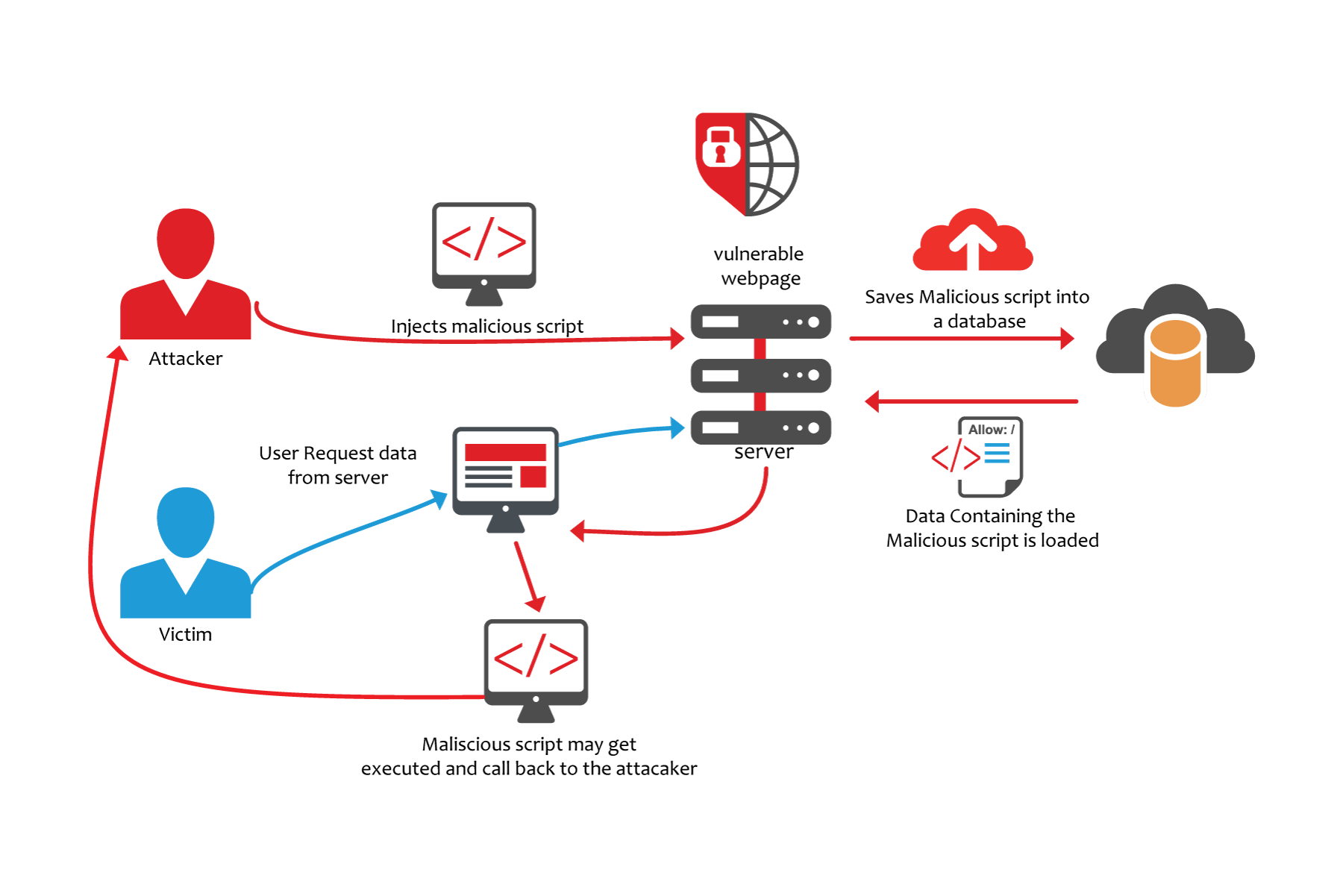
In the context of your CRUD applications, the most relevant variant is Stored XSS. This is where the malicious script is persisted, or "stored," on the server—typically in a database. When a victim requests a page that includes this stored data (like a user comment or a profile bio), the server sends the malicious script along with the legitimate content to the victim's browser, which then executes it.
The diagram below illustrates this exact process.
Seeing the Vulnerability in Action
The theory is important, but seeing the attack happen makes the risk tangible. A common misconception is that you need to inject a full <script> tag. As you'll see, attackers can be much more creative. The video below demonstrates how a seemingly innocuous feature—a search query reflected on the page—can become a vector for stealing user session cookies.
How To Prevent The Most Common Cross Site Scripting Attack
This video from Web Dev Simplified provides a crystal-clear demonstration of an XSS attack using an <img> tag and its onerror event. It powerfully illustrates how this can be used to exfiltrate sensitive data like session cookies.
Please watch from the beginning up to the end of the demonstration. Pay close attention to two key points: How the onerror attribute of an <img> tag is used to execute JavaScript, bypassing the browser's refusal to run injected <script> tags. The explanation of how an attacker can access document.cookie and what this implies for session hijacking.
As the video shows, if your application takes user input and inserts it directly into the HTML sent back to the browser, you are vulnerable. An attacker can craft a special URL, send it to a victim, and steal their session credentials, completely taking over their account.
The First Line of Defense: Auto-Escaping
The fundamental principle for preventing XSS is to treat all user-generated content as text, not as executable code or HTML markup. The most effective way to do this is through output escaping.
Fortunately, this is the default behavior for nearly all modern server-side templating engines, including EJS which we're using with Express. The HTMX documentation has an excellent essay on web security that covers this very topic.
Web Security Basics (with htmx)
This essay provides essential security guidance for hypermedia applications. We'll focus on its explanation of XSS and the role of template engines.
Please read the section on auto-escaping. Notice the table of template engines and the clear example of how a malicious script is rendered harmless by escaping special characters like < and >.
To put this in the context of our Express/EJS setup:
-
When you use
<%= userInput %>in your EJS template, you are using EJS's escaping mechanism. It will take a string like<script>alert('XSS')</script>and turn it into the literal text<script>alert('XSS')</script>. This string will be displayed to the user but will not be executed by the browser. This is the server-side equivalent of using.textContentinstead of.innerHTMLin client-side JavaScript. This should be your default for all user-provided data. -
In contrast,
<%- userInput %>tells EJS to insert the raw, unescaped HTML. This is extremely dangerous ifuserInputcomes from a user. You should only use this when you are 100% certain that the HTML you are inserting is safe and from a trusted source (e.g., it has already been sanitized).
For 95% of cases, simply using <%= %> is all you need to do to prevent XSS.
The Second Line of Defense: Server-Side Sanitization
What about the other 5%? What if you are building a feature, like a comment section with a rich-text editor, where you want to allow users to submit some HTML (e.g., <b>, <i>, <ul>) but block dangerous tags like <script> or attributes like onerror?
This is where sanitization comes in. Sanitization is a more nuanced process than escaping. It involves parsing the user's HTML input, analyzing it against a whitelist of safe tags and attributes, and producing a "clean" version of the HTML that is safe to render.
For this task, the industry standard is a library called DOMPurify. While it's often used on the client, it's critically important to perform this sanitization on the server. Client-side validation is for providing a better user experience; server-side validation is for security.
The following article explains this "defense in depth" philosophy and provides a complete guide for setting up server-side DOMPurify in a Node.js/Express application.
This post argues for a multi-layered security approach and demonstrates how to implement server-side sanitization with DOMPurify in an Express app.
First, read the sections on server-side best practices and defense in depth. This establishes the core mindset. Then, focus on the practical implementation. Read the section detailing the server setup and the subsequent Express code block showing how to handle a form submission. Pay close attention to how jsdom is required to allow DOMPurify to run in a Node.js environment.
Let's integrate this into our Express application.
-
Installation:
Since DOMPurify needs a DOM to work with, and Node.js doesn't have one, you need to provide a virtual DOM implementation likejsdom.npm install dompurify jsdom -
Implementation in an Express Route:
You would initialize DOMPurify and use it to clean any user input that is expected to contain HTML before saving it to the database or rendering it in a template.const express = require('express'); const { JSDOM } = require('jsdom'); // Required to run DOMPurify in Node const DOMPurify = require('dompurify')(new JSDOM().window); // Initialize DOMPurify const app = express(); app.use(express.urlencoded({ extended: true })); app.set('view engine', 'ejs'); // Example route for handling a user comment app.post('/submit-comment', (req, res) => { const userCommentHTML = req.body.comment; // Sanitize the user's HTML input const cleanHTML = DOMPurify.sanitize(userCommentHTML); // Now `cleanHTML` is safe to store in the database // and can be rendered later using the unescaped EJS tag. // db.saveComment(cleanHTML); // For demonstration, we'll render it back immediately res.render('comment-view', { comment: cleanHTML }); }); // In your comment-view.ejs template: // <div><%- comment %></div> // Here we use <%- because we have already made the content safe on the server.In this flow, the
DOMPurify.sanitize()call strips out any dangerous elements or attributes (like<script>oronerror), leaving only a safe subset of HTML that you can then confidently render using EJS's unescaped output tag,<%- %>.
Dangerous Contexts
Finally, it's crucial to understand that user input should only ever be placed in contexts where it is interpreted as text content. Even with escaping, placing user data in certain parts of an HTML document is asking for trouble. The HTMX security essay provides excellent guidance on this.
Web Security Basics (with htmx)
Let's revisit the HTMX security essay to understand where user content should and should not go.
Please read the section titled "Only serve user-generated content inside HTML tags". Absorb the warnings against injecting user content directly into <script> tags, <style> blocks, or as HTML attribute names.
The rule of thumb is simple: User-generated content belongs between HTML tags (e.g., <p>{{ content }}</p>), not as part of the tags themselves (e.g., <{{ tag }}> or class="{{ class_name }}"). While DOMPurify can be configured to handle some attribute-based scenarios, the safest default posture is to avoid them entirely.
Conclusion
You have now added another critical layer of security to your application. By understanding the threat of Cross-Site Scripting, you can ensure that content generated by one user cannot harm another.
Key Takeaways:
- Stored XSS is a primary threat for server-rendered applications, where malicious code is saved to a database and served to other users.
- Output Escaping is your primary defense. Use your templating engine's default escaping mechanism (
<%= %>in EJS) for all user content that should be treated as plain text. - Sanitization is your secondary defense. When you must allow users to submit a limited set of HTML, use a library like
DOMPurifyon the server to strip out dangerous tags and attributes before storing or rendering the content. - Always validate and sanitize on the server. The server is your fortress; it is the only security boundary you can trust.
- Avoid dangerous contexts. Never inject user-controlled data directly into script tags, style blocks, or as HTML tag/attribute names.
In our final security lesson, we will build on this foundation by implementing a Content Security Policy (CSP). A CSP acts as a final backstop, instructing the browser to block certain types of requests and script executions, which can mitigate the impact of an XSS vulnerability that might have somehow slipped past your other defenses.
Can't find a good explanation? Sign up and we'll make it for you
Sign up