
Welcome to our final lesson in the Application Security module. Last time, we fortified our application against Cross-Site Scripting (XSS) by correctly handling user-generated content through server-side escaping and sanitization. These are crucial defenses that operate on your server. Today, we add our final, powerful layer of protection, one that operates directly in the user's browser.
Your learning outcome is to apply a Content Security Policy (CSP) compatible with HTMX's inline attributes and event handlers. A CSP acts as a declarative set of rules that tells the browser what resources are allowed to load and execute. It's an essential defense-in-depth mechanism that can mitigate the impact of an XSS vulnerability if one were ever to slip past your server-side defenses.
At first glance, the declarative nature of HTMX seems to conflict with the principles of a strict CSP, which often forbids inline scripts and styles. In this lesson, we will dissect this apparent conflict and implement a modern, secure CSP that works harmoniously with HTMX in your Express application.
What is a Content Security Policy (CSP)?
A Content Security Policy is delivered to the browser via an HTTP response header, Content-Security-Policy. It contains a string of directives that define a whitelist of trusted sources for various types of content, such as scripts, stylesheets, images, and more. If a resource from a non-whitelisted source attempts to load, the browser will block it and, optionally, send a violation report to a specified endpoint.
This provides an extremely effective mitigation for XSS attacks. Even if an attacker manages to inject a malicious <script> tag into your page, a well-formed CSP will instruct the browser not to execute it.
Implementing CSP in an Express application is straightforward, especially with a middleware like Helmet, which we've discussed before.
How to Configure Content Security Policy (CSP)
This article from OneUptime provides a great introduction to CSP and shows how to implement it in Node.js.
First, read the brief introductory sections How CSP Works and the start of the configuration section. Then, focus on the code example under the heading Using Helmet for Express. This demonstrates the recommended way to manage CSP directives in your application.
As you can see, a basic policy might look something like default-src 'self'; script-src 'self';. This tells the browser to only trust content and scripts that originate from the same domain as the page itself.
The Challenge: HTMX and Strict CSP
A strict CSP that disallows inline scripting and the use of eval() presents two main challenges for an HTMX application:
- Dynamically Loaded Scripts: When HTMX swaps in a new HTML fragment, that fragment might contain
<script>tags. A policy likescript-src 'self'would block these inline scripts from executing. eval()-based Features: Certain HTMX attributes rely on evaluating JavaScript expressions dynamically. A strict CSP blocks this behavior by default.
The HTMX documentation is very clear about which features are affected by disallowing eval().
Let's consult the official documentation to understand the impact of disabling eval().
Please read the subsection on Configuration Options. Pay close attention to the bullet point for htmx.config.allowEval and the list of features it disables.
Disabling eval() impacts trigger filters (e.g., hx-trigger="click[ctrlKey]"), hx-on:* attributes, and dynamic values using the js: prefix. When a CSP violation occurs, your browser's developer console will show an error message, which is your cue that the policy is working but needs adjustment.
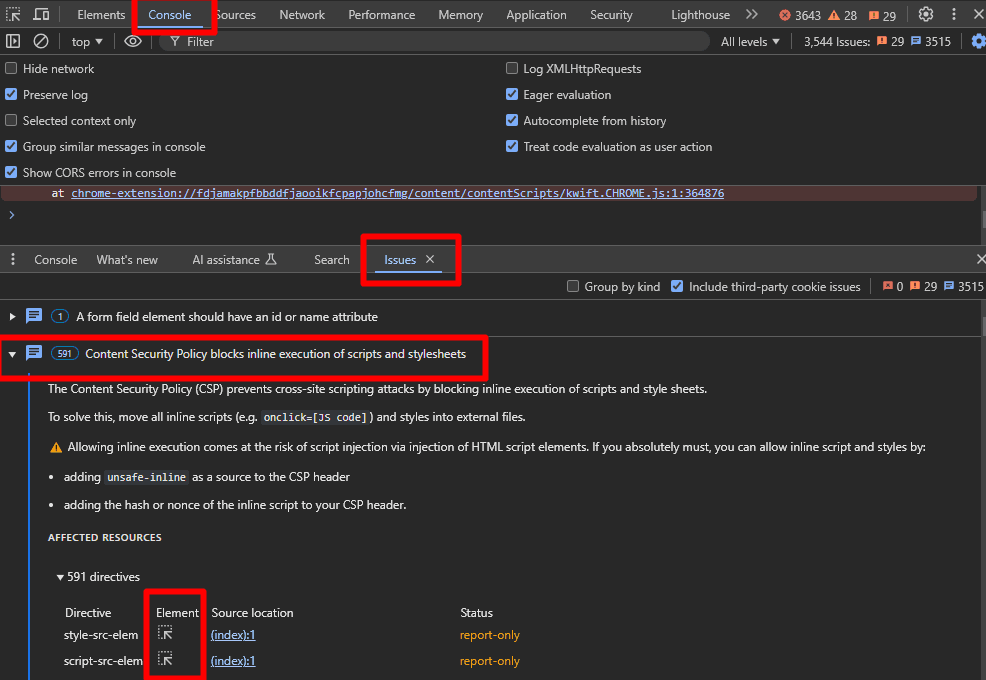
Relying on 'unsafe-inline' or 'unsafe-eval' to fix these errors is a common but dangerous anti-pattern that negates much of the security benefit of using a CSP. Fortunately, there is a much better way.
The Solution: A Nonce-Based, Strict CSP
The modern, recommended solution is to use a nonce (a "number used once"). A nonce is a unique, randomly generated string that you create on your server for every single HTTP request. You include this nonce in your CSP header and also add it as an attribute to your script tags. The browser will only execute scripts that have a nonce attribute matching the value specified in the header.
This approach allows you to selectively approve inline scripts without resorting to the dangerously broad 'unsafe-inline'.
Step 1: Generate a Nonce in Express
First, we'll write a small piece of middleware in Express to generate a nonce for each request and make it available to our EJS templates.
How to Configure Content Security Policy (CSP)
The OneUptime article provides a perfect blueprint for generating and using nonces in Express.
Read the section on using nonces. Focus on the Node.js code block that uses the crypto module to generate the nonce and the res.locals.nonce = nonce; line that passes it to the template.
Here is how you would integrate this into your app.js:
const express = require('express');
const crypto = require('crypto');
const helmet = require('helmet');

const app = express();

// Middleware to generate nonce
app.use((req, res, next) => {
  res.locals.nonce = crypto.randomBytes(16).toString('base64');
  next();
});

// CSP Middleware using the generated nonce
app.use((req, res, next) => {
  helmet.contentSecurityPolicy({
    directives: {
      // ... your other directives
      scriptSrc: ["'self'", `'nonce-${res.locals.nonce}'`],
    },
  })(req, res, next);
});

// ... rest of your app setup
Step 2: Configure HTMX and Your Templates
Now that a unique nonce is available in your EJS templates, you need to do two things:
- Tell HTMX what the nonce is, so it can automatically apply it to any
<script>tags within the fragments it loads. - Apply the nonce to your main HTMX library
<script>tag and any other scripts on the page.
You can configure HTMX by setting htmx.config.inlineScriptNonce. This configuration must be set before the main htmx.min.js file is loaded.
<!-- In your main layout.ejs file -->
<head>
    ...
    <!-- Configure htmx to use the nonce for its dynamic scripts -->
    <script nonce="<%= nonce %>">
      htmx.config.inlineScriptNonce = '<%= nonce %>';

      // MOST SECURE: Disable eval-based features
      htmx.config.allowEval = false;
    </script>

    <!-- Load htmx itself with the nonce -->
    <script src="/js/htmx.min.js" nonce="<%= nonce %>"></script>
    ...
</head>
By referencing the htmx.config table in the HTMX documentation, you can see inlineScriptNonce is the designated tool for this job.
Step 3: Introduce 'strict-dynamic'
There is one more modern directive that makes life much easier: 'strict-dynamic'. When you add 'strict-dynamic' to your script-src directive, you are telling the browser: "Trust any script that is dynamically created by an already-trusted script."
This means that once you've trusted htmx.min.js (using the nonce), you don't have to explicitly whitelist any CDNs or other script sources that HTMX might need to load. It simplifies your policy and enhances security.
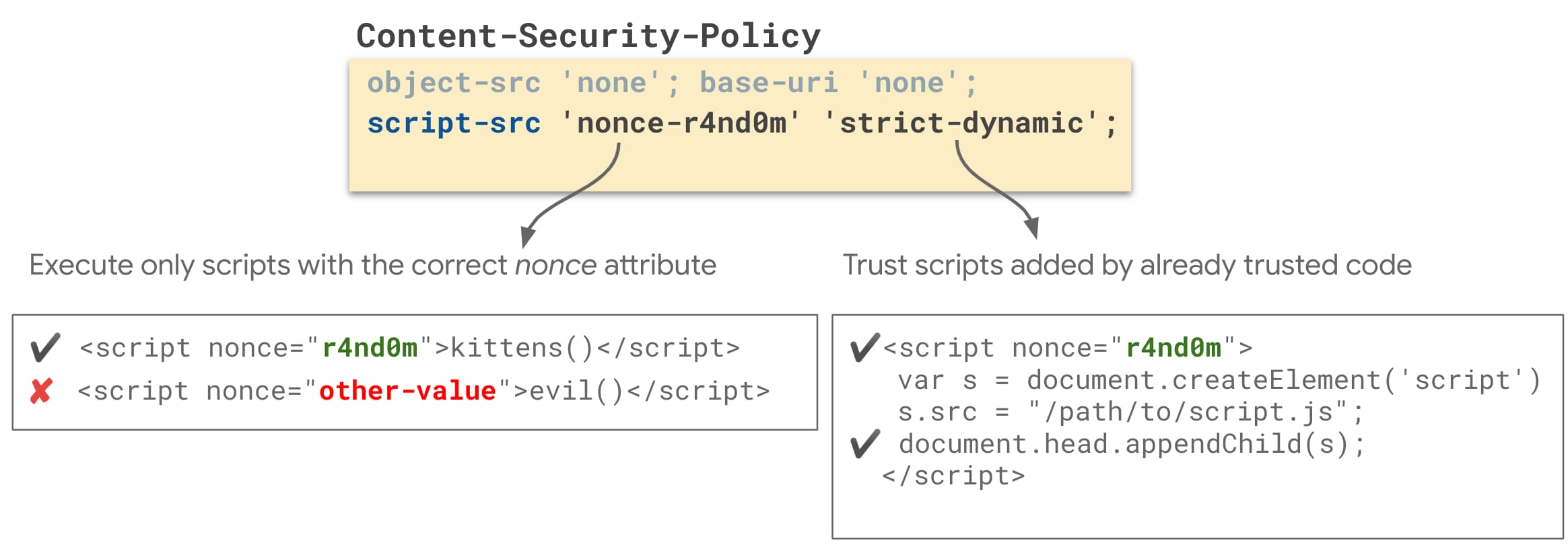
Our final, robust CSP configuration in Express would look like this:
// In your Express middleware
app.use((req, res, next) => {
  const nonce = crypto.randomBytes(16).toString('base64');
  res.locals.nonce = nonce;

  helmet.contentSecurityPolicy({
    directives: {
      defaultSrc: ["'self'"],
      // Allow scripts from self, scripts with the correct nonce,
      // and allow trusted scripts to load other scripts.
      scriptSrc: ["'self'", `'nonce-${nonce}'`, "'strict-dynamic'"],
      styleSrc: ["'self'"], // Adjust as needed for your CSS
      objectSrc: ["'none'"],
      baseUri: ["'self'"],
      formAction: ["'self'"],
    },
  })(req, res, next);
});
This policy is secure, maintainable, and fully compatible with HTMX's mechanism for loading content that contains <script> tags.
The eval() Question Revisited
Our nonce-based strategy perfectly handles dynamically loaded <script> tags. However, it does not address features like hx-on, which rely on eval(). As shown in the template example above, the most secure approach is to explicitly disable this capability:
htmx.config.allowEval = false;
When you do this, you must refactor any eval-dependent logic into standard JavaScript event listeners. Given your extensive front-end experience, this pattern should feel natural. It promotes a clean separation of concerns, moving logic out of your markup and into dedicated script files.
Instead of this (relies on eval()):
<button hx-get="/clicked" hx-on:click="alert('You clicked me!')">
  Click me
</button>
Do this:
<!-- Markup remains clean -->
<button id="my-button" hx-get="/clicked">Click me</button>
// In your separate, properly loaded JS file
document.body.addEventListener('htmx:afterOnLoad', function(event) {
  const button = document.getElementById('my-button');
  if (button) {
    button.addEventListener('click', function() {
      alert('You clicked me!');
    });
  }
});
// Note: You would likely use a more robust event delegation pattern.
If you absolutely must use features that depend on eval(), you would have to add 'unsafe-eval' to your script-src directive. This is a significant security compromise and should only be done after a thorough risk assessment.
Conclusion
You have now implemented the final piece of our "defense-in-depth" security strategy. By combining server-side protections like CSRF tokens and XSS sanitization with a client-side enforcement mechanism like a strict Content Security Policy, your application is significantly hardened against the most common web vulnerabilities.
Key Takeaways:
- CSP is a Browser-Level Defense: It instructs the browser to block untrusted resources, acting as a powerful safety net.
- Nonces are the Key: A nonce-based strategy is the modern, secure way to allow specific inline scripts without using
'unsafe-inline'. - HTMX is CSP-Compatible: Using
htmx.config.inlineScriptNonceallows HTMX to work seamlessly with a nonce-based CSP. 'strict-dynamic'Simplifies Policies: It allows trusted scripts to load other scripts, reducing the need to whitelist every single source domain.- Disable
eval()for Maximum Security: Sethtmx.config.allowEval = falseand handle custom logic through standard JavaScript event listeners rather than relying on attributes likehx-on.
With your application's security posture now robust and well-defined, we are ready to move on to the final module of this course. In the next lesson, we will shift our focus to ensuring the quality and performance of your application by exploring how to write integration tests for your HTMX endpoints.
Can't find a good explanation? Sign up and we'll make it for you
Sign up