
Good to see you again. You have just traced an application request from DNS resolution through transport, TLS, and HTTP. Before those protocols can reach an EC2 instance, load balancer, or database endpoint inside AWS, the network needs an unambiguous address plan.
This lesson makes CIDR notation operational: you will calculate the complete IPv4 range represented by a CIDR block, distinguish total addresses from AWS-assignable addresses, and determine whether two proposed subnets conflict. These are frequent SAA-C03 building blocks and essential when planning VPCs, hybrid connections, or future multi-account environments.
CIDR: an address plus a boundary
IPv4 addresses contain 32 bits, commonly shown as four decimal octets:
10.0.0.42
CIDR notation adds a prefix length:
10.0.0.42/26
The prefix length, /26, says that the first 26 bits identify the network portion. The remaining bits identify positions within that network, often called the host portion.
A larger prefix means fewer host bits and therefore a smaller network:
| CIDR prefix | Subnet mask | Total addresses | Typical block size |
|---|---|---|---|
/16 | 255.255.0.0 | 65,536 | Entire third and fourth octets vary |
/20 | 255.255.240.0 | 4,096 | Third octet moves in blocks of 16 |
/24 | 255.255.255.0 | 256 | Final octet varies from 0 through 255 |
/25 | 255.255.255.128 | 128 | Final octet moves in blocks of 128 |
/26 | 255.255.255.192 | 64 | Final octet moves in blocks of 64 |
/27 | 255.255.255.224 | 32 | Final octet moves in blocks of 32 |
/28 | 255.255.255.240 | 16 | Final octet moves in blocks of 16 |
The number of total addresses in a CIDR block is:
where is the prefix length.
Thus, /24 has addresses, while /26 has . This total-size calculation is useful before considering AWS-specific reservations.
Understanding CIDR Notation in IP Subnets - NetworkCalc
Read NetworkCalc’s concise explanation of CIDR notation, then follow its worked /27 range calculation. It provides a useful binary-level explanation behind the faster boundary method used in this lesson.
In the section “What is CIDR Notation?”, read the CIDR explanation, focusing on why the prefix specifies a flexible-sized address block rather than an old address class. Then, in “How to Convert CIDR Notation to an IP Range,” read the worked range example. Follow how the first address has host bits cleared and the final address has host bits set.
A practical distinction matters in cloud work:
10.0.0.42/26is useful as a host address with a prefix. It tells you the host belongs to a/26network.- The canonical name for the network itself is
10.0.0.0/26, because the network address has all host bits set to zero. - When creating an AWS VPC subnet, use the canonical network address, such as
10.0.0.0/26, not an arbitrary address inside it.
Calculating a CIDR range without converting every bit
You can always convert an address and mask to binary, but for common architecture work, identifying the relevant octet and its increment is faster and less error-prone.
Use this repeatable method:
- Identify the prefix and subnet mask.
- Find the changing octet, the octet where the mask is neither
255nor0. - Determine that octet’s block size.
- Locate the supplied address within one such block.
- Set all host positions to zero for the network address and to one for the final address.
Example 1: 10.0.0.42/26
A /26 has this mask:
255.255.255.192
The changing octet is the fourth octet. A /26 creates blocks of 64:
0–63
64–127
128–191
192–255
Because the given final octet is 42, it belongs to the first block, from 0 through 63.
| Attribute | Result |
|---|---|
| CIDR block | 10.0.0.0/26 |
| Network address | 10.0.0.0 |
| Final address in the block | 10.0.0.63 |
| Total IPv4 addresses | 64 |
Next valid /26 network | 10.0.0.64/26 |
The host address 10.0.0.42 is therefore inside 10.0.0.0/26.
Example 2: 10.24.77.9/20
A /20 has this mask:
255.255.240.0
Here, the changing octet is the third octet. The value 240 in the mask means that the third octet changes in blocks of 16:
0–15
16–31
32–47
48–63
64–79
80–95
The third octet in the supplied address is 77, which falls in the 64–79 block. The full range is therefore:
| Attribute | Result |
|---|---|
| CIDR block | 10.24.64.0/20 |
| Network address | 10.24.64.0 |
| Final address in the block | 10.24.79.255 |
| Total IPv4 addresses | 4,096 |
Notice that the final octet can range from 0 through 255, because a /20 leaves all eight fourth-octet bits available as host bits.
IP Subnetting from CIDR Notations
Watch “IP Subnetting from CIDR Notations” by Joshua Butcher for a visual walkthrough of the mask, block-boundary, and logical-AND perspectives. The examples reinforce why a prefix identifies a whole range rather than one individual address.
Watch the CIDR foundation to connect prefixes such as /20 to masks and network bits. Then watch the worked calculation, pausing when the instructor identifies the relevant octet and its increment. Compare that /20 example with 10.24.77.9/20 above.
AWS subnet capacity: total addresses are not assignable addresses
In conventional IPv4 subnetting, the first address is the network address and the last is the broadcast address. The familiar traditional formula for assignable hosts is:
For example, a /24 contains 256 total addresses and conventionally has 254 usable host addresses.
AWS reserves five IP addresses in every IPv4 subnet, not merely two. In each AWS subnet, AWS reserves:
- The first address: network address.
- The second address: VPC router.
- The third address: DNS server.
- The fourth address: reserved for future use.
- The final address: broadcast address.
Therefore, for AWS subnet capacity planning:
| Subnet | Total addresses | Traditional usable hosts | AWS assignable addresses |
|---|---|---|---|
/24 | 256 | 254 | 251 |
/26 | 64 | 62 | 59 |
/28 | 16 | 14 | 11 |
Return to 10.0.0.0/26. Its mathematical range is 10.0.0.0 through 10.0.0.63, but AWS reserves:
10.0.0.0   Network address
10.0.0.1   VPC router
10.0.0.2   Amazon-provided DNS
10.0.0.3   Reserved by AWS
10.0.0.63  Final address of the subnet
The assignable range begins at 10.0.0.4 and ends at 10.0.0.62, giving 59 assignable addresses.
For SAA-C03 questions, pay close attention to the wording:
- If the question asks for addresses in the CIDR block, use the total.
- If it asks how many addresses can be assigned to AWS resources in a subnet, subtract five.
- If a design specifies a required number of instances, ENIs, load balancer interfaces, or other private IP consumers, ensure the AWS-assignable count is sufficient.
AWS IPv4 VPC and subnet CIDR blocks generally range from /16 through /28. A /28 may look adequate for a small workload, but it contains only 11 AWS-assignable addresses. That can be exhausted quickly by load balancers, NAT gateways, interface endpoints, EC2 instances, and replacement capacity.
Splitting a parent block into child subnets
A subnet must fit entirely within its parent VPC CIDR block. It also must not share any IP address with another subnet in that VPC.
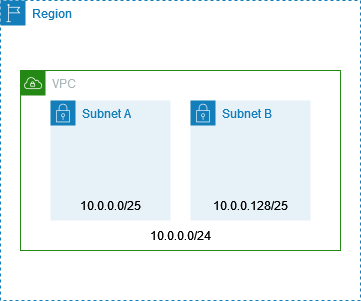
The image shows the most common kind of subnet split: dividing a /24 into two /25 networks.
| Subnet | Range |
|---|---|
10.0.0.0/25 | 10.0.0.0 through 10.0.0.127 |
10.0.0.128/25 | 10.0.0.128 through 10.0.0.255 |
They are adjacent but do not overlap. The first range ends at .127; the second begins at .128.
This distinction is central:
- Adjacent ranges touch at a boundary but share no address.
- Overlapping ranges share at least one address.
- Contained ranges always overlap. A
/25inside a/24is a subset of that/24.
A reliable test for subnet overlap
The most dependable way to assess overlap is to calculate both inclusive address ranges first.
Two ranges overlap when each range begins at or before the other range ends:
Here, and are the two starting addresses, while and are their ending addresses. Treat addresses as numerical values, octet by octet, rather than as text strings.
Worked comparisons
| Range A | Range B | Do they overlap? | Reason |
|---|---|---|---|
10.0.0.0/25 | 10.0.0.128/25 | No | A ends at 10.0.0.127; B begins at 10.0.0.128. |
10.0.0.0/24 | 10.0.0.128/25 | Yes | Every address in B is part of A. |
10.0.0.64/26 | 10.0.0.128/26 | No | A is .64–.127; B is .128–.191. |
10.0.0.0/23 | 10.0.1.0/24 | Yes | A spans 10.0.0.0 through 10.0.1.255, so it contains B. |
The third example is an easy exam trap. Both ranges are /26, but equal prefix lengths do not imply overlap. Calculate the boundaries:
10.0.0.64/26    10.0.0.64 through 10.0.0.127
10.0.0.128/26   10.0.0.128 through 10.0.0.191
They are simply neighboring blocks.
The second and fourth examples illustrate a second major trap: a more-specific CIDR block can be fully inside a larger block. The fact that the two prefixes differ is not evidence that the blocks are separate.
Subnet Overlap Checker - Free CIDR Overlap Detector Tool
Use this short guide to connect the calculation method to architectural consequences, especially VPC peering, VPN connectivity, and independent address allocation across teams.
In “Understanding Subnet Overlaps,” read the causes of overlap. Then read the cloud scenarios and the FAQ example beginning the containment example. Focus on why overlap is a routing-design issue, not merely an AWS console validation error.
Why overlap is an architecture problem
An IP route says, in effect, “send traffic for this destination range toward this network.” If two connected networks claim the same range, the network cannot reliably know which destination is intended.
For example, suppose:
Production VPC:     10.20.0.0/16
On-premises network: 10.20.0.0/16
A workload in the VPC cannot distinguish a server at 10.20.5.10 in AWS from a server with the same address on premises. The conflict makes hybrid routing ambiguous.
The consequences in AWS include:
- VPC peering: AWS does not allow peering connections where the connected VPC CIDR ranges overlap.
- Site-to-Site VPN and hybrid designs: overlapping on-premises and VPC ranges make routing ambiguous and commonly prevent the required connectivity design.
- Multi-account growth: if teams independently choose convenient ranges such as
10.0.0.0/16, later central connectivity becomes difficult or requires renumbering. - Subnet creation in one VPC: subnets within the VPC must not overlap.
A practical allocation policy prevents this. Rather than allowing each environment or team to choose a random private range, reserve larger non-overlapping blocks deliberately. For example:
| Environment | Reserved VPC block |
|---|---|
| Development | 10.10.0.0/16 |
| Test | 10.11.0.0/16 |
| Production | 10.12.0.0/16 |
| Shared services | 10.13.0.0/16 |
Each VPC can then divide its own /16 into smaller subnet blocks without conflicting with the others. Formal IP address management becomes increasingly important as accounts, Regions, and hybrid links grow.
Fast exam workflow
When an SAA-C03 scenario presents CIDRs, use this short scratchpad process:
-
Write the mask or known increment.
Common values worth memorizing include/24as 256 addresses,/25as 128,/26as 64,/27as 32, and/28as 16. -
Calculate the network and final address.
Locate the input address within the relevant block boundary. -
Check containment.
To fit inside a VPC, a proposed subnet’s first and final addresses must both be inside the VPC range. -
Check each existing subnet’s range.
If any two inclusive ranges share even one address, the proposal overlaps. -
Use AWS capacity, not generic host capacity.
For an AWS subnet, subtract five reserved addresses from the total.
A good mental shortcut is to recognize the valid boundaries in the changing octet:
| Prefix | Final-octet network boundaries |
|---|---|
/25 | 0, 128 |
/26 | 0, 64, 128, 192 |
/27 | 0, 32, 64, 96, 128, 160, 192, 224 |
/28 | Multiples of 16 |
This does not replace understanding, but it makes calculations much faster under exam time pressure.
Key takeaways
- CIDR notation uses a prefix length to divide an IPv4 address into network bits and host bits. A larger prefix means a smaller address block.
- The total number of addresses in a block is .
- To calculate a CIDR range, identify its block boundary, then determine the network address and final address.
- In AWS, five IPv4 addresses in every subnet are reserved. A
/28has 16 total addresses but only 11 assignable addresses. - Two CIDR ranges overlap when they share any address. A smaller block contained within a larger block is an overlap; neighboring ranges with consecutive boundaries are not.
- Deliberate, centrally managed address allocation prevents problems with subnet creation, VPC peering, VPNs, and future multi-account connectivity.
Next, you will shift from network mechanics to architectural judgment: applying the six AWS Well-Architected pillars to identify the central trade-off in a simple design.
Can't find a good explanation? Sign up and we'll make it for you
Sign up