
Welcome back. In the previous lesson, you separated AWS’s responsibilities for the cloud infrastructure from your responsibilities for configuring, securing, and operating a workload. That boundary becomes tangible when a user opens a web application: DNS configuration, permitted ports, TLS certificates, and application behavior are all customer-side design decisions, even when AWS runs the underlying platform.
This lesson traces a typical request for https://shop.example.com/products/42. By the end, you should be able to explain what DNS, TCP or UDP, ports, HTTP, and TLS each contribute; identify where a request is likely failing; and recognize the common AWS exam implications of each layer.
One URL, several layers of work
A URL gives the browser several kinds of instructions:
https://shop.example.com/products/42
| Part | Meaning |
|---|---|
https | Use HTTP protected by TLS. |
shop.example.com | The hostname that DNS must resolve. |
/products/42 | The application resource the browser requests. |
| Port, if omitted | The conventional port for the scheme: usually TCP port 443 for HTTPS and TCP port 80 for HTTP. |
A successful request involves distinct layers with distinct jobs:
- DNS translates the human-readable hostname into an address or endpoint.
- IP routing carries packets toward that destination.
- TCP or UDP provides a transport method between processes.
- Ports identify the intended service on the destination system.
- TLS establishes an authenticated, encrypted channel for HTTPS.
- HTTP expresses the actual web request, such as “get this page” or “submit this order.”
- The server, load balancer, API, or application returns an HTTP response.
The distinction matters: DNS does not deliver a web page, TCP does not understand an HTTP GET, and opening port 443 does not itself create encryption. Each layer enables the next.
DNS: finding the destination
A browser cannot connect to shop.example.com directly. Networks deliver traffic using IP addresses, so the hostname must first be resolved. DNS is the distributed system that answers questions such as:
“What address or endpoint should I use for
shop.example.com?”
For a basic IPv4 answer, DNS commonly returns an A record. For IPv6, it returns an AAAA record. In real cloud architectures, the answer may identify a public IP address, a load balancer, a CDN endpoint, or another DNS name through a CNAME-like aliasing arrangement. DNS identifies a destination; it does not guarantee that the destination is reachable or healthy.
What happens in a lookup
The browser first checks local sources, including its browser cache and operating-system cache. If it does not already have a valid answer, the device’s local DNS client, called a stub resolver, asks a recursive resolver. This is often supplied by an ISP, corporate network, or public DNS provider.
If the recursive resolver has no cached answer, it follows DNS’s hierarchy:
- It asks a root name server which name servers handle the top-level domain, such as
.com. - It asks a top-level domain (TLD) name server which name servers are authoritative for
example.com. - It asks an authoritative name server for the requested record, such as
shop.example.com. - It returns the answer to the client and caches it for the record’s configured time to live (TTL).
In AWS, Amazon Route 53 can host the authoritative DNS records for your domain. It does not normally sit in the data path for every HTTP request. Instead, a recursive resolver queries Route 53 when Route 53 is authoritative for that name, receives a DNS answer, and the browser then connects to the returned endpoint.
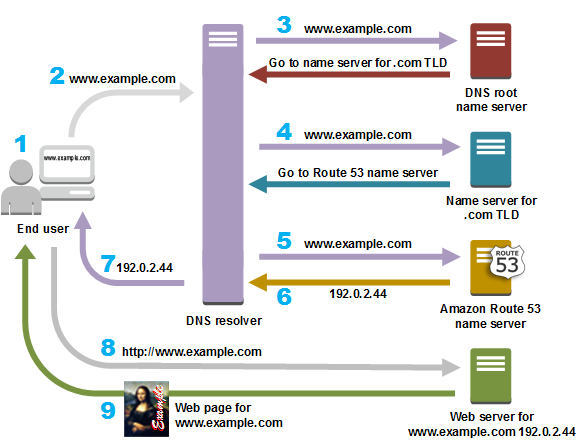
Notice the important separation in the diagram: the DNS query ends when the resolver returns the address. The later request for http://www.example.com is web traffic, not DNS traffic.
What is DNS? (and how it makes the Internet work)
Watch “What is DNS? (and how it makes the Internet work)” from NetworkChuck for a visual walk-through of caches, recursive resolvers, root servers, TLD servers, and authoritative name servers.
Watch the DNS journey. Focus on the difference between a recursive resolver, which finds an answer on the client’s behalf, and an authoritative server, which owns the answer for a domain. Treat the exact server names in the demonstration as examples; the hierarchy is the key idea.
DNS commonly uses UDP, but not only UDP
Traditional DNS queries usually use UDP port 53 because the request and response are small and speed matters. UDP has low overhead and does not establish a long-lived connection first.
However, DNS can also use TCP port 53, including when a response is too large for UDP or when reliability is required. Modern clients may also use encrypted resolver protocols such as DNS over HTTPS or DNS over TLS. These protect the DNS conversation between a client and its resolver; they are separate from the TLS used to protect the eventual website connection.
For SAA-C03-level reasoning, retain this baseline:
- Standard DNS commonly uses UDP 53.
- DNS can also use TCP 53.
- A public HTTPS web application normally accepts client traffic on TCP 443.
- HTTP/3 is a notable modern exception: it uses QUIC over UDP 443.
Transport protocols and ports: reaching the right process
Once DNS supplies an address, the client needs to reach the right service at that address. This is where transport protocols and ports matter.
An IP address identifies a network destination, such as an EC2 instance or public load balancer. A port identifies the particular network service listening on that destination. A single server can therefore run several services at once:
| Service | Typical transport | Typical destination port |
|---|---|---|
| DNS | UDP, sometimes TCP | 53 |
| HTTP | TCP | 80 |
| HTTPS | TCP | 443 |
| SSH administration | TCP | 22 |
| PostgreSQL | TCP | 5432 |
| MySQL or Aurora MySQL-compatible | TCP | 3306 |
A connection is not identified by port alone. At a practical level, the network distinguishes traffic using its protocol plus source and destination addresses and ports. Your browser selects a temporary, high-numbered ephemeral source port, while it targets the server’s well-known destination port, such as 443.
TCP: reliable, ordered delivery
Transmission Control Protocol (TCP) is the usual transport for HTTP and HTTPS. Before transferring application data, TCP establishes a connection. At a high level:
- The client sends a connection request to the server’s listening port.
- The server acknowledges that it can accept the connection.
- The client confirms the connection.
TCP provides ordered delivery, retransmission of lost data, and flow and congestion control. These properties suit a web request: missing part of an HTML document, API response, or payment submission is not acceptable.
If a security group, network firewall, or host firewall blocks TCP port 443, the browser cannot establish the connection. DNS might still resolve perfectly, because successful DNS only proves that the name returned an answer.
UDP: low overhead and loss tolerance
User Datagram Protocol (UDP) has no TCP-style connection establishment and does not guarantee delivery or ordering. That does not make it “bad” or “insecure”; it makes it appropriate where latency matters more than perfect delivery.
Common UDP use cases include:
- Traditional DNS queries.
- Voice and video communication.
- Online games.
- Telemetry and some Internet of Things workloads.
- HTTP/3, which uses QUIC over UDP and adds reliability and security features above basic UDP.
The useful design question is not “which is faster?” It is:
Does the application need the transport itself to provide reliable, ordered delivery, or can it tolerate loss or implement needed reliability at a higher layer?
Top 8 Most Popular Network Protocols Explained
Watch the selected portions of “Top 8 Most Popular Network Protocols Explained” from ByteByteGo for a concise comparison of HTTP, HTTPS, TCP, and UDP.
Watch HTTP and HTTPS to connect request-response behavior with TLS protection. Then watch TCP versus UDP, concentrating on why TCP is normally chosen for web traffic and why HTTP/3 is a deliberate UDP-based exception.
Ports are part of the security boundary
In AWS, network access rules typically match a protocol, port or port range, and source. For example, an internet-facing web entry point may need to accept TCP 443 from the public internet. An administrative SSH service on TCP 22 should normally accept connections only from a defined administrator network, VPN, or bastion host.
Do not treat a port number as a security control by itself:
- TCP 443 is a convention for HTTPS, but a service listening there is not automatically encrypted or trustworthy.
- A DNS record does not specify whether port 443 is open.
- An IP address that responds on port 443 can still present an invalid certificate or return an application error.
- A database port should generally be available only to the application tier that needs it, not directly to internet clients.
The next networking module will examine VPC route tables, security groups, and network ACLs in detail. For now, view an allowed protocol and port as a necessary gate in the request path.
TLS and HTTPS: protecting the conversation
HTTP describes what a web client and server say to each other. By itself, HTTP is not encrypted. A plain HTTP request can be read or modified by parties able to intercept it on the network.
HTTPS means HTTP carried inside a connection protected by Transport Layer Security (TLS). For the common HTTPS-over-TCP case, the order is:
- DNS provides the destination.
- TCP establishes a transport connection to port 443.
- TLS negotiates security and validates the server’s identity.
- HTTP requests and responses travel inside the protected TLS channel.
TLS provides three main protections:
- Confidentiality: observers cannot read the protected application data, such as credentials, session cookies, order details, or API responses.
- Integrity: tampering with protected data in transit is detected.
- Server authentication: the client validates that the server presents a certificate for the hostname it intended to visit.
During the TLS handshake, the server sends a digital certificate. The browser checks, among other things, that the certificate is currently valid, chains to a trusted certificate authority or trust anchor, and matches the hostname requested by the user.
For a normal public website, the user generally authenticates the server. In more specialized designs, mutual TLS can additionally require a client certificate, but that is not the usual browser-to-public-website flow.
TLS does not secure everything
TLS protects data in transit between TLS endpoints. It does not make insecure application code safe, prevent overbroad IAM permissions, or automatically encrypt data in a database. It also does not protect data after it has reached a compromised endpoint.
This fits directly with the shared-responsibility lesson:
- AWS can operate the infrastructure and managed services that support TLS.
- You choose the hostname, configure the certificate, select where TLS terminates, restrict network access, and maintain secure application behavior.
- You must ensure that clients reach the intended endpoint and that the certificate remains valid and appropriate for the domain.
A common exam trap is assuming that a certificate is sufficient. If an application is internet-facing but TCP port 443 is blocked by a security group, users cannot reach the certificate to begin with. Conversely, if port 443 is open but the certificate does not match the hostname, the TCP connection may succeed while the browser rejects the secure session.
HTTP: the application-level request and response
After the secure channel is available, the browser sends an HTTP request. HTTP is an application protocol built around a request-response model.
For example:
GET /products/42 HTTP/1.1
Host: shop.example.com
Accept: application/json
This request includes:
- A method, here
GET, describing the intended action. - A path, here
/products/42, identifying the resource. - Headers, which carry metadata such as the hostname, accepted content types, authentication information, cookies, and caching directives.
- An optional body, typically used by methods such as
POST,PUT, orPATCHto submit data.
A successful response might look like:
HTTP/1.1 200 OK
Content-Type: application/json

{"id":42,"name":"Wireless keyboard"}
The status code communicates the broad result:
| Status range | Typical meaning |
|---|---|
200 range | Request succeeded. |
300 range | Redirection, such as moving from HTTP to HTTPS. |
400 range | Client-side issue, such as an invalid request or missing authentication. |
404 | The application or web server did not find the requested resource. |
500 range | Server-side application or service failure. |
HTTP is deliberately separate from DNS and TCP. A 404 Not Found proves that the browser reached an HTTP-capable endpoint and received an application-layer response. It is not a DNS failure or a blocked-port symptom. In contrast, a browser message such as “DNS name not found” points earlier in the request path, while a connection timeout often suggests a routing, firewall, security-group, or listener problem.
What happens when you type a URL into your browser? | Front-End Web & Mobile
Read this AWS Front-End Web & Mobile post to consolidate the end-to-end browser flow from URL parsing through DNS, connection setup, HTTP request construction, and HTTP response handling.
Begin in “1. You type https://jennapederson.dev/hello-world in your browser and press Enter.” Read the HTTPS explanation, noting the distinction between scheme, domain, and path. Then move to “2. Browser looks up IP address for the domain.” Read the caching discussion, and identify why a recursive lookup is not required every time a user visits a site. In “3. Browser initiates TCP connection with the server,” read the connection sequence. Continue through “4. Browser sends the HTTP request to the server” and read the request structure. Finally, in “5. Server processes request and sends back a response,” read the response explanation. Focus on what each layer contributes rather than memorizing every browser header.
A practical troubleshooting and exam framework
When an internet user cannot use a cloud application, diagnose from the outside inward. Do not jump immediately to the application code.
| Symptom | Likely layer to investigate first | Example cause |
|---|---|---|
| Hostname cannot be resolved | DNS | Missing record, incorrect delegation, expired cached answer |
| Name resolves but connection times out | Network transport and port access | TCP 443 blocked by a security group, firewall, route, or missing listener |
| Browser warns that the connection is not private | TLS | Expired certificate, hostname mismatch, incomplete certificate chain |
Request receives 404 Not Found | HTTP routing or application | No route, incorrect path, missing resource |
Request receives 500 Internal Server Error | Application or backend dependency | Application exception, database failure, invalid backend configuration |
| Real-time service has intermittent loss but low delay | UDP-based application behavior | Expected loss tolerance may be exceeded, or application-level recovery is inadequate |
These symptoms are clues, not proofs. A load balancer, web application firewall, proxy, CDN, or backend service can change what a user sees. Still, the layered model narrows the investigation quickly.
Optional five-minute command-line observation
Using a safe public hostname such as example.com, observe the layers from a terminal:
nslookup example.com
curl -Iv https://example.com
The first command asks DNS for an address. The second command shows connection details, TLS certificate information, and HTTP response headers. You do not need to memorize every line of output. Identify only three things: the resolved address, that the connection targets HTTPS, and the returned HTTP status.
Key takeaways
A cloud application request is a chain of specialized protocols and controls:
- DNS translates a hostname into an address or endpoint. Route 53 can provide the authoritative DNS answer, but DNS is not the web request itself.
- TCP normally carries HTTP and HTTPS because it provides reliable, ordered delivery. UDP is common for DNS and latency-sensitive applications; HTTP/3 uses QUIC over UDP.
- Ports identify destination services. Typical values include UDP or TCP 53 for DNS, TCP 80 for HTTP, and TCP 443 for HTTPS.
- TLS authenticates the server and protects HTTP data in transit through encryption and integrity checking.
- HTTP contains the application request, headers, optional body, and the response status and content.
- For AWS architecture and troubleshooting, separate failures by layer: DNS resolution, reachability to the required port, TLS validation, and HTTP or application behavior.
Next, you will use IPv4 CIDR notation to calculate address ranges and determine whether subnet ranges overlap. That is the addressing foundation needed before placing these request paths inside a VPC.
Can't find a good explanation? Sign up and we'll make it for you
Sign up