Hello! Welcome to your next lesson on fine-tuning diffusion models.
In our last session, we went through the complete, end-to-end workflow of training a LoRA using the Kohya_ss framework. You learned the mechanics of the process: preparing and captioning data, setting up the complex folder structure, and configuring the essential training parameters like learning rates and network rank.
Today, we shift from the mechanics of training to the art of generation. Once you have a trained model, how do you steer it at inference time to produce exactly the image you envision? This lesson is all about gaining that granular control.
This brings us to our learning outcome: Configure hyperparameters and use negative prompts for targeted content generation (SFW and NSFW). We will explore how to craft effective prompts, the immense power of telling the model what not to do, and how to balance key settings to achieve your creative goals, including those related to your interest in generating NSFW content.
1. The Art of the Positive Prompt: Beyond Natural Language
At its core, a prompt is your instruction to the model. While you can use natural language (e.g., "a photo of a woman"), you'll gain far more control by thinking like the model. Given your background in AI, you can think of this as moving from a high-level API call to passing specific arguments to a function. The model was trained on a vast dataset of images and their associated text, often structured as tags or keywords.
For instance, many models, especially those fine-tuned on anime-style images from sites like Danbooru, respond better to a tag-based format.
a photo of a woman might become 1girl, photo, detailed face.
This tag-based approach allows for more precise control. The most crucial techniques for this are prompt weighting and syntax.
Explaining Prompting Techniques In 12 Minutes – Stable Diffusion Tutorial (Automatic1111)
To start, let's watch a practical demonstration of fundamental prompting techniques. This video from Bitesized Genius will show you how to structure prompts and emphasize or de-emphasize specific concepts.
Please watch the following segments: Prompt Basics (00:24 - 02:13): Focus on the idea that prompts are ordered by importance and the concept of tokens (the units the model uses to understand text). Word Importance (03:02 - 04:23): This is key. Pay close attention to how parentheses () increase a word's influence and square brackets [] decrease it. Numerical Weighting (04:23 - 05:21): Learn the syntax (word:1.2) to assign a precise weight. This gives you fine-grained control over the composition.
As you saw, the syntax is straightforward but powerful:
(word): Increases emphasis by a factor of 1.1.((word))is 1.1 * 1.1 = 1.21.[word]: Decreases emphasis (equivalent to(word:0.9))(word:1.4): Sets a specific, strong emphasis.(word:0.8): Sets a specific, reduced emphasis.
Mastering this syntax is the first step toward moving from hoping for a good result to engineering one.
2. The Power of Negative Prompts
If the positive prompt is what you tell the model to create, the negative prompt is what you tell it to avoid. This is arguably one of the most powerful and important features for generating high-quality, targeted images.
Instead of just trying to add more and more detail to your positive prompt, you can often achieve better results by explicitly excluding what you don't want.

So, how does this work under the hood?
How Negative Prompts Steer the Denoising Process
Recall that diffusion models work by starting with random noise and iteratively denoising it to match a prompt. This "matching" is a process of guidance.
- Without Negative Prompts: The model tries to steer the noisy image towards your positive prompt and away from a generic, unconditioned image (what it would generate with an empty prompt).
- With Negative Prompts: The model steers the noisy image towards your positive prompt and away from your negative prompt.
It is actively trying to create an image that maximizes its similarity to the positive prompt while minimizing its similarity to the negative prompt.
Please use NEGATIVE PROMPTS with Stable Diffusion v2.0
For a deeper, more technical explanation, this video from 1littlecoder explains the theory of why negative prompts are so effective, especially in modern models.
Watch from 01:13 to 02:47 and 03:38 to 05:29. Focus on understanding: The explanation of why negative prompts became critical for Stable Diffusion 2.0 due to changes in the latent space. The conceptual model of the denoising process: how the model calculates the difference between a version guided by your positive prompt and a version guided by your negative prompt, and uses that to refine the final image.
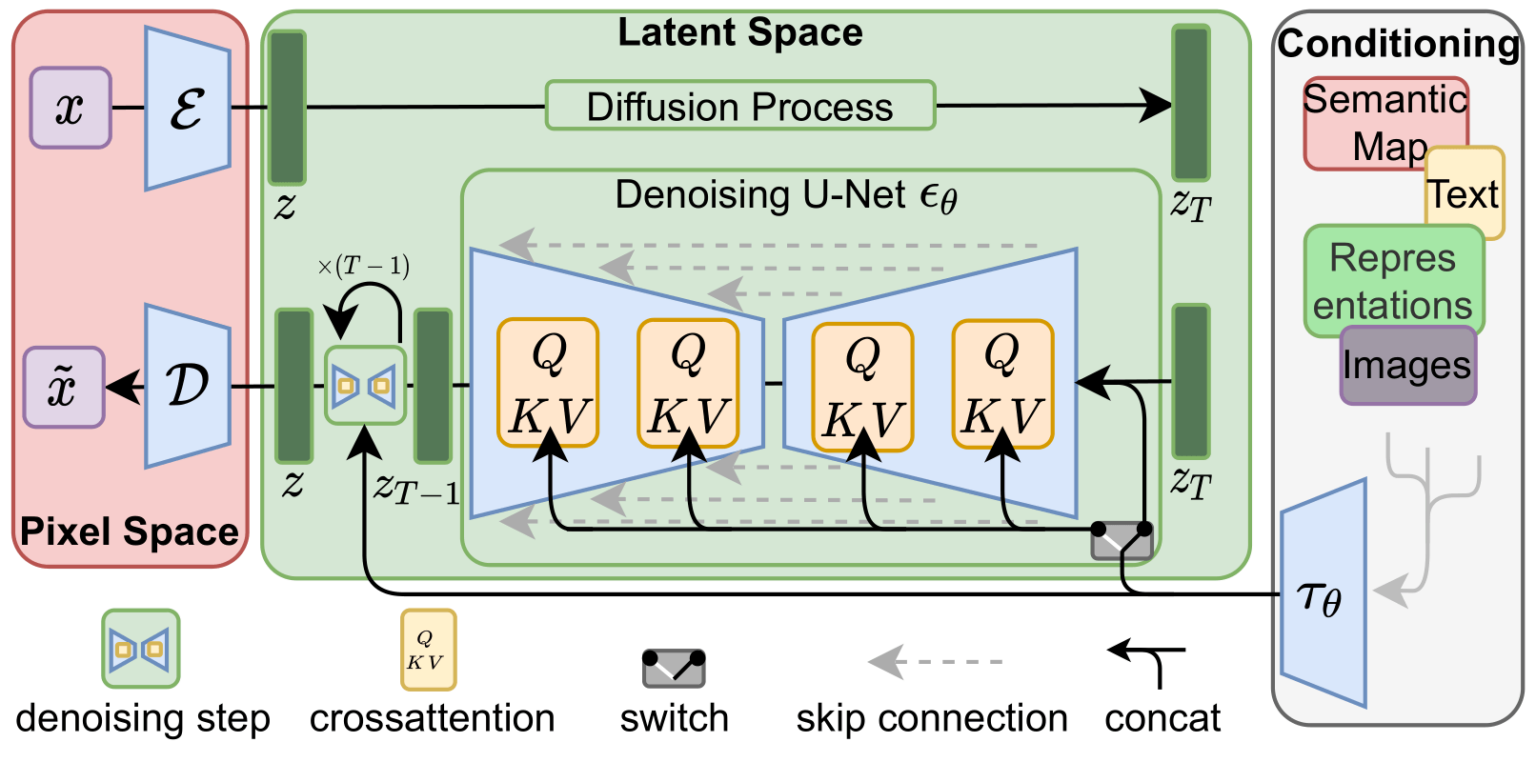
Practical Negative Prompts
The theory is useful, but the real power comes from practice. It's common to have a "standard" set of negative prompts to improve general quality and then add specific ones for your image.
The Most Complete Guide to Stable Diffusion Parameters
Let's look at some commonly used negative prompts. The OpenArt blog provides a great starting list.
Read the section 'Negative Prompt'. It provides excellent template prompts for different scenarios that you can use as a base for your own generations.
Here are some of the most useful categories of negative prompts:
- General Quality:
lowres, worst quality, low quality, jpeg artifacts, blurry, ugly, duplicate - Anatomy & Form:
bad anatomy, deformed, disfigured, mutilated, bad hands, extra limbs, extra fingers, malformed limbs, missing arms, missing legs(These are essential for generating characters). - Artistic Style: If you want a photo, you might negatively prompt
painting, drawing, illustration, sketch, art. Conversely, for a drawing, you might negatively promptphotorealistic, photo. - Anime-Specific: Based on common tags, prompts like
lowres, bad anatomy, bad hands, text, error, missing fingers, extra digit, fewer digits, cropped, worst quality, low quality, normal quality, jpeg artifacts, signature, watermark, username, blurryare a very strong starting point, as noted in the Reddit guideNoob's Guide to Using Automatic1111's WebUI.
3. Key Generation Hyperparameters
Beyond the prompts, you have several other "knobs" to turn. The most important are the CFG Scale, Sampling Steps, and Seed.
CFG Scale (Classifier-Free Guidance)
This is one of the most critical settings. It controls how strictly the model must adhere to your prompt.
- Low CFG (e.g., 2-6): Gives the model more creative freedom. The result might be more artistic or unexpected but may ignore parts of your prompt.
- Medium CFG (e.g., 7-10): The recommended range. A good balance between following your instructions and producing a coherent, high-quality image.
- High CFG (e.g., 11-15): Forces the model to follow your prompt very strictly. This can be useful for complex, detailed prompts but can also lead to "fried" or over-saturated images if pushed too far.
Explaining Prompting Techniques In 12 Minutes – Stable Diffusion Tutorial (Automatic1111)
Let's see the CFG scale in action. This clip visually demonstrates its effect.
Watch from 08:49 to 09:33 to see how changing the CFG scale impacts the generated image's adherence to the prompt.
Sampling Steps
This determines how many denoising iterations the model performs.
- More steps allow the model to add more detail, but there are diminishing returns.
- Early samplers required 100+ steps. Modern samplers (like
DPM++ 2M Karras,Euler a) can produce excellent results in just 20-30 steps. - Going too high (e.g., 80+) rarely improves quality and just wastes computation time. A good range to experiment with is 20-40.
Seed
The seed is the number that initializes the starting random noise.
- If you use the same prompt, same parameters, and same seed, you will get the exact same image.
- Setting the seed to
-1tells the UI to pick a random seed for each generation. - Why is fixing the seed useful? It allows you to perform controlled experiments. You can keep the seed constant and change one word in your prompt to see exactly what effect that word had on the final composition. This is invaluable for iterating and refining an idea.
4. Targeted Content Generation: SFW and NSFW
Now, let's apply these concepts to generate specific types of content.
Generating SFW (Safe-for-Work) Content
This is a straightforward application of negative prompts. If you find a model is generating unwanted nudity or suggestive content, you can explicitly forbid it.
- Positive Prompt:
beautiful portrait of a woman, fantasy art - Negative Prompt:
nsfw, nude, naked, suggestive, bikini
This forces the model to find solutions in the latent space that match "beautiful portrait" but are far away from the "nsfw" concepts.
Generating NSFW (Not-Safe-for-Work) Content
Generating NSFW content is a matter of flipping this logic and overcoming potential safety filters.
-
Disable Safety Filters: Most Stable Diffusion UIs, like Automatic1111, have a built-in safety checker. This checker runs after the image is generated and will blur or replace images it deems NSFW. To generate this content, you must disable this feature in the settings. The Reddit guide
Noob's Guide to Using Automatic1111's WebUIpoints this out in its settings section: you must find and disable "Filter NSFW content". -
Use Descriptive Positive Prompts: Be specific about what you want. The positive prompt is where you describe the scene, subject, and composition.
-
Use Negative Prompts for Subtraction: This is the key. Instead of just prompting for nudity, you get better control by negatively prompting the things you want to remove.
- Positive Prompt:
(1girl, my_character_lora:1.0), detailed body, long hair, standing in a room - Negative Prompt:
clothing, dress, shirt, pants, bra, panties, ugly, deformed, blurry
By telling the model to avoid clothing, you guide it towards generating a nude figure without having to use potentially ambiguous or overly restrictive terms in the positive prompt.
- Positive Prompt:
-
Model Choice is Key: The easiest way to generate high-quality NSFW content is to use a model (checkpoint or LoRA) that was specifically fine-tuned on an NSFW dataset. These models have a strong prior for this type of content, making your job of prompting much easier. Your prompts will be more about refining the details rather than fighting the model's inherent SFW bias.
Test your understanding!
You have fine-tuned a LoRA on a specific anime character, triggered by the keyword my_char_v1. You want to generate a photorealistic image of this character sitting on a park bench. Your first attempt with the prompt photo of my_char_v1 sitting on a park bench, <lora:my_char_v1:1> produces a cartoonish image with distorted hands and six fingers.
Based on what you've learned, design a full generation command:
- A better positive prompt using weighting.
- A strong negative prompt to fix the style and anatomy issues.
- A recommended CFG Scale value.
Show answer
Here is a well-structured solution:
-
Positive Prompt:
(photorealistic:1.3), masterpiece, best quality, photo of a (my_char_v1:1.1) sitting on a park bench, sharp focus, detailed skin, <lora:my_char_v1:1>(photorealistic:1.3)strongly emphasizes the desired style to override the LoRA's anime bias.masterpiece, best qualityare general quality enhancers.(my_char_v1:1.1)gives a slight boost to the character's likeness.
-
Negative Prompt:
anime, cartoon, drawing, painting, sketch, (deformed, distorted, disfigured:1.2), poorly drawn, bad anatomy, wrong anatomy, extra limb, missing limb, floating limbs, (mutated hands and fingers:1.3), disconnected limbs, mutation, mutated, ugly, disgusting, blurry, amputation, bad hands, extra fingers, fewer digitsanime, cartoon, drawing...explicitly forbids the unwanted artistic styles.- The heavily weighted anatomy and hand-related tags strongly guide the model away from these common failure modes.
-
CFG Scale: A value between 8 and 10 would be a good choice. It's high enough to ensure the model adheres to the detailed positive and negative prompts but not so high that it might cause artifacts or "fry" the photorealistic style.
Conclusion
You now have a powerful toolkit for steering diffusion models at inference time. Prompting is an empirical art, and the best way to improve is through experimentation.
Key Takeaways:
- Prompt Syntax is Power: Using tags, weighting
(word:1.2), and ordering are fundamental skills for precise control. - Negative Prompts Guide by Exclusion: They are often more effective for fixing issues (bad anatomy, wrong style) and achieving targeted content (SFW/NSFW) than adding more terms to the positive prompt.
- Hyperparameters Balance Creativity and Control: The CFG Scale is your "prompt adherence" knob, while Steps control detail and Seed ensures reproducibility for experiments.
- Targeted Generation is a System: Achieving specific SFW or NSFW output involves a combination of disabling filters, using descriptive positive prompts, and using subtractive negative prompts.
Preview of the next lesson:
We've covered how to train a model with Kohya_ss and how to steer it during generation. But how do you know if the model you trained is actually good? In the next lesson, we will focus on methods to evaluate the quality of fine-tuned diffusion models and iterate on the training process, closing the loop on the fine-tuning workflow.