
Hello! Welcome to the final module of our course on Production Operations and Scaling.
In our last lesson, we covered how to securely manage credentials using environment variables, a crucial practice for any production system. Today, we'll build on that by examining how to architect n8n to handle a production-level workload. This lesson addresses the learning outcome: Describe the architecture of n8n's scaling capabilities (queue mode and workers).
As a software developer, you know that an application's architecture is the foundation for its performance and reliability. A single-process application can only handle so much load. We'll explore how n8n moves beyond this limitation with a distributed architecture designed for horizontal scaling.
From Single Process to Distributed System
By default, a self-hosted n8n instance runs in what's called main mode. In this mode, a single Node.js process is responsible for everything:
- Serving the n8n user interface and API.
- Listening for webhook calls and schedule triggers.
- Executing every step of every workflow.
This is simple and efficient for development and low-volume tasks. However, as the number of concurrent workflows increases, this single process becomes a bottleneck. To understand this limitation and its solution, a helpful analogy is a restaurant.
The Ultimate Guide to Scaling Your Self-Hosted n8n Instance
This video from Bart Slodyczka uses a great restaurant analogy to introduce the difference between n8n's default main mode and the scalable queue mode.
Please watch from 01:16 to 01:54. The video likens main mode to a restaurant with a single employee doing everything, and queue mode to hiring specialized staff like chefs and front-of-house managers.
As the video explains, to serve more customers efficiently, you need to specialize roles. This is precisely what n8n's queue mode does. It transforms n8n from a monolithic application into a distributed system with specialized components.
The Architecture of Queue Mode
Queue mode is n8n's answer to high-performance, scalable workflow execution. It decouples the various responsibilities of the system into distinct, independently scalable components.
For a clear, plain-language breakdown of these components, the following article is an excellent starting point.
This article from the Evalics blog provides a concise, high-level overview of queue mode and the role of each component.
Read the section titled 'What n8n Queue Mode Is (Plain English)'. It clearly outlines the responsibilities of the main instance, Redis, and workers, and lists the sequence of events during a workflow execution.
As you just read, the key components are:
-
Main Instance: This is the "brain" of the operation. It handles user-facing tasks like the UI, the API, and receiving triggers (e.g., from webhooks or schedules). Crucially, it does not execute the workflows itself. Instead, it creates an execution job and hands it off.
-
Message Broker (Redis): This acts as the central job queue. The main instance places new execution IDs into a list in Redis. It's the "order counter" where new tickets are placed for the kitchen.
-
Database (PostgreSQL): This is the shared source of truth. It stores all workflow definitions, credentials, and execution data. Using a robust database like PostgreSQL is critical because it's designed to handle concurrent read/write operations from many workers simultaneously, which is a limitation of the default SQLite database.
-
Workers: These are the "workhorses" of the system. They are separate n8n processes whose only job is to execute workflows. They continuously poll Redis for new jobs, pick one up, fetch the corresponding workflow data from PostgreSQL, run the execution, and write the results back to the database.
The Flow of an Execution
The interaction between these components follows a clear, logical sequence. A sequence diagram is a perfect way for us to visualize this flow.
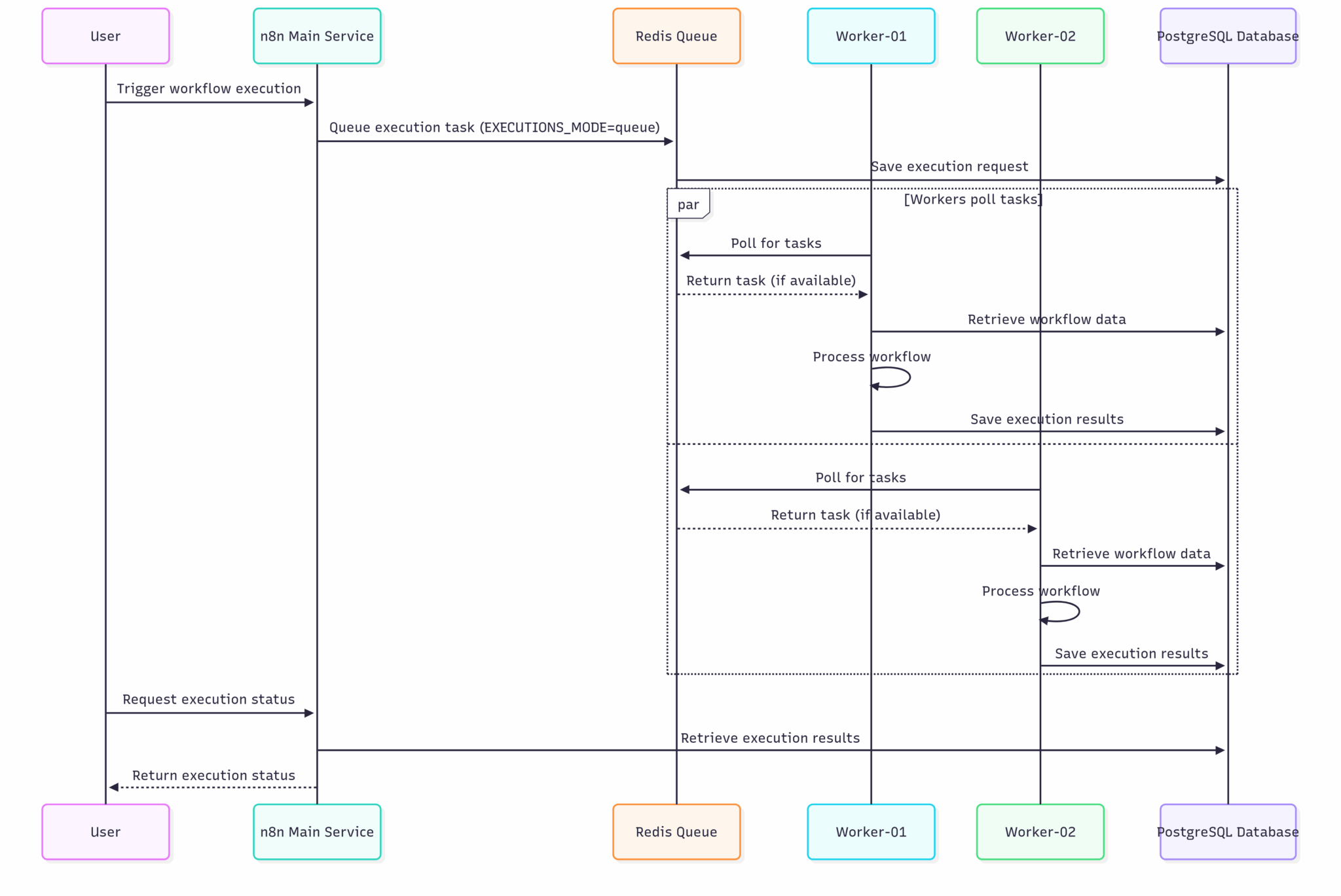
Let's trace the steps outlined in the diagram and the official documentation:
- A trigger (like a webhook call) arrives at the Main Instance.
- The main instance authenticates the request, creates a new execution entry in the PostgreSQL database, and places the new execution ID onto the queue in Redis.
- An available Worker process, which is constantly polling Redis, picks up the execution ID from the queue.
- The worker uses the ID to query the PostgreSQL database for the full workflow definition and any required credentials.
- The worker executes the workflow step by step.
- Upon completion (or failure), the worker writes the final execution log and status back to the PostgreSQL database.
- The worker notifies Redis that the job is complete, which in turn can notify the main instance.
This architecture is powerful because you can scale the execution capacity horizontally simply by adding more worker processes. If you have 100 pending workflows, you can have 10 workers each processing 10, or 20 workers each processing 5, dramatically improving throughput.
Test your understanding!
In a queue mode setup, a developer notices that workflows are being triggered successfully (they appear in the executions list) but are stuck in a "Running" state for a long time and never complete. The main n8n instance UI is responsive. Which component is the most likely source of the problem?
Show answer
The most likely source of the problem is the worker processes. If the main instance is creating executions and placing them on the queue, its job is done. The fact that workflows are not progressing means the workers are either not running, cannot connect to Redis or the database, or are crashing during execution.
A Complete Architectural View
When deployed using Docker, these components translate into separate services, often defined within a single docker-compose.yml file. This diagram provides a comprehensive look at a production-grade setup.

This diagram visualizes how everything fits together:
- Incoming traffic is managed by a reverse proxy.
- The
n8n Mainservice handles the UI and webhook ingestion. - It places jobs into the
Redis BullMQ Queue. - Multiple
n8n Workerservices consume jobs from the queue. - All n8n services communicate with the shared
PostgreSQLdatabase.
Advanced Scaling Patterns
While adding workers is the primary scaling method, the n8n architecture allows for even more granular optimization for extreme-scale scenarios. It's worth being aware of these, as they complete the picture of n8n's capabilities.
- Webhook Processors: For scenarios with an extremely high volume of incoming webhooks, you can deploy a separate pool of processes dedicated solely to ingesting webhook traffic. This prevents the main instance's API from being overwhelmed and ensures no incoming trigger is missed.
- Multi-Main Setup: For high availability, you can run multiple
maininstances behind a load balancer. The system automatically designates one as a "leader" to handle unique tasks (like schedule triggers), while the others act as "followers." If the leader fails, a follower is automatically promoted, preventing a single point of failure for your UI and API. - Worker Concurrency: Each worker can run multiple executions in parallel (defaulting to 10). This concurrency can be tuned. For workflows that are mostly waiting for API responses (I/O-bound), a higher concurrency is efficient. For workflows doing heavy data processing (CPU-bound), a lower concurrency might be better to avoid overloading the worker's resources.
The official n8n documentation provides the authoritative details on these advanced configurations. A quick scan will give you a complete overview of the scaling landscape.
Briefly read the sections 'Webhook processors', 'Configure worker concurrency', and 'Multi-main setup'. You don't need to memorize the configuration details, just understand the purpose of each feature.
Conclusion
Today, we've dissected the architecture that allows n8n to scale from a simple tool to a robust, enterprise-grade automation platform.
Key Takeaways:
- n8n's default
mainmode uses a single process and is suitable for development but not for high-volume production loads. - Queue mode provides scalability by distributing work across specialized components: a main instance, a Redis message queue, a PostgreSQL database, and multiple workers.
- The core scaling strategy is horizontal scaling: adding more worker instances to increase workflow execution capacity.
- This architecture is fault-tolerant and avoids single points of failure by decoupling the UI/API from the execution engine.
- Advanced patterns like dedicated webhook processors and multi-main setups provide further options for scaling and high availability.
Preview of the Next Lesson:
We've now described the what and the why of n8n's scalable architecture. In our next and final lesson of the course, we'll cover the how. You will get hands-on experience as we set up n8n in queue mode with a main process and at least one worker, putting the concepts from today and the previous lesson into practice to build a real, scalable n8n deployment.