
Hello! Welcome back to our module on Production Operations and Scaling.
In our last lesson, we focused on versioning your workflows using Git, treating them as code. A key takeaway was the importance of never committing secrets to your repository. This lesson is the other half of that coin. We'll address the learning outcome: Configure credentials securely in a production environment (e.g., via environment variables).
As a software developer, the concept of environment variables is likely second nature to you. Our goal today isn't just to explain what they are, but to explore their specific and critical role within the n8n ecosystem for building secure, portable, and maintainable automation infrastructure. We'll cover how n8n uses them for its own configuration, how you can leverage them within your workflows, and finally, look at a professional pattern for automating credential management in a self-hosted environment.
Why Environment Variables are Non-Negotiable in Production
Hardcoding credentials—like API keys, database passwords, or webhook secrets—directly into your workflows is a significant security risk and an operational headache.
- Security: If your workflow JSON is ever exposed, so are your secrets.
- Portability: Moving a workflow from a development environment to production requires manually finding and changing every single hardcoded value.
- Maintainability: If a password or API key needs to be rotated, you have to hunt it down in every workflow and node that uses it.
Environment variables solve this by decoupling your configuration and secrets from your workflow logic.
Level 1: Configuring the n8n Application
Before we even get to workflows, the n8n application itself is configured using environment variables. This is especially relevant in a self-hosted Docker setup. You use these variables to tell n8n how to connect to its database, what its public-facing URL is, and more.
This video provides an excellent hands-on demonstration of editing these variables in a docker-compose.yml file.
Master n8n: Set Up Environment Variables Easily!
This video, from the syncbricks channel, shows a practical example of modifying n8n's core configuration variables within a Docker Compose setup to fix issues like incorrect webhook URLs.
Watch from 01:12 to 04:39. Pay attention to how the presenter edits the docker-compose.yml file to change the WEBHOOK_URL and add new variables for controlling execution history (EXECS_DATA_PRUNE, DB_POSTGRESDB_MAX_CONNECTIONS) and setting the GENERIC_TIMEZONE. This clearly illustrates how you control the n8n application's behavior.
As you saw, variables like DB_POSTGRESDB_PASSWORD, WEBHOOK_URL, and GENERIC_TIMEZONE are set in the environment section of the n8n service in your docker-compose.yml file.
The Most Important Variable: N8N_ENCRYPTION_KEY
There is one environment variable that is absolutely critical for data integrity: N8N_ENCRYPTION_KEY.
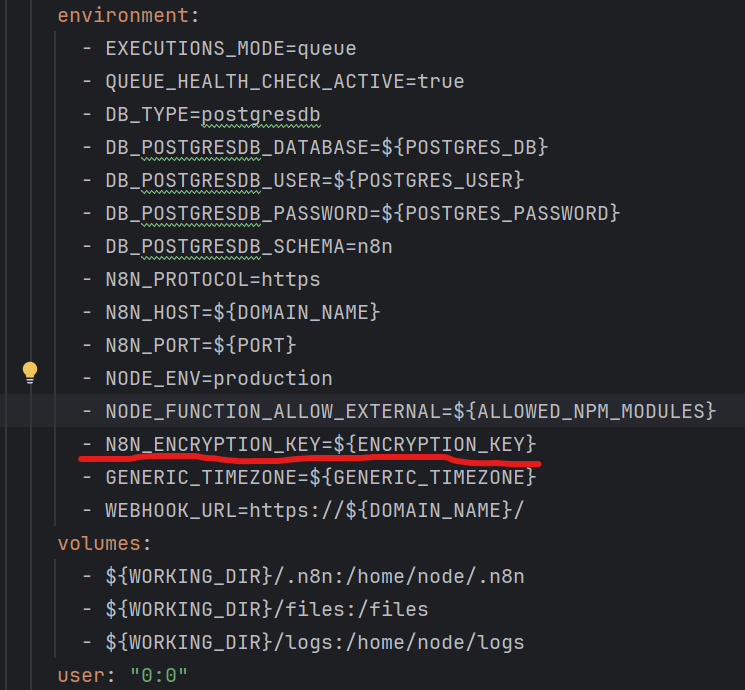
n8n stores all credentials you create in its database, but they are encrypted first. The N8N_ENCRYPTION_KEY is the secret key used for this encryption and decryption process.
- What happens if you lose it? If you ever need to restore your n8n instance from a database backup or move it to a new server, you must provide the same
N8N_ENCRYPTION_KEY. Without it, n8n cannot decrypt the credentials stored in the database, and they will be permanently unusable.
The best practice is to define this key as an environment variable and back it up securely in a password manager.
Self-Hosting n8n: A Production-Ready Architecture on ...
This article on production-ready n8n architecture clearly explains the critical role of the encryption key.
Please read the two short sections 'Solving persistence: Managing the encryption key and binary data' and 'Decouple credentials with environment variables'. This will reinforce why managing this key externally is so important.
Level 2: Using Environment Variables Inside Workflows
Beyond configuring the n8n application, you can also access environment variables directly within your workflows. This is how you securely populate credential fields or provide other dynamic configuration.
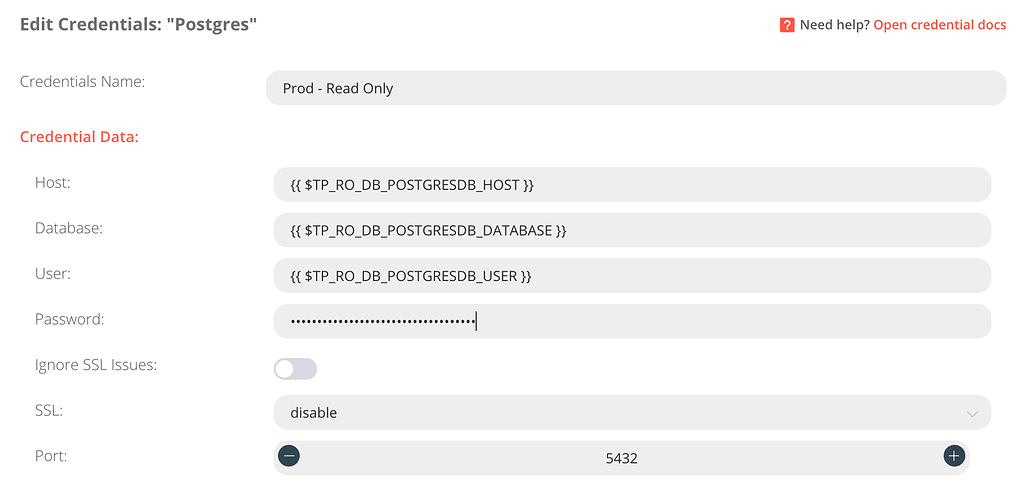
You can access any environment variable available to the n8n process using the expression {{ $env['YOUR_VARIABLE_NAME'] }}.
The following video demonstrates this concept. While the presenter uses a specific hosting panel, the principle of defining a variable and then accessing it in n8n is universal.
n8n Environment Variables: What They Are and How to Use Them
This video by Leonardo Grigorio provides a clear, simple demonstration of defining an environment variable and then using it within an n8n node.
Watch the introduction (00:00 - 01:36) to understand the problem this solves. Then, skip to the demonstration of using the variable in a workflow (02:44 - 04:20). Notice the {{ $env['VAR_NAME'] }} syntax and how changing the variable externally updates the workflow's output without any changes to the workflow itself.
This technique is most powerful when used to configure credentials. Instead of typing your API key into the credential field, you reference an environment variable.
Test your understanding!
You are setting up a new n8n instance using Docker and have successfully restored a database backup from your old instance. However, when you run a workflow, you get an error that a credential (e.g., for the GitHub node) cannot be decrypted. What is the most likely cause of this problem?
Show answer
The most likely cause is that the N8N_ENCRYPTION_KEY environment variable on the new instance does not match the key from the old instance. The credentials in the database were encrypted with the old key, and without it, the new n8n instance cannot decrypt and use them.
A Practical Production Pattern: docker-compose.yml + .env
Now let's combine these concepts into a standard, secure pattern for a self-hosted n8n instance. You never want to commit your docker-compose.yml file to Git if it contains secrets. The standard solution is to use a .env file.
-
Create a
.envfile: This file will live in the same directory as yourdocker-compose.ymlfile and will not be committed to Git.# .env - SENSITIVE - DO NOT COMMIT TO GIT POSTGRES_USER=n8n POSTGRES_PASSWORD=a_very_strong_and_secret_password N8N_ENCRYPTION_KEY=another_very_long_and_secret_key OPENAI_API_KEY=sk-xxxxxxxxxxxxxxxxxxxxxxxx -
Update
docker-compose.yml: Modify your Docker Compose file to reference these variables using the${VARIABLE_NAME}syntax.# docker-compose.yml version: '3.7' services: postgres: image: postgres:14 environment: - POSTGRES_USER=${POSTGRES_USER} - POSTGRES_PASSWORD=${POSTGRES_PASSWORD} - POSTGRES_DB=n8n volumes: - postgres_data:/var/lib/postgresql/data n8n: image: n8nio/n8n ports: - "5678:5678" environment: - DB_TYPE=postgresdb - DB_POSTGRESDB_HOST=postgres - DB_POSTGRESDB_USER=${POSTGRES_USER} - DB_POSTGRESDB_PASSWORD=${POSTGRES_PASSWORD} - DB_POSTGRESDB_DATABASE=n8n - N8N_ENCRYPTION_KEY=${N8N_ENCRYPTION_KEY} - OPENAI_API_KEY=${OPENAI_API_KEY} # Making this key available to workflows depends_on: - postgres volumes: - n8n_data:/home/node/.n8n volumes: postgres_data: n8n_data:When you run
docker-compose up, Docker will automatically load the variables from the.envfile and substitute them. Now, you can commitdocker-compose.ymlsafely. Inside an n8n workflow, you could then create an OpenAI credential and set its API key field to the expression{{ $env['OPENAI_API_KEY'] }}.
Advanced: The "Infrastructure as Code" Approach
For the ultimate in reproducibility, you can combine environment variables with the n8n CLI to automatically provision your n8n instance with pre-configured credentials on first startup. This is an advanced pattern that aligns perfectly with a DevOps mindset.
Building Reproducible n8n Environments with CLI-Based ...
This article by Alex Retana presents a powerful pattern for creating fully reproducible n8n environments, treating configuration as code. This will resonate strongly with your developer background.
Read the sections 'The Solution: n8n CLI + Environment Variables', 'The envsubst Trick', and 'How It Works'. Focus on understanding the end-to-end flow: exporting a credential, turning it into a template with ${VARIABLE} placeholders, and using a startup script with envsubst and n8n import:credentials to automatically configure the instance.
This pattern is the gold standard for automated deployments. It means a developer can pull your repository, run a single start.sh script, and have a fully configured n8n instance with all necessary database and service credentials ready to go—no manual UI clicking required.
Conclusion
You now have a multi-layered understanding of how to manage secrets in n8n, from basic application configuration to advanced, fully-automated credential provisioning.
Key Takeaways:
- Never hardcode secrets. Always decouple them from your workflow logic.
- Use environment variables for core n8n configuration, especially in a Docker environment.
- Guard your
N8N_ENCRYPTION_KEYcarefully. It is the master key to all your credentials. Back it up! - Access environment variables in workflows using
{{ $env['VAR_NAME'] }}to securely populate credential fields. - The
.envfile with Docker Compose is the standard practice for separating secrets from your version-controlled configuration. - For maximum automation, the CLI +
envsubsttemplating pattern allows for fully reproducible, "Infrastructure as Code" deployments.
Preview of the Next Lesson:
We've spent this lesson configuring a single, self-contained n8n instance securely. But what happens when your automation needs grow and a single instance isn't enough? In our next lesson, we will describe the architecture of n8n's scaling capabilities (queue mode and workers). We'll build directly on the Docker Compose knowledge from today to see how n8n can be architected to handle thousands of concurrent executions.