
Hello! Welcome to the fourth lesson in our "SaaS Ideation & Market Validation" module.
In our last lesson, we learned how to perform deep competitive analysis using tools like SimilarWeb, Ahrefs, and BuiltWith. This gave you a "satellite view" of the market—understanding who the players are, their scale, and their strategies.
Today, we're shifting our focus from the broad market to the single most important element of your future business: the customer. We will learn how to define a specific Ideal Customer Profile (ICP) using LinkedIn Sales Navigator criteria. A well-defined ICP is the bedrock of any successful go-to-market strategy. It ensures that every decision—from product features to marketing copy—is focused on attracting and retaining the customers who will benefit most from your solution and, in turn, provide the most value to your business.
From Vague Idea to Precise Target
An Ideal Customer Profile (ICP) is a clear, data-driven definition of the perfect customer for your product. It's not a vague persona like "small business owners," but a specific description of the company and the individual within that company who has the problem you solve, can authorize a purchase, and is easiest for you to reach.
For a SaaS founder, a sharp ICP is your most valuable asset. It prevents you from wasting precious time and money on marketing efforts that target the wrong audience.
There are two core components to a B2B ICP:
- The Account Profile (The Company): These are the firmographic characteristics of the ideal company. Think about industry, company size (headcount), geographical location, and perhaps even the technology they use.
- The Lead Profile (The Person): These are the demographic and professional attributes of the key individuals within those companies. Think about their job title, seniority level, and department (function).
Our primary tool for defining this will be LinkedIn Sales Navigator. While it is a paid tool, understanding its logic and the criteria it uses is fundamental for any B2B SaaS founder. The principles apply even when using free or alternative methods for prospecting.
The Two Halves of Your Search: Lead vs. Account Filters
Before diving in, it's crucial to understand how Sales Navigator organizes its search capabilities. It separates the world into two distinct categories, which perfectly align with the two halves of our ICP.
LinkedIn Sales Navigator Filter
To grasp this fundamental concept, please read this brief introduction from the OutXAI blog. It clearly explains the difference between Lead and Account filters, which is the foundational principle of building a targeted search.
Read the first three sections, starting from the introduction down to 'LinkedIn Sales Navigator Search Filters'. Pay close attention to the table that compares Lead Filters and Account Filters.
As the article explains, the golden rule is:
- Use Account filters to find the right companies.
- Use Lead filters to find the right people inside those companies.
Let's build our ICP by tackling each part separately.
Part 1: Defining the Ideal Account Profile
First, we define the characteristics of the companies you want to sell to. A "VP of Sales" at a 10-person startup behaves very differently and has different needs than a "VP of Sales" at a 10,000-person enterprise. Filtering by company attributes first is essential.
Here are the key Account Filters you will use:
- Company Headcount: This is a primary filter for determining company size and maturity. A SaaS product's pricing and feature set are often designed for a specific headcount range (e.g., 11-50, 51-200).
- Industry: This filter ensures your outreach is relevant. The pain points of a "Computer Software" company are different from those of a "Healthcare" company.
- Geography: Buying behavior, budget cycles, and even language can vary dramatically by region. Targeting "United States" vs. "Europe" requires different strategies.
- Company Headcount Growth: This is a powerful buying signal. A company that is rapidly hiring often has "growing pains" and is more open to new tools and solutions to manage their expansion.
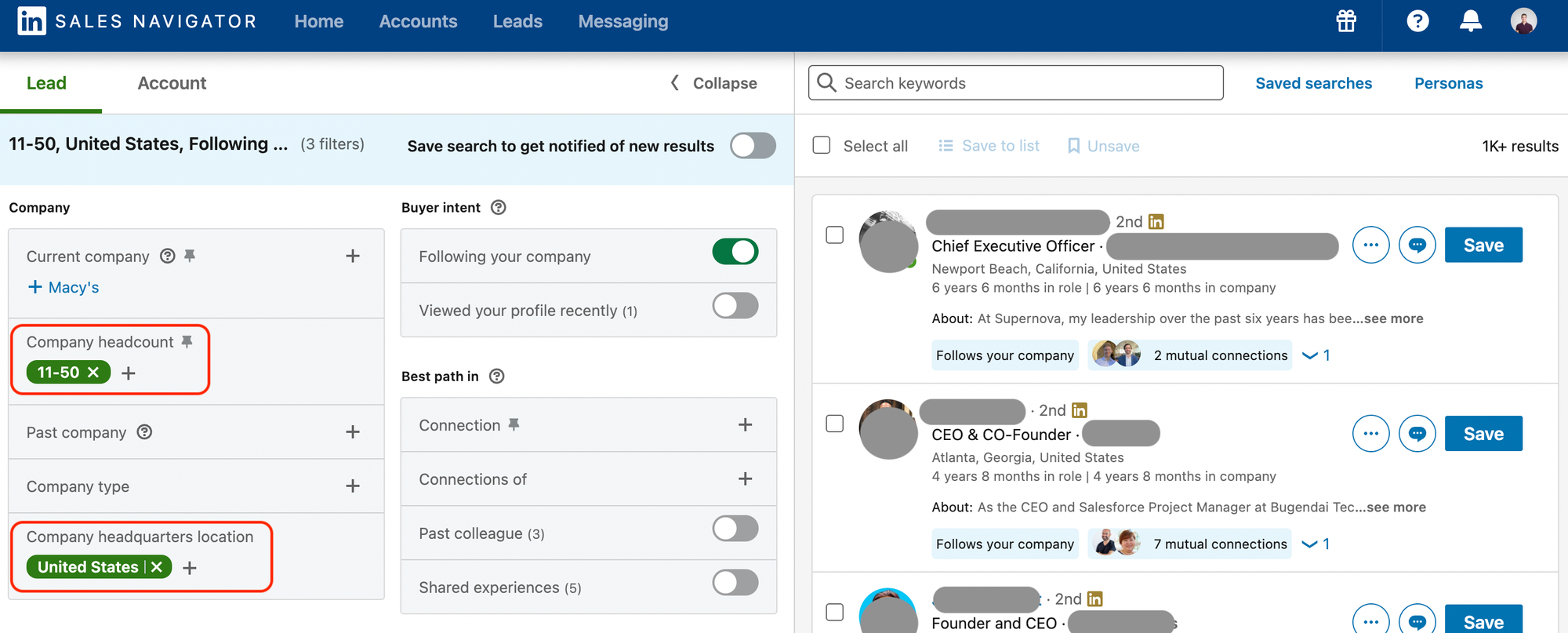
Part 2: Defining the Ideal Lead Profile
Once you have a list of ideal companies, you need to find the right people within them. These are the decision-makers, champions, and influencers who will ultimately buy and use your product.
Here are the essential Lead Filters:
- Function: This specifies the department (e.g., Marketing, Sales, Engineering). It's crucial for ensuring you're talking to someone in the right part of the organization.
- Seniority Level: This targets individuals with the appropriate level of authority (e.g., Manager, Director, VP, CXO). The right level depends on your product's price and strategic importance.
- Job Title: While seniority and function are often more reliable, job titles can help you get more specific. The trick is to think in "title clusters" (e.g., "VP Marketing" OR "Head of Marketing") to account for variations between companies.
To see a comprehensive overview of these filters and a hands-on demonstration, let's turn to a video.
LinkedIn Sales Navigator MASTERCLASS - Tutorial, Tips, Tricks, and Hacks to Find Leads
This 'LinkedIn Sales Navigator MASTERCLASS' from Sales Feed provides a fantastic, practical walkthrough of both lead and account filters and how to combine them.
Please watch the section from 00:04:24 to 00:06:54. The presenter provides a real-world example of building a search for 'senior sales leaders at startups,' combining multiple filters like company headcount, geography, function, seniority, and job title to create a specific, targeted list.
Finding High-Intent Signals with "Spotlight" Filters
Beyond the basic demographic filters, Sales Navigator has powerful "Spotlight" filters that act as buying signals. These help you find people who are more likely to be receptive to your message right now.
The most powerful one for a startup founder is:
- Changed jobs in the last 90 days: A person new to a role is often in an "audit" phase, evaluating existing tools and processes. They are statistically far more likely to consider new solutions to make an early impact.
This short video clip explains this strategy perfectly.
How to Use LinkedIn Sales Navigator For Lead Generation (2025 Update)
This clip from the 'Sell Better' channel explains the strategic value of targeting prospects who have recently changed jobs.
Watch from 00:02:29 to 00:04:17. Pay attention to the rationale behind why new decision-makers are more open to buying new technologies.
Putting It All Together: A Practical Example
Let's solidify this by creating a sample ICP for a hypothetical SaaS product: "Auto-Report," a tool that automates weekly performance reports for marketing teams.
We'll use a table to define our ICP, combining filters to narrow our search to the most relevant prospects.
| Filter Type | Filter | Setting | Rationale |
|---|---|---|---|
| Account | Industry | Computer Software, Internet, Marketing & Advertising | These industries are tech-savvy and data-driven. |
| Account | Company Headcount | 51-200 employees | Large enough to have a dedicated marketing team, small enough to be nimble. |
| Account | Geography | United States | Focus on a single, large market to start. |
| Lead | Function | Marketing | We are solving a marketing problem. |
| Lead | Seniority | Director, Manager | Directors feel the pain of inefficient reporting; Managers execute it. |
| Lead | Spotlight | Changed jobs in last 90 days | High-intent signal; they are looking to make an impact with new tools. |
| Lead | Boolean in Job Title | "Marketing Director" OR "Head of Marketing" NOT (intern OR assistant) | Targets specific roles while excluding junior staff. |
This combination of filters takes you from millions of LinkedIn users to a highly targeted, manageable list of a few hundred ideal prospects. This is your starting point for validation and outreach.
Test your understanding!
Imagine you're building a SaaS product that helps early-stage tech startups (less than 50 employees) streamline their engineering hiring process.
Using the filter categories we've discussed (Industry, Headcount, Geography, Function, Seniority, Job Title), define a precise ICP for this product.
Show answer
Here is one possible ICP definition. Yours might vary slightly, which is perfectly fine!
-
Account Filters:
- Industry: Computer Software, Information Technology & Services
- Company Headcount: 1-50 employees
- Geography: North America (or a specific tech hub like San Francisco Bay Area)
- Account Spotlight: Hiring on LinkedIn (indicates they are actively recruiting)
-
Lead Filters:
- Function: Engineering, Human Resources
- Seniority: CXO, Partner, Owner (for very small startups), or VP, Director (for slightly larger ones)
- Job Title: "CTO" OR "Founder" OR "Head of Engineering" OR "VP of Engineering" OR "Head of Talent"
This targets the key decision-makers (Founders, CTOs, Heads of Talent) at small, growing tech companies who are actively involved in the hiring process.
Conclusion
You now have a structured framework for defining your Ideal Customer Profile using the powerful filtering capabilities of LinkedIn Sales Navigator. This is one of the most critical steps in the entire go-to-market process. Getting this right saves you countless hours and thousands of dollars by focusing your efforts where they'll have the most impact.
Key Takeaways:
- An ICP has two parts: The ideal Account (company) and the ideal Lead (person).
- Use Account Filters first to define your target market based on firmographics like Industry, Company Headcount, and Geography.
- Then use Lead Filters to find the right people based on Function, Seniority, and Job Title.
- Leverage "Spotlight" filters like "Changed jobs in last 90 days" to identify prospects with high buying intent.
- Be specific. A narrow, well-defined ICP is far more powerful than a broad, generic one.
Preview of the Next Lesson:
Defining your ICP tells you who to talk to. The next question is where do you find them? In the next lesson, we'll move beyond LinkedIn to identify and analyze 5-10 relevant online communities (e.g., subreddits, forums) where your ICP is active. This is where you will go to listen, learn, and ultimately, validate your SaaS idea with your target audience.