
Hello! Welcome to the final lesson in our module on Cross-Site Scripting.
In our previous lessons, you learned to exploit Reflected XSS (where the payload is in the request and immediately returned in the response) and Stored XSS (where the payload is saved by the server and served to future visitors). In both cases, the server plays a direct role in delivering the payload to the victim.
Today, we shift our focus entirely to the client side. Your learning outcome is to analyze client-side code to identify and exploit DOM-based XSS vulnerabilities. This type of XSS occurs when a web application's client-side scripts handle data from an untrusted source in an unsafe way. The server itself can be perfectly secure, yet the application can still be vulnerable. For a bug bounty hunter, mastering DOM XSS is critical as it's a frequent and often subtle bug class.
Let's begin.
1. Understanding the DOM and DOM-based XSS
At the heart of DOM XSS is the Document Object Model (DOM). The DOM is the browser's in-memory representation of an HTML document, structured as a tree of objects. JavaScript can interact with this tree to dynamically change the page's content, structure, and style.
DOM-based XSS happens when JavaScript takes data from an attacker-controllable location (a source) and passes it to a dangerous function that can execute scripts (a sink) without proper sanitization.
The key difference from other XSS types is that the payload is processed entirely on the client-side. The server may never even see the payload.
Mastering DOM XSS for Bug Bounties: DOM Invader & Bug Bounty Reports!
To start, let's get a clear definition of DOM XSS and the crucial concepts of 'sources' and 'sinks'. This video from Medusa provides an excellent explanation tailored for bug bounty hunters.
Watch from 01:25 to 05:39. Focus on understanding: How DOM XSS differs from Reflected and Stored XSS. The definition of a Source: A JavaScript property that accepts user data (e.g., location.search). The definition of a Sink: A dangerous JavaScript function that processes the data from the source (e.g., document.write, innerHTML).
As the video explained, the vulnerable flow looks like this:
Attacker-controlled Source → Unsafe Processing in JavaScript → Dangerous Sink
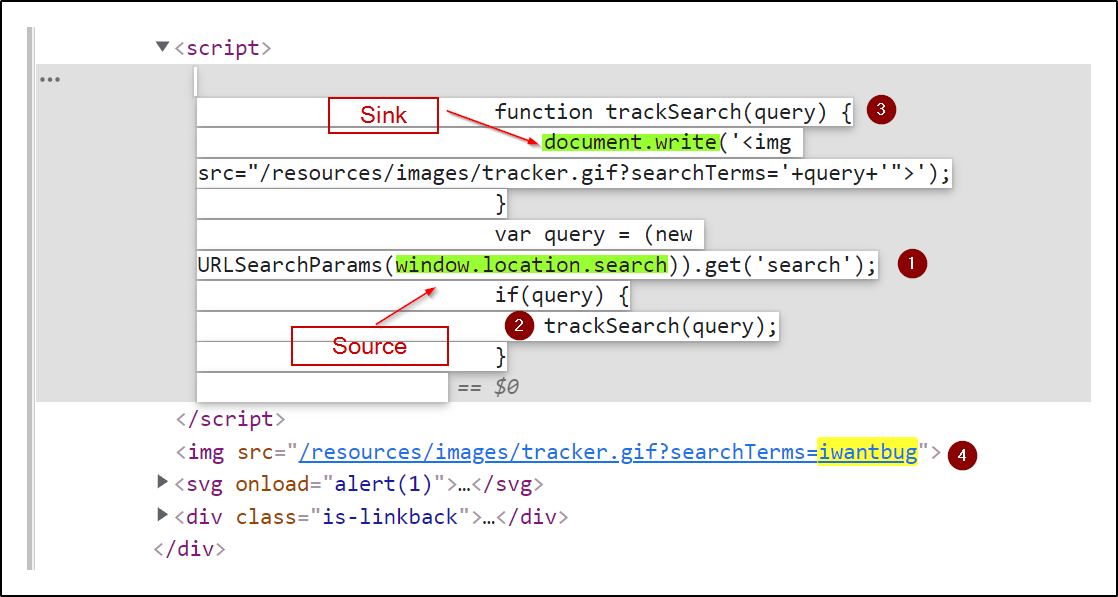
2. Manual Analysis: Hunting for DOM XSS
Your Computer Science background and experience with JavaScript give you a significant advantage here. Hunting for DOM XSS is essentially a code review and debugging exercise performed within the browser. The process involves two main steps: finding potential sinks and tracing the data flow back to see if it originates from a controllable source.
Let's walk through this manual process.
How To Search For DOM-Based XSS!
This video from Intigriti is a perfect walkthrough of the manual hunting process using browser developer tools. It shows exactly how to apply the source-to-sink methodology.
Watch this video from the beginning to 09:19. Pay close attention to the step-by-step methodology: Inspecting Sources (00:01 - 01:49): Using developer tools to look for JavaScript code within the page. Identifying a Source (01:49 - 03:36): Discovering that window.location.search is used, making the URL a controllable input source. Finding a Sink and Injecting Data (03:36 - 06:06): Identifying document.write as the sink and manipulating the source (the URL) to inject arbitrary data into the DOM. Crafting the Exploit (06:06 - 07:36): Creating a payload that breaks out of the intended context to achieve script execution. Recap (07:36 - 09:19): A summary of the entire process.
To formalize this process, here is a textual guide from PortSwigger that you can use as a reference during your hunts.
This article from PortSwigger's Web Security Academy provides a detailed methodology for manually testing for DOM XSS. It covers how to use developer tools to find sinks and trace data flow.
Read the section titled 'How to test for DOM-based cross-site scripting'. This reinforces the techniques shown in the video, such as using the developer tools' search functionality (Ctrl+F to search the DOM, Ctrl+Shift+F to search all JS files) and the JavaScript debugger to set breakpoints and trace variables.
The general workflow is:
- Identify Sinks: Use your browser's dev tools to search across all JavaScript files for known dangerous sinks.
- Trace Backwards: Once you find a sink, set a breakpoint in the debugger just before the sink is called. Refresh the page with some test input. When the breakpoint hits, inspect the variables being passed to the sink. Trace them backwards to see if they originate from a source you control (like
location.hash,location.search,document.referrer, etc.). - Confirm Control: Manipulate the source (e.g., by changing the URL) and observe if your input reaches the sink.
Test your understanding!
You are analyzing the following JavaScript snippet you found on a target website:
function displayMessage() {
  var url = new URL(window.location.href);
  var message = url.searchParams.get("message");
  var container = document.getElementById("message-box");
  container.innerHTML = "Your message: " + message;
}

displayMessage();
Which of the following describes the DOM XSS vulnerability here?
- The source is
document.getElementByIdand the sink iswindow.location.href. - The source is
window.location.href(via themessageparameter) and the sink iscontainer.innerHTML. - The source is
container.innerHTMLand the sink is themessagevariable. - There is no vulnerability because
URLandsearchParamsare secure functions.
Show answer
The correct answer is 2. The window.location.href is used to extract the message URL parameter, making it the source of user-controllable data. This data is then passed directly into the innerHTML property, which is a dangerous sink that can parse and execute HTML/JavaScript.
3. Exploitation: Sinks, Context, and Payloads
Once you've confirmed a source-to-sink data flow, exploitation depends on the sink and the context it provides. Different sinks have different behaviors.
Let's dive deeper into exploitation techniques. This PortSwigger article details how to exploit different sinks and even vulnerabilities within third-party libraries like jQuery.
Read the sections 'Exploiting DOM XSS with different sources and sinks' and 'Which sinks can lead to DOM-XSS vulnerabilities?'. Pay close attention to: The difference in exploiting document.write (which often accepts <script> tags) versus innerHTML (which doesn't, requiring event handlers like onerror). The comprehensive list of sinks for both plain JavaScript and jQuery. This is an essential reference for your future hunts.
Real-World Examples from Bug Bounty Reports
Theory is great, but seeing how these vulnerabilities are found and reported in the wild is invaluable. Let's analyze some real bug bounty reports.
Mastering DOM XSS for Bug Bounties: DOM Invader & Bug Bounty Reports!
The same Medusa video from earlier also breaks down several real bug bounty reports for DOM XSS. This is a fantastic way to see how the concepts we've discussed are applied in practice.
Watch the following two segments: Practical Lab Example (05:39 - 09:53): This is a practical demonstration in a PortSwigger lab, showing the full exploitation of a document.write sink from a location.search source. Analyzing Bug Bounty Reports (09:53 - 21:33): This is the most important part. The video analyzes several reports, including a classic document.write bug and a very complex clipboard-based DOM XSS in GitLab. Given your background, try to fully grasp the logic of the GitLab exploit—it's an excellent example of deep analysis.
The GitLab report is a prime example of advanced bug hunting. The researcher didn't just find a source and a sink; they understood that the vulnerability was only triggered when the clipboard data had a specific MIME type. This level of detailed analysis is what separates top-tier hunters.
4. Automating Discovery with DOM Invader
Manually tracing JavaScript can be time-consuming, especially with large, minified codebases. Burp Suite Professional includes a powerful extension called DOM Invader that automates much of this process.
DOM Invader instruments the browser to find controllable sources, test them against known sinks, and even generate proof-of-concept exploits.
Mastering DOM XSS for Bug Bounties: DOM Invader & Bug Bounty Reports!
Let's see DOM Invader in action. This final segment from the Medusa video shows how to use the tool to quickly identify the same vulnerability we've been analyzing.
Watch from 21:33 to 24:27. Observe how DOM Invader automates the process of finding the sink (document.write) and even provides a one-click exploit.
While tools like DOM Invader are powerful accelerators, remember that a strong manual methodology is irreplaceable. The tool helps you find potential issues quickly, but your ability to manually verify, understand the context, and craft a bypass for any filters is what will lead to a successful report.
Conclusion
You have now covered the three major types of Cross-Site Scripting. DOM-based XSS is a purely client-side vulnerability that requires a deep dive into an application's JavaScript code, making it a perfect challenge for your analytical skills.
Key Takeaways:
- DOM XSS is Client-Side: The vulnerability exists in the scripts running in the user's browser, independent of the server's security.
- It's All About Source-to-Sink: The core of the vulnerability is the flow of untrusted data from a source (e.g.,
location.hash) to a dangerous sink (e.g.,innerHTML). - Analysis is Code Review: Finding DOM XSS involves using browser developer tools to search for sinks and use the debugger to trace data flow back to a controllable source.
- Exploitation is Context-Dependent: The payload needed to achieve XSS depends entirely on the sink being used and the HTML surrounding it.
- Automation Helps, Manual Skill Wins: Tools like DOM Invader are excellent for identifying potential vulnerabilities, but manual verification and exploit crafting are essential skills.
Next Lesson Preview:
In the next lesson, we will move on to the next major vulnerability class in web applications: Server-Side Injection & File Inclusion Attacks. You will start by learning to identify and exploit OS command injection, a critical vulnerability that allows an attacker to execute arbitrary commands on the server's operating system.