
Hello! Welcome back to our module on Cross-Site Scripting.
In the last lesson, we explored Reflected XSS, where a malicious script is delivered via a crafted URL and executed immediately in the victim's browser. You learned that its main characteristic is being non-persistent; the attack is over as soon as the user navigates away from the malicious link.
Today, we're escalating the threat by focusing on a more persistent and often more dangerous variant. Your learning outcome is to identify and exploit stored XSS by injecting persistent malicious scripts into application data. Unlike reflected XSS, stored XSS involves the application saving the attacker's payload, which is then served to any user who visits the affected page, making it a "write once, infect many" type of vulnerability.
1. The Mechanics of Stored XSS
Stored XSS, also known as Persistent XSS, occurs when an application receives data from an untrusted source (like a user) and stores it in its database, a file, or another backend system. Later, this data is retrieved and included in the application's responses without proper sanitization.
To start, let's get a formal definition and see the fundamental difference from reflected XSS.
Testing for stored XSS with Burp Suite
This short introduction from PortSwigger clearly defines Stored XSS and outlines a typical attack scenario.
Watch the first 44 seconds of the video. Pay close attention to the core idea: the attacker places the exploit into the application, and it executes later when a victim visits a specific page.
The attack flow is distinct from reflected XSS because the attacker and victim don't interact directly. The vulnerable web application acts as the intermediary.
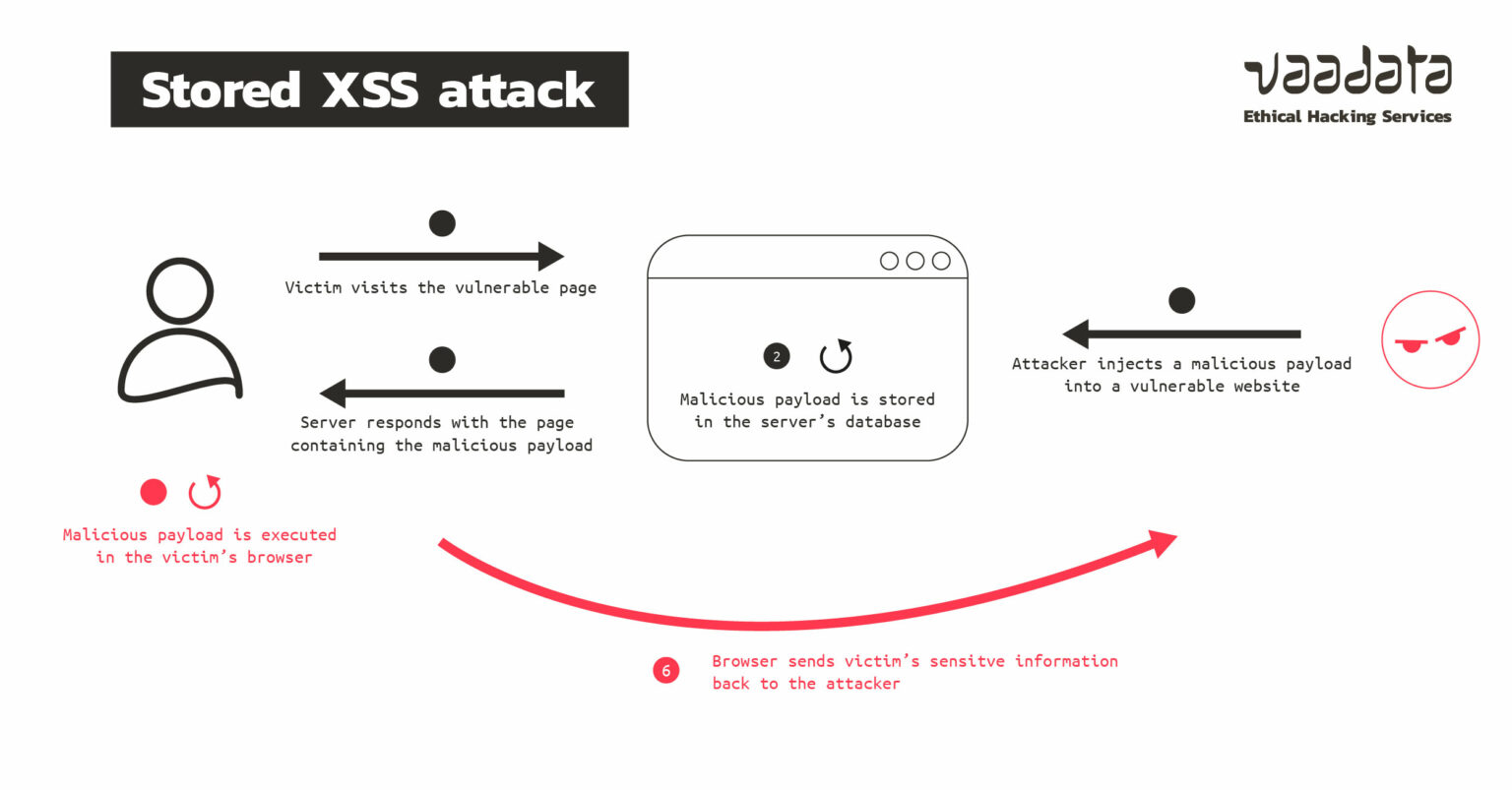
This persistence makes stored XSS particularly dangerous. A single payload injected into a popular forum thread, a product review section, or a user profile page could compromise thousands of users, including high-privilege administrators.
XSS attacks & exploitation: the ultimate guide
This article from YesWeHack provides a textual summary of Stored XSS and highlights common places you'll find this vulnerability.
Read the sections 'Stored XSS' and 'Detecting a stored XSS'. This will reinforce the definition and give you a mental checklist of application features to target, such as comment fields, posts, and chats.
2. Methodology: Finding and Exploiting Stored XSS
The methodology for finding stored XSS builds directly on what you learned for reflected XSS, but with a crucial difference. Instead of looking for an immediate reflection in the same response, you are looking for linked input and output points. You submit data in one HTTP request (e.g., POST /update-profile) and look for where it appears in a different request (e.g., GET /view-profile).
Burp Suite is the perfect tool for this task. The following video demonstrates this workflow.
Testing for stored XSS with Burp Suite
PortSwigger's video provides a practical, tool-centric walkthrough for finding stored XSS. It shows exactly how to trace user input from its submission point to its rendering point.
Watch from 00:57 to 03:59. Focus on the two main steps: Identifying Linked Points: Observe how a unique value is submitted in a form and then found in the HTTP history to identify which response renders that input. Exploitation with Repeater: See how Burp Repeater is used to group the 'input' request and the 'output' request, allowing you to efficiently test payloads and verify the exploit.
Notice a key takeaway from that video: once you've identified the output context (where your input is rendered), the payload crafting process is identical to what you learned for reflected XSS. You still need to analyze whether your input is rendered between HTML tags, inside an attribute, or within a JavaScript block. The skills you practiced in the last lesson using the "Cross-site scripting contexts" article are directly transferable here.
Test your understanding!
You are testing a blog application. You can submit comments via a POST request to /post/123/comment. The comment text is sent in a parameter named comment_text. When you view the blog post at /post/123, you see your comment displayed.
What is the most effective first step to test for stored XSS?
- Submit a generic payload like
<script>alert(1)</script>and hope it works. - In Burp Suite, send the
GET /post/123request to Repeater and start fuzzing it. - Submit a unique, non-malicious string (e.g.,
XYZABC123) in thecomment_textparameter and then inspect the HTML source of theGET /post/123response to see whereXYZABC123appears. - Use a vulnerability scanner to automatically find the flaw.
Show answer
- is the correct answer. This follows the methodical approach. By submitting a unique string, you can precisely locate the reflection point in the page's HTML. This allows you to understand the context (is it inside a
<p>tag? Adiv? An attribute?) before you waste time trying payloads that won't work for that specific context.
3. Advanced Stored XSS: The Blind Spot
What if the page where your payload executes is one you can't see? This is the essence of Blind XSS, a subtype of stored XSS.
Imagine you submit a payload in a "Contact Us" form. The payload is stored in a database and rendered not on the public website, but in an internal administration panel viewed only by support staff. You are "blind" to the output. So how do you know if your attack worked?
You need the payload to call back to you. This is where tools like XSS Hunter come in.
Let's dive into this with bug bounty hunter NahamSec.
The Beginner's Guide to Blind XSS (Cross-Site Scripting)
This video is a fantastic guide to Blind XSS, covering the concept, the tooling, and practical exploitation techniques that are highly relevant for bug bounty hunting.
This video is packed with valuable information. Please watch the following segments: Concept and Tooling (01:09 - 02:42): Understand what Blind XSS is and why a tool like XSS Hunter is necessary to 'see' the exploit fire. Payload Injection (04:39 - 11:01): Pay close attention to the thought process. Notice how payloads are injected into multiple fields (name, delivery notes, address nickname). The key is to make assumptions about the context where your data might be rendered and craft payloads to break out of them (e.g., </textarea><script>...). Advanced Vector - HTTP Headers (13:41 - 15:24): This is a pro-tip. Applications often log user metadata. See how Burp's 'Match and Replace' feature is used to inject a payload into the User-Agent header, a common blind XSS vector. The Callback (18:54 - 20:16): Finally, see what the result looks like in the XSS Hunter dashboard. It captures the DOM, cookies, a screenshot, and other crucial data, providing definitive proof of the vulnerability.
The techniques in that video are gold for a bug bounty hunter. Always be thinking about every piece of data you send to an application. Usernames, profile information, support tickets, and even HTTP headers are all potential vectors for stored and blind XSS. Your ability to read JavaScript and anticipate how a developer might render your stored data gives you a significant advantage in crafting these context-aware payloads.
Conclusion
Today you've moved beyond the immediate nature of reflected XSS into the persistent and scalable threat of stored XSS. This is a critical vulnerability class that often leads to high-severity findings in penetration tests and bug bounty programs.
Key Takeaways:
- Stored XSS is Persistent: The payload is saved on the server and executed for any user who views the compromised data. This makes it highly scalable and dangerous.
- The Methodology is About Linking Input to Output: You must trace your input from the point of submission to the point of rendering, which may be on a completely different page or part of the application.
- Context Analysis Remains King: The payload you craft depends entirely on the HTML context where the application renders your stored data. All the context-analysis skills from the previous lesson apply here.
- Blind XSS Requires Out-of-Band Callbacks: When you can't see the output (e.g., in an admin panel), you must use a payload that calls back to a service like XSS Hunter to confirm the exploit and gather information.
Next Lesson Preview:
In our next lesson, we'll cover the final major category: DOM-based XSS. This is where things get even more client-side focused. A DOM XSS vulnerability exists entirely within the client-side JavaScript code. The server might be completely secure, but unsafe JavaScript handling of data can still lead to script execution. This will be an excellent opportunity to leverage your JavaScript analysis skills.