
Hello! Welcome back.
In our previous lessons, you mastered identifying and exploiting Reflected, Stored, and DOM-based XSS. You learned how to find injection points where you can execute JavaScript in a user's browser. However, in the real world, you'll often find that your basic payloads like <script>alert(1)</script> are blocked by a Web Application Firewall (WAF) or some other form of input filter.
This lesson is about the crucial next step: getting your payload past those defenses. Your learning outcome is to bypass common XSS filters and input sanitization using encoding, obfuscation, and event handlers. This skill is what elevates a theoretical finding into a reportable, high-impact vulnerability, which is essential for your goal of becoming a professional bug bounty hunter.
1. Why Filters and WAFs Can Be Bypassed
Before diving into techniques, it's important to understand why these security mechanisms aren't foolproof. A WAF's job is to inspect incoming traffic and block requests that match known malicious patterns. However, this is harder than it sounds.
3 Powerful WAF Bypass Techniques That Actually Work
Let's start with a high-level overview of why WAFs can be bypassed. This video from The Cyber Mentor clearly explains the fundamental reasons, which will shape our bypass mindset.
Watch from 00:18 to 01:46. Pay attention to the three main reasons WAFs fail: Complexity of web traffic: Modern web applications handle many data formats, and it's difficult for a WAF to parse them all correctly. Performance trade-offs: Inspecting every byte of every request is computationally expensive, so WAFs often have limits on what they'll inspect. Inconsistencies: The WAF and the back-end application might interpret the same data differently, creating a gap an attacker can exploit.
This means our goal is not to guess random payloads, but to systematically find the blind spots and inconsistencies in the target's defenses.
2. A Systematic Methodology for Bypassing Filters
Bypassing a filter is like a game of chess against a hidden opponent. You need a structured approach to understand its rules. Given your computer science background, you'll appreciate a formal methodology.
Bypassing XSS detection mechanisms
This paper by security researcher Somdev Sangwan (s0md3v) proposes an excellent three-phase methodology for bypassing XSS filters. We'll adopt this structure for our lesson.
Read the 'Abstract' and 'Introduction' sections to understand the high-level approach: determining payload structure, probing the filter, and then obfuscating the payload.
The process is:
- Probe: Send simple, targeted inputs to understand what the filter is blocking. Does it block all HTML tags? Only certain tags like
<script>? Specific event handlers likeonerror? - Hypothesize: Based on the responses, form a hypothesis about the filter's rules. For example, "The filter seems to be blacklisting the string
onerrorbut allowsonmouseover." - Bypass: Craft a payload that uses allowed components and bypass techniques to evade the specific rules you've identified.
Let's see this methodology in action.
Bug Bounty: Best Way To Find XSS & Bypass WAF | Live Demonstration | 2024
This video from BePractical provides a perfect, hands-on demonstration of this methodology. It shows how to use Burp Suite to probe a filter and discover which HTML tags are allowed.
Watch from 02:54 to 09:32. Observe how the tester: Confirms that basic HTML tags like <h1> are blocked. Uses Burp Intruder with a list of HTML tags (from PortSwigger's XSS cheat sheet) to fuzz the application. Analyzes the response lengths to identify which tags are not blocked (e.g., hgroup). This is a standard and effective technique used by professional bug hunters.
Once you've found an allowed tag, the next step is to combine it with other components to build a working payload. Let's explore the techniques to do that.
3. Core Bypass Techniques
Now we'll break down the three key techniques mentioned in the learning outcome.
A. Encoding
Encoding transforms your payload into an equivalent representation that may not be recognized by a filter looking for literal strings. Your background in CS means you're already familiar with different character encoding schemes. Here's how they apply to XSS:
- HTML Entity Encoding: Filters often look for
<and>. You can often bypass this using their decimal (<,>) or hexadecimal (<,>) equivalents. - URL Encoding: When the payload is in a URL, characters like spaces, quotes, and brackets can be URL-encoded (e.g.,
%20,%22,%3C). - JavaScript Encoding: Inside a JavaScript context, you can use Unicode escapes (
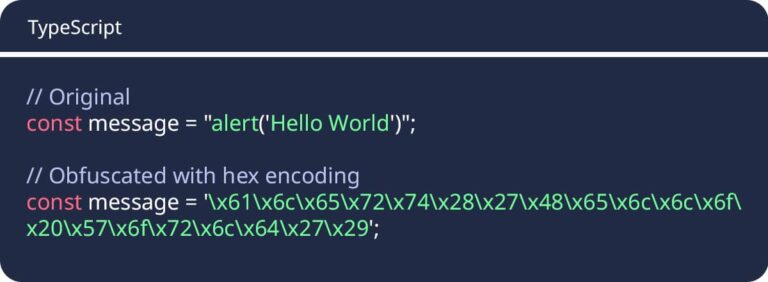
\u0041for 'A') or hex escapes (\x41for 'A') to build strings. This is highly effective at hiding malicious keywords from filters.
This image shows a simple example of hex encoding:
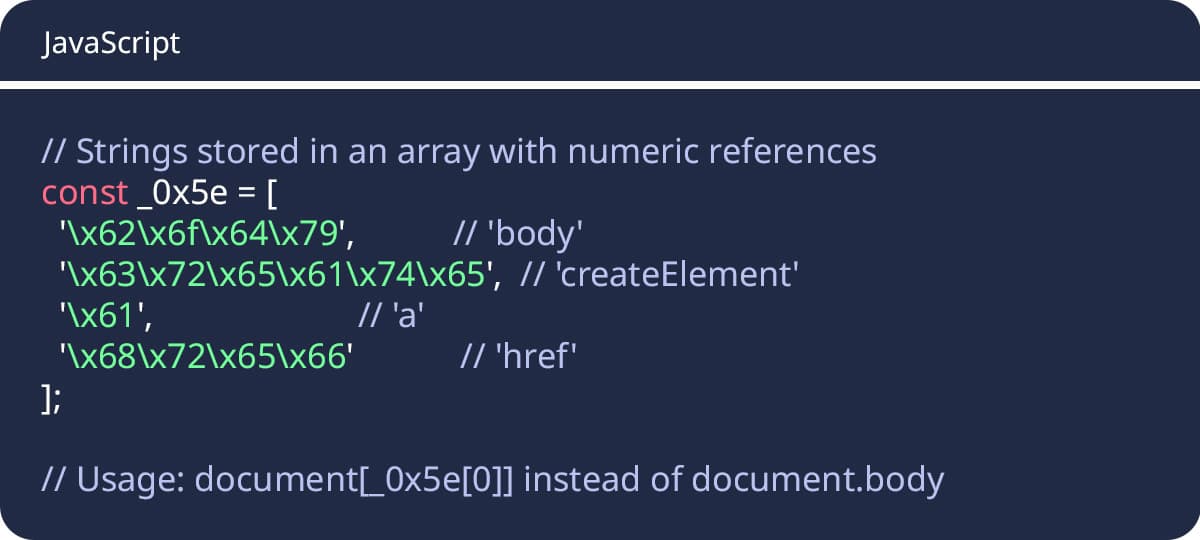
A more advanced use of this is to obfuscate all your strings and call them from an array, which makes static analysis by a WAF very difficult.
B. Obfuscation
Obfuscation is about making your payload syntactically valid but confusing for a filter's pattern-matching logic (often regular expressions).
- Case Manipulation: The simplest trick. If a filter looks for
<script>, try<sCrIpt>. HTML tags are case-insensitive. - Adding "Noise": Filters often look for keywords like
javascript:alert(). You can break up these keywords with characters that the browser will ignore but the filter might not account for.- Whitespace: Tabs (
%09), newlines (%0a), and carriage returns (%0d) can often be inserted inside or around keywords. - Comments: In some contexts, you can use JavaScript comments (
/**/) to break up expressions, e.g.,xss:ex/**/pression(...). - Null Bytes: A null byte (
%00) can sometimes terminate a WAF's analysis of a string prematurely while the browser continues to process it.
- Whitespace: Tabs (
C. Using Alternative Tags and Event Handlers
This is one of the most powerful bypass strategies. Instead of trying to force a blocked tag like <script> through, find a tag the developers forgot to filter.
As you saw in the video, you can fuzz for allowed tags. Once you find one, you need an event handler to trigger your JavaScript. While onload and onerror are common (and often filtered), there are dozens of others.
XSS Filter Evasion Cheat Sheet
The OWASP XSS Filter Evasion Cheat Sheet contains a massive list of event handlers. You don't need to memorize them, but it's a critical resource to have when you're looking for an obscure handler that a WAF might not know about.
Scroll through the section 'Attacks Using Event Handlers'. Notice the sheer variety, from mouse events (onmouseover, onauxclick) to focus events (onfocus) and drag-and-drop events (ondrag).
Some particularly useful ones that are often missed by filters include:
<details open ontoggle=alert(1)>(Theontoggleevent fires when the<details>element is opened or closed).<svg onmouseover=alert(1)>(Many different tags support standard mouse events).<a onauxclick=alert(1)>(onauxclickfires on a middle-click).
Test your understanding!
You are testing a search field. Your payload <img src=x onerror=alert(1)> is blocked with a "Malicious Input Detected" message. However, the payload <img src=x> is accepted.
Based on this, which of the following is the most likely hypothesis about the filter, and what would be a logical next step?
- The filter blocks the
<img>tag. The next step is to try a different tag like<script>. - The filter blocks the
onerrorevent handler. The next step is to try a different event handler likeonmouseover. - The filter blocks the
alert()function. The next step is to try encodingalertusing HTML entities. - The filter blocks the
srcattribute. The next step is to try thehrefattribute.
Show answer
The correct answer is 2. Since <img src=x> was accepted, the <img> tag itself is allowed. The most likely reason for the block is the presence of the common and dangerous onerror event handler. A logical next step is to test other, less common event handlers on the allowed <img> tag, such as <img src=x onmouseover=alert(1)>.
4. Putting It All Together: A Complete Bypass
Let's synthesize these techniques by walking through a full bypass, using the same video as before.
Bug Bounty: Best Way To Find XSS & Bypass WAF | Live Demonstration | 2024
Now, let's watch the second part of the BePractical video to see how the tester combines an allowed tag with an event handler and encoding to achieve a successful XSS.
Watch from 09:32 to 14:34. This segment demonstrates the final steps of the attack: Finding an Allowed Tag: The tester confirms that the <content> tag is allowed. Choosing an Event Handler: They choose onmouseover to trigger the payload. Constructing the Payload: They build the payload content onmouseover=alert(1). Notice the use of a space between the tag and the event handler. Encoding for the URL: To send this payload in the URL, the space is URL-encoded to %20, and other special characters are encoded as needed. This is a practical example of combining techniques.
This walkthrough encapsulates the entire process: probe for an allowed tag, select a less-common event handler, and use the necessary encoding to deliver the payload.
Finally, let's look at some real-world WAF bypasses to see how these techniques are used against specific products.
Bypassing XSS detection mechanisms
The s0md3v paper you looked at earlier concludes with a list of bypasses found against major WAF vendors. These are golden nuggets of information.
Read the section 'Bypassing WAFs in Wild'. For each WAF, analyze the payload and identify the specific bypass technique used. For example: Cloudflare: <a"/onclick=(confirm)()>click uses a non-whitespace character ("/) as a filler to bypass a regex expecting a space. ModSecurity: <details/open/ontoggle=alert()> uses a less common tag (<details>) and event handler (ontoggle). Wordfence: <a/href=javascript:alert()>click uses HTML entity encoding for the colon.
Conclusion
You've now moved beyond simply finding XSS and into the art of making it work despite defenses. Bypassing filters is a continuous cat-and-mouse game that requires creativity, a systematic approach, and a deep understanding of how both browsers and security filters interpret data.
Key Takeaways:
- Bypassing is a Methodical Process: Don't just throw random payloads. Probe the filter, form a hypothesis about its rules, and then craft a specific bypass.
- Master the Core Techniques: Encoding (HTML, URL, JS), Obfuscation (case, whitespace, comments), and using a wide variety of Tags and Event Handlers are your primary tools.
- Context is Everything: The specific bypass that works will depend on the injection context (HTML tag, attribute, JavaScript string) and the filter's rules.
- Leverage Your JS Knowledge: Your ability to read and understand JavaScript is a huge asset. Use techniques like
String.fromCharCode()and other JS-native functions to build payloads that are hard for filters to analyze statically.
Next Lesson Preview:
Now that you can reliably get JavaScript to execute in a victim's browser, the next step is to make that script do something impactful. In our next lesson, you will learn how to craft an XSS payload to steal a victim's session cookies and exfiltrate them to an attacker-controlled server. This is the classic attack that demonstrates the true risk of XSS: full account takeover.