
Hello! Welcome to the seventh module of your penetration testing course.
In the previous module, we concluded our deep dive into server-side attacks with Out-of-Band SQL Injection. You learned how to force a server's database to communicate with you directly, bypassing the web application's response flow entirely. Now, we pivot from attacking the server to attacking the user.
This module is dedicated to Cross-Site Scripting (XSS), arguably the most common and persistent vulnerability on the web. Unlike SQL injection, where the target is the application's backend database, the primary target of an XSS attack is another user's browser.
Today's lesson focuses on the first and most common type of XSS. Your goal is to identify and exploit reflected XSS vulnerabilities by injecting non-persistent JavaScript into user inputs. You'll learn how an attacker crafts a malicious link and tricks a victim into clicking it, causing the victim's own browser to execute the attacker's script in the context of the trusted website.
1. What is Reflected Cross-Site Scripting?
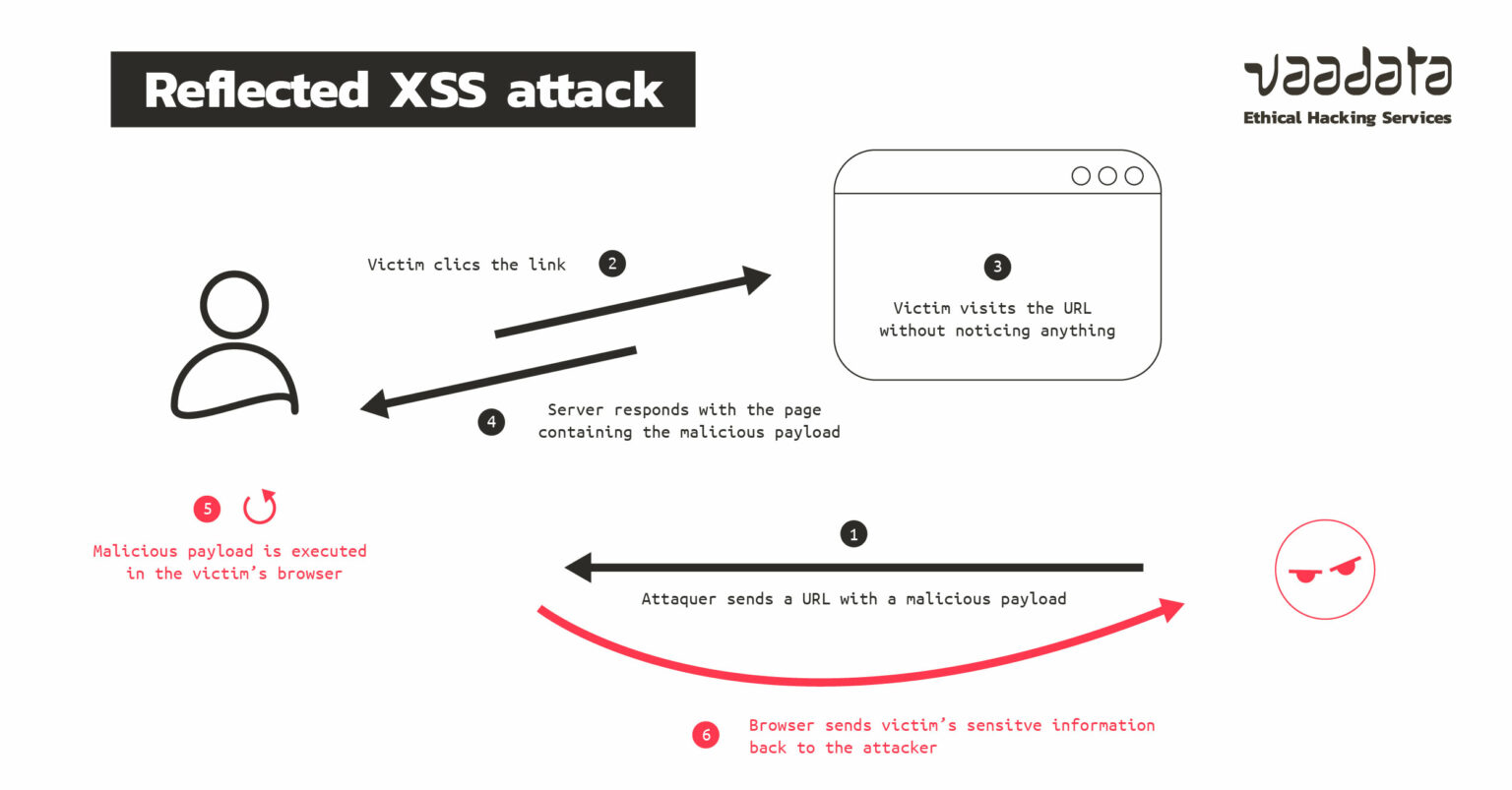
Reflected XSS is "non-persistent" because the malicious script is not stored on the target server. Instead, it's part of the request itself (usually in the URL) and is "reflected" back by the server in the HTTP response. The attack is only successful if the victim makes the malicious request, typically by clicking a crafted link.
Let's start with a formal definition from PortSwigger, the creators of Burp Suite.
This article provides a concise and clear definition of reflected XSS, including a simple example using a search function and a summary of the potential impact.
Please read the sections 'What is reflected cross-site scripting?' and 'Impact of reflected XSS attacks'. Pay close attention to how the payload is delivered via a URL parameter.
The attack flow can be visualized as a chain of events starting with the attacker and ending with the victim's browser executing the payload.
Now, let's hear from a professional bug bounty hunter, NahamSec, for a high-level overview of what XSS is and why it's so significant.
Cross-Site Scripting (XSS) Explained! // How to Bug Bounty
This video gives a great introduction to XSS from a bug bounty hunter's perspective, explaining the core concept of injecting JavaScript and its potential impact.
Watch from 00:46 to 01:53. Focus on understanding the fundamental goal of XSS: gaining control of the browser's behavior within the context of the target website.
2. The Methodology: Finding and Exploiting Reflected XSS
The process for finding reflected XSS is systematic. It's not about randomly throwing payloads at an application; it's about methodical testing and analysis.
PortSwigger provides an excellent, step-by-step methodology for manually finding reflected XSS. This process is fundamental to your work as a pentester.
Read the section 'How to find and test for reflected XSS vulnerabilities'. This outlines the core workflow you'll use: test every entry point, submit a unique value, find the reflection, determine its context, and craft a payload.
The most critical step in this methodology is determining the reflection context. Where your unique test string appears in the HTML response dictates the type of payload you need to use. Let's see this in action.
Cross-Site Scripting (XSS) Explained! // How to Bug Bounty
In this part of the video, NahamSec demonstrates the exact methodology you just read about. He tests a URL parameter, inspects the page source to find the reflection, and analyzes the context to craft a working payload.
Watch from 04:49 to 08:24. Notice how he doesn't just copy-paste a generic payload. He first identifies that his input is reflected inside a <script> tag and then crafts a payload specifically designed to break out of that context.
3. Context is King: Crafting Payloads for Different Scenarios
As you just saw, you can't use the same payload everywhere. An XSS payload is not one-size-fits-all. The structure of your payload depends entirely on where the server places your input within the HTML document. Your Computer Science background gives you an advantage here, as understanding the structure of HTML and JavaScript is key.
Let's explore the two most common contexts:
- Between HTML tags: Your input is placed directly in the HTML body.
- Inside an HTML tag attribute: Your input is placed within the value of an attribute like
href,src, orclass.
This PortSwigger article delves into the specifics of payload crafting for different contexts. It's an essential read for moving beyond basic XSS.
Read the sections 'XSS between HTML tags' and 'XSS in HTML tag attributes'. For the second section, focus on the techniques for breaking out of an attribute and using the javascript: pseudo-protocol.
Now, let's tie this theory to practice. The following video is a fantastic demonstration where the presenter builds a vulnerable Node.js/Express application, allowing us to see both the vulnerable code and the resulting exploit.
Bug Bounty Tip | Do This Exercise Every Day to Get Better at Finding XSS Bugs!
This video walks through building and exploiting a vulnerable application. The presenter's 'build it, break it' approach is perfect for understanding the root cause of the vulnerability.
Please watch these two key segments: Context 1: Between HTML Tags (02:18 - 15:18): Watch how a simple web server is built to reflect a 'name' parameter inside an <h1> tag. The exploit involves injecting a full <script> tag. Context 2: Inside an HTML Attribute (24:02 - 32:01): The code is changed to reflect a 'url' parameter inside the href attribute of an <a> tag. Observe the two exploitation techniques: first, breaking out of the attribute using a " character to inject an onclick event handler, and second, dealing with filters by using a javascript: URI.
Test your understanding!
An application reflects a user-supplied id parameter inside an HTML tag as follows:
<input type="text" name="user_id" value="YOUR_INPUT_HERE">
You discover that the application filters (removes) angle brackets (< and >), so you cannot inject a new <script> tag. Which of the following payloads is most likely to execute an alert(1)?
123; alert(1);"><script>alert(1)</script>" onmouseover="alert(1)javascript:alert(1)
Show answer
-
" onmouseover="alert(1)is the correct answer. Here's why:- The payload starts with
"to close thevalueattribute. - It then injects a new attribute,
onmouseover, which is a JavaScript event handler. - When a user moves their mouse over the input field, the
alert(1)will execute. - This works because it doesn't require angle brackets, which are filtered.
Option 1 would just be treated as a string inside the
valueattribute. Option 2 would fail because<and>are filtered. Option 4 would only work if the reflection was inside anhreforsrcattribute. - The payload starts with
4. Bypassing Simple Defenses
In the real world, developers rarely leave an input completely unsanitized. They often try to fix XSS by removing or replacing "dangerous" characters. However, these fixes are often incomplete, creating an opportunity for bypasses.
Your background in programming will help you appreciate these nuances. For example, a common mistake in JavaScript is using .replace() when .replaceAll() is needed. .replace() only affects the first occurrence of a character, a weakness an attacker can easily exploit.
Bug Bounty Tip | Do This Exercise Every Day to Get Better at Finding XSS Bugs!
Let's return to the rs0n_live video. The presenter demonstrates common but flawed developer fixes and how an attacker can bypass them. This is a crucial skill for real-world engagements.
Watch these two segments on bypassing filters: Bypassing replace() (15:18 - 21:06): See how a filter that uses replace() to strip < is bypassed by simply doubling up the character in the payload. Bypassing Quote Sanitization (32:01 - 35:31): After the developer fixes the attribute-based XSS by removing quotes, see how the javascript: URI scheme is used as an alternative vector that doesn't require quotes to break out.
Conclusion
Congratulations on completing your first lesson on Cross-Site Scripting! You now understand the mechanics of reflected XSS, where the vulnerability lies not in the server's storage, but in its immediate response to a crafted request.
Key Takeaways:
- Reflected XSS is a Client-Side Attack: The payload is delivered via a URL and executed in the victim's browser, making the user the primary target.
- The Methodology is Key: A systematic approach of testing inputs, identifying reflections, and analyzing the context is more effective than random payload fuzzing.
- Context Dictates the Payload: The location of the reflection (between tags, in an attribute, etc.) determines the structure of a successful XSS payload.
- Bypasses are Common: Many sanitization attempts are incomplete. Understanding how functions like
replace()work or knowing alternative vectors like thejavascript:URI scheme is essential for bypassing weak filters.
Next Lesson Preview:
In our next lesson, we will explore Stored XSS. Unlike reflected XSS, the attacker's payload in a stored XSS attack is saved by the application—for example, in a comment section, user profile, or forum post. Every user who views that page will then have the malicious script executed in their browser, making it a more persistent and often higher-impact vulnerability.