
Welcome back. In the last lesson, you learned that the price shown on a gold chart is not automatically the price you receive: longs enter at the ask, shorts enter at the bid, and fast movement can create slippage. This lesson adds the decision that comes before those costs: how will you ask the platform to enter?
For a gold breakout approach, an order type is not a prediction tool. It is simply the instruction that matches your entry condition. By the end, you should be able to hear a condition such as “buy only if gold breaks above the range high” and select a buy stop, or hear “sell only if price retraces into resistance” and select a sell limit—without guessing.
The core choice: now, better price, or confirmation price?
Every entry instruction answers two questions:
- Do I want to enter immediately, or only at a stated future price?
- Am I trying to enter after price moves in my expected direction, or after it pulls back to a better price?
That produces the three main order categories.
| Order type | What you are telling the broker | Main benefit | Main trade-off |
|---|---|---|---|
| Market order | Enter immediately at the best available price | Immediate entry | Exact fill price is not controlled |
| Limit order | Enter only at my price or a better one | Price control | The trade may never fill |
| Stop order | Enter only if price reaches a trigger beyond the current market | Automates a breakout trigger | Once triggered, it becomes a market order and can slip |
The distinction between limit and stop is easier when you think in terms of where your entry lies relative to the current price:
- A limit order looks for a better entry price than the current market.
- A stop order looks for price to move through a confirmation level in the direction of the trade.
For the breakout style you want to test later, stop-entry orders will be especially relevant. But they are not automatically “the best” order. They are only correct when your written condition is genuinely: enter if price trades beyond this level.
The four pending-order combinations
A pending order is simply an order waiting for price to reach a specified level. On TradeLocker, once you choose a direction and set a pending price above or below the current market, the platform classifies it as a limit or stop order.
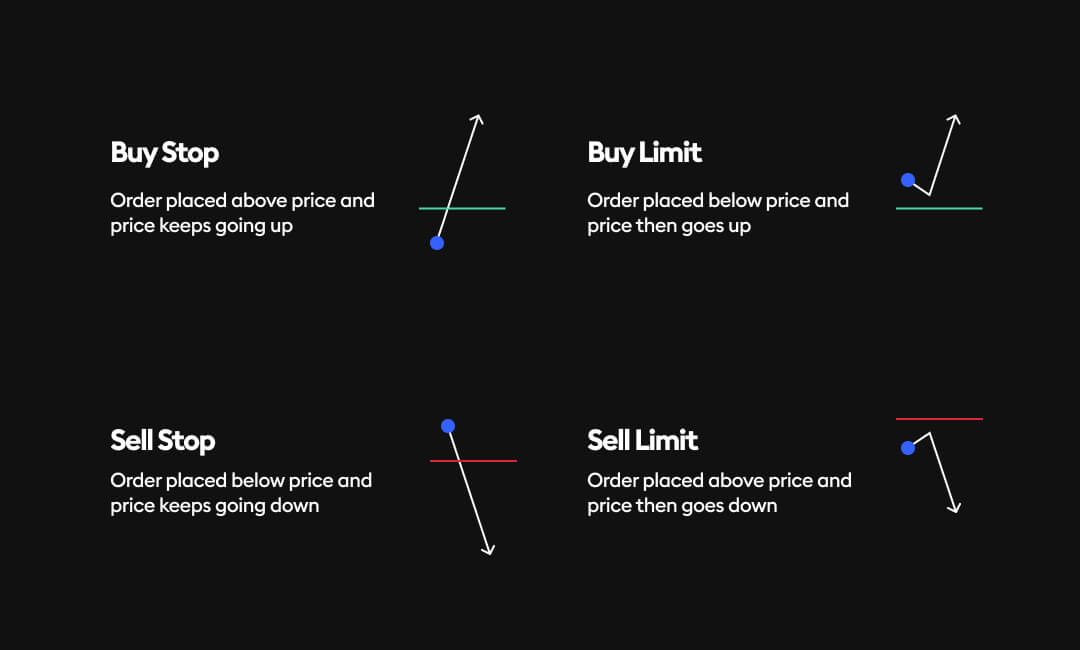
Use this table as your main reference:
| If your planned entry is… | Order to use | Relative to current price | Typical idea |
|---|---|---|---|
| Buy above current price | Buy Stop | Above | Buy only if resistance breaks |
| Buy below current price | Buy Limit | Below | Buy a pullback into support |
| Sell below current price | Sell Stop | Below | Sell only if support breaks |
| Sell above current price | Sell Limit | Above | Sell a retracement into resistance |
A compact way to remember it:
-
Stops follow a breakout.
- Buy Stop: price must rise to activate your long.
- Sell Stop: price must fall to activate your short.
-
Limits wait for a pullback.
- Buy Limit: price must fall before you buy.
- Sell Limit: price must rise before you sell.
The word “stop” can be confusing because you have probably also heard stop-loss. Those are different jobs:
- A buy stop or sell stop can be an entry instruction when you do not yet have a position.
- A stop-loss is a protective exit attached to a position that already exists.
For example, a sell stop below current price could mean either:
- “Open a short if support breaks,” if you are currently flat; or
- “Close my existing long if it fails,” if you are already long.
Always identify whether you are planning an entry or a protective exit before placing the order.
TradeLocker’s pending-order logic
Types of orders on TradeLocker
Read TradeLocker’s explanation of how its Pending tab determines whether your planned order becomes a stop or a limit. This is the platform logic you will use when placing gold orders in demo.
In the “Pending order” subsection, read the pending-order mapping. Match each of the four outcomes to the table above. Then read the complete “Limit order” and “Stop order” subsections. Focus on limit-price control, followed by what happens after a stop triggers.
The final sentence in that stop-order explanation matters: a stop order does not guarantee that you will be filled at its trigger price. Its trigger activates a market order, which is then filled at the next available price.
That connects directly to the previous lesson:
- A Buy Stop can be triggered during a fast upward move and fill above the planned level.
- A Sell Stop can be triggered during a sharp drop and fill below the planned level.
- The difference is potential slippage.
A limit order handles that trade-off differently. It controls the worst acceptable entry price, but it may not fill at all. Missing a limit entry is not permission to chase price with an oversized market order.
Select the order from the entry condition
Suppose XAUUSD is currently quoted around:
The prices below are illustrative only. Your actual symbol’s quote and contract details control your live or demo order.
Condition 1: “My long setup is valid now.”
Perhaps your written rule says that a five-minute candle has already closed beyond resistance, your other conditions are satisfied, and you are ready to enter immediately.
Select: Buy Market
A market buy tells the platform to open the long now at the best available ask. If the ask is when you click but market movement is fast, your actual fill may be slightly higher or lower.
A market order is appropriate when the condition is already true and you deliberately accept current execution rather than waiting for another price.
For a short version of the same idea, select Sell Market. You expect to enter near the current bid, subject to normal movement and possible slippage.
Condition 2: “Buy only if gold breaks above .”
This is a classic mechanical breakout condition. You do not want a long while price remains below the range high. You want the order activated only if price reaches the breakout level.
Select: Buy Stop at
The buy stop sits above the current market. If price reaches its trigger condition, TradeLocker activates the order and attempts to buy at the next available price.
This is useful when your exact rule is:
“If price trades through the marked range high, I want to be long.”
It is not the right order if your rule says:
“I enter only after a full five-minute candle closes above the range high.”
A Buy Stop can trigger during the candle, including on a wick that later falls back into the range. If your rule requires a completed candle close, wait for the candle to close, reassess the checklist, and then use a market order if the setup remains valid. Later, when you define your breakout playbook, this distinction between a wick breach and a close will be central.
Condition 3: “Buy only if gold pulls back to support at .”
Here, you are not asking for confirmation through a higher price. You are asking for a lower, more favorable entry at a level you believe may hold.
Select: Buy Limit at
The order can fill at or better, but it may remain unfilled if price never pulls back. That is the cost of demanding your planned entry.
A Buy Limit is a pullback or mean-reversion entry tool, not a direct breakout-entry tool. It may become relevant later if you choose a breakout-and-retest variation, but for now keep the concepts separate.
Condition 4: “Sell only if gold breaks below .”
This is the short mirror of a long breakout.
Select: Sell Stop at
You are instructing the platform to open a short only if price falls through the support boundary. As with a Buy Stop, it becomes a market order once triggered, so its fill can be worse than the planned level in fast conditions.
Condition 5: “Sell only if price retraces upward into resistance at .”
You want a short, but only at a higher price where your resistance thesis becomes relevant.
Select: Sell Limit at
The Sell Limit waits above the current market for price to rise into your planned sell area.
The key breakout decision: stop entry or market after a close?
This is where many breakout traders accidentally use the wrong instruction.
| Your actual written trigger | Suitable order | Why |
|---|---|---|
| “Enter if price trades above the range high.” | Buy Stop | The order can activate as soon as price reaches the level |
| “Enter if price trades below the range low.” | Sell Stop | The order can activate as soon as price reaches the level |
| “Enter after a five-minute candle closes beyond resistance.” | Buy Market after the close | A stop cannot verify that the candle stayed closed beyond the level |
| “Enter after a five-minute candle closes below support.” | Sell Market after the close | You need the completed candle before the entry condition exists |
| “Enter on a pullback to a level after breakout confirmation.” | Usually a Limit order | You are waiting for price to return to a better specified entry |
This does not say that market-after-close entries are safer or that stop entries are wrong. It says the order must obey the rule.
If you use a Buy Stop for a setup that requires a candle close, you have quietly changed the strategy. You are now trading every intrabar breach, including possible false breakouts. If you wait for a close when your strategy was designed around immediate breakout participation, you have also changed the strategy. Later, you will test these as separate variations rather than blending them trade by trade.
A visual walkthrough of order types
Trading Order Types: Market Order - Buy Limit - Sell Limit - Buy Stop - Sell Stop
Watch “Trading Order Types: Market Order - Buy Limit - Sell Limit - Buy Stop - Sell Stop” by Mind Math Money for a visual explanation of where each order sits relative to current price. The platform shown is not TradeLocker, but the order logic is the same.
Watch limit orders to see why a Buy Limit sits below current price and a Sell Limit sits above it. Then watch stop orders, focusing on the fact that Buy Stops are above current price and Sell Stops are below it. Finish with market execution to reinforce that a market order is an immediate request, not a promise of the exact displayed price.
As you watch, ignore the specific asset and price numbers. Pause mentally before each example and identify:
- Is the trader buying or selling?
- Is the desired entry above or below current price?
- Is the trader waiting for a breakout or a pullback?
Those three observations are sufficient to select the order.
Placing the correct category in TradeLocker demo
The TradeLocker ticket separates an immediate Market entry from a Pending entry. The Pending route is where you specify a future entry price; TradeLocker then labels it as the appropriate limit or stop order based on the direction and location of that price.
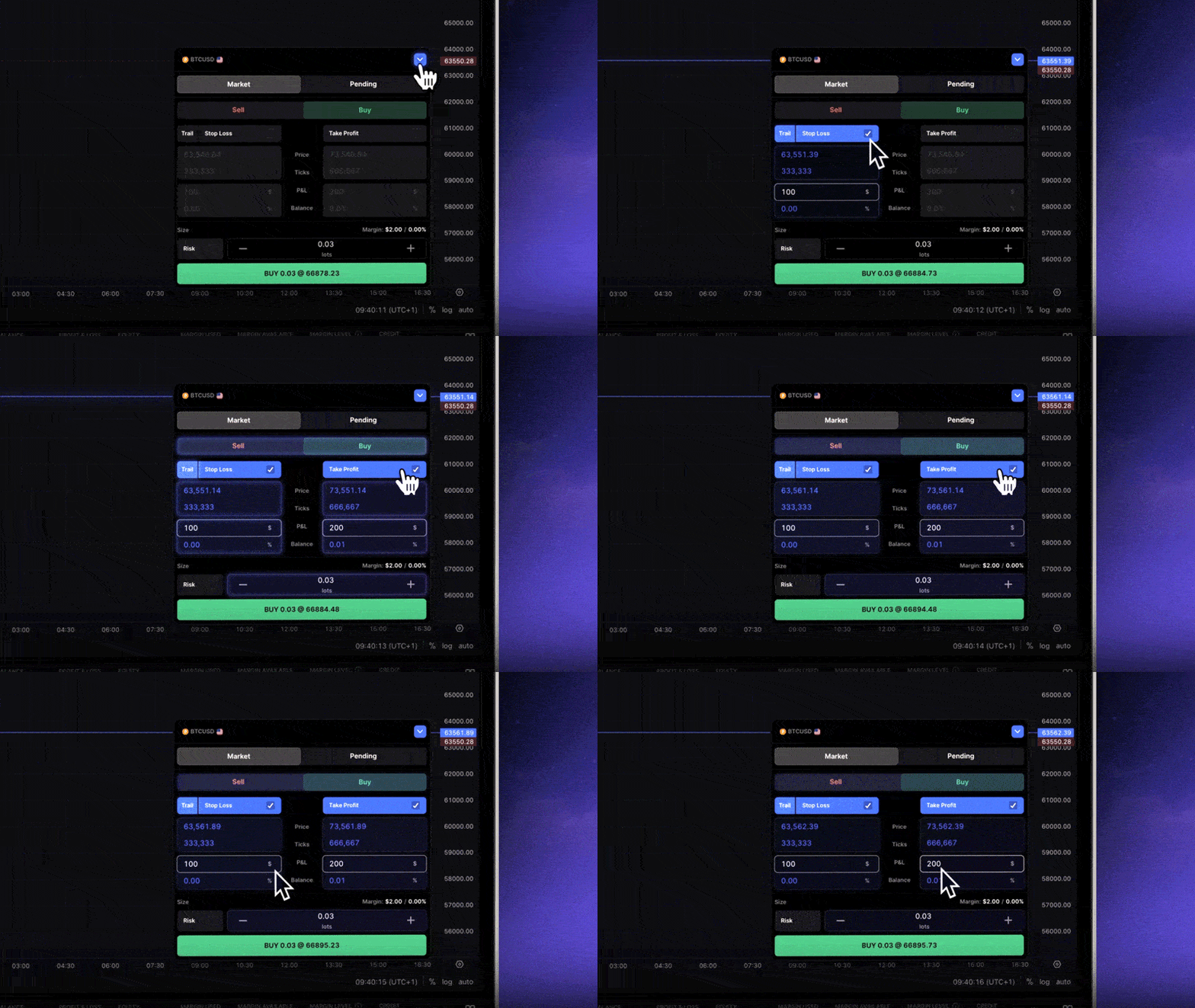
In demo, use this process before clicking Buy or Sell:
-
State the entry condition aloud or write it down.
For example: “Buy only if price trades above the marked range high.” -
Mark the exact level on the chart.
Do not use vague wording such as “if it breaks soon” or “around resistance.” -
Choose Market or Pending.
- The condition is true now: Market.
- The condition needs a future price: Pending.
-
For a Pending order, compare its entry level with current price.
- Buying above current price gives a Buy Stop.
- Buying below current price gives a Buy Limit.
- Selling below current price gives a Sell Stop.
- Selling above current price gives a Sell Limit.
-
Set and verify the protective stop and target before committing.
The exact structural placement rules come later, but do not treat entry as the only decision that matters. -
Cancel an unfilled pending order when its setup is invalidated.
A level from the morning can become meaningless after a major move, a news event, or a change in structure. An old pending order is not a valid trade plan merely because it still exists.
One practical caution for gold: your chart may display a single price, while the order is triggered using the broker’s executable bid or ask logic. A buy-related order and a sell-related order do not necessarily react to the same visible chart price. Use demo observations and your broker’s documentation to learn exactly how your specific XAUUSD symbol triggers orders.
A small-account rule: one condition, one order
The urge to place multiple entries usually comes from uncertainty: “Maybe it breaks upward, but maybe it first pulls back, and maybe I should catch both.” That is not one setup; it is several different setups with different entries, stops, fill quality, and risk.
For now, use this discipline:
One written entry condition should correspond to one selected order type.
If your condition is a break above resistance, use the single appropriate Buy Stop—or wait for a close and use a single market entry, if that is your written rule. Do not place a Buy Stop, a Buy Limit, and a discretionary market order around the same level just to avoid missing movement.
That restraint matters more than catching every move. A missed valid trade is measurable. A cluster of unplanned entries is difficult to evaluate and can consume capital quickly.
Key takeaways
- A Market order enters immediately at the best available price. It is suitable when your entry condition is already satisfied.
- A Limit order seeks a stated price or better:
- Buy Limit below current price
- Sell Limit above current price
- A Stop order waits for price to reach a breakout trigger:
- Buy Stop above current price
- Sell Stop below current price
- A stop-entry order becomes a market order when triggered, so it can experience slippage.
- A stop entry is not the same thing as a protective stop-loss.
- For breakout trading, distinguish carefully between:
- “price trades through the level,” which can use a stop entry; and
- “a candle closes beyond the level,” which requires waiting for the close before deciding to enter.
- A pending order must be cancelled if the original setup no longer exists.
Next, you will examine leverage and margin: why a small margin requirement can make a position look affordable while its actual loss exposure remains much larger.
Can't find a good explanation? Sign up and we'll make it for you
Sign up