
Hello and welcome back to your n8n journey!
In our last lesson, you successfully deployed a secure, public-facing n8n instance using Traefik as a reverse proxy. This was a major step in making your automation platform production-ready. While setting up our docker-compose.yml file, you configured several volumes for Traefik, PostgreSQL, and n8n itself.
Today, we will dive deep into that exact topic. The learning outcome for this lesson is to configure persistent storage using Docker volumes for workflow and credential data. You'll learn precisely what Docker volumes are, why they are absolutely critical for any stateful application like n8n, and how they safeguard your valuable workflows and credentials. For a software developer, this concept is key to understanding how to correctly manage state in a containerized world.
1. The Core Problem: Ephemeral Containers
By design, Docker containers are ephemeral. This means that any data created or modified inside a container's filesystem is lost forever when that container is removed. If you were to update your n8n image and recreate the container, all the workflows and credentials you've created would simply vanish.
This is where Docker Volumes come in. They are the standard mechanism for persisting data generated by and used by Docker containers. A volume is essentially a directory on the host machine that is managed by Docker and mounted into the container. When the container writes data to its designated path (e.g., /home/node/.n8n), Docker ensures that data is actually written to the volume on the host, completely independent of the container's lifecycle.
To get a clear, concise overview of this concept, let's start with a short video.
Docker Volumes explained in 6 minutes
The video "Docker Volumes explained in 6 minutes" by TechWorld with Nana provides an excellent conceptual foundation. It explains why volumes are necessary and introduces the different types.
Please watch from the beginning until 04:06. Focus on understanding the problem volumes solve and the distinction between host volumes (bind mounts), anonymous volumes, and named volumes.
As the video explains, named volumes are the recommended approach for production applications because Docker manages them, making them easier to back up, migrate, and manage across different environments.
2. Volumes in Your n8n Setup
You've already been using named volumes in your docker-compose.yml file. Let's dissect the implementation.
The configuration happens in two places:
- Under the service definition:
volumes: - n8n_data:/home/node/.n8nmaps the named volumen8n_datato the/home/node/.n8ndirectory inside the n8n container. - At the top level: The
volumes:block at the end of the file (volumes: n8n_data:) officially declares the named volume, telling Docker Compose to manage it.
This is the standard syntax for using named volumes in Docker Compose.
Docker Volumes explained in 6 minutes
Let's return to the "Docker Volumes explained..." video to see this syntax in action.
Watch the short segment from 04:06 to 05:36. It shows exactly how named volumes are defined in a docker-compose.yml file, which should look very familiar to you.
The image below shows the output of a docker-compose up command, where you can see the named volumes being created before the containers start.
.png)
3. What Data Does n8n Persist?
Understanding what needs to be saved is crucial. For our n8n setup, there are two critical pieces of data we must persist:
- The PostgreSQL Database: This is the primary data store for your workflows, execution logs, and encrypted credentials. Your
docker-compose.ymlhandles this by mapping thepostgres_datavolume to the/var/lib/postgresql/datadirectory inside thepostgrescontainer. - The n8n User Directory (
/home/node/.n8n): Even when using an external database like PostgreSQL, this directory remains vital. It contains configuration files and, most importantly, the encryption key used to secure your credentials.
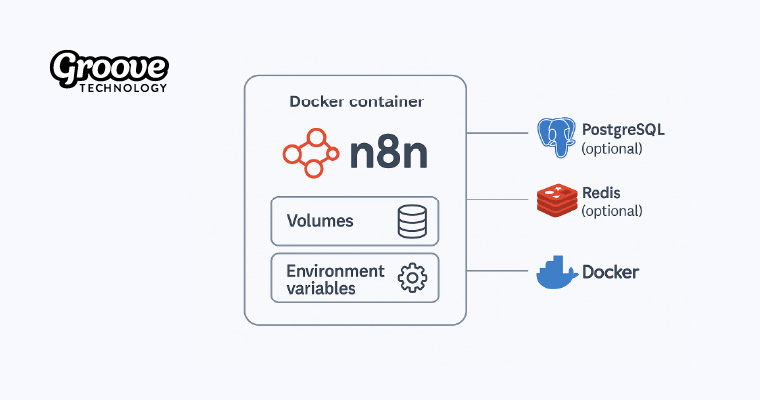
The Critical Role of the Encryption Key
When you save a credential in n8n, it is encrypted before being stored in the database. The key used for this encryption is unique to your n8n instance. By default, this key is generated on the first run and stored in a config file within the /home/node/.n8n directory.
What happens if you have a perfect backup of your PostgreSQL database but you lose the contents of the /home/node/.n8n directory?
All of your credentials become permanently inaccessible. The data is in the database, but you no longer have the key to decrypt it. This is why persisting the .n8n directory via a volume (n8n_data) is non-negotiable.
Docker Installation | n8n Docs
The n8n documentation and a community workflow template provide excellent explanations of this critical dependency. Please read the highlighted sections to solidify your understanding.
First, read the subsection titled 'Persisting the .n8n directory still recommended' under 'Using with PostgreSQL'. It directly states why this directory is important even when using Postgres.
Automated workflow & credential restoration system
Next, review this section from a community-provided backup and restore workflow. It gives a fantastic, in-depth explanation of the encryption key problem and how to manage it.
Read the section titled 'Critical: N8N_ENCRYPTION_KEY Configuration'. It explains why the key is critical, how it works, and how to retrieve it from your container and persist it securely using an environment variable—a best practice for production.
4. Hands-On: Managing and Inspecting Your Volumes
Let's make this tangible. You can interact with your Docker volumes directly from your server's terminal.
-
List all volumes: Run this command to see the volumes Docker is managing. You should see the ones created by your
docker-composestack (the names will be prefixed with your project directory name).docker volume ls -
Inspect a volume: To see the details of a specific volume, including where it is physically located on your host machine, use the
inspectcommand.# Replace 'yourproject_n8n_data' with the actual name from the list above docker volume inspect yourproject_n8n_dataThe output will show you a
Mountpoint, which is the absolute path on your server where the n8n data is being stored. This is the directory you would need to back up to save your n8n configuration and encryption key.
Test your understanding!
You need to migrate your n8n instance to a new server. You have already copied your .env file and your docker-compose.yml file. Besides the data from the PostgreSQL volume, what is the single most important file you must ensure is backed up from your n8n_data volume to be able to use your existing credentials on the new server?
Show answer
The most critical file is the config file located inside the .n8n directory. This file contains the N8N_ENCRYPTION_KEY that is required to decrypt your credentials stored in the database. Without it, your credentials are not recoverable. This is why persisting the entire .n8n directory via a volume is so important.
An Alternative: Bind Mounts
In your exploration, you may see another method for persisting data: bind mounts. This is what the Techno Tim video demonstrates. Instead of creating a Docker-managed volume, a bind mount maps a specific directory or file from your host system directly into the container.
The syntax in docker-compose.yml would look like this:volumes: - ./data:/home/node/.n8n
This maps a local directory named data (relative to your docker-compose.yml file) to the container's .n8n directory. While this can be convenient for development as it makes files immediately accessible on the host, named volumes are generally preferred for production as they are more portable and less dependent on the host's specific folder structure.
Self-Host Your Own Automation Platform with n8n + Docker
To see this alternative approach in action, watch this segment from Techno Tim's setup guide.
Watch from 02:46 to 05:24 and the brief segment from 09:27 to 10:03. Notice how he defines the volume mappings directly as paths (./data:/...) and then has to manually create those directories on the host before starting the container.
Conclusion
You now have a robust understanding of how and why to use Docker volumes to ensure the persistence of your n8n data. This knowledge is fundamental to running a stable and reliable self-hosted service.
Key Takeaways:
- Docker containers are ephemeral, and Docker volumes are the solution for data persistence.
- Named volumes are the recommended best practice for production application data.
- n8n requires persistent storage for two key components: the database (PostgreSQL) and the
.n8ndirectory. - The
.n8ndirectory is critically important because it contains the encryption key needed to access your credentials, even when using an external database. - Losing the encryption key means your saved credentials become permanently unreadable.
- You can manage and inspect your volumes using
docker volumecommands.
Preview of the Next Lesson:
In our current setup, we are already running PostgreSQL in a container and have connected n8n to it. In the next lesson, "Connect a self-hosted n8n instance to an external database," we will formalize this concept. We'll review the specific environment variables used for the connection and discuss how you would connect n8n to a database that lives outside your Docker Compose stack, such as a managed cloud database service (like Amazon RDS or DigitalOcean Managed PostgreSQL). This will give you the flexibility to integrate n8n into a wider range of infrastructure setups.