
Hello again. You can now compile and run a Java class both through IntelliJ IDEA and from the command line. That gives you a tight feedback loop: edit source, compile, run, inspect the result.
This lesson moves inside the program. You will write small, focused Java methods that accept inputs, store intermediate values in local variables, calculate with operators, choose behavior with control flow, and convert numeric types deliberately. These are the building blocks behind backend work such as validating request parameters, calculating pagination, and deciding whether a user action is allowed.
Because we are still working from main, the methods in today’s examples will be static. That is a temporary practical choice: later, Spring will call methods on managed objects rather than having application logic sit in main.
Methods: named units of behavior
A method groups a coherent piece of work behind a name. Instead of putting every statement inside main, you can define operations such as:
- calculate how many pages a result set needs;
- determine whether a page number is valid;
- assign a label based on an account’s state.
A method declaration has four important parts:
static int add(int left, int right) {
    return left + right;
}
| Part | Meaning |
|---|---|
static | Lets main call the method directly for now. |
int | The type of value the method returns. |
add | The method name; use lowerCamelCase. |
int left, int right | Parameters: named inputs that exist inside the method. |
The return statement finishes the method and sends a value back to the call site. A method declared with int must return an int on every possible path.
int total = add(3, 4);
System.out.println(total); // 7
Here, 3 and 4 are arguments: concrete values supplied in the call. left and right are parameters: local variables declared in the method definition to receive those values.
A method that performs an action but does not produce a value has return type void:
static void printStartupMessage() {
    System.out.println("Backend service starting");
}
Use a return value when the caller needs a result to make a later decision. Prefer that over printing inside a calculation method. In a backend service, a calculation usually returns data; a controller, logger, or response layer decides how it is presented.
Java methods explained in 10+ minutes! 📞
Watch “Java methods explained in 10+ minutes!” by Bro Code for a visual walkthrough of method definitions, calls, parameters, and return values.
Watch method basics to connect main, static, void, and method calls. Then watch parameters for the argument-versus-parameter distinction, followed by return values. Focus on the boundary created by a method: inputs enter through parameters, and a result leaves through return.
Local variables and types
A local variable is declared inside a method or block. It exists only while that code is executing and is visible only within its enclosing braces.
static int add(int left, int right) {
    int sum = left + right;
    return sum;
}
sum cannot be used in main, because it belongs only to add. Likewise, parameters are local variables: left and right are meaningful only within add.
Java is statically typed, so you declare a type before a variable name:
int pageSize = 20;
long userId = 4_000_000_000L;
double averageRating = 4.5;
boolean active = true;
char grade = 'A';
String displayName = "Mina";
For the backend-oriented code you will write early on, these are the practical defaults:
| Need | Typical type | Notes |
|---|---|---|
| Whole-number count, index, page size | int | Default integer type for ordinary values. |
| Very large whole-number identifier or count | long | Add L to a literal when needed, such as 4_000_000_000L. |
| Approximate decimal measurement | double | Useful for a rate or scientific-style value, not money. |
| True/false state | boolean | Produced by comparisons and used by conditions. |
| Text | String | A reference type with special language support; use double quotes. |
| One character | char | Use single quotes; less common in web backend code. |
Do not use double or float for currency. Binary floating-point representations cannot reliably represent many decimal fractions exactly. Java backend applications commonly use BigDecimal for monetary values; that class comes later. For this lesson, double is suitable for illustrating numeric conversion.
Unlike fields on an object, local variables do not receive automatic default values. This does not compile:
int retries;
System.out.println(retries);
Java makes you assign a local variable before reading it. That compile-time rule prevents an entire category of accidental behavior.
Creating Primitive Type Variables in Your Programs - Dev.java
Read this Dev.java tutorial to establish the primitive types, literal syntax, and initialization rule that underlie method-local variables.
In the “Primitive Types” section, read the type overview, concentrating on the practical distinction between numeric primitives, boolean, and String. Continue in “Initializing a Variable with a Default Value” with local initialization. Then, in “Creating Values with Literals,” read integer literals and the following “Floating-Point Literals” subsection, noting why L and F suffixes exist.
Expressions and operators: producing values
An expression computes a value. An operator is the symbol that performs an operation within it.
int remaining = totalItems - processedItems;
boolean hasNextPage = currentPage < totalPages;
The most common arithmetic operators are familiar:
| Operator | Example | Result |
|---|---|---|
+ | 10 + 3 | 13 |
- | 10 - 3 | 7 |
* | 10 * 3 | 30 |
/ | 10 / 3 | 3 for int values |
% | 10 % 3 | 1, the remainder |
The remainder operator, %, is particularly useful for reasoning about repeated groups and parity:
static boolean isEven(int value) {
    return value % 2 == 0;
}
The expression value % 2 leaves the remainder after division by two. A zero remainder means the number is even.
Assignment uses a single equals sign:
int attempts = 0;
attempts = attempts + 1;
Compound assignment makes the update concise:
attempts += 1;
attempts *= 2;
For simple counter updates, attempts++ is also common. Avoid placing ++ inside larger expressions while learning; prefix and postfix forms produce different expression values, even though both ultimately increase the variable by one.
Integer division: a backend-relevant trap
When both operands are integers, Java performs integer division and discards the fractional part:
int items = 25;
int pageSize = 10;

int pages = items / pageSize; // 2, not 2.5
For pagination, two pages would be wrong: 25 items at 10 per page require 3 pages. One reliable whole-number formula is:
static int calculatePageCount(int itemCount, int pageSize) {
    return (itemCount + pageSize - 1) / pageSize;
}
For 25 items and a size of 10, the numerator is 34; integer division yields 3. For 20 items, it is 29 / 10, which yields 2. This is a useful technique when both values are non-negative and pageSize is positive.
If you genuinely need a fractional result, ensure at least one operand is a floating-point value:
double average = 25 / 10.0; // 2.5
Parentheses are valuable when they make the intended grouping clear. Java otherwise follows precedence rules: multiplication and division happen before addition and subtraction.
int wrongTotal = basePrice + quantity * unitPrice;
int groupedTotal = (basePrice + quantity) * unitPrice;
Those are different calculations. Do not rely on a reader remembering precedence when one pair of parentheses makes the business rule unmistakable.
Java - Operators - W3Schools.com
Watch the selected portion of “Java - Operators” from W3Schools.com for a compact review of arithmetic, assignment, comparison, and logical operators.
Watch arithmetic and assignment, paying particular attention to division, remainder, and compound assignment. Then watch comparisons and logic to see how expressions produce boolean values for decisions.
Boolean expressions and control flow
A boolean expression evaluates to either true or false. Comparisons create boolean results:
int requestedPage = 2;
int totalPages = 5;

boolean validPage = requestedPage >= 1 && requestedPage <= totalPages;
Be precise about the two equality-looking operators:
pageSize = 20;      // assignment: store 20
pageSize == 20;     // comparison: ask whether it equals 20
Using = where Java expects a boolean condition is usually a compile error, which is helpful. But develop the visual habit now: one = changes a variable; two == compares primitive values.
Logical operators combine conditions:
| Operator | Meaning | Example |
|---|---|---|
&& | Both conditions must be true | page >= 1 && page <= totalPages |
|| | At least one condition must be true | roleIsAdmin || ownsResource |
! | Reverses a boolean value | !active |
Java’s && and || use short-circuit evaluation. For &&, Java stops when the left side is false, because the entire result must be false. For ||, Java stops when the left side is true, because the entire result must be true.
That behavior is useful for safe ordering:
static boolean isValidPageRequest(int page, int pageSize) {
    return page >= 1 && pageSize > 0;
}
As conditions get more meaningful, name them rather than producing a dense, opaque expression.
Choosing a branch with if
An if statement runs a block only when its condition is true. else handles the alternative. In request validation and business rules, an early return often keeps the normal path readable:
static String describePageRequest(int page, int totalPages) {
    if (page < 1) {
        return "Page must be at least 1";
    }

    if (page > totalPages) {
        return "Page is beyond the available results";
    }

    return "Page is valid";
}
Notice the guarantee: every execution path reaches a return String. If you removed the final return, the compiler would reject the method because it could finish without producing its declared return type.
For a compact choice between two values, the conditional operator can be readable:
static String accessLabel(boolean authenticated) {
    return authenticated ? "authenticated" : "anonymous";
}
Read it as: if authenticated is true, use "authenticated"; otherwise use "anonymous". Prefer a normal if when either branch needs several statements.
Repeating work with a for loop
Use a for loop when you know how many times a block should repeat. This method calculates the total number of retry attempts across a fixed number of jobs:
static int countAttempts(int jobCount, int attemptsPerJob) {
    int totalAttempts = 0;

    for (int job = 0; job < jobCount; job++) {
        totalAttempts += attemptsPerJob;
    }

    return totalAttempts;
}
The loop has three parts:
int job = 0initializes the counter once.job < jobCountis checked before each iteration.job++runs after each iteration.
The loop variable job exists only inside the loop. The accumulator, totalAttempts, is declared outside because the method needs its final value after the loop ends.
For control flow, use braces even for a one-line body. It avoids fragile code when a later change adds a second statement.
Using Operators in Your Programs - Dev.java
Read the relevant sections of Dev.java’s “Using Operators in Your Programs” to reinforce the operators that will recur throughout Java and Spring code.
Begin with “The Arithmetic Operators” and read arithmetic and assignment. In “The Unary Operators,” read prefix and postfix; the important takeaway is to avoid ambiguous uses in larger expressions. Then read the “Equality and Relational Operators” and “Conditional Operators” material from comparisons and short circuiting, stopping before the instanceof section.
Type conversions: when a value changes numeric type
A type conversion changes how Java treats a value’s numeric type. The central distinction is whether Java can make the conversion safely on its own.
A widening conversion moves a value into a type that can represent a broader range. Java performs it implicitly:
int itemCount = 42;
long longCount = itemCount;
double measuredCount = itemCount;
No cast is required. The source value is still numerically 42.
A narrowing conversion moves into a type with a smaller range or potentially less precision. Java requires an explicit cast because data might be lost:
double rawScore = 87.9;
int displayedScore = (int) rawScore; // 87
Casting a double to int does not round. It truncates toward zero:
(int) 8.9;   // 8
(int) -8.9;  // -8
If a business rule requires rounding, state that rule directly:
static int roundRating(double rating) {
    return (int) Math.round(rating);
}
Math.round returns a long for a double input, so the final cast is needed here because the method promises an int. In production code, make sure the expected rounded result can fit in an int.
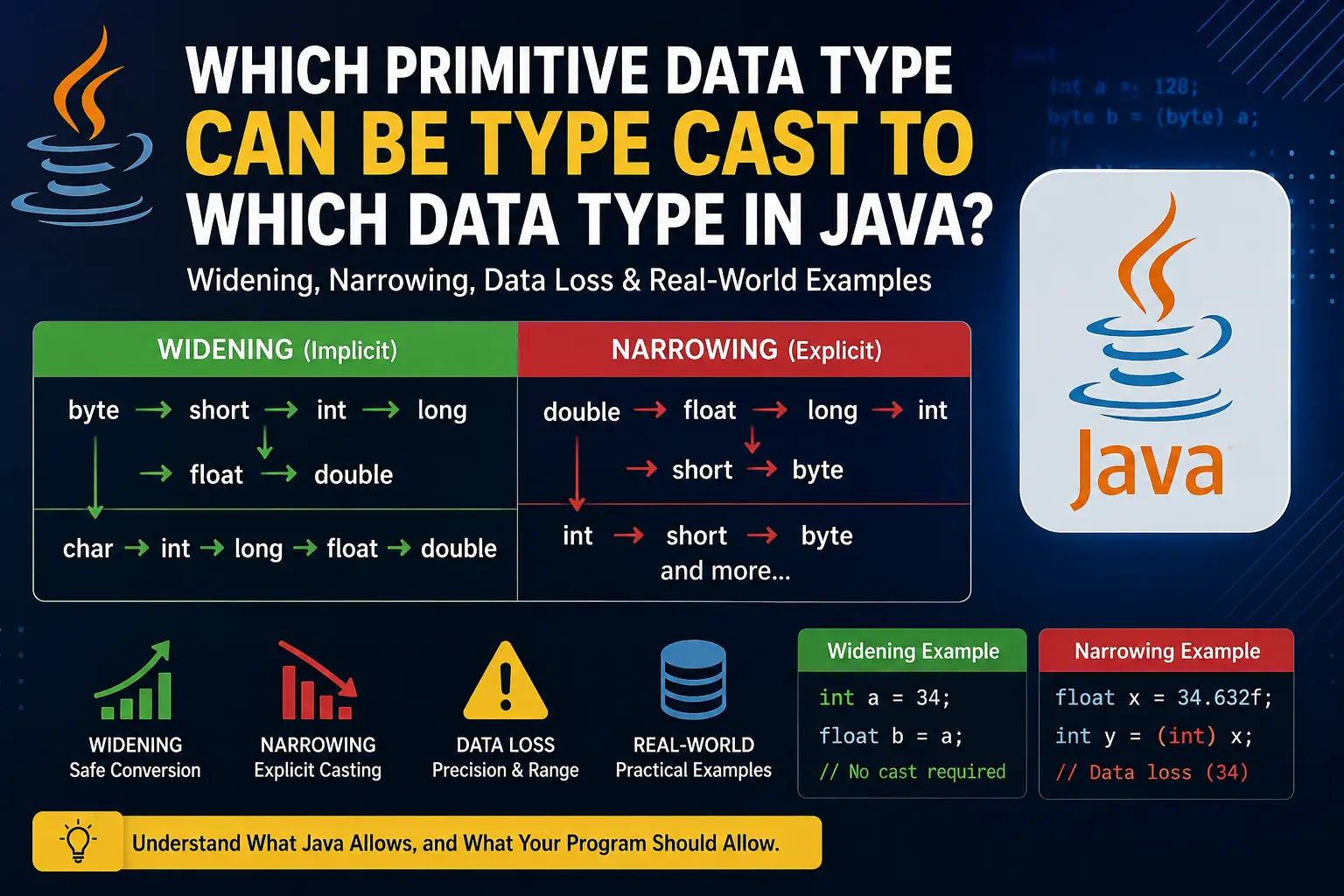
There is another subtle source of loss: assigning a large value to a too-small integral type can wrap around rather than report a friendly error.
int userSuppliedCount = 200;
byte compactCount = (byte) userSuppliedCount; // -56, not 200
The explicit cast tells the compiler that you accept the risk; it does not make the conversion safe. For ordinary backend quantities, use int unless you have a real reason to choose byte or short.
A complete small program
Create a new file named MethodBasics.java in the same project or folder used in the previous lesson. This program combines parameters, local variables, operators, branching, loops, and conversions in a small pagination-style example:
public class MethodBasics {

    public static void main(String[] args) {
        int itemCount = 25;
        int pageSize = 10;
        int requestedPage = 3;

        int totalPages = calculatePageCount(itemCount, pageSize);
        boolean valid = isValidPage(requestedPage, totalPages);

        System.out.println("Total pages: " + totalPages);
        System.out.println("Request valid: " + valid);
        System.out.println(describePageRequest(requestedPage, totalPages));

        double rawScore = 87.9;
        int roundedScore = roundScore(rawScore);
        System.out.println("Rounded score: " + roundedScore);

        System.out.println("Retry attempts: " + countAttempts(3, 2));
    }

    static int calculatePageCount(int itemCount, int pageSize) {
        if (itemCount < 0 || pageSize <= 0) {
            return 0;
        }

        return (itemCount + pageSize - 1) / pageSize;
    }

    static boolean isValidPage(int page, int totalPages) {
        return page >= 1 && page <= totalPages;
    }

    static String describePageRequest(int page, int totalPages) {
        if (page < 1) {
            return "Page must be at least 1";
        }

        if (page > totalPages) {
            return "Page is beyond the available results";
        }

        return "Page is valid";
    }

    static int roundScore(double score) {
        return (int) Math.round(score);
    }

    static int countAttempts(int jobCount, int attemptsPerJob) {
        int totalAttempts = 0;

        for (int job = 0; job < jobCount; job++) {
            totalAttempts += attemptsPerJob;
        }

        return totalAttempts;
    }
}
Run it, then trace one method call at a time. For example, calculatePageCount(25, 10) receives new local parameter variables named itemCount and pageSize; it returns 3; then main stores that returned value in its distinct local variable, totalPages.
This distinction matters: a parameter has the same value as its argument at the moment of the call, but it is not the same local variable. This is especially useful when debugging methods: inspect the method inputs, intermediate local values, and returned result separately.
A sensible manual variation is to alter the values in main and observe the branches:
- Set
requestedPageto0and then to4. - Set
itemCountto0. - Set
pageSizeto0and confirm that the method avoids division by zero. - Change
rawScoreto87.1and compare truncation,(int) rawScore, with rounding throughMath.round.
Key takeaways
A Java method declares a return type, a lowerCamelCase name, and optional typed parameters. Arguments provide concrete values at the call site; parameters and local variables exist only within their method or block.
Use arithmetic operators to calculate values, comparison and logical operators to produce booleans, if statements to select behavior, and loops to repeat bounded work. Remember that integer division discards fractions, and use parentheses where they clarify the intended calculation.
Finally, widening numeric conversions are automatic, while narrowing conversions require casts because they can truncate, overflow, or lose precision. Treat an explicit cast as a deliberate decision, not as validation.
Next, you will use these building blocks to define a Java class with fields, constructors, methods, and encapsulation—the form in which backend domain data and behavior are normally organized.
Can't find a good explanation? Sign up and we'll make it for you
Sign up