
Hello again. In the previous lesson, you organized logic into methods, used local variables and parameters, and applied control flow to produce results. Those pieces become more useful when they belong to an object that owns both state and behavior.
In this lesson, you will define a Java class with fields, constructors, and instance methods, then protect its internal state with encapsulation. This is the basic shape of the domain objects and service components you will encounter in Spring Boot applications. The syntax will be familiar in spirit if you have written C# or Unity scripts, but Java’s conventions around fields and access are worth making explicit early.
From a class to independent objects
A class defines a new type. It describes what each object of that type can store and do:
- Fields store an object’s state.
- Constructors establish an object’s initial state.
- Methods define operations that object can perform.
For example, a backend might represent an API subscription. Each subscription has a plan name, a monthly request limit, and a record of how many requests it has used. The class defines that shared structure; each object has its own values.
public class Subscription {
    String planName;
    int monthlyRequestLimit;
    int requestsUsed;
}
Here, planName, monthlyRequestLimit, and requestsUsed are fields (also called instance variables). Unlike the local variables from the previous lesson, fields belong to an object and remain available between method calls while that object exists.
A class name follows PascalCase by convention:
public class Subscription {
}
A variable or method name follows lowerCamelCase:
int monthlyRequestLimit;
The word public makes the Subscription class usable from other classes. For now, place this public class in a file named exactly Subscription.java. Java is strict about this convention: a public top-level class and its filename must match.
An object is an instance created from the class:
Subscription starterPlan = new Subscription();
Subscription professionalPlan = new Subscription();
These are two separate objects. Changing data in starterPlan does not change data in professionalPlan. This is comparable to having multiple Unity GameObjects using the same script type: the script defines the fields and behavior, while each instance holds its own state. Java objects are not tied to Unity’s component lifecycle, but the distinction between a type and its individual instances is the same.
The following video gives a visual walkthrough of that distinction. Its early examples expose fields directly, which is useful for seeing the mechanics, but we will improve that design with encapsulation shortly.
Watch “Java Classes & Objects” by Keep On Coding to see a class become multiple independent objects, then see constructor initialization and this in context.
Watch class structure for the distinction between a template and an instance. Continue with objects and fields, focusing on why two instances have separate field values. Then watch constructors and this keyword. Notice that the direct field access shown in the video is a starting point, not the design we will keep for backend code.
Fields, methods, and instance state
A field declaration has the same basic type-and-name structure as a local variable declaration, but it sits directly inside a class rather than inside a method:
public class Subscription {
    String planName;
    int monthlyRequestLimit;
    int requestsUsed;

    boolean hasRequestsRemaining() {
        return requestsUsed < monthlyRequestLimit;
    }
}
hasRequestsRemaining() is an instance method. It is called on a particular object and can read that object’s fields:
boolean available = starterPlan.hasRequestsRemaining();
For the call above, the method uses the fields belonging to starterPlan, not the fields of any other Subscription.
This differs from the static helper methods you wrote in the previous lesson. A static method belongs to the class itself and has no particular object whose fields it can use. An instance method belongs to a specific object and is the normal choice when behavior depends on that object’s state.
Fields technically receive default values if you do not assign them:
| Field type | Default value |
|---|---|
int | 0 |
boolean | false |
Reference type such as String | null |
But defaults rarely express a useful business decision. A subscription whose plan name is null and limit is zero is not a meaningful application object. Constructors let you make valid initialization explicit.
The official Dev.java material provides a concise vocabulary for class declarations, fields, and access control.
Read “Creating Classes” from Dev.java. It distinguishes fields, local variables, and parameters, then introduces the access-control idea that underpins encapsulation.
In “Declaring Classes,” read the class declaration overview; focus on the class body as the home of constructors, fields, and methods. Then, in “Declaring Member Variables,” read from “There are several kinds of variables:” through the field discussion. Finally, in “Controlling who has Access to a Member,” read the encapsulation passage. The page previews inheritance and interfaces; those are intentionally outside today’s scope.
Constructors establish a valid starting state
A constructor runs when new creates an object. It resembles a method, with two crucial differences:
- Its name must exactly match the class name.
- It has no return type, not even
void.
public Subscription(String planName, int monthlyRequestLimit) {
    this.planName = planName;
    this.monthlyRequestLimit = monthlyRequestLimit;
    this.requestsUsed = 0;
}
Now callers must provide the information needed to create a subscription:
Subscription starterPlan = new Subscription("Starter", 3);
The arguments "Starter" and 3 are passed into the constructor parameters. The constructor then assigns those values to the fields of the new object.
Why use this?
Inside the constructor, Java allows a parameter and a field to share the same name:
public Subscription(String planName, int monthlyRequestLimit) {
    this.planName = planName;
    this.monthlyRequestLimit = monthlyRequestLimit;
}
The name on the right, planName, means the closest variable: the constructor parameter. this.planName means “the planName field on the current object.”
Without this, this line does nothing useful:
planName = planName;
It merely assigns the parameter back to itself. Using this.fieldName makes the intended assignment unambiguous and is standard Java style.
A constructor is a good place to reject invalid initial state:
public Subscription(String planName, int monthlyRequestLimit) {
    if (planName == null || planName.isBlank()) {
        throw new IllegalArgumentException("planName must not be blank");
    }

    if (monthlyRequestLimit <= 0) {
        throw new IllegalArgumentException("monthlyRequestLimit must be positive");
    }

    this.planName = planName;
    this.monthlyRequestLimit = monthlyRequestLimit;
    this.requestsUsed = 0;
}
For now, read throw new IllegalArgumentException(...) as: “stop creation because the caller supplied an invalid argument.” You will study exceptions and error-handling design in depth later. The immediate design lesson is that a constructor protects the object from beginning life in an invalid state.
One constructor rule is easy to miss:
Java supplies an automatic no-argument constructor only when you declare no constructors at all.
Once you add Subscription(String, int), this will no longer compile:
new Subscription();
That is appropriate here. A subscription without a plan name or request limit is not meaningful, so callers should not be allowed to create one.
Encapsulation: expose operations, protect representation
The first draft of Subscription made its fields directly writable:
starterPlan.requestsUsed = -500;
This is dangerous. It lets any caller create impossible or inconsistent state. A caller could set usage to a negative number, set it above the limit, or reset usage without authorization.
Encapsulation means keeping an object’s internal representation under the object’s control. In Java, the usual first step is to make fields private:
private int requestsUsed;
A private member can be accessed directly only by code inside its own class. Code outside the class must use the public operations the class deliberately provides.
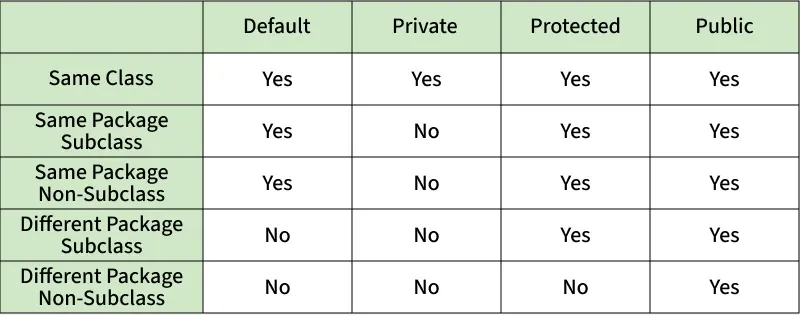
Encapsulation is not “write a getter and setter for every field automatically.” Instead, ask: what should outside code be allowed to do?
For a subscription, outside code might reasonably be allowed to:
- read its plan name;
- read the number of remaining requests;
- attempt to consume one request.
Outside code should not be allowed to assign arbitrary values to requestsUsed. The class should control that transition.
public boolean tryConsumeRequest() {
    if (requestsUsed >= monthlyRequestLimit) {
        return false;
    }

    requestsUsed++;
    return true;
}
This method preserves the rule that usage cannot exceed the monthly limit. It returns true when it successfully records a request and false when the limit has already been reached.
Java does not have C#-style auto-properties built into the language. A Java getter is an explicitly declared method, commonly named getSomething() for ordinary values or isSomething() for booleans. IDEs can generate basic getters and setters, but generation is not a reason to expose a setter. A domain object should publish meaningful operations, not merely reveal every implementation detail.
Build a small encapsulated class
Create these two files in the same folder or IntelliJ project. Do not add packages yet; packages are the subject of the next lesson.
Subscription.java
public class Subscription {
    private String planName;
    private int monthlyRequestLimit;
    private int requestsUsed;

    public Subscription(String planName, int monthlyRequestLimit) {
        if (planName == null || planName.isBlank()) {
            throw new IllegalArgumentException("planName must not be blank");
        }

        if (monthlyRequestLimit <= 0) {
            throw new IllegalArgumentException("monthlyRequestLimit must be positive");
        }

        this.planName = planName;
        this.monthlyRequestLimit = monthlyRequestLimit;
        this.requestsUsed = 0;
    }

    public String getPlanName() {
        return planName;
    }

    public int getRequestsRemaining() {
        return monthlyRequestLimit - requestsUsed;
    }

    public boolean tryConsumeRequest() {
        if (requestsUsed >= monthlyRequestLimit) {
            return false;
        }

        requestsUsed++;
        return true;
    }
}
SubscriptionDemo.java
public class SubscriptionDemo {

    public static void main(String[] args) {
        Subscription starterPlan = new Subscription("Starter", 3);
        Subscription professionalPlan = new Subscription("Professional", 10);

        for (int attempt = 1; attempt <= 4; attempt++) {
            boolean accepted = starterPlan.tryConsumeRequest();

            System.out.println(
                "Starter request " + attempt + " accepted: " + accepted
            );
        }

        System.out.println(
            starterPlan.getPlanName()
                + " requests remaining: "
                + starterPlan.getRequestsRemaining()
        );

        System.out.println(
            professionalPlan.getPlanName()
                + " requests remaining: "
                + professionalPlan.getRequestsRemaining()
        );
    }
}
Run SubscriptionDemo. The Starter subscription accepts its first three requests and rejects the fourth. Its remaining count becomes zero. The Professional object still has all ten requests because it has its own independent fields.
If you are compiling from the command line, compile both source files before running the demo:
javac Subscription.java SubscriptionDemo.java
java SubscriptionDemo
Trace the first line in main carefully:
Subscription starterPlan = new Subscription("Starter", 3);
new Subscription(...)creates a newSubscriptionobject and invokes its constructor.- The constructor validates the incoming values.
this.planNameandthis.monthlyRequestLimitstore those values in the new object’s fields.this.requestsUsedbegins at zero.starterPlanlets the rest ofmainuse that particular object.
Then consider this intentionally invalid statement:
// starterPlan.requestsUsed = -10;
If you remove the comment markers, the compiler rejects it because requestsUsed is private. That error is not an obstacle to work around; it is the class enforcing its boundary. The caller should use a public method such as tryConsumeRequest() instead.
A few common errors at this stage have direct explanations:
| Symptom | Likely cause |
|---|---|
invalid method declaration; return type required | A constructor name does not exactly match its class name, so Java interprets it as a malformed method. |
constructor Subscription ... cannot be applied | The arguments in new Subscription(...) do not match a declared constructor. |
requestsUsed has private access | External code attempted to read or write a private field directly. |
cannot find symbol for a field | The field name is misspelled, out of scope, or was never declared. |
Key takeaways
A class defines a type; an object is a specific instance of that type. Fields hold each object’s state, instance methods operate on that state, and constructors establish state when an object is created.
A constructor has the same name as its class and no return type. Use this.fieldName when assigning a parameter to a same-named field. Once you declare a constructor yourself, Java no longer supplies an automatic no-argument constructor.
Most importantly, make mutable fields private by default. Expose a small public API of constructors and methods that lets callers perform meaningful operations while the class preserves its own rules. This is the foundation for modeling backend data safely rather than passing around freely editable bags of values.
Next, you will organize these classes with packages and imports, then expand access control beyond today’s public and private focus.
Can't find a good explanation? Sign up and we'll make it for you
Sign up